The right smart home hub can turn a collection of disconnected devices into a faster, more reliable, and easier-to-manage home automation system.
We compared 10 leading options across compatibility, automation depth, wireless standards, privacy, setup, and everyday usability to help you find the best fit.
Best 10 Smart Home Hubs Picks for 2026
Best Overall

- Supports Matter, Z-Wave Plus, Zigbee, and Wi-Fi
- Works with Alexa and Google Home
- Offers Ethernet or Wi-Fi setup
Best For: Broad multi-protocol SmartThings setups
Best Local Matter Bridge
SONOFF Bridge Max Smart Home Hub
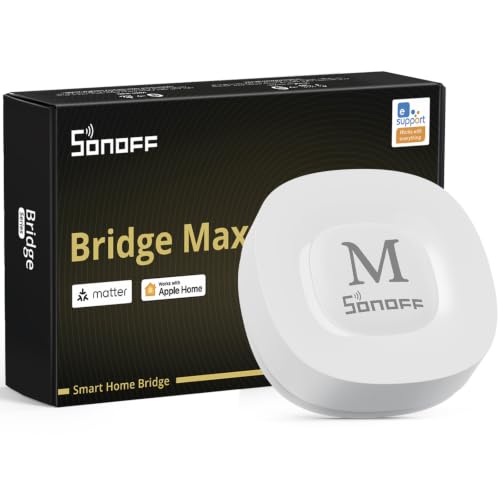
- Bridges Zigbee devices to Matter platforms
- Local web console avoids cloud dependence
- Includes a 90 dB alarm with Zigbee sensors
Best For: Local Zigbee-to-Matter integration
Best for Home Assistant

- Comes with Home Assistant OS installed
- Keeps home data stored locally
- Supports USB expansion for major protocols
Best For: Local Home Assistant automation
Best for Advanced Local Automation

- Processes automations locally without a subscription
- Supports Matter, Z-Wave, Zigbee, and Bluetooth
- Works with Alexa, Google Home, and Apple HomeKit
Best For: Advanced DIY automation and protocol coverage
Best for Lutron Lighting

- Supports up to 75 Caseta devices
- Works with Alexa, HomeKit, Google Assistant, Ring, and Sonos
- Simple router and app setup
Best For: Lutron Caseta lighting users expanding voice-controlled rooms
Best for Local Automation

- Bridges Aqara Zigbee and Thread devices to Matter
- Supports local automations and encrypted storage
- Offers PoE, dual-band Wi-Fi, and IR control
Best For: Advanced Aqara and Matter-based smart homes
Best for Visual Control

- 8-inch customizable smart home dashboard
- Supports Alexa, Zigbee, Matter, Thread, and more
- Controls routines, cameras, security, and media
Best For: Families wanting a shared touchscreen control panel
Best for Security Monitoring
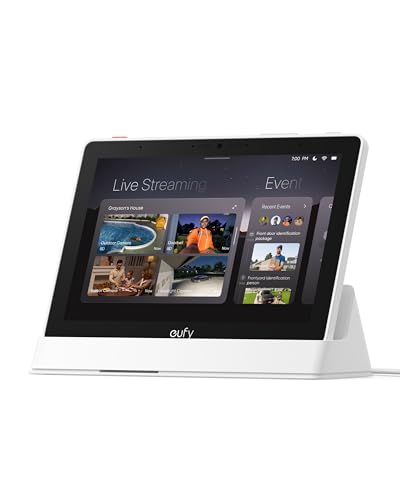
- 8-inch touchscreen for simple control
- Shows four live feeds simultaneously
- Local event playback and daily summaries
Best For: eufy security monitoring and family-friendly viewing
Best Multi-Protocol Hub

- Seven built-in connectivity technologies
- Supports 50,000+ devices from 1,000+ brands
- Local-first automation and energy tracking
Best For: large, mixed-brand smart home systems
Best SmartThings Value
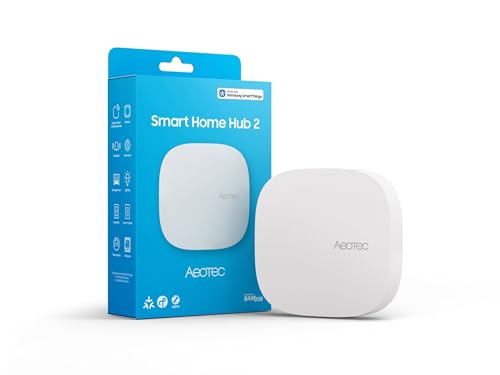
- SmartThings app and ecosystem support
- Matter and Zigbee connectivity
- Wi-Fi or Ethernet with local automations
Best For: SmartThings homes that do not need Z-Wave
Best Overall – Aeotec Smart Home Hub
The Aeotec Smart Home Hub is a versatile choice for shoppers comparing smart home hubs that support several major protocols. It works with SmartThings, Matter, Z-Wave Plus, Zigbee, Wi-Fi, Alexa, and Google Home, while offering both Ethernet and Wi-Fi setup.
Best For: Households that want broad device compatibility and SmartThings-based automations.
Pros:
- Supports Matter, Z-Wave Plus, Zigbee, and Wi-Fi devices.
- Works with Amazon Alexa and Google Home.
- Supports wired Ethernet or Wi-Fi connectivity.
- Many automations can run locally for improved speed and reliability.
Cons:
- Designed for use in North America.
- Requires the SmartThings app for setup and management.
Choose this hub if you want a familiar SmartThings experience with strong protocol coverage and flexible network connectivity. It is especially practical for homes combining devices from multiple ecosystems.
Best Local Matter Bridge – SONOFF Bridge Max Smart Home Hub
The SONOFF Bridge Max is a focused option among smart home hubs for connecting Zigbee, BTHome, and eWeLink devices to Matter platforms. Its local web console lets you configure the bridge from your LAN without depending on an app or cloud service.
Best For: Users who need a local Zigbee gateway and Matter bridging for Alexa, Google Home, Apple Home, or Home Assistant.
Pros:
- Bridges Zigbee and compatible devices to Matter platforms.
- Provides a local web console with no cloud requirement.
- Supports Ethernet and Wi-Fi connections.
- Includes a 90 dB alarm and mobile notifications when paired with Zigbee sensors.
Cons:
- It is a Matter Bridge, not a Matter Controller.
- It cannot add Matter devices directly.
The Bridge Max makes sense when your priority is integrating existing Zigbee devices across platforms while keeping configuration local. Be sure its bridge-only Matter functionality matches your setup.
Best for Home Assistant – Home Assistant Green
Home Assistant Green | Smart Home hub with Advanced Automation | Official Home Assistant Hardware
Check Price On AmazonHome Assistant Green is an approachable pick among smart home hubs for anyone who wants Home Assistant preinstalled. Plug in the included power supply and Ethernet cable, then use its local storage and expandable USB ports to build a centralized automation system.
Best For: Homeowners who want local Home Assistant control, advanced automations, and room to add Zigbee, Z-Wave, or Thread connectivity.
Pros:
- Home Assistant OS comes preinstalled.
- Stores home data locally on the device.
- Fanless, silent, and power efficient.
- USB ports support expansion with Z-Wave, Zigbee, and Thread devices.
Cons:
- Ethernet is the primary included network connection.
- Z-Wave, Zigbee, and Thread connectivity requires additional USB devices.
This is a strong starting point for a privacy-conscious Home Assistant setup. Its simple hardware and preinstalled software reduce initial setup work, while USB expansion leaves room for future protocols.
Best for Advanced Local Automation – Hubitat Elevation C-8 Pro
The Hubitat Elevation C-8 Pro stands out among smart home hubs for local processing and advanced automation. It supports Matter, Z-Wave 800 Series Long Range, Zigbee 3.0, and Bluetooth, with compatibility across more than 1,000 devices and no recurring subscription required.
Best For: Experienced DIY users who want fast local automations, extensive protocol support, and detailed rule-building tools.
Pros:
- Runs automations locally so routines can continue during internet outages.
- Supports Matter, Z-Wave Long Range, Zigbee 3.0, and Bluetooth.
- Works with Alexa, Google Home, and Apple HomeKit.
- Offers Rule Machine and an AI-assisted automation builder.
Cons:
- Advanced features and rule-building tools may have a steeper learning curve.
- Some integrations depend on community apps, drivers, or documentation.
The C-8 Pro is a compelling fit for users who value responsiveness, privacy, and control over subscription simplicity. Its broad compatibility and external antennas also suit larger or device-dense homes.
Best for Lutron Lighting – Caseta Smart Hub
For households centered on Lutron Caseta lighting, this smart home hub offers a straightforward bridge to Alexa, Apple HomeKit, Google Assistant, Ring, Sonos, and Serena shades. It connects to your router and uses Lutron’s Clear Connect technology, helping keep Caseta device communication separate from Wi-Fi traffic.
Best For: Lutron Caseta users who want voice control and room to expand their lighting setup.
Pros:
- Supports up to 75 Caseta devices.
- Works with Alexa, Apple HomeKit, Google Assistant, Ring, Sonos, and Serena shades.
- Simple setup through the router and Lutron app.
- Plugs into an outlet and uses Clear Connect technology.
Cons:
- Coordinating Caseta dimmers, switches, and other accessories are sold separately.
- Its strongest fit is for homes using Lutron Caseta devices.
This is a focused, easy-to-install choice rather than a universal control panel. Choose it when dependable Lutron integration and broad voice-assistant compatibility matter most.
Best for Local Automation – Aqara Hub M3
The Aqara Hub M3 is an advanced smart home hub for users building around Zigbee, Thread, Matter, and local automation. It combines Matter bridging, a learning IR blaster, dual-band Wi-Fi, PoE, encrypted local storage, and support for Aqara Home integrations with several major ecosystems.
Best For: Advanced Aqara users who want local automations, Matter compatibility, and flexible wired or wireless networking.
Pros:
- Supports up to 127 Aqara Zigbee devices and 127 Thread devices, with repeaters needed for Thread.
- Prioritizes local control and can migrate Zigbee devices from older Aqara hubs.
- Includes Matter bridge functionality and compatibility with Apple HomeKit, Alexa, SmartThings, and Home Assistant.
- Offers PoE, dual-band Wi-Fi, USB-C power options, and 8GB encrypted local storage.
Cons:
- Some cloud-based notifications still require an internet connection.
- A 2A USB power adapter is not included.
- Third-party Zigbee devices are not included in the stated 127-device support.
With its local automation focus and broad protocol support, the M3 is suited to technically minded setups. Its capabilities are extensive, but compatibility and placement requirements deserve attention before installation.
Best for Visual Control – Amazon Echo Hub
The Amazon Echo Hub adds an 8-inch touchscreen to the smart home hub category, making it easier to view cameras, activate routines, and adjust connected devices from a customizable dashboard. Its built-in support for Wi-Fi, Bluetooth, Zigbee, Matter, Sidewalk, and Thread connects it with thousands of compatible devices.
Best For: Families who want a wall-mounted, shared control panel for Alexa-compatible devices and home security.
Pros:
- Customizable dashboard with sections and resizable controls.
- Built-in support for Wi-Fi, Bluetooth, Zigbee, Matter, Sidewalk, and Thread devices.
- Can control routines, compatible security systems, cameras, locks, alarms, and sensors.
- Supports wall mounting and optional power-over-Ethernet installation.
Cons:
- Wall-mounting pass-throughs, power-over-Ethernet adapters, and tabletop stands are sold separately.
- Some Ring camera features require Alexa+ and a compatible Ring subscription.
This is a strong choice when a visible touchscreen is more convenient than app-only control. It is particularly practical for shared household access, though optional accessories and subscription requirements may affect the total setup.
Best for Security Monitoring – eufy Smart Display E10
The eufy Smart Display E10 is a security-focused option among smart home hubs, pairing an 8-inch touchscreen with eufy camera and doorbell monitoring. It is designed for quick visual awareness, local event playback, and straightforward control around the home.
Best For: Households that want an easy-to-use display for monitoring multiple eufy security cameras and reviewing recorded events.
Pros:
- Automatically shows a live feed and voice alert when supported doorbell, door, or camera activity is detected.
- Displays up to four simultaneous live feeds for at-a-glance property monitoring.
- Supports local historical event playback and daily summaries using facial and package recognition through HomeBase 3.
- The 8-inch touchscreen is designed to be accessible for children and seniors.
Cons:
- Its strongest features are centered on eufy security devices and HomeBase 3.
- This is a display-centered hub rather than a broad, multi-protocol automation platform.
The E10 makes the most sense when security visibility is the priority. Its touchscreen and simultaneous feeds offer a convenient central view, while local storage and summaries help with reviewing what happened.
Best Multi-Protocol Hub – Homey Pro (2026)
Homey Pro (2026) is a versatile choice among smart home hubs for users building a large, mixed-brand setup. It combines seven connectivity technologies with local-first processing and automation tools intended to coordinate devices from many ecosystems.
Best For: Advanced smart home users who need broad device compatibility, multiple wireless protocols, and flexible automations.
Pros:
- Supports Wi-Fi, Zigbee, Z-Wave Plus, infrared, BLE, Matter, and Thread in one hub.
- Works with more than 50,000 devices from over 1,000 brands, according to the supplied product information.
- Homey Flow and Advanced Flows support custom routines, schedules, and multi-device actions.
- Processes automations locally and can track energy usage and sensor alerts.
Cons:
- The broad feature set may be more than a small or simple smart home requires.
- Compatibility should be checked for specific brands and devices before purchase.
Homey Pro stands out when interoperability and automation depth matter more than simplicity. Its protocol coverage and local-first approach provide room to expand, while energy tools add a practical benefit for larger installations.
Best SmartThings Value – Aeotec Smart Home Hub2
The Aeotec Smart Home Hub2 is a practical entry point for SmartThings-based smart home hubs. It supports Matter and Zigbee devices, offers Wi-Fi or Ethernet setup, and can run many automations locally for improved responsiveness and continued operation during temporary internet outages.
Best For: SmartThings users who want Matter and Zigbee support without needing Z-Wave compatibility.
Pros:
- Works through the SmartThings app for connecting, monitoring, and automating compatible devices.
- Supports Matter and Zigbee devices, including lighting, sensors, plugs, switches, and thermostats.
- Offers Wi-Fi or wired Ethernet connectivity for flexible installation.
- Local automation capability can keep many routines working during temporary internet interruptions.
Cons:
- Z-Wave is not supported.
- Its device and automation experience is closely tied to the SmartThings ecosystem.
The Hub2 is a sensible choice for a Matter- and Zigbee-focused setup, especially if SmartThings is already part of your home. Just confirm that your existing devices do not require Z-Wave before choosing it.
How We Picked the Best Smart Home Hubs
We evaluated each hub based on the standards it supports, the ecosystems it can control, automation flexibility, connectivity, software experience, and long-term expandability. We also considered whether a hub is best suited to beginners, advanced users, security systems, lighting, or highly customized local automation.
Compatibility claims can vary by device and region, so check the manufacturer’s supported-device list before buying. Matter support is useful, but it does not guarantee that every feature from a device will be available through every platform.
Quick Comparison
| Best For | What to Prioritize |
|---|---|
| Simple voice and touchscreen control | Alexa, Google Home, Apple Home, and an easy interface |
| Advanced local automation | Powerful rules, local processing, and broad protocol support |
| Z-Wave or Zigbee installations | A hub with the required radio built in |
| Lighting reliability | Dedicated lighting ecosystem support and dependable wireless range |
| Security and camera control | Native security features, displays, and compatible sensors |
| Privacy-focused setups | Local control, local automations, and limited cloud dependence |
Key Buying Factors for Smart Home Hubs
Wireless Protocols
Wi-Fi is common, but Zigbee and Z-Wave can reduce congestion and improve reliability for sensors, switches, and locks. Matter and Thread are important for newer devices, although Thread support may require a separate border router or compatible hardware.
Ecosystem Compatibility
Choose a hub that fits the platforms you already use. Alexa, Google Home, Apple Home, SmartThings, and Home Assistant each differ in device support and automation capabilities. Confirm support for essential products rather than relying only on a broad compatibility label.
Local Control and Automation
Cloud-based systems are often easier to configure, while local-first platforms can respond faster and continue working during internet outages. Advanced users should look for conditions, variables, scenes, schedules, dashboards, and reliable backups.
Setup and Expansion
Consider where the hub will sit, how far it must reach, and whether you plan to add dozens of devices. Ethernet, Wi-Fi, USB expansion, antenna design, and mesh-network behavior can all affect the experience over time.
Who Should Buy Which Smart Home Hubs?
Choose an accessible Alexa- or Google-compatible hub if you want straightforward voice commands and basic routines. A touchscreen-focused option makes sense for households that want a central wall or countertop control panel.
For serious automation enthusiasts, prioritize platforms with local processing, detailed rules, and broad protocol support. Dedicated lighting hubs are the better choice when dependable switches and dimmers matter more than controlling every device from one interface.
If you are building around Matter, Zigbee, Z-Wave, or Thread, verify the exact radios included in the model you select. Finally, buy with your existing ecosystem and future expansion in mind: the best hub is the one that supports the devices you own while leaving room for the next stage of your smart home.