Shopping for a gamer can mean improving their play space, adding a useful accessory, or opening up a new way to enjoy games. This guide covers options for desktop PC players, console fans, streamers, and people who game while traveling.
20 Tech Christmas Gifts for Gamers
1. KTC 27-Inch 4K 160Hz Gaming Monitor
A Crisp, Flexible PC Display
KTC 27-Inch 4K 160Hz Gaming Monitor

- 27-inch 4K UHD fast IPS display with a 160Hz refresh rate for PC gaming.
- Adaptive Sync supports FreeSync and G-Sync compatibility.
- Stand adjusts for tilt, height, pivot, and swivel.
Best For: PC gamer upgrading a desktop display
2. TP-Link Deco 7 Wi-Fi 7 Mesh System
A Whole-Home Connection Upgrade
TP-Link Deco 7 Wi-Fi 7 Mesh System

- Dual-band Wi-Fi 7 mesh system supports up to 150 devices and coverage up to 6,600 square feet, according to the product notes.
- Deco units can use wired and wireless backhaul; backhaul requires at least two units.
- Setup and network management use the Deco app; a separate modem is required.
Best For: Household with gamers, streamers, and many connected devices
3. beyerdynamic DT 770 Pro 80-Ohm Headphones
Closed-Back Audio for Focus
beyerdynamic DT 770 Pro 80-Ohm Headphones

- Closed-back design provides passive isolation for gaming, recording, and listening.
- Replaceable grey velour ear pads and a spring-steel headband are specified in the notes.
- Includes a fixed 3-meter straight cable and a 1/4-inch adapter.
Best For: Gamer or aspiring creator who values wired, isolated audio
4. KOORUI 34-Inch Curved Ultrawide Gaming Monitor
An Expansive Curved Screen
KOORUI 34-Inch Curved Ultrawide Gaming Monitor

- 34-inch curved display has a 3440 × 1440 resolution and 21:9 aspect ratio.
- DisplayPort supports refresh rates up to 200Hz; HDMI supports up to 120Hz, per the notes.
- Stand offers tilt, swivel, and height adjustment; the monitor also supports PIP and PBP.
Best For: Gamer who wants an ultrawide view or room for multitasking
5. SHW 55 × 28-Inch Electric Standing Desk
A More Flexible Gaming Station
SHW 55 × 28-Inch Electric Standing Desk

- 55 × 28-inch desktop adjusts from 28 to 45 inches with a motorized lift.
- Includes a built-in drawer, cable management tray, desktop grommets, and hooks.
- Memory presets and adjustable floor levellers are listed among its features.
Best For: Gamer or computer user refreshing a home desk setup
6. NETGEAR Nighthawk Wi-Fi 7 Router RS90
7. HUANUO Adjustable Dual Monitor Arm
More Room for a Two-Screen Desk
HUANUO Adjustable Dual Monitor Arm

- Supports two 13- to 32-inch monitors weighing 4.4 to 19.8 pounds each with VESA 75 × 75 or 100 × 100 mounting holes.
- Provides tilt, swivel, rotation, and height adjustment, plus cable management along the arms.
- Desk must meet the stated thickness and material requirements for clamp or grommet mounting.
Best For: PC user with two compatible displays and limited desk space
8. EMEET NOVA 4K Autofocus Webcam
A Clearer Camera for Calls and Streams
EMEET NOVA 4K Autofocus Webcam

- Webcam supports 4K at 30 frames per second, with 1080p as the default resolution.
- PDAF autofocus, automatic light adjustment, and two built-in microphones are specified.
- Connects by USB-A and includes a physical privacy cover.
Best For: Streamer or remote worker who wants a higher-resolution webcam
9. WAVLINK 10-in-1 Dual-Monitor Dock
A Hub for a Laptop Desk
WAVLINK 10-in-1 Dual-Monitor Dock
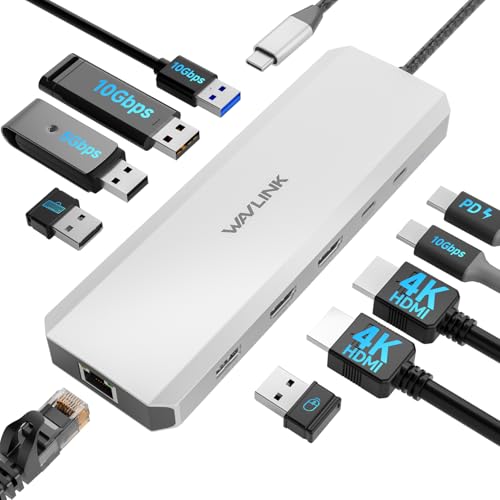
- Includes dual HDMI, Gigabit Ethernet, USB-A and USB-C ports, and 100W power delivery input.
- For Windows, supports two displays at up to 4K 60Hz and 4K 30Hz, according to the notes.
- Requires a compatible USB-C port and a separate 100W charger; not compatible with macOS.
Best For: Windows laptop user connecting multiple desk devices
10. Yodoit 15.6-Inch Portable Monitor
A Second Screen to Take Along
Yodoit 15.6-Inch Portable Monitor

- 15.6-inch matte FHD IPS display has a 1920 × 1080 resolution and built-in speakers.
- Connects by USB-C or Mini HDMI with USB power, depending on the device.
- Product notes list compatibility with laptops and several game consoles; check the needed video connection.
Best For: Laptop gamer or traveler who needs an extra screen
11. MAONO DGM20S USB Gaming Microphone
A Desk Mic with Quick Controls
MAONO DGM20S USB Gaming Microphone

- USB microphone set includes a boom arm, shock mount, pop filter, and USB and USB-C cable.
- One-touch mute, gain control, headphone monitoring, and controllable RGB lighting are listed features.
- Notes list PC, Mac, PS4, and PS5 compatibility; it does not support Xbox.
Best For: Gamer, streamer, or podcaster who chats or records at a desk
12. Redragon K668 Hot-Swap RGB Keyboard
A Keyboard They Can Customize
Redragon K668 Hot-Swap RGB Keyboard

- Wired keyboard has 108 keys, including four dedicated shortcut keys.
- Hot-swap sockets accept compatible 3-pin or 5-pin switches without soldering.
- Includes two keycap sets and software for remapping shortcuts, lighting, and macros.
Best For: PC gamer who enjoys changing keyboard controls and appearance
13. EasySMX X15 Wireless Gaming Controller
A Multi-Device Gamepad
EasySMX X15 Wireless Gaming Controller

- Product notes list compatibility with Windows PC, Steam, Switch, Android, and iOS.
- Connects by 2.4GHz wireless, Bluetooth, or USB-C cable.
- Hall Effect sticks and triggers, two programmable back buttons, and a 1,000mAh battery are listed features.
Best For: Gamer who prefers a controller for PC or compatible devices
14. Redragon M810 PRO Wireless Gaming Mouse
Wireless Control with Custom Buttons
Redragon M810 PRO Wireless Gaming Mouse

- Connects wirelessly with a 2.4GHz receiver and has eight programmable buttons.
- Offers five adjustable DPI levels, with software customization noted in the product details.
- Rechargeable battery is listed for up to 45 hours in eco mode.
Best For: PC gamer who wants wireless control and customizable buttons
15. SofaBaton X2 Universal Remote
One Remote for an Entertainment Setup

- Touchscreen remote supports IR, Bluetooth, Wi-Fi, and RF devices, with a hub and charging dock included.
- Custom Activities can combine commands for compatible entertainment and smart-home devices.
- Product notes list Alexa and Google Assistant support, plus Home Assistant integration.
Best For: Tech enthusiast managing several home entertainment devices
16. Crucial X9 2TB Portable SSD
Extra Storage for Games and Files

- Portable SSD provides 2TB of storage and transfer speeds up to 1,050MB/s, according to the notes.
- Product details list compatibility with Windows, Mac, Android, and PS4, PS5, and Xbox via USB-C or USB-A.
- Notes specify IP55 water and dust resistance and drop resistance up to 7.5 feet.
Best For: Gamer or creator storing large files, backups, or game libraries
17. Meta Quest 3S 128GB VR Headset
A Standalone Step into VR
Meta Quest 3S 128GB VR Headset

- Standalone headset offers virtual and mixed-reality experiences with Touch Plus controllers.
- Batman: Arkham Shadow and a three-month Meta Horizon+ trial are listed as included offers in the product title and notes.
- Supports casting play to a TV, multiple virtual screens, and parental controls.
Best For: Gamer curious about virtual reality and mixed-reality play
18. Turtle Beach Stealth 600 Wireless Gaming Headset
Wireless Audio for Multiplayer Sessions
Turtle Beach Stealth 600 Wireless Gaming Headset

- Product notes list 2.4GHz wireless and Bluetooth connectivity for multiple platforms.
- Features include 50mm drivers, a flip-to-mute microphone, and glasses-friendly memory foam cushions.
- Listed battery life is up to 80 hours; the headset also includes a QuickSwitch button.
Best For: Multiplayer gamer who wants a wireless headset for compatible devices
19. N-GEN GAMING High-Back Chair with Footrest
A Reclining Seat for the Gaming Desk
N-GEN GAMING High-Back Chair with Footrest

- Chair has a reclining backrest adjustable from 90 to 135 degrees and a retractable footrest.
- Includes neck and lumbar cushions, adjustable seat height, and linkage armrests.
- Upholstery is PU leather; the product notes list a steel frame and nylon base.
Best For: Gamer who spends long sessions at a desk
20. Logitech G29 Racing Wheel, Pedals, and Shifter
A Driving Setup for Racing Fans
Logitech G29 Racing Wheel, Pedals, and Shifter

- Set combines the G29 wheel and pedals with a six-speed Driving Force shifter.
- Dual-motor force feedback simulates driving effects such as turns, understeer, and drifting.
- Product notes list compatibility with PS5, PS4, and PC; the shifter also works with G923 and G920 wheels.
Best For: Racing game fan who wants wheel, pedal, and shifter controls
Choose for the Gamer’s Setup
Start with how the recipient actually plays. A PC gamer who spends most evenings at a desk may appreciate a display, keyboard, mouse, or controller that fits their preferred games. A racing fan has a more specialized option in a wheel and pedal set with a shifter. For someone who streams, records, or spends time in voice chat, a microphone or webcam can improve their desk setup as well as gaming sessions.
Consider the parts they already own. A monitor arm is useful when there are two compatible screens and a desk that can support the clamp or grommet mount. A laptop dock can reduce cable juggling, while a portable monitor suits someone who works or plays away from home. If their main frustration is managing large files or limited storage, an external SSD is a practical, compact gift. A chair or standing desk changes the space itself, so measure the available room before choosing either.
Match the Gift to Your Budget
The products in this guide range from small desk accessories to substantial setup changes. A webcam, microphone, mouse, or keyboard can make a focused upgrade without replacing a major piece of equipment. A headset or controller adds a new way to play and can work well as a self-contained gift. For a larger present, monitors, networking gear, a desk, chair, or racing controls can address a clear need.
When comparing options, think about what is included and what is required separately. The webcam connects by USB, while the monitor arm depends on compatible screens and desk dimensions. The laptop dock requires a separate charger and has specific Windows and USB-C requirements. The mesh Wi-Fi system requires a modem, and its backhaul feature needs at least two Deco units. Those details affect the complete cost and effort of putting the gift to use, even when the listed product seems like a simple purchase.
Check Compatibility and Personal Preferences
For electronics, identify the recipient’s platform before choosing. The gaming microphone notes exclude Xbox, the laptop dock is not compatible with macOS, and the racing wheel set is listed for PS5, PS4, and PC. The controller and wireless headset list multiple platforms, but the recipient’s device, connection method, and preferred controls still matter. For a wireless network upgrade, check the current modem or gateway and the internet provider’s setup needs.
Physical fit is just as important. Confirm the screen size, weight, and VESA mounting pattern before selecting the dual monitor arm. Check desk thickness and material for its mounting system. Compare a monitor’s available connections with the PC or console, and confirm the refresh-rate support you want over the selected port. For a standing desk or chair, consider room dimensions and the recipient’s comfort preferences. Useful personal touches can be as simple as matching a keyboard’s keycap colors or selecting a display format suited to the games they play.
Plan Timing and Last-Minute Choices
For Christmas shopping, allow time to confirm compatibility, gather any separately required cables or adapters, and assemble larger desk equipment. A monitor arm, desk, chair, or racing setup can take more preparation than a small accessory. Keep packaging and setup instructions together so the recipient can check fit before assembly.
If time is short, favor gifts with a clear connection to the recipient’s current setup and fewer fit questions. A storage drive, webcam, headset, or controller may be easier to match when the device compatibility is already known. If you are unsure about a desk, console, or laptop specification, verify it before purchasing. A thoughtfully matched upgrade makes a stronger Christmas gift than a technically impressive item that cannot connect or fit.