If you need a compact system with more stable networking than a typical single-port mini PC, a desktop computer with dual ethernet can be a smart upgrade. These models are especially useful for small offices, edge tasks, lab setups, and home networks that benefit from wired redundancy or multiple network connections.
In this roundup, we focus on practical desktop options that balance size, performance, and connectivity so you can choose the right machine without overpaying for features you will not use.
Best 10 Desktop Computer with Dual Ethernet Picks for 2026
Dual-2.5G Networking Mini PC

- Two 2.5GbE LAN ports for network labs and firewalls
- 16GB RAM, 512GB NVMe SSD, and upgradeable storage
- Triple 4K display output for multitasking
Best For: Home server, firewall, and office productivity
AI-Ready Commercial Mini PC

- Dual 2.5G LAN for isolation, firewall, and NAS use
- Core Ultra 5 with NPU for AI-assisted productivity
- Quad-display support with dual HDMI and dual USB4
Best For: Business, kiosks, and commercial networked workloads
Value Dual-LAN Mini PC

- Dual Gigabit Ethernet for stable wired networking
- Ryzen 5 3500U handles office work and streaming
- Triple 4K display support for productivity
Best For: Budget users needing dual-LAN connectivity
Fanless Industrial Dual-NIC PC

- Fanless design for silent, low-maintenance use
- Dual Gigabit Ethernet with PXE and WOL support
- Expandable storage and up to 32GB RAM
Best For: Industrial control and always-on edge deployments
Business-Ready Dual-LAN Mini PC

- Dual Gigabit LAN for flexible wired networking
- Triple 4K display support via HDMI, DP, and USB-C
- 16GB RAM and 512GB SSD for everyday office work
Best For: Home offices and small businesses needing dual ethernet and multi-display support
Compact Dual-Network Mini PC

- Dual RJ45 ports with one 2.5GbE connection
- 16GB RAM and 512GB SSD for light productivity
- Triple 4K display support plus WiFi 6
Best For: Router, NAS, and firewall users who want a compact desktop computer with dual ethernet
Compact Dual-LAN Office Mini PC
BOSGAME E5 Ryzen 5300U Mini PC

- Dual 2.5GbE LAN for networking tasks
- Triple-display support for productivity
- Upgradeable memory and extra SSD slot
Best For: Office, programming, and home lab networking
High-Throughput Networking Mini PC
GMKtec G11 Ryzen R2514 Dual 2.5GbE
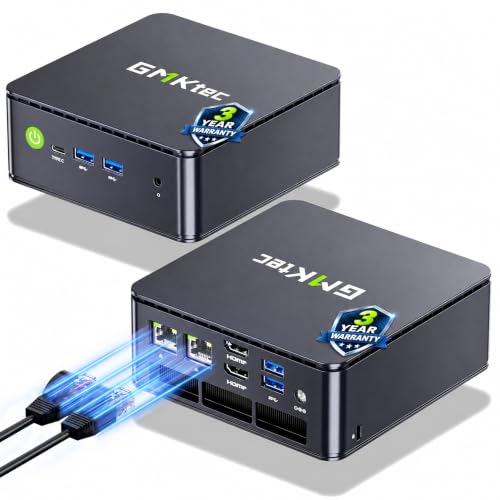
- Dual 2.5GbE ports for router and NAS use
- Built for 24/7 business and home lab workloads
- Triple 4K display support with USB-C and HDMI
Best For: Firewall, NAS, and always-on home lab builds
Dual-Ethernet Compact Server PC

- Dual 2.5GbE ports for advanced networking
- 24/7-capable R2514 platform
- 256GB SSD for a lower-storage entry point
Best For: NAS, router, and virtualization projects
Dual-2.5G Networking Mini PC – BOSGAME E5 Ryzen 3 5300U
If you want a desktop computer with dual ethernet for office work, home lab tasks, or a compact firewall build, the BOSGAME E5 is a practical budget pick. Its Ryzen 3 5300U handles everyday productivity smoothly, while the twin 2.5GbE LAN ports make it stand out for network-focused setups.
Best For: Home server, pfSense/OPNsense, NAS, and everyday office productivity.
Pros:
- Dual 2.5GbE RJ45 ports for advanced networking and physical network isolation
- Ryzen 3 5300U with 16GB RAM and 512GB NVMe SSD for responsive daily use
- Supports triple 4K@60Hz display output via HDMI, DisplayPort, and USB-C
- Dual NVMe storage expansion and up to 64GB memory upgrade support
Cons:
- Not intended for demanding 3D rendering or intensive AAA gaming
- Wi-Fi 5 is included, but the main highlight is wired networking rather than wireless speed
The E5 makes sense if dual ethernet is your priority and you still want a small, quiet machine for normal productivity. It offers a strong balance of networking flexibility, upgrade room, and multi-monitor support without pushing into higher-end pricing.
AI-Ready Commercial Mini PC – GEEKOM IT12 MAX Ultra 5 125U
For buyers looking for a desktop computer with dual ethernet that can also serve in business or commercial deployments, the GEEKOM IT12 MAX brings a lot to the table. Its dual 2.5G LAN ports, quad-display support, and efficient Core Ultra platform make it a strong fit for office, signage, and networked workloads.
Best For: Business deployments, kiosks, NAS, network isolation, and AI-assisted productivity.
Pros:
- Dual 2.5G LAN enables network isolation, firewall use, and local NAS setups
- Intel Core Ultra 5 125U with NPU support for AI-assisted multitasking
- Quad 4K output via dual HDMI and dual USB4 for commercial display setups
- Business-grade chassis, 3-year coverage, and support for Linux/Ubuntu
Cons:
- More specialized and feature-rich than a basic home office mini PC
- LPDDR5 memory is fast, but the configuration is fixed at 16GB in this model
The IT12 MAX is especially appealing if you need dual ethernet plus commercial-grade reliability. It combines flexible I/O, strong thermals, and long support coverage in a compact system built for continuous use.
Value Dual-LAN Mini PC – BOSGAME E4 Air Ryzen 5 3500U
If you need a desktop computer with dual ethernet for a small server, office desk, or media setup, the BOSGAME E4 Air offers a straightforward value proposition. Its Ryzen 5 3500U, dual Gigabit LAN, and triple 4K display support make it a versatile low-cost option for everyday tasks.
Best For: Budget office use, light server tasks, and dual-network connectivity.
Pros:
- Dual Gigabit Ethernet for stable wired networking and multi-tasking
- Ryzen 5 3500U with Radeon Vega 8 graphics for daily workloads and 4K streaming
- Triple 4K display support via HDMI, DisplayPort, and USB-C
- 8GB RAM and 256GB SSD for basic productivity out of the box
Cons:
- 8GB memory and 256GB storage are modest for heavier workloads
- SATA SSD is slower than NVMe-based options in this roundup
The E4 Air is best viewed as a practical entry-level dual-LAN mini PC rather than a performance machine. It covers the essentials well and should suit users who mainly care about networking stability and compact size.
Fanless Industrial Dual-NIC PC – VENOEN H3D J6412
For industrial installs where a desktop computer with dual ethernet needs to stay quiet and compact, the VENOEN H3D is a sensible fit. Its fanless design, dual Gigabit NICs, and always-on features make it useful for control rooms, kiosks, and networked edge roles.
Best For: Industrial control, kiosks, edge deployments, and quiet 24/7 operation.
Pros:
- Fanless build for silent operation and low-maintenance deployment
- Dual Gigabit Ethernet plus Wake-on-LAN, PXE, and auto power-on support
- Triple 4K display output for monitoring and multi-screen work
- Expandable storage options and up to 32GB DDR4 RAM support
Cons:
- J6412 is a low-power processor, so it is better for utility tasks than demanding computing
- Basic 8GB RAM and 256GB SSD configuration may need upgrades for heavier storage needs
The H3D is geared toward reliability, not raw speed. If your priority is dual ethernet, fanless cooling, and deployment-friendly features, it is a strong industrial-style choice.
Business-Ready Dual-LAN Mini PC – BOSGAME E7 for Productivity
If you want a desktop computer with dual ethernet for office work, light business tasks, or a compact multi-monitor setup, the BOSGAME E7 is built around that use case. Its Intel Core 3 100U, 16GB of RAM, and 512GB SSD give it a solid productivity foundation, while the dual Gigabit LAN ports add network flexibility for wired workstations, load balancing, or firewall-style setups.
Best For: Home offices, small businesses, and users who want dual LAN plus triple-display support in a small chassis.
Pros:
- Dual Gigabit Ethernet ports for flexible wired networking and load balancing
- Supports up to three 4K displays through HDMI, DisplayPort, and USB-C
- 16GB DDR4 RAM and 512GB PCIe NVMe SSD for everyday productivity
- WiFi 6, Bluetooth 5.2, and Windows 11 Pro are included
Cons:
- Not aimed at heavy gaming or workstation-class workloads
- Base memory may need expansion for larger business demands
- Compact design favors office use over high-end upgrade headroom
Overall, the E7 is a practical pick if dual ethernet and desktop-style versatility matter more than raw performance. It is especially appealing for buyers who need a quiet, space-saving machine that can handle work tasks and multiple displays.
Upgradeable Dual-LAN Work Mini PC – C4 SE for Everyday Office Use
The C4 SE is a compact desktop computer with dual ethernet aimed at work, study, and everyday computing. With a Ryzen 5 3500U, 8GB of RAM, and a 256GB SSD, it delivers a responsive baseline for office apps, browsing, online classes, and meetings, while the dual Gigabit Ethernet ports make it useful in wired network environments.
Best For: Remote workers, students, and small offices that want dual LAN, triple-display support, and upgrade flexibility.
Pros:
- Dual Gigabit LAN for stable wired networking and advanced setups
- Supports up to three displays via HDMI, DisplayPort, and USB-C
- Upgradeable memory up to 32GB and expandable storage via M.2 slot
- Wake-on-LAN, RTC Wake, and Auto Power-On add convenience
Cons:
- 8GB RAM and 256GB SSD are modest out of the box
- WiFi 5 is older than WiFi 6 alternatives
- Best suited to productivity rather than demanding creative workloads
For buyers who want a small, practical dual-ethernet desktop that can grow over time, the C4 SE checks a lot of boxes. Its combination of upgradeability, triple-display support, and business-friendly features makes it a versatile everyday option.
Compact Dual-Network Mini PC – Intel N150 with 2.5GbE
If your priority is a desktop computer with dual ethernet for networking tasks, light office work, or a small home server role, this N150 mini PC is built with that in mind. It pairs 16GB of RAM and a 512GB SSD with two RJ45 ports, including one 2.5GbE connection, giving it more wired-network flexibility than a basic single-LAN mini desktop.
Best For: Router, NAS, firewall, and productivity users who want dual LAN with a faster 2.5GbE port.
Pros:
- Dual RJ45 ports include one 2.5GbE and one 1GbE connection
- 16GB RAM and 512GB SSD provide a strong baseline for everyday use
- Supports triple 4K display output through HDMI, DisplayPort, and USB-C
- WiFi 6, Bluetooth 5.2, and Windows 11 Home are included
Cons:
- N150 is designed for light productivity, not heavy workloads
- Base storage and memory are upgradeable but still modest for power users
- Focus is on networking flexibility more than performance headroom
This is the strongest fit if dual ethernet is the main reason you are shopping, especially because one port supports 2.5GbE. It combines compact size with flexible connectivity, making it a smart option for network-centric home or small-office builds.
Compact Dual-LAN Office Mini PC – BOSGAME E5 Ryzen 5300U Mini PC
If you want a desktop computer with dual ethernet in a compact form factor, the BOSGAME E5 is built around a Ryzen 5300U and 2.5GbE dual LAN for office work, light creative use, and network-focused projects. It also adds triple-display support, so it can handle multitasking without constant window switching.
Best For: Office users, programmers, and home lab builders who want a small PC with dual 2.5GbE networking.
Pros:
- Dual 2.5GbE LAN supports soft router, NAS, or home lab use
- Triple display output via HDMI, DisplayPort, and USB-C
- 16GB DDR4 memory with upgrade support up to 64GB
- Extra M.2 slot allows adding a second SSD up to 2TB
Cons:
- Integrated Radeon graphics are best for everyday computing, not heavy gaming
- Only one SSD is included by default
- Mini PC design may not suit users who want a full-size tower
The E5 stands out if dual Ethernet is a priority and you also want a capable work PC in a very small chassis. It is especially practical for users who value networking flexibility and multi-monitor productivity.
High-Throughput Networking Mini PC – GMKtec G11 Ryzen R2514 Dual 2.5GbE
This desktop computer with dual ethernet is aimed at users who care about networking speed and always-on reliability. The GMKtec G11 combines a Ryzen Embedded R2514 processor with dual 2.5GbE ports, triple-display support, and 16GB of dual-channel memory for office, server, and NAS-style workloads.
Best For: Router, firewall, NAS, and home lab users who need dual 2.5GbE ports and 24/7 operation.
Pros:
- Dual 2.5GbE NICs are ideal for firewall, router, or NAS setups
- Ryzen Embedded R2514 is validated for continuous 24/7 workloads
- Triple independent 4K display support via dual HDMI and USB-C
- Dual-channel 16GB RAM helps multitasking and graphics performance
Cons:
- Optimized more for networking and productivity than heavy creative work
- Performance mode must be enabled in BIOS for maximum output
- Compact design may limit expandability compared with a full desktop
The G11 is one of the strongest picks here if your main goal is building a dependable dual-ethernet mini PC for networking or server duties. It balances practical hardware with the kind of connectivity that makes advanced home and small-office setups easier.
Dual-Ethernet Compact Server PC – GMKtec G11 Ryzen R2514 256GB
For buyers looking for a desktop computer with dual ethernet in a small, versatile chassis, this GMKtec G11 version focuses on networking and everyday compute tasks. It uses the Ryzen Embedded R2514, dual 2.5GbE ports, and triple-display support, making it a solid fit for a compact office machine or home lab starter.
Best For: Users who want a dual-2.5GbE mini PC for NAS, router, or virtualization projects.
Pros:
- Dual 2.5GbE networking suits firewall, NAS, and VPN use
- R2514 platform is designed for continuous 24/7 operation
- Triple-display support adds flexibility for desk setups
- 256GB PCIe M.2 SSD provides a smaller-cost storage starting point
Cons:
- 256GB storage is modest if you plan to keep many files locally
- Like the other G11 model, performance mode is BIOS-based
- Most appealing to networking buyers, not users seeking a gaming PC
This version makes sense if you want the same dual-ethernet foundation with a lighter storage configuration. It is best viewed as a practical compact system for networking experiments, office use, and small-server duties.
How We Picked the Best Desktop Computer with Dual Ethernet
We prioritized systems that make sense for real-world networking use: compact footprints, dependable performance, SSD-based storage, and clear wired connectivity advantages. We also favored models that can handle everyday office work, routing-adjacent tasks, light virtualization, digital signage, or always-on business use.
Because not every compact desktop offers true dual-LAN hardware, we emphasized product listings and configurations that are marketed for business or networking flexibility, along with hardware that is suitable for stable wired installations.
Quick Comparison: What Matters Most
For many buyers, the biggest differences will be processor class, memory, storage capacity, and port layout. Faster CPUs and 16GB RAM are better for multitasking, browser-heavy workflows, and background services. Lower-power chips can still be ideal if you mainly need a reliable networked desktop rather than a performance machine.
If two models look similar, check whether the storage is NVMe or SATA, whether RAM is upgradeable, and whether the machine supports triple displays, Wi-Fi backup, or always-on operation.
Key Buying Factors for a Desktop Computer with Dual Ethernet
1. Confirm the Ethernet Setup
Look closely at the product details to verify whether the system includes two physical Ethernet ports or a networking configuration that supports your use case. Dual Ethernet is most valuable when you need segmentation, failover, or separate WAN/LAN-style connections.
2. Match the CPU to the Workload
For office and light business use, entry-level Intel N-series and AMD U-series processors are often enough. If you want better multitasking, choose a stronger chip such as Ryzen 5-class or newer Intel Core-based options.
3. Choose Enough RAM and Storage
16GB RAM is the safer pick for long-term use, especially if you keep multiple apps open or run network utilities. A 512GB SSD gives more breathing room than 256GB, though the smaller option can work for basic deployments.
4. Consider Cooling and Uptime
Fanless designs can be attractive for silent operation and low maintenance, while business mini PCs with active cooling may deliver better sustained performance. If the device will run 24/7, focus on thermals, power efficiency, and build quality.
Who Should Buy Which Desktop Computer with Dual Ethernet?
If you need the most balanced option, choose a midrange mini PC with 16GB RAM and a 512GB SSD. If your priority is quiet operation in an office or industrial setting, a fanless model may be the better fit. If you mainly want a budget-friendly Desktop Computer with Dual Ethernet for basic networking tasks, an entry-level Ryzen or Intel N-series system can be enough.
Power users, small IT teams, and home lab buyers should lean toward the fastest CPU and the most expandable configuration available. For simple productivity, browsing, and light network management, there is no need to overspend on premium processing power.