The KOORUI G2511XC 25 Inch Curved Gaming Monitor review is all about speed, smooth motion, and practical gaming value.
If you want a fast 1080p display for competitive play, this one deserves a close look.
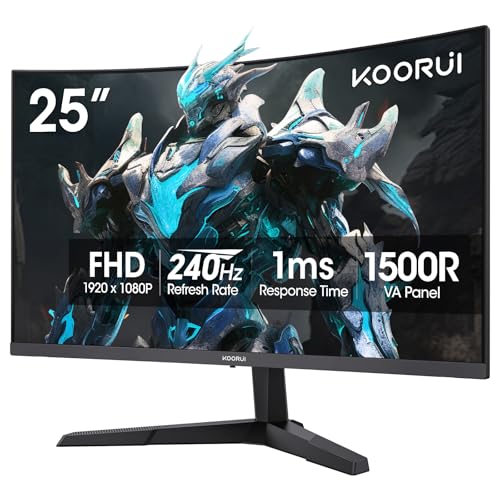
KOORUI G2511XC Review Summary
If you are shopping for a monitor that prioritizes fast motion, low lag feel, and immersive curved gaming, the KOORUI G2511XC 25 Inch Curved Gaming Monitor makes a strong case for itself.
It is especially appealing to FPS, racing, and esports players who want 240Hz responsiveness without moving into a larger, more expensive screen class.
What stands out most is the balance of 240Hz refresh rate, 1ms MPRT response, Adaptive Sync, and a 1500R curve.
That combination gives this monitor a clear advantage for smooth tracking, quick flick shots, and consistent movement in high-speed games.
The panel’s 90% DCI-P3 color gamut, HDR10 support, and 3000:1 contrast ratio also help it look more lively than a basic entry-level gaming monitor.
Still, buyers should understand the trade-offs.
This is a 25-inch 1080p monitor built for speed first, not a high-resolution productivity display or a feature-packed ergonomic workstation.
If you want a sharper image for text-heavy work, more desktop space, or height-adjustable flexibility, there are better alternatives.
But for a gaming-first setup, the KOORUI G2511XC is easy to recommend.
Scorecard
| Category | Score | Why it matters |
|---|---|---|
| Gaming smoothness | 9.0/10 | 240Hz refresh and 1ms MPRT are excellent for fast-paced games. |
| Image clarity | 8.0/10 | 1080p is sharp enough at 25 inches, though not class-leading for workspace or text. |
| Color and contrast | 8.0/10 | Wide gamut, HDR10, and 3000:1 contrast add punch for the category. |
| Motion handling | 9.0/10 | One of the monitor’s best strengths, especially in FPS and racing titles. |
| Comfort features | 8.0/10 | Flicker-free and low blue light support longer gaming sessions. |
| Ergonomics and mounting | 7.0/10 | Tilt and VESA help, but there is no clear height or swivel adjustment. |
| Connectivity versatility | 8.0/10 | HDMI 2.0 and DisplayPort 1.4 cover common PC and console setups. |
Bottom line: the KOORUI G2511XC 25 Inch Curved Gaming Monitor is best for buyers who want esports-grade smoothness in a compact, curved 1080p form factor.
It is a smart pick if your priority is gaming performance over maximum resolution or premium ergonomic features.
Key Features and Specifications of KOORUI G2511XC
The KOORUI G2511XC 25 Inch Curved Gaming Monitor combines several buyer-friendly features into a straightforward gaming package.
Below is a quick specification breakdown to help you decide whether the design fits your setup.
| Specification | Details |
|---|---|
| Brand / Model | KOORUI G2511XC |
| Screen Size | 25 inches |
| Resolution | 1920 x 1080 (FHD 1080p) |
| Panel Type | LCD |
| Screen Finish | Matte |
| Curvature | 1500R |
| Refresh Rate | 240Hz |
| Response Time | 1ms MPRT |
| Contrast Ratio | 3000:1 |
| Brightness | 250 cd/㎡ |
| Color Support | 90% DCI-P3 / 99 color gamut listing |
| HDR | HDR10 |
| Viewing Angle | 178 degrees |
| Connectivity | HDMI 2.0, DisplayPort 1.4 |
| Adaptive Sync | Yes |
| Eye Comfort | Flicker-Free, Low Blue Light |
| Stand Adjustment | Tilt: -5° to 20° |
| Mounting | VESA 75 x 75 mm |
| Weight | 4.63 kg |
| Dimensions | 9.02″ D x 21.93″ W x 17.02″ H |
| Warranty | 1 year on display, 3 years on accessories |
From a buyer’s perspective, the key decision points are simple.
240Hz and 1ms MPRT are the headline specs for motion performance, while the 1500R curve is there to make the panel feel more immersive during play.
The 1080p resolution is a deliberate choice: it reduces the hardware demand on your PC and makes hitting high frame rates easier, which is exactly what competitive players want.
The matte finish is another useful design choice because it helps control reflections in brighter rooms.
And while the brightness rating is modest compared with some premium gaming panels, the contrast ratio and color support suggest a display that should still look respectable in everyday gaming, streaming, and general media use.
Pros and Cons of KOORUI G2511XC
Here is the short version of the KOORUI G2511XC 25 Inch Curved Gaming Monitor pros and cons buyers should weigh before adding it to their cart.
| Pros | Cons |
|---|---|
| Very high 240Hz refresh rate for smooth competitive gaming | 1080p resolution may feel limited for sharper text and larger workspaces |
| 1ms MPRT helps reduce blur during fast movement | No confirmed height, swivel, or pivot adjustment |
| Adaptive Sync improves consistency and reduces tearing | 250 cd/㎡ brightness is not especially high |
| Good color features for the class, including HDR10 and wide gamut support | Best suited to gaming-first use rather than creator-grade accuracy |
| Flicker-free and low blue light support long sessions | Curved design may not suit everyone, especially spreadsheet-heavy users |
| HDMI 2.0 and DP 1.4 cover common gaming setups | 1080p at 25 inches is a performance play, not a premium clarity play |
The biggest advantage is obvious: speed without unnecessary complexity.
The biggest drawback is equally clear: if you want a monitor that doubles as a productivity centerpiece, this is not the most flexible option.
That is not a flaw so much as a design decision.
Who Should Buy KOORUI G2511XC?
The KOORUI G2511XC 25 Inch Curved Gaming Monitor is a strong fit for buyers who care more about how a game feels than how many pixels a monitor can pack onto the panel.
If you play fast titles and want the screen to keep up with rapid camera movement, this monitor aligns well with your priorities.
- Competitive FPS players who want quick motion handling and a responsive feel.
- Racing and action gamers who benefit from 240Hz smoothness and the curved shape.
- PC users who can drive high frame rates at 1080p without overspending on extra resolution.
- Xbox owners looking for a compatible, fast, and simple gaming monitor.
- Buyers wanting curved immersion in a smaller desk-friendly size.
Who should skip it?
Content creators, spreadsheet-heavy workers, and users who want more ergonomic adjustability may be happier with a 27-inch 1440p display or a monitor that offers height, swivel, and pivot controls.
If you need a sharper desktop for work and multitasking, this 25-inch 1080p panel will feel intentionally focused rather than universally versatile.
How the 240Hz Panel Feels in Fast Games
This is the section that matters most for the KOORUI G2511XC 25 Inch Curved Gaming Monitor.
In fast games, the 240Hz panel should feel notably more fluid than standard 60Hz or even 144Hz screens, especially if your PC can deliver high frame rates consistently.
High refresh rate displays do not make you better on their own, but they do make motion easier to track and can improve the sense of control.
The 1ms MPRT response time is especially relevant for reducing perceived blur when the screen is changing rapidly.
That matters in titles where enemies peek quickly, corners fly by, or your aim is constantly making tiny corrections.
The Adaptive Sync support is equally important because it helps smooth out frame pacing when the GPU cannot hold a perfectly steady output.
For esports-style play, this is a sensible formula.
The 25-inch size keeps the display compact enough for focus, and the 1080p resolution makes high frame rates easier to achieve than 1440p or 4K.
In practice, that means the KOORUI G2511XC is designed to feel fast first and look sharp enough second.
Color, HDR10, and Everyday Media Use
Even though the KOORUI G2511XC is clearly a gaming monitor, it does not ignore image quality.
The 90% DCI-P3 color support is a useful sign that the panel can deliver richer tones than the cheapest gaming displays, and the claimed 3000:1 contrast ratio should help blacks look deeper in darker scenes.
HDR10 support is welcome, but buyers should keep expectations realistic.
On a monitor in this category, HDR usually adds a little more range and punch rather than transforming the display into a full cinematic reference screen.
That said, it can still improve supported games and videos enough to make the picture feel less flat.
The monitor’s 25-inch size works nicely for everyday streaming and casual media because it keeps the image concentrated in your field of view.
If you enjoy watching shows, browsing, or using the monitor outside gaming, the color and contrast features should make it pleasant enough.
Just remember that this is still an esports-leaning panel, not a creator monitor built for color-critical work.
Ports, Console, and PC Compatibility
Connectivity is straightforward and useful.
With HDMI 2.0 and DisplayPort 1.4, the KOORUI G2511XC supports common desktop and laptop gaming setups without forcing you into adapters or complicated workflows.
That makes it easy to recommend for people who want a simple plug-and-play experience.
The monitor is also listed as compatible with Xbox, PCs, and laptops, which broadens its appeal beyond pure desktop gaming.
If you plan to use it with a console, confirm your preferred cable and output standard, but the basic compatibility story is solid.
For PC gaming, DisplayPort is typically the best route if you want to take full advantage of the high refresh rate.
One practical buying tip: if your system cannot consistently push high frame rates, a 240Hz panel still works, but you will not get the same return on the refresh-rate advantage.
This monitor makes the most sense when paired with a GPU and CPU combination that can keep up.
Tilt Stand and VESA Mount Options
The stand is functional rather than luxurious.
You get tilt adjustment from -5° to 20°, which is enough to set the screen angle for a comfortable seated position, but there is no clear evidence of height, swivel, or pivot support.
That is the area where the KOORUI G2511XC shows its value-focused design.
For many buyers, the included stand will be fine.
But if desk ergonomics matter to you, the VESA 75 x 75 mm mount support becomes an important upgrade path.
Pairing this monitor with an aftermarket arm or wall mount could dramatically improve viewing comfort and free up desk space.
The compact dimensions and moderate weight also make it relatively easy to position in a gaming setup.
The main question is whether you are comfortable with a tilt-only stand.
If not, budget for a VESA arm and you will get a much better long-term experience.
Eye Comfort for Long Gaming Sessions
Long gaming sessions can expose weak eye-care design, so the inclusion of flicker-free technology and low blue light support is genuinely useful.
These features do not magically eliminate fatigue, but they can reduce strain when you are playing for hours or using the display in a dim room.
The matte screen finish is another plus because it helps cut distracting reflections.
That matters more than many shoppers realize, especially if your desk faces a window or bright lamp.
A glossy gaming monitor can look punchy in a dark room, but it often becomes annoying in real-world use.
For a monitor in this class, the comfort package is a nice bonus.
It supports the idea that the KOORUI G2511XC 25 Inch Curved Gaming Monitor is not just about raw speed; it is also designed to be livable for regular daily play.
KOORUI G2511XC Review Compared With Alternatives
When evaluating the is KOORUI G2511XC 25 Inch Curved Gaming Monitor worth it question, it helps to compare it with a few common alternatives.
- 27-inch 1440p gaming monitors: Better for sharpness, desktop space, and mixed gaming/productivity use.
They are the smarter pick if you want a more versatile all-rounder.
- Other 240Hz esports monitors with height adjustment: Better if ergonomics matter as much as speed.
These are ideal for players who want to fine-tune their posture.
- Flat 24.5-inch gaming monitors: Better for users who prefer a traditional competitive shape and want to avoid curvature entirely.
The KOORUI G2511XC stands out because it tries to combine high refresh rate performance, a curved panel, and eye comfort features in a compact size.
That combination is attractive if your goal is a focused gaming monitor rather than a universal desktop solution.
If you want to compare directly on Amazon, here are a few useful search links:
- KOORUI G2511XC 25 Inch Curved Gaming Monitor
- 27-inch 1440p gaming monitor
- 240Hz esports monitor
- 24.5-inch flat gaming monitor
Is KOORUI G2511XC Worth It?
Yes, the KOORUI G2511XC 25 Inch Curved Gaming Monitor is worth it for the right buyer.
If your main goal is competitive gaming with a smooth, responsive, and immersive feel, it delivers the specs that matter most without overcomplicating the buying decision.
The best case for this monitor is simple: it gives you 240Hz speed, 1ms MPRT responsiveness, Adaptive Sync, and curved immersion in a size that fits many desks easily.
It also adds meaningful quality-of-life touches like flicker-free support, low blue light, and VESA mounting compatibility.
Those details make it easier to live with after the initial excitement wears off.
The case against it is just as simple: if you need more resolution, more ergonomic flexibility, or a display that can do serious productivity work, you should probably look at a 27-inch 1440p option instead.
This monitor is not trying to be everything.
It is trying to be fast, focused, and practical.
Final verdict: buy the KOORUI G2511XC 25 Inch Curved Gaming Monitor if you want a budget-conscious esports-style display with real speed advantages and comfortable everyday use. Skip it only if your priorities lean toward resolution, workstation ergonomics, or creator-grade versatility.
Recommendation: For competitive PC gamers and console players who want a curved 240Hz monitor, the KOORUI G2511XC is a smart, value-driven pick that gets the essentials right.