If you are searching for a Gaming keyboard wired option that is simple, quiet, and built for everyday desk use, this model is easy to place.
The appeal is not premium flash; it is a straightforward feature set that covers light gaming, typing, and a darker room.
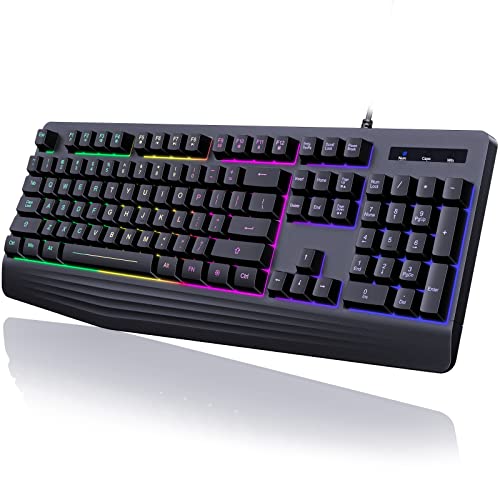
Gaming Wired Rainbow Backlit Keyboard Review Summary
This Gaming Wired Rainbow Backlit Keyboard review comes down to fit: it makes the most sense for buyers who want a full-size keyboard with a wrist rest, basic lighting, and low-noise typing without paying for a mechanical board.
It also suits people who want a plug-and-play keyboard that can handle office work, casual gaming, and general home use on Windows or Mac.
The strongest case for it is the combination of a 104-key layout, 19 anti-ghosting keys, 12 multimedia shortcuts, and a built-in wrist rest.
The tradeoff is equally clear: this is a membrane keyboard with a rainbow-only backlight, so buyers looking for switch customization, per-key lighting, or a sharper gaming feel should keep looking.
Review Scorecard
| Category | Score | Rationale |
|---|---|---|
| Typing Comfort | 8/10 | The listing emphasizes quiet membrane keys and an ergonomic wrist rest for long sessions. |
| Gaming Utility | 7/10 | 19 anti-ghosting keys and WASD/arrow swapping cover casual gameplay well. |
| Lighting | 6/10 | Rainbow backlight helps visibility, but it is not customizable beyond listed modes. |
| Desk Ergonomics | 8/10 | The stepped keycap design and wrist support make it friendlier for daily typing. |
| Durability | 7/10 | ABS construction and laser-engraved key legends are practical choices for regular use. |
| Compatibility | 8/10 | The listing calls out broad Windows support and Mac compatibility for basic use. |
| Value Focus | 8/10 | It bundles several useful features into a no-frills wired keyboard package. |
Key Features and Specifications of Gaming Wired Rainbow Backlit Keyboard
The product is a 104-key wired keyboard with a rainbow LED backlight and a wrist rest built into the design.
It uses a membrane-style layout rather than mechanical switches, which is the main reason the listing highlights quieter typing and a shorter key travel feel.
Key details from the listing include:
- Rainbow backlight only, with steady and breathing modes
- Brightness and speed adjustment for the lighting
- Wrist rest for support during long sessions
- 12 dedicated multimedia keys for common shortcuts
- 19 anti-ghosting keys for multi-key input
- FN+W swap between WASD and arrow keys
- FN+Win to lock the Windows key
- ABS shell material with laser-engraved lettering
- USB wired plug-and-play connection
- Compatibility listed for Windows systems and Mac
What stands out most is the practical balance.
This is not chasing enthusiast features.
It is trying to be a reliable full-size desktop keyboard with a few gaming-friendly touches and a lighting style that makes sense in low light.
Pros and Cons of Gaming Wired Rainbow Backlit Keyboard
Pros
- Quiet membrane typing is better for shared spaces than loud clicky switches.
- The wrist rest and stepped key design should help reduce fatigue.
- Anti-ghosting support adds real utility for casual gaming.
- Dedicated media keys improve day-to-day convenience.
- Wired USB operation keeps setup simple.
Cons
- The rainbow lighting is not customizable into solid color themes.
- It is not a mechanical keyboard, so key feel will be softer and less tactile.
- Mac support is basic, and the listing notes multimedia keys are not available on Mac.
- The design is functional rather than premium.
Who Should Buy Gaming Wired Rainbow Backlit Keyboard?
This keyboard makes sense for buyers who want an affordable-feeling, feature-packed full-size board for work, school, and casual gaming.
It is especially suitable for people who type a lot, prefer quiet keys, or want a simple wired setup that does not need software tuning.
It also fits buyers who like having a wrist rest already included, since that removes the need for a separate accessory.
The rainbow backlight is useful if you often work in dim light, but only if you are happy with a fixed rainbow style instead of advanced RGB control.
You should probably skip it if you want a mechanical keyboard, per-key lighting control, a compact layout, or a more premium gaming aesthetic.
It is also less compelling if your main concern is Mac-specific multimedia support.
How the Gaming Wired Rainbow Backlit Keyboard Fits Daily Use
Quiet Typing at a Desk
The listing’s focus on quiet membrane keys matters because it shapes the whole experience.
This should feel more like a practical office-and-home keyboard than a loud gaming board, which is a plus if you share space or work late.
Lighting for Low-Light Rooms
The rainbow backlight is useful, but it is clearly a utility feature rather than a personalization feature.
If you want something easy to see in the dark, it does the job; if you want color matching, it will feel limited.
Gaming Basics Without Extra Complexity
For casual gaming, the 19 anti-ghosting keys, WASD swap, and Win lock are the useful parts.
That is enough for many players who want dependable input without chasing enthusiast-level hardware.
Everyday Convenience Features
The multimedia keys and plug-and-play wired connection make this board easy to live with.
It is the type of keyboard that tries to stay out of the way while still giving you a few shortcuts that improve routine use.
Alternatives to Gaming Wired Rainbow Backlit Keyboard
If you want a similar full-size gaming keyboard with a more established gaming line, consider the Redragon K552 search on Amazon.
If you want a mainstream branded membrane option, the Logitech G213 search on Amazon is a logical comparison.
For buyers who want a different popular full-size wired gaming keyboard, the Corsair K55 search on Amazon is worth a look.
If you want a lower-cost office-and-casual-use alternative, the Amazon Basics wired keyboard search on Amazon is another practical benchmark.
Is Gaming Wired Rainbow Backlit Keyboard Worth It?
Yes, if your priority is a quiet, wired, full-size keyboard with a wrist rest and basic gaming features.
It is a sensible buy for casual players, home-office users, and anyone who wants a straightforward keyboard that is comfortable enough for long sessions.
No, if you want mechanical switches, advanced lighting control, or a more premium gaming feel.
In short, this is worth it for practical buyers, not hobbyists chasing customization.