A cute gaming gift can brighten a desk, make long sessions more comfortable, or help a player personalize their setup. The right pick depends on how and where they play, plus the gear they already own.
13 Cute Christmas Gift Ideas for Gamers
1. Quntis Curved Monitor Light Bar
A Softer Glow for the Gaming Desk
Quntis Curved Monitor Light Bar

- Fits curved monitors over 34 inches and large flat screens, with an adjustable clamp.
- Offers dimmable front lighting and adjustable color temperature from 3000K to 6500K.
- Adds 15 RGB backlight modes for gaming or late-night desk ambience.
Best For: A gamer or student who spends evenings at a computer.
2. Valorise Wireless Gaming Headset, Gray-Pink
Pastel Audio for Multiplayer Nights
Valorise Wireless Gaming Headset, Gray-Pink

- Connects through a 2.4GHz USB transmitter, Bluetooth 5.4, or a 3.5mm cable.
- Includes a retractable microphone with one-touch mute and RGB lighting modes.
- Has memory-foam cushions and supports use while charging.
Best For: A gamer who plays online or chats with friends.
3. EasySMX X05Pro Wireless Gaming Controller
Quiet Controls for Shared Spaces
EasySMX X05Pro Wireless Gaming Controller

- Works with Windows PC, Switch, Switch 2, Android, and iOS; it is not compatible with Xbox or PlayStation.
- Offers USB-C, 2.4G wireless, and Bluetooth connections.
- Uses silicone-damped buttons and includes programmable top buttons.
Best For: A PC, Switch, or mobile player who wants quieter controls.
4. ZZI 60000mAh Portable Power Bank
Extra Power for Gaming Away from Home
ZZI 60000mAh Portable Power Bank
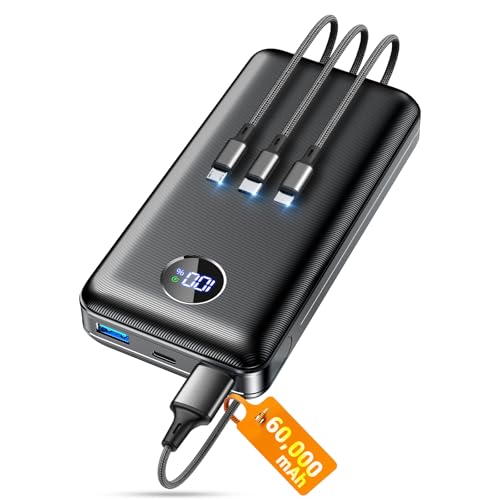
- Includes a 3-in-1 cable and can charge up to five devices at once.
- Its LED display shows remaining battery, and the listed capacity is 60000mAh.
- The listing states it is not allowed on airplanes.
Best For: A handheld-console player who games away from an outlet.
5. Purple Starry Sky XXL Desk Pad
A Colorful Desk Makeover
Purple Starry Sky XXL Desk Pad

- Measures 31.5 by 15.75 inches to fit a keyboard, mouse, and other desk items.
- Has a Lycra cloth surface, non-slip rubber base, and stitched edges.
- The pad can be rolled for transport and is described as easy to clean.
Best For: Someone who games or studies at a desk and likes cheerful decor.
6. Pink Jelly MOA Mechanical Keycaps
A Pastel Keyboard Refresh
Pink Jelly MOA Mechanical Keycaps

- Includes 132 translucent pink keycaps with a rounded MOA profile.
- Listed for 60%, 75%, TKL, and full-size layouts with Cherry MX and Gateron switches.
- A keycap puller is included; the keyboard and switches are not.
Best For: A mechanical-keyboard owner who enjoys customizing their setup.
7. SONGMICS Teddy Fleece Foot Stool
A Cozy Place to Put Their Feet Up
SONGMICS Teddy Fleece Foot Stool

- Has a soft teddy-fleece surface and 2-inch foam padding.
- Includes a hidden compartment and carrying handle.
- The listed maximum weight recommendation is 330 pounds.
Best For: A gamer who would enjoy a footrest beside their chair.
8. Pixio PX278 Wave Pink Gaming Monitor
A Pink Screen Upgrade
Pixio PX278 Wave Pink Gaming Monitor

- Features a 27-inch QHD 1440p display with a listed 180Hz refresh rate.
- Supports DisplayPort and HDMI connections, with FreeSync compatibility.
- Includes built-in speakers and a stand.
Best For: A PC gamer considering a larger or higher-refresh-rate screen.
9. kepptory 39-Inch Gaming Floating Shelves
A Display Wall for Games and Figures
kepptory 39-Inch Gaming Floating Shelves

- Combines five shelves with two removable tempered-glass shelves.
- Includes remote-controlled RGB lighting with seven main colors and 22 modes.
- The listing gives a total weight capacity of 121 pounds; wall mounting is required.
Best For: A gamer with collectibles or gear to display and organize.
10. Razer Base Station V3 Chroma Headset Stand
A Luminous Home for Their Headset
Razer Base Station V3 Chroma Headset Stand
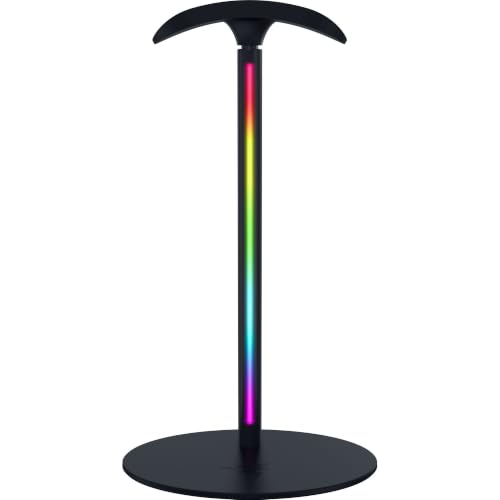
- Adds 12-zone Chroma RGB lighting and two USB 3.1 ports.
- The curved, rubberized support is designed to hold gaming headsets between sessions.
- Headset detection and 7.1 surround sound features require Synapse on PC, according to the listing.
Best For: Someone who wants a tidy, illuminated spot for a headset.
11. GTPLAYER Pink Gaming Chair with Footrest
A Pink Seat for Long Sessions
GTPLAYER Pink Gaming Chair with Footrest

- Includes a headrest, lumbar pillow, and pull-out footrest.
- The lumbar pillow connects by USB and is described as providing massage support.
- The faux-leather chair reclines and has a 360-degree swivel seat.
Best For: A gamer who wants a dedicated chair for play or study.
12. GLORIOUS Model O Eternal RGB Gaming Mouse
Lightweight Control with RGB Color
GLORIOUS Model O Eternal RGB Gaming Mouse

- Uses a wired USB connection and has a listed weight of 55 grams.
- Includes six programmable buttons and customizable dual-zone RGB lighting.
- The listing gives a maximum sensitivity of 12000 DPI and compatibility with PC and Mac.
Best For: A PC gamer who values programmable controls and lighting.
13. 32×32 USB Pixel Art Display
A Tiny Canvas for Their Gaming Space

- Can sit on a desk or mount on a wall.
- A mobile app supports custom pixel art, templates, editable text, animations, and clock modes.
- Runs on USB power and does not have a built-in battery.
Best For: A gamer who likes customizing a bedroom or streaming backdrop.
How to Choose a Cute Gaming Gift
Start with the recipient’s routine. A desk accessory suits someone who spends most of their time at a PC: a desk pad changes the look of a workspace, while a monitor light bar adds adjustable desk lighting. For a player who uses a headset, consider either a headset itself or a stand that keeps it in a regular place. If you are unsure which console or computer they use, check before choosing a controller, monitor, or keycaps; those gifts depend more on equipment and connection details.
Comfort gifts can work well when you know how the person plays. A foot stool is easy to place beside an existing chair, while a gaming chair is a larger, dedicated furnishing. Think about available room, whether the recipient has a suitable desk and floor surface, and whether they would welcome a substantial change to their setup. A power bank may suit handheld gaming and travel, but its listing explicitly says it is not allowed on airplanes, so it is not a good choice for someone who needs a battery pack for air travel.
Set a Budget That Fits the Gift
For a modest, personal gesture, look at items that refresh the existing setup, such as a desk pad, keycaps, or pixel display. These can feel tailored to the recipient’s tastes without replacing their main equipment. A power bank, controller, or headset is a more functional present, and a monitor, chair, or wall shelf represents a larger addition to their space. Prices can change, so check the current listing and your budget before deciding.
Consider what else the recipient might need to use the gift. Keycaps do not include a keyboard or switches, and their compatibility depends on layout and switch type. A light bar is intended for larger curved monitors and large flat screens. Shelves need wall mounting and room for the displayed items. These details can affect the total cost or effort, even when they are not part of the gift itself.
Check Compatibility and Personalization
Before buying a device, confirm the recipient’s platform and connections. The EasySMX controller supports PC, Switch, Switch 2, Android, and iOS, but not Xbox or PlayStation. The Valorise headset lists 2.4GHz, Bluetooth, and wired connections; which one is useful depends on the device. The Pixio monitor offers DisplayPort and HDMI, so match its input to the computer or console. For keycaps, check the keyboard layout and whether its switches are compatible.
Personalization can be as simple as choosing an item that suits the existing room. Pink and pastel accessories add color, while RGB lights and app-controlled pixel art let the player adjust the look. A practical gift can still feel personal if it reflects their favorite colors, interest in collecting, or preference for a tidy desk. If you are uncertain about their taste, choose something that fits a clear need and does not require changing the whole setup.
Timing and Last-Minute Decisions
For Christmas shopping, leave time to check fit, connection requirements, and the recipient’s available space. Larger items like a monitor, chair, or wall shelf may need more planning than a desk accessory. Confirm current delivery estimates with the seller rather than relying on assumptions, especially as the holiday approaches.
When time is short, a gift that fits equipment they already use can simplify the decision. A desk pad or foot stool may be easier to place than a new monitor or chair, while a headset or controller calls for a quick compatibility check. If a gift needs installation or mounting, make sure the recipient has room and the setup effort is welcome. A thoughtful cute Christmas gift does not need holiday graphics: useful gear in a color or style they enjoy can make their everyday gaming space feel more like their own.