A good surge protector does more than add outlets. For a gaming setup, it helps keep your PC, monitor, console, router, speakers, and charging gear organized and protected.
Below, we focus on models that combine solid joule ratings, practical outlet spacing, and useful USB charging so you can build a cleaner, safer desk or battlestation.
Best 10 Surge Protector for Gaming Setup Picks for 2026
RGB Gaming Surge Guard

- 4000J surge protection
- RGB lighting with 3 modes
- 6 AC outlets plus USB-C charging
Best For: Gamers wanting desk-friendly protection with lighting
High-Outlet Desk Protector

- 12 outlets with 6 wide-spaced slots
- 3000J surge protection
- USB-A and USB-C charging
Best For: Gaming desks with lots of devices
Heavy-Duty Desk Strip

- 12 AC outlets with wide spacing
- 3,780J surge protection
- 8-foot flat plug cord
Best For: Long-cord setups that need high outlet capacity
Budget USB Power Hub

- 12 AC outlets plus 4 USB ports
- 2700J surge protection
- ETL listed with protected indicator
Best For: Budget gaming desks needing lots of charging
Ultimate High-Capacity Pick
28-in-1 Surge Protector for Gaming Rooms

- 22 AC outlets plus 6 USB ports
- 2100J surge protection with multiple safety layers
- Flat plug, mountable design, and wide spacing
Best For: Large gaming rooms and heavy multi-device setups
Value Outlet-Heavy Pick
18-Outlet Surge Strip with USB
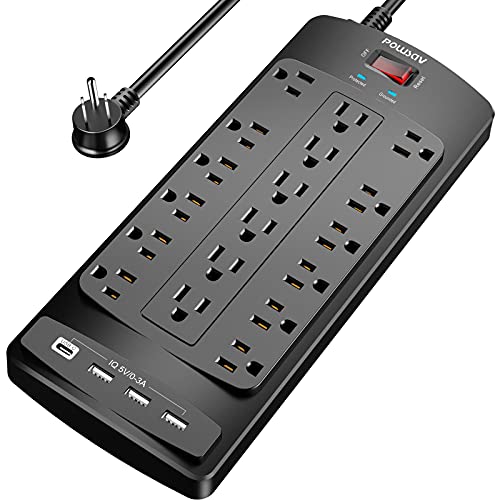
- 18 AC outlets and 4 USB ports
- 2100J surge protection with ETL listing
- 6-foot flat plug cord with cable ties
Best For: Budget setups that need lots of plug space
Compact Premium Pick
Anker 12-Outlet 2100J Power Strip

- 12 AC outlets with 3 USB ports
- Extra spacing for bulkier plugs
- 20W USB-C and 8-point safety system
Best For: Cleaner desk setups that still need strong protection
Desk-Ready Power Expansion
TROND 13-Outlet Surge Protector With USB

- 13 widely spaced AC outlets reduce adapter crowding
- 4 USB ports add basic charging convenience
- 4000J surge protection with ETL listing
Best For: Gaming desks and entertainment setups with lots of devices
High-Capacity Gaming Hub
18-Outlet Surge Strip With USB-C

- 18 AC outlets and 4 smart USB ports for dense setups
- 4800J surge protection with status indicators
- 10-foot cord and flat plug improve placement flexibility
Best For: Large gaming rigs and desks with lots of gear
Balanced Gaming Desk Pick
SUPERDANNY 18-Outlet Power Strip
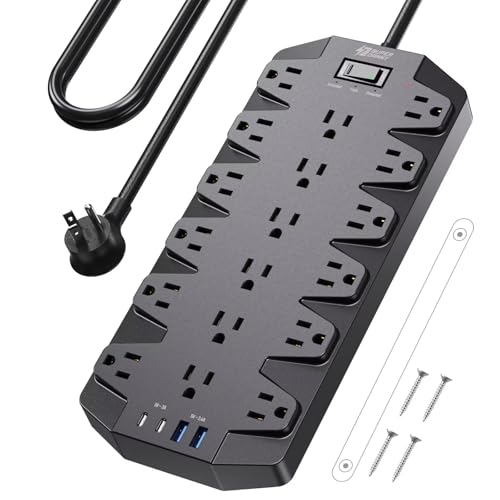
- 18 outlets with super-spaced layout for bulky plugs
- 2 USB-A and 2 USB-C ports add charging convenience
- Flat plug and wall-mount holes help with cable management
Best For: Gaming rooms and dorm desks needing a tidy all-in-one strip
RGB Gaming Surge Guard – 4000J RGB Power Strip for PCs
If you want a surge protector for gaming setup use, this model is built to do more than just add outlets. It combines 4000J surge protection, wide-spaced sockets, and USB-C fast charging with RGB lighting, so it can support a gaming PC desk while adding a little atmosphere.
Best For: Gamers who want a feature-rich desk power strip with lighting, charging, and strong surge protection.
Pros:
- 4000J surge protection and 15A overload protection for gaming gear.
- RGB lighting with 4 brightness levels and 3 lighting modes.
- 6 AC outlets plus 1 USB-A and 2 USB-C ports, including 20W max USB-C charging.
- 10° angled outlet layout and 1.8-inch spacing for bulkier plugs.
Cons:
- Only 6 AC outlets if you need a very high outlet count.
- RGB lighting may be unnecessary for minimal desk setups.
Overall, this is a strong pick if you want protection and convenience in one gaming-focused strip. The combination of surge rating, wide spacing, and USB-C support makes it practical for modern desktop setups.
High-Outlet Desk Protector – 12-Outlet CyberPower Strip
This surge protector for gaming setup use is a good fit when your desk needs a lot of powered devices at once. With 12 outlets, 3000J of surge protection, and both USB-A and USB-C charging, it covers the basics of a busy PC, monitor, and accessory layout without taking up much space.
Best For: Gaming desks that need lots of outlets and a simple, practical layout.
Pros:
- 12 grounded outlets with 6 widely spaced positions for bulky adapters.
- 3000J surge protection for computers and electronics.
- Includes 1 USB-A and 1 USB-C port for device charging.
- Right-angle plug and 6-foot cord help with tighter setups.
Cons:
- Only two USB ports, so it is less charging-focused than some rivals.
- Plain black design with no gaming-specific extras.
For setups where outlet count matters more than flair, this CyberPower strip is easy to recommend. It offers a straightforward mix of capacity, spacing, and protection for an organized gaming desk.
Heavy-Duty Desk Strip – Belkin 12-Outlet Protector
If you need a surge protector for gaming setup equipment and want a sturdy, low-profile option, this Belkin strip is built around capacity and spacing. It provides 12 AC outlets, strong surge protection, and an 8-foot flat plug cord that can be easier to route behind a desk or entertainment center.
Best For: Gamers who want a durable, wall-mountable strip with a long cord and lots of outlets.
Pros:
- 12 AC outlets for monitors, PCs, chargers, and accessories.
- 3,780 joules of protection for connected gear.
- Widely spaced outlets help fit larger plugs.
- 8-foot flat plug cord is useful in tight or awkward spaces.
Cons:
- No USB charging ports.
- Larger cord length may be more than some compact desks need.
This Belkin model is a solid utility-first choice for a gaming desk or nearby entertainment setup. It stands out for its generous outlet count, long cord, and practical wall-mountable design.
Budget USB Power Hub – ALESTOR 12-Outlet Strip
This surge protector for gaming setup use focuses on value and utility. It combines 12 AC outlets, 4 USB ports, and 2700J of surge protection, making it a practical choice for a desktop that needs to power multiple accessories without adding a lot of complexity.
Best For: Budget-conscious gaming setups that still need plenty of outlets and USB charging.
Pros:
- 12 AC outlets with two 2-inch widely spaced positions for large adapters.
- 4 USB ports, including 1 USB-C port with 3A max output.
- 2700J surge protection plus overload protection.
- ETL listed with a protected indicator light.
Cons:
- USB charging is useful, but not as fast or plentiful as more premium models.
- Design is basic and geared more toward function than style.
For a gaming desk that needs a lot of power outlets without a high price tag, this ALESTOR strip is a sensible pick. The mix of outlet count, USB support, and safety features makes it versatile for everyday setups.
Ultimate High-Capacity Pick – 28-in-1 Surge Protector for Gaming Rooms
If you need a surge protector for gaming setup with a lot of gear, this SUPERDANNY model is built for high-device desks and entertainment corners. With 22 AC outlets plus 6 USB ports, it can handle a gaming PC, monitor stack, console, speakers, lamps, and charging accessories without turning your desk into an outlet fight.
Best For: Large gaming rooms, media centers, and anyone powering many devices from one strip.
Pros:
- 22 grounded AC outlets and 6 USB ports provide massive device capacity.
- Wide-spaced outlet layout helps reduce plug congestion from bulky adapters.
- 2100J surge protection plus multiple safety protections for connected electronics.
- Flat plug, mountable design, and 6.5 ft cord make placement easier behind furniture.
Cons:
- The side outlets cannot be rotated.
- The large footprint may be more than you need for a simple desk setup.
Overall, this is the most expansion-friendly option in the group, especially if your gaming station has grown beyond a basic PC-and-monitor setup. The mix of AC outlets, USB charging, and flat-plug convenience makes it practical for busy rooms where cable organization matters.
Value Outlet-Heavy Pick – 18-Outlet Surge Strip with USB
This surge protector for gaming setup focuses on outlet count and straightforward utility. With 18 AC outlets, 4 USB ports, a 6-foot flat plug cord, and 2100 joules of surge protection, it gives a desk or gaming corner plenty of room for power bricks, consoles, and accessories.
Best For: Budget-minded gamers who want lots of outlets and simple cord management.
Pros:
- 18 AC outlets provide generous capacity for a crowded setup.
- 4 USB ports add convenient charging for smaller devices.
- 6-foot flat plug cord and reusable cable ties help keep things organized.
- 2100J surge protection and ETL listing add reassurance for everyday use.
Cons:
- No USB-C port is included.
- It does not highlight mounting hardware or advanced layout features.
If your priority is simply getting more powered connections around a gaming desk, this is a practical no-frills choice. It balances outlet count, basic USB charging, and safety certification without overcomplicating the build.
Compact Premium Pick – Anker 12-Outlet 2100J Power Strip
For a cleaner surge protector for gaming setup, the Anker 351 keeps the layout simpler while still offering solid expansion. It includes 12 AC outlets, 1 USB-C port, 2 USB-A ports, and extra spacing between outlets, which is helpful when your gaming gear uses bulky power adapters.
Best For: Neater desk setups that want reliable protection and a smaller outlet count.
Pros:
- 12 AC outlets cover the essentials for a PC desk or bedroom setup.
- Extra spacing between outlets helps fit larger plugs more comfortably.
- 2100J surge protection and an 8-point safety system add strong protection features.
- USB-C with 20W fast charging is useful for phones and accessories.
Cons:
- Fewer AC outlets than the larger alternatives here.
- The 5-foot cord is best suited to desk-level placement, not longer reaches.
This is a smart pick if you want a cleaner, more premium-feeling power strip without going overboard on outlet count. It suits gaming desks where spacing, charging convenience, and dependable protection matter more than maximum capacity.
Desk-Ready Power Expansion – TROND 13-Outlet Surge Protector With USB
If you need a surge protector for gaming setup that can handle a crowded desk, this TROND power strip is built for serious outlet expansion. It offers 13 widely spaced AC outlets plus 4 USB ports, a 5 ft heavy-duty cord, and 4000J of surge protection, making it a practical fit for gaming PCs, monitors, and accessory charging without constant plug swapping.
Best For: Gaming desks, entertainment centers, and users who need lots of spaced outlets in one strip.
Pros:
- 13 AC outlets with extra spacing to fit larger adapters
- 4 USB ports for charging phones and smaller accessories
- 4000J surge protection and ETL listing for added peace of mind
- Flat 45° plug, 14AWG cord, and wall-mount tabs for flexible placement
Cons:
- USB output is limited to 17W total, so it is not a high-speed charging hub
- 5 ft cord may be short for farther wall outlets
Overall, this is a strong choice if your priority is outlet count and spacing rather than premium USB charging. It gives a gaming setup plenty of room for power bricks, peripherals, and charging basics while keeping the layout organized.
High-Capacity Gaming Hub – 18-Outlet Surge Strip With USB-C
For a surge protector for gaming setup that needs maximum capacity, this heavy-duty strip stands out with 18 AC outlets, four smart USB ports, and 4800J of surge protection. The 10-foot cord and flat plug make it easier to reach behind desks or across a room, while the wide-spaced outlets help keep game consoles, monitors, and chargers from blocking each other.
Best For: Large gaming rigs, home offices, and multi-device desks that need a long cord and maximum outlet count.
Pros:
- 18 wide-spaced AC outlets for high device density
- 4 USB ports, including USB-C PD20W charging
- 4800J surge protection with grounded/protected LED indicators
- 10-foot cord, flat plug, and 3-way mounting options
Cons:
- Large size may be more than you need for a simple desk setup
- Higher capacity design can take up more mounting space
This is the most feature-rich option here for power-hungry setups. If your gaming area includes a PC, monitor, console, accessories, and charging needs all at once, the combination of outlet count, USB-C, and long reach is hard to beat.
Balanced Gaming Desk Pick – SUPERDANNY 18-Outlet Power Strip
This surge protector for gaming setup focuses on balance: plenty of outlets, useful USB charging, and a layout that helps keep cables under control. With 18 AC outlets, 4 USB ports, 2100J of surge protection, and a 6.5 ft flat plug cord, it is designed for gaming rooms, dorm desks, and home office spaces where multiple devices need to stay plugged in.
Best For: Gaming rooms, dorm desks, and home setups that need wide outlet spacing without going oversized.
Pros:
- 18 AC outlets with extra-large spacing for bulky adapters
- 2 USB-A and 2 USB-C ports for convenient device charging
- Flat plug, wall-mount holes, and included mounting hardware
- Fireproof materials and 2100J surge protection
Cons:
- USB output is shared and modest at 17W total
- 6.5 ft cord is shorter than some long-reach alternatives
For buyers who want a practical all-around strip rather than the biggest possible cord or highest joule rating, this model makes sense. It gives a gaming desk a clean, mountable power center with enough room for oversized plugs and everyday charging.
How We Picked the Best Surge Protector for Gaming Setup
We prioritized surge protection rating, outlet layout, spacing for bulky power bricks, USB charging usefulness, cord length, and overall build quality. For a Surge Protector for Gaming Setup, the best choice is usually the one that can handle multiple devices without crowding or blocking adjacent outlets.
Quick Comparison
High-joule models are best for premium PCs and full desk rigs, while large-outlet strips suit setups with consoles, monitors, docking stations, and accessories. USB-C and fast-charging ports are helpful if you want to keep controllers, headsets, or phones powered without using extra wall adapters.
Key Buying Factors for a Surge Protector for Gaming Setup
Surge Protection Rating
Look for a joule rating that matches the value of your gear. More joules generally means more protection headroom, especially for expensive desktops, gaming laptops, and displays.
Outlet Spacing and Count
Gaming power bricks can be bulky. Wide spacing matters as much as total outlet count, especially if you use a large GPU-powered PC, monitor adapters, or console charging docks.
USB Ports and Charging Speed
USB-A is fine for low-demand accessories, but USB-C and higher-wattage fast charging are more versatile for modern controllers, earbuds, phones, and handhelds.
Cord Length and Plug Design
A longer cord helps if your outlet is behind a desk, but flat plugs and mountable bodies can make cable management much cleaner in tight spaces.
Safety and Certification
ETL or UL listing is important for peace of mind. For a Surge Protector for Gaming Setup, certification and a solid warranty are worth considering alongside specs.
Who Should Buy Which Surge Protector for Gaming Setup?
If you have a compact desk, choose a strip with fewer but well-spaced outlets and fast USB charging. If you run a full gaming station with a tower PC, monitor, console, speakers, and accessories, go for a higher-outlet model with a longer cord. If protection is your top priority, favor the highest joule rating you can get in a certified unit. If convenience matters most, pick one with USB-C and easy cable routing so your gaming area stays tidy and ready to use.