If you want that authentic arcade feel for classic titles, the right controller matters as much as the game itself. A good setup should feel responsive, durable, and comfortable for long sessions.
Below, we focus on the best options for casual play, serious fighting games, and DIY retro builds so you can choose the right fit for your setup and budget.
Best 10 Arcade Joystick Controller for Retro Games Picks for 2026
Premium Customizable Arcade Stick
8Bitdo Arcade Stick for Switch & Windows

- Bluetooth, 2.4G, and USB-C wired connection options
- Custom button mapping and macros via ultimate software
- Universal mounting plate supports Sanwa arcade sticks
Best For: Switch and Windows players who want a customizable, moddable fight stick
Classic Retro USB Gamepad
Hyperkin Trooper 2 Premium Controller

- Works with Windows, macOS, Linux, and Raspberry Pi
- Ergonomic design with a classic Atari-style layout
- Quiet joystick and responsive, mappable buttons
Best For: Emulation fans who want a comfortable classic-style USB controller
DIY Two-Player LED Arcade Kit
EG STARTS 2 Player Arcade Games Kit

- Includes 2 joystick handles and 20 LED-lit buttons
- Zero-delay USB encoder for Windows MAME builds
- Made for DIY two-player arcade panels
Best For: DIY builders creating a custom two-player retro arcade setup
Zero-Delay USB Fight Stick
PC Fighting Joy Stick Controller

- USB plug-and-play with no driver needed
- Eight round controls and a spherical metal joystick
- Four suction cups help keep it stable
Best For: Windows PC players who want a simple wired fight stick
Mini Retro Arcade Pick

- 300 built-in 8-bit games
- 8-way joystick and 2 buttons
- 2.5-inch colour screen with speakers
Best For: A handheld mini arcade cabinet with built-in retro games.
Wired Cabinet Companion
Quarter Arcades USB A Controller

- 1.5m wired USB connection
- Removable thumbstick design
- Works with Windows 11 PCs
Best For: Mini arcade cabinets and Windows PC retro setups.
Fight Stick Value Pick
Wired Arcade Joystick Fight Stick

- Spherical metal joystick
- 6 round control buttons
- Works with Switch, PC, and PS3
Best For: Arcade-style fighting games across multiple platforms.
2-Player LED DIY Starter
Qenker 2-Player LED Arcade Kit

- Includes 2 joysticks and 20 LED buttons
- Zero-delay USB encoders for retro builds
- Works with PC, Raspberry Pi, Mac, Linux, Android
Best For: Two-player DIY retro arcade builds with LED controls
Classic 2-Player Cabinet Kit
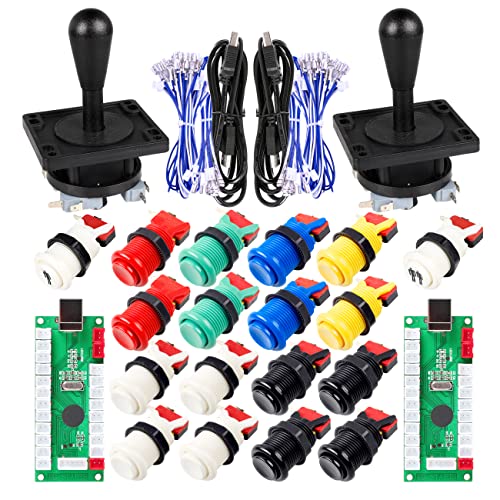
- 8-way joystick with 18 arcade push buttons
- Zero-delay USB interface for PC/MAME use
- Includes 1P/2P start buttons and microswitches
Best For: Classic two-player cabinet and emulator setups
4-Player LED Build Set
EG STARTS 4-Player DIY Arcade Kit
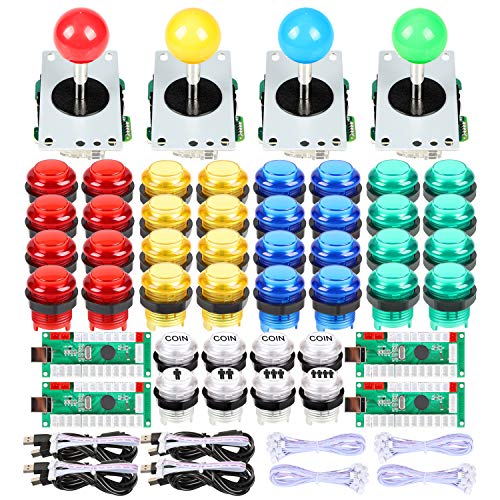
- Designed for 4-player arcade projects
- Includes 40 5V LED illuminated buttons
- Zero-delay USB encoders for PC and Raspberry Pi
Best For: Large custom arcade panels for four-player retro gaming
Premium Customizable Arcade Stick – 8Bitdo Arcade Stick for Switch & Windows
If you want an arcade joystick controller for retro games that can also handle modern play, this 8Bitdo stick is built around flexibility. It works with Switch and Windows, connects three ways, and gives you software-level control over button mapping and macros.
Best For: Players who want a moddable arcade stick with wireless and wired options for Switch or Windows.
Pros:
- Three connection methods: Bluetooth, 2.4G receiver, and USB-C wired
- Ultimate software support for custom button mapping and macros
- Universal mounting plate supports Sanwa arcade sticks
- Dynamic button layout changes with mode functionally and visually
Cons:
- Only listed for Switch and Windows compatibility
- Heavier than many compact controllers at 4.6 pounds
This is a strong pick if you value customization and connection flexibility over a simple plug-and-play stick. The hidden compartment for the 2.4G receiver is a thoughtful detail for keeping the setup tidy.
Classic Retro USB Gamepad – Hyperkin Trooper 2 Premium Controller
This arcade joystick controller for retro games is aimed at emulation fans who want a classic feel with modern USB convenience. The Hyperkin Trooper 2 is designed for Windows, macOS, Linux, and Raspberry Pi, with an ergonomic shape and responsive controls for long sessions.
Best For: Retro gamers and emulation users who want a classic Atari-style USB controller.
Pros:
- Compatible with Windows, macOS, Linux, and Raspberry Pi
- Ergonomic design with chamfered corner grips for comfort
- Quiet movement joystick and responsive buttons
- Includes a 10-foot USB cable and 6 mappable buttons
Cons:
- It is a gamepad-style controller rather than a full arcade fight stick
- Wired USB connection only
For classic-style play on a wide range of emulation setups, this controller keeps things simple and practical. The 4-way joystick and old-school layout make it especially appealing if you want a retro look without giving up modern compatibility.
DIY Two-Player LED Arcade Kit – EG STARTS 2 Player Arcade Games Kit
If you’re building an arcade joystick controller for retro games from scratch, this EG STARTS kit is all about customization. It includes two oval joystick handles, 20 LED-lit buttons, and a zero-delay encoder with USB support for Windows-based MAME-style setups.
Best For: DIY builders putting together a two-player arcade control panel for PC emulation.
Pros:
- Includes 2 joystick handles and 20 LED-lit arcade buttons
- 100% zero-delay encoder with USB support for Windows systems
- Designed as a 2-player arcade MAME DIY accessory
- Made with high temperature resistant plastic
Cons:
- Requires DIY installation and assembly
- Compatible devices are limited to PC and Windows
This kit makes sense if you want to build a custom two-player panel instead of buying a finished stick. The LED buttons and included encoder give it a strong starting point for a retro arcade project.
Zero-Delay USB Fight Stick – PC Fighting Joy Stick Controller
USB Fighting Joy stick Controller, Fight Stick, Game Console No Delay for PC Computer Games
Check Price On AmazonFor shoppers comparing an arcade joystick controller for retro games on PC, this fight stick focuses on straightforward wired play. It connects by USB, uses a spherical metal joystick, and adds suction cups to help keep the unit stable during use.
Best For: PC players who want a basic plug-and-play fight stick with a stable base.
Pros:
- USB plug-and-play connection with no driver needed
- Eight round controls plus a spherical metal joystick
- Supports two-joystick play on one computer
- Four suction cups help secure the controller in place
Cons:
- Only listed as compatible with Windows
- Generic feature set compared with more customizable sticks
- Wired-only USB connection
This is a practical budget-style option if you just want a simple PC fight stick that is easy to set up. Its strengths are stability and basic multiplayer support rather than advanced customization.
Mini Retro Arcade Pick – Orb Mini Arcade Machine
If you want an arcade joystick controller for retro games in a compact all-in-one format, this mini arcade machine is built around simple, authentic play. It comes with an 8-way joystick, two buttons, and 300 pre-loaded 8-bit games, making it a straightforward pick for casual retro sessions at home or on a table.
Best For: Players who want a handheld mini arcade cabinet with a built-in joystick and a large library of preloaded retro games.
Pros:
- Includes 300 built-in 8-bit games across action, platform, puzzle, shooting, racing, and strategy
- Has an 8-way joystick plus 2 control buttons for classic arcade-style input
- 2.5-inch full-colour LCD screen adds a more complete handheld arcade experience
- Built-in speakers with volume control support portable play
Cons:
- Designed for one player only
- Uses 3 AA batteries, so it is not rechargeable
- Small screen may not suit buyers who want a larger display
This is a practical choice if you care more about easy retro play and a nostalgic control layout than console-style flexibility. The integrated games and compact size make it a simple grab-and-play option for casual use.
Wired Cabinet Companion – Quarter Arcades USB A Controller
If you need an arcade joystick controller for retro games that feels closer to a classic cabinet accessory, this wired USB-A controller is a compact option. It uses a removable thumbstick, a 1.5m cable, and a simple rectangular form factor, so it fits well with mini arcade cabinets or a straightforward PC setup.
Best For: Retro gaming fans who want a wired USB controller for mini arcade cabinets or Windows 11 PCs.
Pros:
- 1.5m wired USB connection is positioned for reliable, zero-latency play
- Compact rectangular design gives it a nostalgic arcade-controller feel
- Removable thumbstick adds flexibility for different setups
- Compatible with Windows 11 PCs and other USB-compatible devices
Cons:
- Only includes 5 buttons, so it may feel basic for some games
- Wired-only design limits placement freedom
- Best suited to cabinet-style or PC use rather than broad console compatibility
This is a focused accessory rather than a feature-heavy universal controller, which is useful if you want a simple retro-style input device. Its strength is the dependable wired connection and compact design for smaller arcade setups.
Fight Stick Value Pick – Wired Arcade Joystick Fight Stick
For buyers looking for an arcade joystick controller for retro games with a fight-stick layout, this wired model keeps things simple and platform-friendly. It pairs a spherical metal joystick with 6 round buttons and supports Switch, PC, and PS3, making it a practical choice for arcade-style action on multiple devices.
Best For: Players who want a wired fight stick for arcade-style gaming on Switch, PC, or PS3.
Pros:
- Spherical metal joystick is designed for smooth, precise control
- 6 round buttons support classic fight-stick play
- Compatible with Nintendo Switch, PC, and PS3
- Wired USB connection keeps the controller at a comfortable distance from the screen
Cons:
- Wired only, so there is no wireless option
- Single-color red design may not suit every setup
- Built for arcade and fighting games more than general controller use
This model is a good fit if you want a dedicated stick-and-buttons layout without extra complexity. Its multi-platform support and ergonomic build make it the most game-focused option in this group.
2-Player LED DIY Starter – Qenker 2-Player LED Arcade Kit
If you want an arcade joystick controller for retro games with a bright, customizable look, this Qenker kit is built for a two-player DIY setup. It includes two joysticks, 20 LED arcade buttons, and zero-delay USB encoders, making it a practical option for MAME, Raspberry Pi, PC, Linux, Mac, and Android projects.
Best For: Builders who want a 2-player LED arcade controller kit for multi-platform retro gaming projects.
Pros:
- Includes 2 joysticks, 20 LED buttons, and 2 zero-delay USB encoders
- Supports Windows, Linux, Mac, Android, PC, and Raspberry Pi
- LED lighting adds a more arcade-style presentation
- Designed for MAME and other DIY cabinet projects
Cons:
- DIY-focused kit requires full assembly
- Primarily aimed at two-player builds only
Overall, this is a solid choice if you want a feature-rich retrofit kit with LED buttons and broad platform support. It is especially appealing for users building a custom two-player arcade control panel from scratch.
Classic 2-Player Cabinet Kit – EG STARTS 8-Way Joystick Set
This arcade joystick controller for retro games is geared toward straightforward two-player cabinet builds. The kit includes an 8-way joystick, 18 arcade push buttons, 1P/2P start buttons, and a zero-delay USB interface, so it fits well in emulator and MAME projects where simple PC compatibility matters.
Best For: Builders who want a classic 2-player MAME control set with 8-way joystick support.
Pros:
- Includes 18 arcade buttons plus 1P/2P start buttons
- Zero-delay USB interface is designed for responsive play
- 8-way joystick suits traditional arcade control layouts
- Microswitches are included and tested for long life
Cons:
- Listed for Windows devices only
- No LED lighting in the kit
If you want a practical, cabinet-style control set rather than a flashy build, this kit keeps the focus on core arcade hardware. It is a strong fit for users replacing controls or assembling a standard retro gaming panel.
4-Player LED Build Set – EG STARTS 4-Player DIY Arcade Kit
For larger builds, this arcade joystick controller for retro games is designed around a four-player DIY layout with LED push buttons and zero-delay USB encoders. It supports PC and Windows systems, and the kit is aimed at MAME and Raspberry Pi projects that need multiple player controls in one package.
Best For: Users building a 4-player retro arcade panel with LED buttons and USB encoder support.
Pros:
- Built for 4-player DIY arcade projects
- Includes 40 buttons with 5V LED illumination
- Zero-delay USB encoders are included
- Compatible with PC, Windows, and Raspberry Pi
Cons:
- More complex than a basic 2-player kit
- Focuses on DIY builds rather than plug-and-play use
This is the most expansion-friendly option in the group if you need four-player support and an illuminated control panel. It makes the most sense for custom cabinet builders who want a complete multi-player kit.
How We Picked the Best Arcade Joystick Controller for Retro Games
We looked for options that balance responsiveness, build quality, compatibility, and value. For an Arcade Joystick Controller for Retro Games, the most important factors are low-latency input, solid buttons, reliable joystick movement, and support for the systems you actually use.
We also favored products that cover different buyer needs: ready-to-play fight sticks, compact retro controllers, and DIY kits for custom cabinets and multi-player setups.
Quick Comparison
For plug-and-play convenience, a finished arcade stick is usually the easiest choice. If you want a classic feel for older games and emulation, a simple USB controller may be enough. If you are building a cabinet or customizing a panel, DIY encoder kits and button packs offer the most flexibility.
Key Buying Factors for Arcade Joystick Controller for Retro Games
Compatibility
Check support for your platform first: PC, Windows, Mac, Linux, Raspberry Pi, or console. Some controllers are made for desktop play, while others are better for cabinet builds or emulator rigs.
Joystick Gate and Button Layout
An 8-way stick is the standard choice for most retro titles, especially arcade action and fighters. Button layout matters too, since some game genres feel better with a simpler classic setup while others benefit from extra inputs.
Latency and Connection Type
Wired connections are usually the safest pick for competitive play and emulation accuracy. Wireless can be convenient, but make sure the controller offers a stable connection and low input delay.
Build Quality and Modding
Look for sturdy housings, quality microswitches, and replaceable parts if you plan to customize later. DIY kits should include clear wiring, dependable encoders, and enough buttons for your build.
Who Should Buy Which Arcade Joystick Controller for Retro Games?
Choose a ready-made fight stick if you want the fastest path to play and the cleanest all-in-one experience. Pick a compact retro controller if you mostly want casual play or a smaller footprint. Go with a DIY joystick and button kit if you are building a cabinet, a two-player setup, or a fully customized arcade panel.
If you are buying for multiplayer use, prioritize kits with enough buttons and encoder support for each player. If you care most about authenticity, focus on an 8-way arcade feel, durable parts, and a layout that matches the games you play most.