The right soldering microscope can make tiny pads, fine-pitch components, and difficult rework far easier to see. The 10 models in this roundup cover compact LCD scopes, high-resolution HDMI systems, autofocus designs, and flexible dual-lens options.
Use the guide below to compare the features that matter most at the bench, including working distance, display quality, lighting, camera controls, and mounting flexibility.
Best 10 Soldering Microscopes Picks for 2026
Best All-Purpose Station

- Three lenses for soldering, coins, and slides
- 2160p HDMI output with 7-inch monitor
- Helping hands, storage, mat, and tool holder included
Best For: Versatile electronics repair and inspection
Best Large-Screen Value

- 10.1-inch IPS display with 1080p video
- Adjustable 1cm–26cm working distance
- Multiple lights for soldering, coins, and slides
Best For: Large-screen DIY repair and coin inspection
Best Premium Soldering Setup

- 10.1-inch monitor with 2160p HDMI output
- Three lenses up to 2040x
- Expanded station with storage and helping hands
Best For: Dedicated electronics repair benches
Best Autofocus Pick
TOMLOV TM4K-AF Flex 4K Microscope

- TOF-assisted autofocus and preset focus points
- 4K video with 52MP images on an 8-inch display
- Flexible arm, dual gooseneck lights, and 64GB storage
Best For: Precision soldering and electronics repair with autofocus
Best Versatile Kit
Andonstar AD246S-M 3-Lens Microscope

- Three lenses for soldering, coins, and biological slides
- 2160P recording with HDMI output
- Metal boom arm, remote, LEDs, and accessories included
Best For: Multi-purpose repair, inspection, and educational use
Best Compact Value
Aikokkl 5-Inch LCD Soldering Microscope

- 5-inch IPS screen and C-clamp for hands-free work
- Flexible arm for tight workspaces
- Plug-and-play computer viewing with manual focus
Best For: Budget-conscious PCB repair and solder-joint inspection
Most Versatile 3D Pick
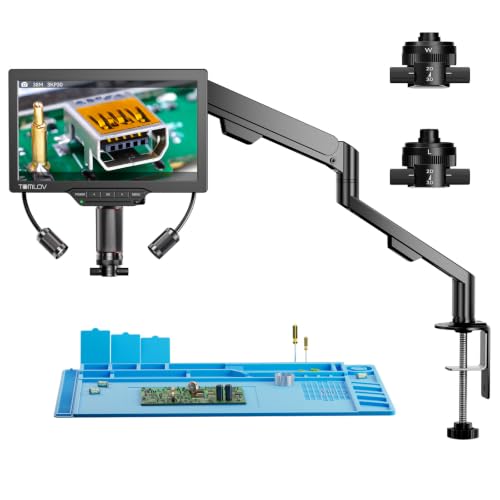
- 3D side-viewing with 360-degree rotation
- Magnetic long-distance and wide-angle lenses
- 3K 7-inch display with HDMI and USB output
Best For: PCB repair, soldering, jewelry, and multi-angle inspection
Best Large-Screen Workstation

- 10.1-inch IPS screen with 178-degree viewing
- 50X–2000X magnification for detailed inspection
- Metal stand, remote control, and PC connectivity
Best For: Soldering, coin collecting, and shared large-screen viewing
Best Coin-and-Hobby Value

- Stable metal base with adjustable 8.5-inch stand
- 7-inch screen and 1200X magnification
- 12MP capture, 1080P video, and included 16GB card
Best For: Coin collecting, hobby electronics, and light soldering
Best All-Purpose Station – Andonstar AD246S-M Plus
The Andonstar AD246S-M Plus is one of the most versatile soldering microscopes in this roundup. It combines a 7-inch monitor, 2160p HDMI output, three interchangeable lenses, and a dedicated soldering-station setup with helping hands, tool storage, and an extension base.
Best For: Users who want one microscope for soldering, coin viewing, and biological slides, along with a well-equipped repair workspace.
Pros:
- Three lenses cover soldering, general inspection, coins, and biological slides.
- 2160p video and HDMI support provide detailed viewing on larger screens.
- Includes rotatable helping hands, tool holder, storage boxes, soldering mat, and a 32GB SD card.
- Windows measurement software supports photo, video, and measurement functions.
Cons:
- The 7-inch display is smaller than the 10.1-inch screens on some alternatives.
- Lens changes require removing and installing screws.
This model is a strong choice when workspace organization and broad magnification flexibility matter as much as the microscope itself. Its included accessories make it especially practical for electronics repair projects.
Best 3D Viewing – TOMLOV TM3K-3D Max
The TOMLOV TM3K-3D Max stands out among soldering microscopes for its side-viewing design and 360-degree 3D rotation. Its 10.1-inch 3K IPS screen, magnetic dual lenses, and articulating arm are designed to make PCB repair and detailed inspection easier from multiple angles.
Best For: Electronics technicians, watchmakers, jewelers, and hobbyists who need adjustable side views of components and solder joints.
Pros:
- 3D side-viewing and 360-degree rotation help reveal details from multiple perspectives.
- Magnetic L and W lenses switch quickly without tools.
- 10.1-inch 3K IPS display provides a large, detailed viewing area.
- Supports built-in, HDMI, and USB display options, with an adjustable LED gooseneck spotlight.
Cons:
- The specialized 3D design may be more than needed for straightforward inspection.
- The supplied notes do not specify the included memory capacity beyond the product highlight’s 16G reference.
Choose this model if viewing angle is a major part of your work. The flexible arm, targeted lighting, and 3D rotation are particularly useful when components must be inspected around their sides rather than only from above.
Best Large-Screen Value – Andonstar AD210
The Andonstar AD210 is a practical choice among soldering microscopes for buyers who prefer a large built-in display and a straightforward all-purpose setup. Its 10.1-inch IPS screen, adjustable metal stand, generous working distance, and multiple lighting options support electronics repair, coin inspection, and slide viewing.
Best For: DIY users and collectors who want a large-screen microscope for soldering, coins, and occasional biological slide observation.
Pros:
- 10.1-inch IPS display supports 1080p video and 12MP photos.
- Adjustable working distance ranges from 1cm to 26cm for varied tasks.
- Metal stand reaches up to 12.6 inches and accommodates larger objects such as silver dollars.
- Includes top, side, and bottom LED illumination plus a 32GB memory card.
Cons:
- It does not offer the three-lens system found on the higher-end Andonstar models here.
- The supplied notes do not identify a dedicated HDMI output.
The AD210 makes sense for buyers who prioritize screen size, stand clearance, and simple versatility. It is especially appealing for mixed use where soldering and coin viewing are more important than extreme magnification flexibility.
Best Premium Soldering Setup – Andonstar AD249S-M Plus
The Andonstar AD249S-M Plus is a feature-rich option for shoppers comparing soldering microscopes with dedicated repair stations. It pairs a larger 10.1-inch monitor with 2160p HDMI output, three lenses, a boom arm, helping hands, tool storage, and an expanded work area.
Best For: Serious electronics repair users who want a larger display and a bundled, organized soldering workspace.
Pros:
- Three lenses cover soldering, general objects, coins, plants, stones, and biological slides.
- 2160p capture and HDMI connectivity support detailed viewing and larger displays.
- Extension base expands the soldering area by 230% and includes component storage boxes.
- Includes helping hands, tool holder, anti-static soldering mat, bottom light stage, and 32GB SD card.
Cons:
- The lens system requires removing and installing screws when changing lenses.
- Its large, accessory-heavy setup may take more workspace than a basic digital microscope.
Compared with the smaller AD246S-M Plus, this version is better suited to users who value a larger built-in screen and a fully equipped bench setup. It is a compelling pick for recurring soldering and repair work rather than occasional inspection.
Best Autofocus Pick – TOMLOV TM4K-AF Flex 4K Microscope
For buyers seeking soldering microscopes with minimal manual adjustment, the TOMLOV TM4K-AF Flex combines autofocus, a large 8-inch display, and a flexible arm. Its TOF-assisted autofocus and preset focus points are especially useful when inspecting uneven components or moving between work areas.
Best For: Precision soldering, PCB inspection, electronics repair, and users who want autofocus with a large viewing screen.
Pros:
- Autofocus system with TOF sensor and AI-assisted focus adjustment.
- 4K video, 52MP images, and an 8-inch IPS display.
- 360-degree articulating flex arm with adjustable dual gooseneck lighting.
- Includes remote control, 64GB microSD card, HDMI/USB output, and DIY grid lines.
Cons:
- Its extensive feature set may be more than casual users need.
- Digital magnification and multiple display options can require setup time.
The TM4K-AF Flex is a feature-rich choice for serious bench work. Autofocus, preset focus positions, flexible positioning, and strong recording and display options make it particularly appealing for detailed soldering workflows.
Best Versatile Kit – Andonstar AD246S-M 3-Lens Microscope
The Andonstar AD246S-M stands out among soldering microscopes because it includes dedicated lenses for repair work, general observation, and biological slides. Its 2160P output, adjustable boom arm, and HDMI support make it a flexible option for both bench tasks and demonstrations.
Best For: Users who want one microscope for soldering, coin viewing, slide observation, teaching, and general inspection.
Pros:
- Three interchangeable lenses include a soldering and repair lens.
- 2160P video recording with HDMI output to a larger display.
- Adjustable metal boom arm provides a larger work envelope and suits high-temperature soldering environments.
- Includes remote control, adjustable LED lighting, microSD card, slides, and accessories.
Cons:
- Changing lenses and manually adjusting focus takes more effort than an autofocus model.
- The broad range of lenses may be unnecessary for buyers focused only on PCB repair.
This is a strong all-purpose package for households, classrooms, and repair benches. The dedicated soldering lens and sturdy stand support electronics work, while the additional lenses broaden its usefulness beyond solder inspection.
Best Compact Value – Aikokkl 5-Inch LCD Soldering Microscope
For straightforward bench inspection, this compact Aikokkl model offers a 5-inch IPS display, flexible arm, and C-clamp that keeps both hands available for soldering. It is a practical entry-level choice among soldering microscopes, provided you are comfortable focusing manually.
Best For: PCB repair, checking solder joints, and hobbyists working in tight spaces who need a self-contained screen.
Pros:
- 5-inch IPS screen works without a computer.
- C-clamp and flexible gooseneck arm help keep the work area clear.
- Connects to Windows or Mac using built-in camera applications without extra software.
- Battery-powered design and LED lighting support portable inspection.
Cons:
- It is not autofocus; distance and the focus wheel must be adjusted manually.
- MicroSD card up to 32GB is required for saving photos and 1080P videos but is not included.
- The 5-inch display and viewing area are intended for micro-details rather than large objects.
This model keeps the essentials simple and affordable for hands-on repair. Its main trade-offs are manual focusing, a smaller display, and the need to supply a microSD card for regular recording.
Most Versatile 3D Pick – TOMLOV TM3K-3D
Among soldering microscopes, the TOMLOV TM3K-3D stands out for its side-viewing design and rotating 3D imaging. Its dual magnetic lenses, 3K display, and adjustable lighting make it a flexible choice for inspecting boards, components, coins, and other detailed subjects.
Best For: Electronics repair, PCB soldering, jewelry inspection, coin viewing, and users who need multiple viewing angles.
Pros:
- 3D side-viewing and 360-degree rotation help reveal details from multiple perspectives.
- Magnetic L and W lenses switch without tools for long-distance work or wide-angle viewing.
- 7-inch IPS screen provides a crisp 3K image, with HDMI and USB display options.
- Flexible arm stand and adjustable gooseneck spotlight support precise positioning.
Cons:
- Its broader feature set may be more than needed for basic coin inspection.
- The arm stand and dual-lens design may require more setup than a simpler microscope.
The TM3K-3D is a strong option when viewing angle flexibility matters as much as magnification. It is particularly well suited to detailed repair work where fixed, straight-on viewing can hide important features.
Best Large-Screen Workstation – Hayve DM13
The Hayve DM13 is one of the more workspace-focused soldering microscopes, pairing a large 10.1-inch IPS screen with a stable metal stand. Its wide viewing angle, high-resolution camera, remote control, and multiple lights are useful for detailed repair and shared viewing.
Best For: Electronics repair, PCB soldering, coin collecting, and users who prefer a large display.
Pros:
- 10.1-inch IPS display offers a wide 178-degree viewing angle.
- 50X–2000X magnification supports work on circuit boards, coins, watches, and samples.
- Sturdy 10.6-inch metal stand provides room for viewing an entire one-dollar coin.
- Remote control and PC connectivity support hands-free operation and larger-screen viewing.
Cons:
- The large stand and screen take up more workspace than compact microscope designs.
- The supplied notes specify Windows and MacBook connectivity rather than broader device compatibility.
Choose the DM13 if comfortable on-screen viewing and stand stability are priorities. Its generous display and lighting system make it practical for prolonged inspection, demonstrations, and detail-heavy repair tasks.
Best Coin-and-Hobby Value – TOMLOV DM9
The TOMLOV DM9 is a practical option for buyers comparing soldering microscopes for coin collecting and light electronics work. It combines a 7-inch screen, 1200X magnification, a metal stand, adjustable lighting, and built-in storage for documenting findings.
Best For: Coin collectors, hobby electronics users, DIY inspection, and light soldering tasks.
Pros:
- Solid metal base and adjustable 8.5-inch stand help reduce shaking during inspection.
- 7-inch screen provides a comfortable direct view for close-up work and demonstrations.
- 12MP camera, 1080P video, and included 16GB card support photo and video records.
- Eight built-in LEDs plus two flexible gooseneck lights allow angled illumination.
Cons:
- It is positioned for light soldering rather than specialized, advanced repair work.
- Its 7-inch screen is smaller than the displays on the other microscopes in this roundup.
The DM9 makes the most sense for collectors and hobbyists who want one approachable setup for coins, small components, and documentation. Its stable base and included storage add useful convenience without requiring separate accessories.
How We Picked These Soldering Microscopes
We selected models suited to hands-on electronics work rather than treating advertised magnification as the deciding factor. The lineup includes scopes with built-in LCD screens, HDMI output, adjustable stands, flexible arms, dual-lens systems, and different working distances. We also considered practical details such as illumination, camera resolution, focusing controls, stability, and how easily each microscope can accommodate a soldering iron, tweezers, or hot-air tool.
Because specifications and included accessories can vary by listing, confirm the current package contents before buying. A claimed maximum magnification is less useful than a clear image at a comfortable distance from the circuit board.
Quick Comparison
| Best for | Look for | Why it matters |
|---|---|---|
| General PCB repair | Adjustable stand and bright LEDs | Provides a stable, well-lit view for everyday rework. |
| Fine-pitch soldering | High-resolution camera and long working distance | Helps reveal small joints while leaving room for tools. |
| Large or awkward boards | Flexible arm or wide base | Makes it easier to position the scope over the work area. |
| Recording or external viewing | HDMI output and onboard capture | Supports a larger monitor, documentation, or demonstrations. |
| Inspection from multiple angles | Dual-lens or 3D viewing design | Can provide a more natural sense of depth and component height. |
Key Buying Factors for Soldering Microscopes
Working Distance and Stand Clearance
Prioritize the space between the lens and the board. A microscope that magnifies strongly but sits too close can interfere with soldering tools. Check whether the stand, arm, and platform leave enough room for your typical PCB size.
Image Quality, Focus, and Magnification
Resolution, lens quality, sensor performance, and focus control generally matter more than a large magnification number. Manual focus can be predictable for bench work, while autofocus is convenient when inspecting components at different heights. A smooth digital zoom is useful, but it cannot replace optical detail.
Lighting and Glare Control
Built-in ring lights are convenient, especially when brightness is adjustable. Diffusers, side lighting, or additional lamps can help reduce reflections from solder, metal shields, and glossy boards. Look for lighting controls that can be reached without disturbing the setup.
Display and Connectivity
A built-in LCD keeps the workspace self-contained. HDMI output is valuable if you prefer a larger monitor or need to share the view. Check supported resolutions, cable requirements, recording features, and whether the screen can be positioned at a comfortable viewing angle.
Stability and Adjustment
A heavy base, firm clamp, and smooth height adjustment reduce image shake. Flexible arms offer positioning freedom but may need careful tightening. For frequent soldering, choose a setup that stays steady when tools touch the board or stand.
Who Should Buy Which Soldering Microscopes?
Choose a Compact LCD Microscope for Occasional Repairs
A smaller 5- or 7-inch model is a sensible choice for hobbyists, beginners, and limited workbenches. It can provide a dedicated screen without requiring a separate monitor.
Choose a Higher-Resolution HDMI Model for Detailed Bench Work
Frequent repair work, fine-pitch components, and documentation benefit from a sharper camera and external-display support. These models make the most sense when image clarity and a larger viewing area are priorities.
Choose a Flexible-Arm or Autofocus Model for Changing Projects
If you inspect boards, coins, connectors, and components at different heights, an autofocus system or adjustable arm can save setup time. Confirm that the arm remains stable at the desired extension.
Choose a Dual-Lens or 3D Model for Depth-Aware Inspection
Dual-lens designs may suit users who want a more natural view of component height and solder joints. They are especially appealing for inspection and teaching, though a conventional camera microscope may remain simpler for straightforward repairs.