The best soldering microscopes for beginners make tiny components, joints, and PCB traces easier to inspect without forcing you into an expensive professional setup. The right model should provide a stable view, useful lighting, and enough working distance for your tools.
This roundup compares 10 digital and autofocus options, including compact clamp-mounted scopes and larger HDMI models. Use the buying guide below to match features such as screen size, camera resolution, arm design, and recording capability to the way you solder.
Best 10 Soldering Microscopes for Beginners Picks for 2026
Best All-Purpose Kit

- Three lenses for soldering, general viewing, and slides
- 2160P HDMI output with 7-inch monitor
- Helping hands, tool holder, mat, and storage included
Best For: Beginners wanting a complete, versatile microscope station
Best for 3D Inspection
TOMLOV TM3K-3D Digital Microscope
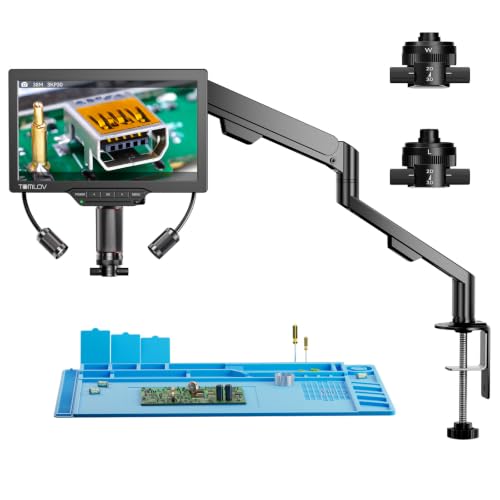
- 3D side-viewing with 360-degree rotation
- Magnetic dual lenses switch without tools
- 3K display, flexible arm, and adjustable spotlight
Best For: Beginners inspecting solder joints from multiple angles
Best Large-Screen Starter

- 10.1-inch IPS display with 178-degree viewing angle
- 1080p video and 12MP photos
- Adjustable working distance and three lighting types
Best For: Beginners who prioritize a large, easy-to-view screen
Best Premium Display Setup

- 10.1-inch display with 2160P HDMI output
- Three lenses for soldering and general observation
- Expanded station includes storage and helping hands
Best For: Beginners building a spacious, feature-rich electronics bench
Best Large-View Pick
TOMLOV DM9 Max 10.1" Digital Soldering Microscope

- Large 10.1-inch IPS display
- Tall stand and spacious metal base
- 20MP photos and 1080P video
Best For: Beginners needing generous PCB repair space and comfortable viewing
Best Compact Starter
5" LCD Digital Soldering Microscope with C-Clamp

- Compact 5-inch IPS display
- Flexible arm for tight workspaces
- Plug-and-play Windows and Mac viewing
Best For: Beginners focused on close-up PCB inspection in limited bench space
Best Balanced Option
TOMLOV DM9 7" Digital Coin Microscope

- Comfortable 7-inch viewing screen
- Stable metal base and adjustable stand
- Includes lighting, PC connection, and 16GB storage
Best For: Beginners combining light soldering with coin and hobby inspection
Most Versatile Workstation

- Sliding rail arm creates ample PCB workspace
- 10.1-inch display with HDMI and multiple outputs
- Includes endoscope, mat, remote, and 24-month warranty
Best For: Beginners needing a stable, spacious electronics repair station
Easiest Autofocus Setup

- Autofocus simplifies initial setup
- Preset focus positions speed repeated inspections
- 3K imaging, flexible arm, and adjustable lighting
Best For: Beginners wanting hands-free focus for soldering and inspection
Best High-Resolution Upgrade

- 4K video and 52MP image capture
- TOF autofocus with two preset focus points
- Flexible arm, adjustable lights, and 64GB card
Best For: Beginners planning detailed repairs, recording, or teaching
Best All-Purpose Kit – Andonstar AD246S-M Plus 2160P
For beginners comparing soldering microscopes for beginners, the Andonstar AD246S-M Plus stands out as a complete workstation rather than just a viewing device. It combines a 7-inch monitor, three interchangeable lenses, a boom arm, helping hands, tool holder, extension base, and soldering mat.
Best For: Beginners who want one versatile setup for soldering, electronics repair, coins, and biological slides.
Pros:
- Three lenses cover soldering, general inspection, and biological slides.
- 2160P HDMI output, 32GB card, remote control, and Windows measurement software support documentation and analysis.
- Expanded soldering area includes storage boxes, helping hands, tool holder, and mat.
- Adjustable LED brightness offers eight intensity levels.
Cons:
- The extensive accessory set may be more than a beginner needs initially.
- Lens changes require removing and installing screws.
- The included monitor is 7 inches, smaller than some alternatives.
This is a strong choice when flexibility and included soldering accessories matter more than keeping the setup minimal. Its multiple lenses also make it useful beyond electronics work.
Best for 3D Inspection – TOMLOV TM3K-3D Digital Microscope
The TOMLOV TM3K-3D is an intriguing option among soldering microscopes for beginners because its side-viewing design helps users inspect components from multiple angles. A 7-inch IPS screen, flexible arm, magnetic lenses, and adjustable spotlight make it suited to hands-on electronics work.
Best For: Beginners who want angled, rotating views of solder joints, microchips, jewelry, or other detailed objects.
Pros:
- 3D side-viewing and 360-degree rotation provide multiple inspection angles.
- Magnetic L and W lenses switch without tools.
- 3K UHD resolution is displayed on a 7-inch IPS screen.
- Flexible arm, HDMI, USB, and adjustable gooseneck lighting add positioning and viewing flexibility.
Cons:
- The specialized 3D design may be unnecessary for users who only need straightforward top-down magnification.
- Its supplied notes do not specify a built-in recording memory capacity beyond listing 16G in the included highlights.
The TM3K-3D is best viewed as a flexible inspection system for users who value perspective. Its magnetic lens setup and articulating arm can make experimentation less intimidating for beginners.
Best Large-Screen Starter – Andonstar AD210 10.1-Inch
For beginners seeking soldering microscopes for beginners with an easy-to-see display, the Andonstar AD210 offers a large 10.1-inch IPS screen and a sturdy metal stand. Its adjustable working distance and three lighting options support electronics repair, coin viewing, and slide observation.
Best For: Beginners who prefer a large screen and a straightforward, multi-purpose setup for soldering and inspection.
Pros:
- Large 10.1-inch IPS display has a 178-degree viewing angle.
- Supports 1080p video and 12MP photos, with a 32GB card and card reader included.
- Adjustable 1cm-to-26cm working distance accommodates different projects.
- Top, side, and bottom LEDs support soldering, coins, and biological slides.
Cons:
- It does not list the 2160P output offered by the higher-resolution Andonstar models.
- The supplied notes emphasize a metal stand rather than a dedicated boom-arm soldering station with built-in helping hands.
- The broad accessory range may add setup choices for first-time users.
The AD210 is a practical starting point if screen size and stand stability are priorities. It offers useful room for both soldering and general observation without requiring a separate computer display.
Best Premium Display Setup – Andonstar AD249S-M Plus
The Andonstar AD249S-M Plus is a strong contender among soldering microscopes for beginners who want a spacious, high-resolution station. It pairs a 10.1-inch monitor with 2160P HDMI output, three lenses, a boom-arm stand, helping hands, storage, and a soldering mat.
Best For: Beginners or hobbyists who want a large display and a fully equipped station for electronics repair and broader observation.
Pros:
- 10.1-inch display and 2160P HDMI output provide a detailed viewing setup.
- Three lenses cover soldering, coins and objects, and biological slides.
- Extension base increases the soldering area by 230% and adds component storage boxes.
- Includes helping hands, tool holder, anti-static mat, bottom light stage, remote, and 32GB card.
Cons:
- The larger station and extensive accessories require more workspace.
- Lens changes use screw-mounted lenses rather than a tool-free system.
- Its wide range of features may be more than needed for simple soldering tasks.
Compared with the smaller AD246S-M Plus, this model is the better fit for users who value a larger built-in screen. It is a comprehensive choice for building a dedicated beginner electronics bench.
Best Large-View Pick – TOMLOV DM9 Max 10.1" Digital Soldering Microscope
For beginners comparing soldering microscopes for beginners, the TOMLOV DM9 Max stands out with a roomy work area, a large screen, and straightforward controls. Its tall stand and heat-resistant metal base leave space for circuit boards, soldering irons, and hand movement.
Best For: Beginners who want a large display for PCB repair, coin inspection, and shared viewing.
Pros:
- Large 10.1-inch IPS screen with a 178° viewing angle
- 12.6-inch stand and large metal base provide extra repair clearance
- Includes adjustable lighting, remote control, and 16GB Micro SD card
- Supports 20MP photos, 1080P video, PC, and TV connections
Cons:
- Its larger footprint may take up more bench space
- The 5X–1500X range requires manual magnification and focus adjustments
The DM9 Max is a practical choice when comfort and workspace matter more than portability. It is especially useful for beginners who want to inspect and document repairs without crowding the work area.
Best Compact Starter – 5" LCD Digital Soldering Microscope with C-Clamp
Among soldering microscopes for beginners, this compact model keeps the setup simple with a 5-inch IPS display, flexible arm, and plug-and-play computer viewing. It is designed for close inspection of solder joints and small components rather than large objects.
Best For: Beginners working in tight spaces who want a compact microscope for PCB repair and basic computer viewing.
Pros:
- 5-inch IPS display helps reduce neck and eye strain
- Flexible arm adapts to tight workspaces and irregular objects
- Windows and Mac PC viewing works through built-in camera apps without extra software
- Up to 1000X digital magnification is available through physical positioning and focus adjustment
Cons:
- Micro SD card is required for saving photos and 1080P videos but is not included
- It is not an autofocus camera
- Not intended for full-screen views of large objects
This model is a sensible entry point for focused electronics work, provided you are comfortable manually positioning the arm and turning the focus wheel. Budget for a Micro SD card if recording is important.
Best Balanced Option – TOMLOV DM9 7" Digital Coin Microscope
The TOMLOV DM9 offers a middle ground for shoppers seeking soldering microscopes for beginners: a comfortable 7-inch screen, stable metal construction, and lighting controls for close-up inspection. It also covers coin collecting, jewelry examination, and hobby electronics.
Best For: Beginners who want one microscope for light soldering, coin inspection, and general hobby projects.
Pros:
- 7-inch screen provides a comfortable direct-view workspace
- Solid metal base and adjustable 8.5-inch stand support stable inspection
- Eight built-in LEDs and two flexible gooseneck lights help control shadows
- Includes 12MP imaging, 1080P video, PC connection, and 16GB storage
Cons:
- Its stand and screen are smaller than the DM9 Max
- It is intended for light soldering tasks rather than a large repair workspace
The DM9 is a versatile beginner option when you want more viewing comfort than a small display without moving to the larger DM9 Max. Its included storage and multiple lighting options also make it convenient for documenting projects.
Most Versatile Workstation – Andonstar AD409 SA
For beginners comparing soldering microscopes for beginners, the Andonstar AD409 SA stands out as a flexible workstation for larger PCBs and detailed electronics repair. Its sliding rail arm, 10.1-inch display, HDMI connectivity, and included soldering mat make it easier to set up a dedicated bench.
Best For: Beginners who want generous workspace, stable positioning, and both microscope and endoscope functionality.
Pros:
- Sliding rail arm provides a large working area for PCBs and tools.
- All-metal rails and dual C-clamps support steady, one-hand positioning.
- 10.1-inch IPS screen supports 2160P recording plus HDMI, Windows PC, and Wi-Fi output.
- Includes a UV-filtered lens, soldering mat, remote, endoscope, and 24-month warranty.
Cons:
- The larger rail-arm setup may require more bench space than a basic microscope stand.
- Measurement software is intended for Windows PCs, and the endoscope is not supported through the Windows PC connection.
The AD409 SA is a strong choice when stability and workspace matter more than a compact footprint. Beginners who expect to work on large boards or use an endoscope will get more flexibility than with a simple fixed-arm model.
Easiest Autofocus Setup – TOMLOV TM3K-AF Max
The TOMLOV TM3K-AF Max is a beginner-friendly option among soldering microscopes for beginners because autofocus reduces manual setup. Its 10.1-inch IPS display, preset focus positions, flexible arm, and dual gooseneck lights are useful for soldering as well as inspecting coins and jewelry.
Best For: Beginners who prioritize quick focusing, hands-free controls, and a versatile microscope for repairs and inspection.
Pros:
- Autofocus quickly locks onto subjects for hands-free viewing.
- P1/P2 preset memory recalls two focus heights for repeated tasks.
- 3K imaging with a 38MP sensor and a 10.1-inch wide-color-gamut display.
- Flexible arm, adjustable dual lights, remote control, and heat-resistant mat are included.
Cons:
- Its 1-year manufacturer warranty is shorter than the warranty supplied with the Andonstar model.
- The included 16GB card provides less listed storage than the 64GB card included with the TM4K-AF Flex.
Choose the TM3K-AF Max if you want to spend less time adjusting focus and more time inspecting joints. The preset positions are especially practical for repeated beginner projects, while the flexible lighting broadens its usefulness beyond soldering.
Best High-Resolution Upgrade – TOMLOV TM4K-AF Flex
For beginners seeking soldering microscopes for beginners with room to grow, the TOMLOV TM4K-AF Flex combines autofocus with 4K imaging and an 8-inch screen. The TOF sensor, P1/P2 focus presets, flexible arm, and adjustable spotlights are designed to simplify detailed PCB work.
Best For: Beginners and DIYers who want high-resolution viewing, autofocus, and flexible lighting for electronics repair.
Pros:
- 4K video and 52MP images provide detailed views of small components.
- TOF-based autofocus and P1/P2 presets help maintain clear views on uneven surfaces.
- 360-degree flexible arm and adjustable dual gooseneck lights support comfortable positioning.
- Supports simultaneous HDMI/USB output and includes a 64GB microSD card and remote.
Cons:
- The 8-inch screen is smaller than the 10.1-inch displays on the other listed models.
- Its higher-resolution feature set may be more than beginners need for simple soldering projects.
The TM4K-AF Flex is the most specification-heavy option in this group. It makes sense for beginners who want autofocus now but also expect to record, teach, or inspect increasingly fine details as their skills develop.
How We Picked the Best Soldering Microscopes for Beginners
We focused on features that make electronics work easier to learn and more comfortable to perform: image clarity, screen visibility, working distance, lighting control, mounting stability, and straightforward setup. The selection includes digital microscopes with built-in LCD screens, HDMI connectivity, adjustable stands, magnetic or flexible arms, and autofocus designs.
Because beginner workspaces vary, we also considered footprint and versatility. A compact C-clamp model may suit occasional repairs, while a larger 10.1-inch display or articulated arm can be more useful for frequent PCB assembly. Advertised magnification numbers were treated cautiously; usable detail, focus stability, and room for a soldering iron matter more than maximum claims.
Quick Comparison
| Feature | Why It Matters | Best For |
|---|---|---|
| 5- to 7-inch display | Compact and easy to position | Small benches and occasional repairs |
| 8- to 10.1-inch display | More comfortable for longer sessions | Frequent soldering and inspection |
| HDMI output | Connects to a larger monitor | Detailed viewing and teaching |
| Autofocus | Reduces manual refocusing | Mixed-height components and inspection |
| Flexible or endoscope arm | Improves access to awkward areas | Large boards and hard-to-reach work |
Key Buying Factors for Soldering Microscopes for Beginners
Working Distance and Stand Design
Choose a scope that leaves enough space beneath the lens for tweezers, a soldering iron, and component movement. A rigid stand can provide steadier images, while a flexible arm offers positioning freedom but may need careful tightening to prevent vibration.
Display, Resolution, and Focus
A larger screen is generally easier on the eyes, especially when inspecting fine-pitch components. 4K or 2160P output can improve detail when the optics and lighting are good, but resolution alone does not guarantee a sharp image. Autofocus is convenient, although manual focus can be more predictable for fixed-height soldering.
Lighting and Glare Control
Adjustable LED lighting is important because shiny solder and exposed copper can create glare. Look for brightness control, even illumination, and enough clearance around the lens. A diffuser or adjustable light angle can make reflective joints easier to read.
Connectivity and Recording
HDMI is useful if you want a larger external monitor with minimal delay. USB, photo capture, or video recording may help with documentation and troubleshooting, but these features are secondary to a stable live view for hands-on work.
Who Should Buy Which Soldering Microscopes for Beginners?
Choose a 5- or 7-inch clamp-mounted scope if you have limited bench space or are learning basic repairs. Pick a 10.1-inch model when comfortable viewing and longer work sessions are priorities. Autofocus models suit users who inspect components at varying heights, while magnetic, flexible-arm, or endoscope-equipped designs are better for repositioning around larger boards. If you regularly teach, stream, or document repairs, prioritize HDMI output and recording support. For most first-time buyers, a stable stand, generous working distance, and controllable lighting are more valuable than the highest advertised magnification.