Running out of space on your PlayStation 5 is almost inevitable once your game library grows. A good ps5 game drive gives you a simple way to expand storage, archive big titles, and keep your favorite games within reach.
Whether you want a fast internal SSD for PS5 installs or a portable drive for storing and moving games, the best options balance speed, capacity, and value. Below, we focus on drives that make everyday PS5 storage management easier.
Best 10 Ps5 Game Drive Picks for 2026
Official PS5 NVMe Upgrade

- Officially licensed for PS5 compatibility
- Up to 7300/6000MB/s Gen4 speeds
- Includes heatsink and 5-year warranty
Best For: PS5 users wanting fast internal game storage
Huge Portable Storage

- Massive 6TB capacity for up to 150 games
- Works with PS5, Xbox Series X|S, and PC
- Portable hard drive rated up to 130MB/s
Best For: Gamers needing lots of portable storage
Official Portable SSD
Seagate Game Drive PS4/PS5 2TB
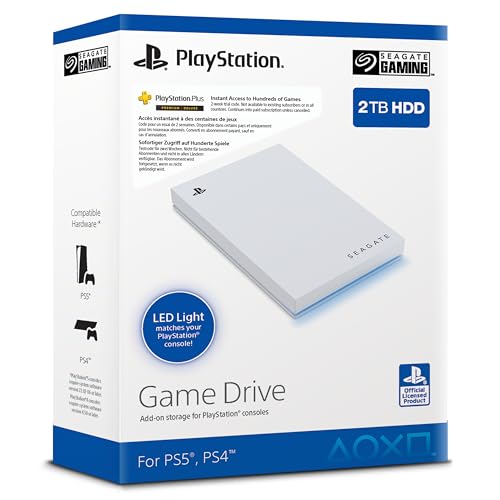
- Officially licensed for PS4 and PS5
- 2TB portable external storage
- Compact design with blue LED lighting
Best For: Players wanting an easy portable console drive
High-Capacity Console Backup

- 5TB portable storage for larger libraries
- Works with PlayStation, Xbox, and PC
- Metal top and 3-year limited warranty
Best For: Gamers who need dependable extra storage
Budget White 1TB Option
Avolusion HD250U3-Z1-PRO-WH 1TB USB 3.0 Portable External Gaming Hard Drive

- 1TB USB 3.0 portable drive with no power adapter
- PS4 games play directly from the drive
- PS5 games can be copied faster than redownloading
Best For: Budget shoppers who want easy extra storage and PS5 game transfer support
High-Capacity 5TB Choice
Seagate 5TB Game Drive for PlayStation

- Big 5TB capacity for large libraries
- Officially licensed PS5/PS4 compatibility
- PS4 games play directly from the drive
Best For: Gamers who want the most storage space in this roundup
White 1TB Starter Pick
Avolusion T1 Series 1TB USB 3.0 Portable External Gaming Hard Drive

- 1TB USB 3.0 external storage
- Pre-formatted for PS4 / PS5
- Portable 2.5-inch design
Best For: PS5 owners needing simple, low-capacity expansion
Big Library Pick
Seagate Game Drive voor PS4/PS5 5TB

- 5TB capacity for larger libraries
- Officially licensed for PS4 and PS5
- Portable design with blue LED lighting
Best For: Gamers prioritizing maximum external game storage
Budget Portable Backup
Seagate Portable 2TB External Hard Drive

- 2TB USB 3.0 portable storage
- Plug-and-play with no software needed
- Works with PS5, PC, and Mac
Best For: Buyers wanting a flexible portable drive for multiple devices
Official PS5 NVMe Upgrade – Seagate Game Drive PS5 1TB
If you want a true ps5 game drive upgrade for faster internal storage, this Seagate Game Drive PS5 NVMe SSD is built for the console and uses PCIe Gen4 speeds to keep your library ready to go. It is designed for PS5 and PS4 games to run directly from the drive, and the included heatsink helps support sustained performance.
Best For: PS5 owners who want an officially licensed internal SSD for installing and playing games directly from console storage.
Pros:
- Officially licensed and built with matching firmware for PS5 compatibility.
- Up to 7300MB/s read and 6000MB/s write speeds for strong Gen4 performance.
- Custom heatsink helps minimize thermal throttling during longer sessions.
- Lets PS5 and PS4 games run directly from the NVMe SSD.
Cons:
- 1TB capacity may fill quickly for large game libraries.
- Internal M.2 installation is less convenient than a plug-and-play external drive.
This is the best fit if your priority is speed and direct-play convenience over portable storage. The 5-year warranty adds extra peace of mind for a console-focused upgrade.
Huge Portable Storage – WD_Black P10 6TB Game Drive
For shoppers comparing a ps5 game drive that prioritizes capacity over speed, this WD_Black P10 gives you portable external storage with up to 6TB of room. It is built for PlayStation, Xbox, and PC use, and the drive is rated up to 130MB/s for moving and storing games.
Best For: Players who want a large-capacity portable drive for storing lots of console games.
Pros:
- Large 6TB capacity can hold up to 150 games.
- Compatible with PS5, Xbox Series X|S, and PC.
- Portable 2.5-inch design with a metal top covering.
- Rated up to 130MB/s for external game storage use.
Cons:
- As a mechanical hard drive, it is slower than an SSD.
- PS5 support is for storing PS5 games and playing/storing PS4 games, not direct SSD-like performance.
This is the practical pick when library size matters more than top speed. It is a simple way to keep a lot of games on hand without constantly deleting and redownloading.
Official Portable SSD – Seagate Game Drive PS4/PS5 2TB
Seagate Game Drive voor PS4/PS5 2TB, externe SSD, 2.5", USB 3.0, Blauwe ledverlichting (STLV2000202)
Check Price On AmazonThis Seagate Game Drive is a straightforward ps5 game drive option if you want external storage that is officially licensed and easy to carry. With 2TB of space, USB 3.0 connectivity, and blue LED lighting, it is built to keep a console game vault ready for travel or overflow storage.
Best For: PS5 and PS4 players who want a portable external drive with official licensing and a clean, compact design.
Pros:
- Officially licensed with matching firmware for PS5 and PS4.
- 2TB capacity helps avoid deleting and redownloading games.
- Compact 2.5-inch portable design is easy to take on the go.
- Blue LED lighting adds a visual accent.
Cons:
- USB 3.0 external drive speeds are much lower than an internal NVMe SSD.
- It is still external storage, so it is not the same as running games from internal PS5 SSD space.
This drive makes sense if you want convenience, portability, and official console support in one package. It is a balanced choice for expanding storage without opening the console.
High-Capacity Console Backup – WD_BLACK P10 5TB
If you need a ps5 game drive for extra room rather than maximum speed, this WD_BLACK P10 offers 5TB of portable external storage for console and PC libraries. It is rated up to 130MB/s, uses a metal top covering, and is designed for storing PS4 games and archiving PS5 games on compatible consoles.
Best For: Console players who want a large external hard drive for backups and game storage.
Pros:
- 5TB capacity provides plenty of room for a growing library.
- Compatible with PlayStation, Xbox, and PC.
- Portable 2.5-inch design with a durable metal top covering.
- 3-year limited warranty from WD_BLACK.
Cons:
- Mechanical drive performance is slower than an SSD.
- PS5 use is for storing PS5 games and playing/storing PS4 games, not internal-style gameplay from the drive.
This is a strong pick when you want dependable extra space and broad compatibility. It is best treated as a storage companion, not a performance upgrade.
Officially Licensed 2TB Pick – Seagate 2TB Game Drive for PlayStation
If you want a ps5 game drive that focuses on simple storage expansion, this Seagate 2TB model is built to archive PS5 games and play PS4 titles directly. The officially licensed design, USB 3.0 connection, and plug-and-play setup make it a practical add-on for players who want more room without a complicated install.
Best For: PS5 owners who want a licensed 2TB external drive for archiving PS5 games and running PS4 games directly.
Pros:
- Officially licensed with matching firmware for PS5 and PS4 compatibility
- 2TB capacity helps reduce deleting and redownloading games
- PS4 games can be stored and played directly from the drive
- Easy plug-and-play setup with no tools required
Cons:
- PS5 games are stored for transfer, not played directly from the drive
- Mechanical HDD design is not as fast as internal console storage
This is a straightforward pick if your priority is dependable external game storage with console-focused compatibility. The 2TB size is a good middle ground for players who want extra space without going oversized.
Budget White 1TB Option – Avolusion HD250U3-Z1-PRO-WH 1TB USB 3.0 Portable External Gaming Hard Drive
For buyers searching for a ps5 game drive on a tighter budget, this Avolusion 1TB portable hard drive keeps the basics covered. It works with PS5 and PS4, lets you play PS4 games directly, and makes it quicker to move PS5 games back to internal SSD storage when you want to play them.
Best For: Budget-minded PS5 owners who want a simple 1TB external drive for storing and moving games.
Pros:
- 1TB external storage with USB 3.0 and no bulky power adapter
- PS4 games can be played directly from the drive
- PS5 games can be moved or copied faster than redownloading
- Pre-formatted and compatible with PS5 and PS4
Cons:
- PS5 games cannot be downloaded directly to the USB drive
- PS5 games must be copied back to internal SSD before playing
This is a practical storage helper rather than a performance upgrade. It works best if you mainly need extra space and are comfortable moving PS5 games between the drive and the console.
High-Capacity 5TB Choice – Seagate 5TB Game Drive for PlayStation
If you want a ps5 game drive with more headroom, this Seagate 5TB model is the capacity-focused option in the lineup. It is officially licensed, uses USB 3.0, and supports storing PS5 games for later transfer while letting you play PS4 games directly from the drive.
Best For: Players who need the largest storage buffer here for a big PS5 and PS4 game library.
Pros:
- Large 5TB capacity helps avoid deleting games
- Officially licensed with matching firmware for PS5 and PS4
- PS4 games can be stored and played directly from the drive
- Plug-and-play setup with no tools required
Cons:
- PS5 games still need to be transferred back to the console to play
- It is still a mechanical HDD, not internal SSD storage
This is the strongest choice when storage size matters more than anything else. If your library is growing fast and you want fewer cleanup sessions, the 5TB capacity is the main advantage.
White 1TB Starter Pick – Avolusion T1 Series 1TB USB 3.0 Portable External Gaming Hard Drive
If you need a straightforward ps5 game drive for adding extra space without opening your console, this Avolusion 1TB portable drive is a simple, budget-friendly option. It is pre-formatted for PS4/PS5 use and connects over USB 3.0, making it a practical plug-in storage add-on for players who want quick expansion rather than a huge library vault.
Best For: PS5 owners who want an easy external storage upgrade for a modest game library.
Pros:
- 1TB capacity for instant storage expansion
- Pre-formatted for PS4 / PS5 use
- USB 3.0 external setup with no console case opening required
- Compact 2.5-inch portable design
Cons:
- 1TB is smaller than larger game library drives
- Mechanical hard drive, not an SSD
- Renewed product, which may matter to some buyers
Overall, this is a practical entry-level choice if your main goal is easier game storage and portability. The white styling and 2-year warranty add a bit of appeal, but the real value is the simple PS5-compatible expansion it offers.
Big Library Pick – Seagate Game Drive voor PS4/PS5 5TB
This ps5 game drive is built for players who want a larger external storage pool for their PS4 and PS5 game collections. With 5TB of capacity, official licensing, and a lightweight portable design, it is aimed at keeping more games ready to go without constant deleting and redownloading.
Best For: Gamers who want a large, console-friendly drive for storing a big library.
Pros:
- 5TB capacity for a large game vault
- Officially licensed for PS4 and PS5 compatibility
- Blue LED lighting adds a distinctive look
- Portable 2.5-inch form factor
Cons:
- Listed media speed is 50 MB/s, which is modest
- Still an external drive, so it is for storage rather than internal upgrade use
- Bulkier than smaller-capacity drives in everyday carry terms
If capacity is your priority, this Seagate option stands out as the most storage-heavy pick here. The officially licensed design and lightweight build make it a strong fit for players who want to keep more games accessible in one place.
Budget Portable Backup – Seagate Portable 2TB External Hard Drive
If you want a versatile ps5 game drive that can also handle PC and Mac storage duties, this Seagate 2TB portable drive is a practical all-rounder. It uses USB 3.0 plug-and-play setup and offers enough space for everyday game backups and transfers without adding much bulk.
Best For: Buyers who want a portable, general-purpose drive that can also be used with PS5.
Pros:
- 2TB capacity for flexible storage
- USB 3.0 plug-and-play setup with no software required
- Compact and lightweight portable design
- Also compatible with PC and Mac use cases
Cons:
- Not specifically focused on PS5-only use
- Mechanical hard drive rather than SSD
- 2TB may be limiting for very large game libraries
This is the most flexible pick if you want one drive for multiple devices, not just your console. It is best suited to players who value simple setup, portability, and broad compatibility over premium console-specific features.
How We Picked the Best Ps5 Game Drive Options
We prioritized drives that make sense for real PS5 use: reliable storage, sensible capacities, and compatibility with Sony’s storage rules. For internal upgrades, speed and PS5-ready NVMe specs matter most. For external models, we looked at portability, capacity, brand reputation, and how well they work for archiving PS5 games and running PS4 titles.
Quick Comparison: Internal SSD Vs External HDD
An internal NVMe SSD is the best choice if you want to install and play PS5 games directly from expanded internal storage. It delivers the fastest performance, but installation is more involved and capacity usually costs more per terabyte. An external HDD is better for bulk storage, backups, and moving games between consoles or locations. You can store PS5 games on it, but you’ll need to copy them back to internal storage before playing.
Key Buying Factors for a Ps5 Game Drive
Capacity
Choose 1TB if you mainly need a small boost, 2TB for a balanced sweet spot, and 5TB or more if you have a large digital library. Bigger drives are especially useful for users who rotate between many large games and want fewer storage headaches.
Speed and Use Case
For a Ps5 Game Drive, speed determines whether a product is suitable for direct play or mainly for storage. PCIe Gen4 NVMe SSDs are the right choice for internal expansion. USB 3.0 external drives are fine for archiving and transferring games, but they are not a replacement for internal PS5 game performance.
Form Factor and Portability
Portable external drives are convenient for travel, shared households, and console-to-PC use. Internal SSDs are more permanent but offer the cleanest PS5 setup. If you want a simple plug-and-store solution, external hard drives are the easiest option.
Compatibility and Formatting
Make sure the drive is compatible with PlayStation and, if needed, pre-formatted for easier setup. Officially licensed models can offer extra confidence, while universal USB drives may be more flexible across devices.
Who Should Buy Which Ps5 Game Drive?
Choose an internal NVMe SSD if your priority is speed and you want the best long-term PS5 storage upgrade. Pick a 2TB to 6TB external HDD if you mainly need space for archiving PS5 titles, storing PS4 games, or keeping a large library available without constantly deleting files. If you move games between systems or want a budget-friendly Ps5 Game Drive, a portable USB model is often the smartest value.
In short, the best choice depends on whether you value performance, capacity, or convenience most. Match the drive to how you actually play, and you’ll avoid paying for features you won’t use.