Adding M.2 storage to a PS5 is one of the easiest ways to unlock more room for big games without sacrificing speed. The right heatsink helps keep drive temperatures in check during long installs, transfers, and demanding gameplay.
In this roundup, we focused on PS5-compatible options that balance cooling, fit, and value, including full SSD-plus-heatsink bundles and standalone cooler solutions for different setups.
Best 10 Ps5 M2 SSD Heatsink Picks for 2026
Premium PS5-Ready Performance
Samsung 990 PRO 1TB w/ Heatsink

- Up to 7,450 MB/s read speed
- Integrated heatsink designed for PS5
- Samsung Magician software support
Best For: PS5 owners wanting a fast, branded internal SSD with built-in cooling
Standalone Cooling Upgrade
Thermalright TR-M.2 2280 Heatsink

- Double-sided thermal pad design
- Aluminum alloy with anodized finish
- Fits many M.2 2280 SSDs
Best For: Desktop builders who need a simple M.2 2280 cooling solution
PS5 Console-Slot Design

- Built for the PS5 SSD expansion slot
- Replaces the stock PS5 cover
- Includes screws, tape, and guide
Best For: PS5 users who already have an NVMe drive and need a dedicated heatsink
High-Capacity Premium Option
Samsung 990 PRO 2TB w/ Heatsink
- 2TB capacity for larger game libraries
- Up to 7,450 MB/s read speed
- Integrated heatsink made for PS5
Best For: PS5 gamers wanting more storage and a built-in cooling solution
Official PS5-ready pick
WD_BLACK SN850P 1TB with heatsink

- Officially licensed for PS5 compatibility
- Includes optimized PS5 heatsink
- Up to 7,300MB/s read speed
Best For: PS5 owners who want an easy internal SSD upgrade with built-in cooling.
Heatsink-only upgrade
ARCTIC M2 Pro PS5-compatible heatsink
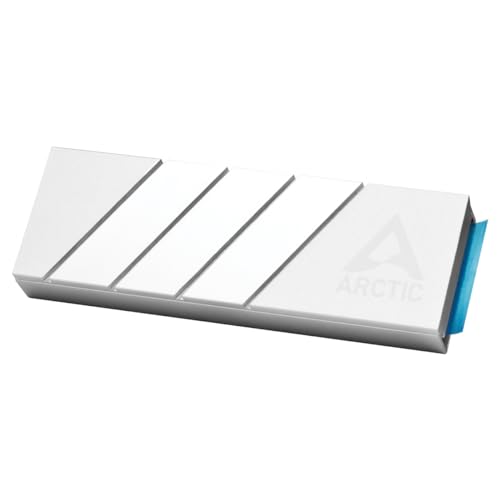
- Fits M.2 2280 SSDs and PS5 setups
- Aluminum design helps reduce heat
- Click mount with included thermal pads
Best For: Builders who need a PS5-compatible heatsink for an existing M.2 SSD.
Higher-capacity PS5 pick
WD_BLACK SN850P 2TB with heatsink

- Officially licensed for PS5
- PS5-optimized heatsink included
- 2TB capacity with up to 7,300MB/s
Best For: PS5 owners who want a larger officially licensed internal SSD with built-in cooling.
Original PS5 heat-pipe cooler
ElecGear EL-P5C Heat Pipe Heatsink

- Made for first-gen PS5 CFI-1xxx models
- Heat pipe and aluminum fins for passive cooling
- Includes thermal pads and revised mounting post kit
Best For: Launch PS5 owners who need a silent internal SSD heatsink
Simple budget heatsink
2280 Double-Sided M.2 Heatsink

- Fits PS5 and desktop PC M.2 slots
- Double-sided clip design for varied SSD heights
- Thermal pads included for basic heat transfer
Best For: Budget-minded buyers wanting a simple PS5 or PC SSD cooler
Slim/Pro premium cooler
ElecGear EL-P5SP Ultra Heatsink

- Built for PS5 Slim CFI-2000 and PS5 Pro CFI-7000
- Heat pipe plus copper bridge and dual aluminum decks
- Supports standard NVMe M.2 drives from 2230 to 22110
Best For: Slim and Pro PS5 owners wanting a premium passive SSD heatsink
Premium PS5-Ready Performance – Samsung 990 PRO 1TB w/ Heatsink
If you’re comparing a ps5 m2 ssd heatsink upgrade, the Samsung 990 PRO with Heatsink is built for players who want top-tier speed plus integrated thermal control. It targets PlayStation 5 console expansion with PCIe 4.0 performance and an ultra-slim heatsink designed to help prevent overheating-related slowdowns.
Best For: PS5 owners who want a fast, all-in-one internal expansion drive with a built-in heatsink.
Pros:
- Up to 7,450 MB/s read and 6,900 MB/s write speeds for very fast game loading.
- Integrated heatsink is stated to fit PlayStation 5 and help manage thermals.
- Uses Samsung’s in-house controller, V-NAND, and Magician software support.
- Backed by a 5-year manufacturer warranty.
Cons:
- 1TB capacity may fill up quickly if you keep a large PS5 library installed.
- Premium performance focus may be more than casual users need.
Overall, this is a strong pick if you want a reputable PS5 expansion SSD that already includes the heatsink solution. It combines high-speed specs with a PS5-friendly design, making installation and compatibility straightforward.
Standalone Cooling Upgrade – Thermalright TR-M.2 2280 Heatsink
The Thermalright TR-M.2 2280 is a practical option if you already have a drive and just need a ps5 m2 ssd heatsink-style cooler for a desktop M.2 setup. Its aluminum body, double-sided thermal pads, and clip-and-screw mounting are aimed at improving heat dissipation on 2280 SSDs.
Best For: Desktop users who want an affordable M.2 2280 heatsink for better SSD cooling.
Pros:
- Double-sided heat sink design with thermal conductivity film on both sides.
- Aluminum alloy construction with anodized finish for improved heat dissipation.
- Claims a 10°C-30°C temperature reduction depending on the environment.
- Compatible with a wide range of M.2 2280 SSDs, including Samsung 990 Pro and 980 PRO.
Cons:
- Listed for desktop M.2 interfaces rather than specifically for the PS5 expansion bay.
- Cooling results vary by environment, so performance is not guaranteed.
This is a solid accessory if your goal is to cool an existing SSD rather than buy a new PS5-specific drive. Just be sure your installation environment and clearance match the intended desktop use case.
PS5 Console-Slot Design – Sabrent M.2 NVMe PS5 Heatsink
If you want a ps5 m2 ssd heatsink made specifically for the console, the Sabrent SB-PSHS is designed to fit the PS5 SSD expansion slot and replace the native cover. Its larger aluminum design uses the console fan and a sandwich-style layout to support more efficient heat transfer.
Best For: PS5 owners who want a purpose-built heatsink that replaces the stock SSD cover.
Pros:
- Engineered specifically for the PS5 console’s SSD expansion slot.
- Replaces the native PS5 cover to allow better cooling and a larger heatsink.
- Uses CNC’d aluminum and a sandwich design for consistent pressure and heat transfer.
- Includes installation guide, screws, and thermal tape.
Cons:
- It is a heatsink accessory only, not an SSD.
- Compatibility is limited to the PS5 console SSD slot.
For PS5-specific cooling, this is one of the most direct solutions in the lineup because it is built around the console’s expansion bay. It makes the most sense if you already have a compatible NVMe drive and want a dedicated PS5 cover replacement.
High-Capacity Premium Option – Samsung 990 PRO 2TB w/ Heatsink
The Samsung 990 PRO 2TB with Heatsink is a strong ps5 m2 ssd heatsink choice if you want more storage without giving up the built-in cooling solution. Samsung positions it for PS5 compatibility, and the integrated heatsink is designed to stabilize temperature and help prevent performance drops.
Best For: PS5 gamers who want a 2TB internal expansion drive with an integrated heatsink and premium speed.
Pros:
- 2TB capacity gives you more room for a larger PS5 game library.
- Up to 7,450 MB/s read and 6,900 MB/s write speeds.
- Ultra-slim integrated heatsink is designed for temperature control and PS5 compatibility.
- Backed by Samsung’s 5-year manufacturer warranty.
Cons:
- Higher-capacity model may cost more than smaller options.
- Integrated heatsink design may be more than needed for users with modest storage needs.
This model makes sense if you want a more future-proof PS5 expansion drive and prefer the convenience of an all-in-one solution. Its combination of capacity, speed, and built-in thermal management makes it easy to recommend for heavy gaming use.
Official PS5-ready pick – WD_BLACK SN850P 1TB with heatsink
If you want a ps5 m2 ssd heatsink solution that’s straightforward and console-focused, the WD_BLACK SN850P is built specifically for PlayStation 5 storage expansion. It’s officially licensed for PS5, includes an optimized heatsink for the PS5 console, and offers up to 7,300MB/s read speeds for fast game loading and smooth play.
Best For: PS5 owners who want an officially licensed, worry-free internal SSD upgrade with an included heatsink.
Pros:
- Officially licensed for PlayStation 5 compatibility
- Includes a heatsink designed especially for the PS5 console
- Up to 7,300MB/s read speeds for quick loads
- Lets you play directly from the drive instead of transferring games
Cons:
- Only 1TB in this listing, so it adds less total storage than larger capacities
- Designed specifically for PS5 use, so it’s less versatile for other setups
The SN850P is a strong fit if your priority is a PS5-ready drive that minimizes compatibility concerns and includes the cooling hardware you need in one package. It’s a practical upgrade for players who want faster access and more space without extra assembly steps.
Heatsink-only upgrade – ARCTIC M2 Pro PS5-compatible heatsink
If you’re building a ps5 m2 ssd heatsink setup around an existing M.2 2280 drive, the ARCTIC M2 Pro is a dedicated cooler made to reduce heat and help prevent thermal throttling. It’s described as PS5-compatible, uses an aluminum design, and includes thermal pads for the controller, RAM, and NAND.
Best For: Users who already have an M.2 2280 SSD and need a PS5-compatible heatsink add-on.
Pros:
- PS5-compatible and suitable for PS5 Slim installation
- Aluminum heatsink helps dissipate heat effectively
- Includes two TP-3 thermal pads for better contact
- Click mount design avoids screws or rubber bands
Cons:
- Heatsink only, so it does not provide storage by itself
- Must be paired with a compatible M.2 2280 SSD
The M2 Pro makes sense if you already own the SSD and just need a reliable cooling solution that meets Sony’s stated requirements. Its simple mounting approach and included pads make it a practical add-on for a PS5 storage build.
Higher-capacity PS5 pick – WD_BLACK SN850P 2TB with heatsink
For shoppers comparing a ps5 m2 ssd heatsink upgrade, the 2TB WD_BLACK SN850P is the larger-capacity version of the same PS5-focused drive. It’s officially licensed for PlayStation 5, includes an optimized heatsink for the console, and advertises read speeds up to 7,300MB/s for fast loading and direct play from the drive.
Best For: PS5 users who want the same easy-install, licensed SSD design as the 1TB model but with more storage.
Pros:
- Officially licensed for PlayStation 5 consoles
- Includes a PS5-optimized heatsink
- 2TB capacity gives you more room for games and installs
- Up to 7,300MB/s read speeds for smooth gameplay
Cons:
- More expensive than the 1TB version in the same product line
- Still a PS5-focused drive, so it’s not aimed at broad multi-device use
This is the better pick if you know 1TB won’t be enough and want to stay within the same officially licensed, heatsink-included PS5 storage family. It keeps the installation and compatibility benefits while giving you more headroom for a larger library.
Original PS5 heat-pipe cooler – ElecGear EL-P5C Heat Pipe Heatsink
If you want a ps5 m2 ssd heatsink for the original PS5, this ElecGear EL-P5C is built around a heat pipe and a large solid aluminum fin stack to move heat away from a Gen4 NVMe drive. It is designed for the first PS5 models, uses the console’s airflow rather than a fan, and includes thermal pads plus a revised mounting post kit to improve the SSD fit inside the drive bay.
Best For: Original PS5 owners who want a high-capacity, silent SSD cooling solution for an internal Gen4 drive.
Pros:
- Heat pipe plus large aluminum heatsink for strong passive cooling
- Includes 1.0mm and 1.5mm thermal pads for fit adjustment
- Re-designed mounting post kit helps secure the SSD more cleanly
- Compatible with common M.2 sizes from 2230 to 2280, with future 22110 support noted
Cons:
- Not compatible with PS5 Slim or PS5 Pro
- Requires removing any thin heatsink already attached to the SSD
- Installation is specific to first-generation PS5 models only
This is a purpose-built option if you’re cooling a supported launch-model PS5 and want a silent design that leans on the console’s existing fan path. The included mounting hardware and pad options add flexibility, but the model-specific compatibility means it is not a universal PS5 upgrade.
Simple budget heatsink – 2280 Double-Sided M.2 Heatsink
This ps5 m2 ssd heatsink is a simple aluminum 2280 cooler aimed at keeping an NVMe drive within a safer temperature range. It uses a double-sided clip design and thermal silicone pads, and the listing says it fits PS5 as well as desktop M.2 slots, making it a straightforward pick if you want basic cooling without a complex install.
Best For: Buyers who want an affordable, easy-to-install SSD heatsink for a PS5 or PC.
Pros:
- Compatible with PS5 and desktop PC M.2 slots
- Double-sided clip design supports different SSD heights
- Thermal pads included for heat transfer
- Claims 10°C to 20°C cooling effect depending on conditions
Cons:
- Best fit is listed for 2280 drives, so it is less versatile than multi-size options
- Cooling claims depend heavily on the environment
- No bundled extras beyond the heatsink and pads are noted
For a no-fuss SSD cooler, this model keeps the focus on compatibility and installation simplicity. It’s a practical choice when you want a basic thermal solution for a PS5 or PC drive, though it lacks the premium materials and model-specific refinement of higher-end designs.
Slim/Pro premium cooler – ElecGear EL-P5SP Ultra Heatsink
If you need a ps5 m2 ssd heatsink for the newer console revisions, this ElecGear EL-P5SP is built for PS5 Slim and PS5 Pro internal NVMe drives. It uses internal and external aluminum decks linked by a copper bridge, plus a wide heat pipe and multiple thermal pads, aiming to move heat efficiently while staying fully passive and silent.
Best For: PS5 Slim and PS5 Pro owners who want ElecGear’s most advanced silent SSD cooling setup.
Pros:
- Designed specifically for PS5 Slim CFI-2000 and PS5 Pro CFI-7000
- Heat pipe, copper bridge, and dual aluminum decks for strong heat flow
- Works with standard NVMe M.2 drives from 2230 through 22110
- Includes thermal pads and mounting screws in the box
Cons:
- Installation is described as more complicated than the regular version
- The newest PS5 Pro may require cutting a corner of the heat bridge
- Not intended for the original PS5 CFI-1xxx models
This is the most feature-rich option in the group, but it’s also the most specialized. If you’re matching a Slim or Pro console and want a passive design built around the console’s airflow, the EL-P5SP delivers a carefully engineered fit with more installation effort than simpler heatsinks.
How We Picked These Ps5 M2 SSD Heatsink Options
We prioritized PS5 compatibility first, then looked at cooling design, installation simplicity, height and clearance, and whether the product is a complete SSD package or a heatsink-only upgrade. We also favored models designed for Gen4 M.2 2280 drives, since that is the standard used in most PS5 storage upgrades.
Quick Comparison
If you want the simplest path, an all-in-one SSD with a preinstalled heatsink is usually the easiest choice. If you already own a compatible M.2 drive, a standalone Ps5 M2 SSD Heatsink can be the smarter value. Officially licensed PS5 storage solutions tend to offer the most plug-and-play convenience, while third-party coolers can provide more flexibility and lower cost.
Key Buying Factors for Ps5 M2 SSD Heatsink
Fit and Clearance
The PS5 expansion bay has limited space, so height matters. Make sure the heatsink and SSD combo fits the console cover without forcing or modifying the shell.
Cooling Design
Look for aluminum construction, thermal pads, or heat-pipe designs if you want better heat transfer. A good heatsink should help sustain performance during longer sessions, not just look robust.
Drive Compatibility
Confirm the SSD is M.2 2280 and PCIe Gen4 if you are buying a drive for PS5 use. Some coolers are made for broad PC compatibility, while others are shaped specifically for the console.
Single-Sided Vs. Double-Sided
Many PS5-friendly drives are single-sided, but some coolers can work with double-sided modules too. Check the product details carefully if your SSD has chips on both sides.
Bundle Versus Heatsink-Only
Choose a bundle if you want a simple, ready-to-use expansion. Choose a heatsink-only product if you already own a fast compatible SSD and just need better thermal control.
Who Should Buy Which Ps5 M2 SSD Heatsink?
Buyers who want the easiest installation should look at preassembled PS5-ready SSDs with heatsinks. Gamers upgrading an existing drive should focus on a dedicated Ps5 M2 SSD Heatsink that matches their SSD’s size and layout. If you are on a tighter budget, a compact aluminum cooler can be enough for most everyday gaming use. If you want maximum convenience and a cleaner fit, a PS5-specific model is usually worth the extra cost.