A good power strip for gaming setup does more than add outlets. It helps protect expensive gear, reduce cable clutter, and keep your desk or battlestation easier to manage.
In this roundup, we focus on practical features that matter for gamers: surge protection, outlet spacing, USB charging, cord length, and mounting options.
Best 10 Power Strip for Gaming Setup Picks for 2026
RGB Gaming Pick
4000J Surge Protector with USB and Wide Spacing

- RGB ambient lighting with adjustable modes
- 4000J surge and 15A overload protection
- 6 spaced AC outlets plus USB-C charging
Best For: Gamers who want lighting effects and stronger protection
High-Capacity Desk Pick
18 Outlet Surge Protector with 4 USB Ports
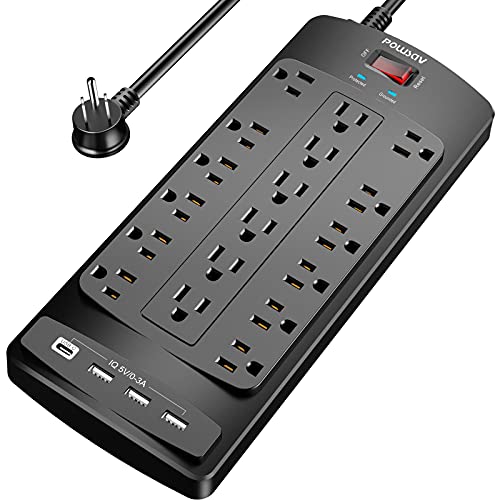
- 18 AC outlets and 4 USB ports
- 6-foot flat plug with cable ties
- 2100J surge protection and overload safety
Best For: Large gaming desks with lots of devices
Balanced Everyday Pick
Anker 12-Outlet Power Strip with USB-C

- 12 AC outlets with extra spacing
- 20W USB-C plus 2 USB-A ports
- 8-point safety system with surge protection
Best For: Gaming desks needing dependable everyday power
Value Charging Pick
ALESTOR 12-Outlet Surge Protector with USB

- 12 AC outlets plus 4 USB ports
- 2700J surge protection and overload safety
- Wide-spaced sections for larger adapters
Best For: Budget-conscious gamers needing lots of connections
Desk-Ready High-Capacity Pick
Anker 12-Outlet Surge Strip with USB-C

- 12 AC outlets plus 3 USB ports
- 2100J surge protection with safety system
- Extra spacing for larger plugs
Best For: Gaming desks with lots of devices and a need for built-in USB charging
Heavy-Duty Protection Pick
Belkin 12-Outlet 3940J Surge Protector

- 12 AC outlets with 3,940J protection
- 8-foot flat plug cord
- Safety indicator light for protection status
Best For: Gaming setups that prioritize surge protection and longer reach
Most Versatile Layout
TROND 10-Outlet Strip with USB-C

- 10 widely spaced outlets plus 4 USB ports
- 4000J surge protection with flat plug
- Wall-mountable design for flexible placement
Best For: Gaming desks and entertainment setups needing both spacing and USB charging
Ultra-High Capacity Desk Hub

- 18 AC outlets with wide spacing
- 4 USB ports, including USB-C PD20W
- 10-foot cord plus 4800J surge protection
Best For: Large gaming stations and heavy-duty desk setups
Wide-Space Gaming Strip
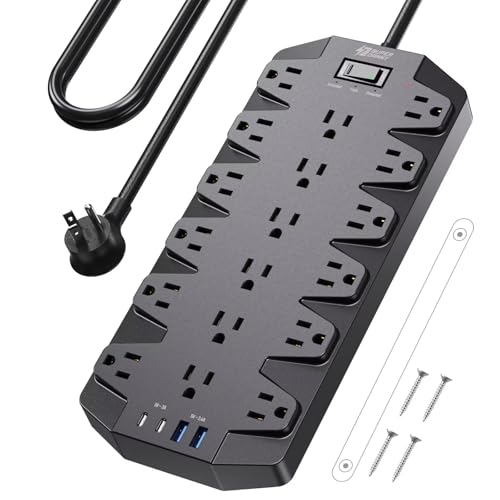
- Extra-wide outlet spacing for bulky adapters
- 2 USB-A and 2 USB-C ports
- Flat plug with wall-mount holes
Best For: Gaming rooms and streaming desks with lots of adapters
High-Density Media Strip

- 22 grounded outlets for maximum capacity
- 6 USB ports for device charging
- Flat plug and mountable design
Best For: Large gaming or media setups with many devices
RGB Gaming Pick – 4000J Surge Protector with USB and Wide Spacing
If you want a power strip for gaming setup that adds atmosphere while keeping your gear protected, this one stands out for its RGB lighting and 4000J surge rating. It also includes wide-spaced outlets, angled plug access, and USB charging, which makes it easier to manage a busy desk with a PC, accessories, and mobile devices.
Best For: Gamers who want lighting effects, strong surge protection, and flexible charging in one strip.
Pros:
- RGB ambient lighting with 4 brightness levels and 3 lighting modes
- 4000J surge protection plus 15A overload protection for gaming equipment
- 6 AC outlets with 1.8-inch spacing and a 10° angled layout for easier plug access
- Includes 1 USB-A port and 2 USB-C ports with up to 20W max charging
Cons:
- Only 6 AC outlets, so very large setups may need more capacity
- RGB styling may not suit users who prefer a plain utility look
For a gaming desk where both protection and presentation matter, this model is a strong match. The combination of surge defense, practical spacing, and USB-C charging makes it useful beyond the visual flair.
High-Capacity Desk Pick – 18 Outlet Surge Protector with 4 USB Ports
If your power strip for gaming setup needs to handle a lot of gear, this 18-outlet model is built for density and organization. The flat plug, 6-foot cord, and included cable ties make it easier to route behind a desk, while the 2100J surge protection adds a basic layer of defense for connected devices.
Best For: Large gaming desks and setups that need lots of outlets in one strip.
Pros:
- 18 AC outlets plus 4 USB ports for high-device setups
- 6-foot flat plug cord helps with tighter wall or desk clearance
- 2100J surge protection with overload protection
- ETL listed, with cable ties included for better cord management
Cons:
- No USB-C port listed
- Bulky outlet count may be more than smaller desks need
This is a practical pick when outlet quantity matters more than extras. It focuses on giving you a large number of AC connections and a simple, tidy layout for a crowded gaming desk.
Balanced Everyday Pick – Anker 12-Outlet Power Strip with USB-C
For a power strip for gaming setup that balances outlet count, charging, and safety, this Anker model is easy to recommend. It offers 12 AC outlets, a 20W USB-C port, and a compact 5-foot cord that works well for desk-based setups where you need dependable everyday power.
Best For: Gaming desks that need a reliable mix of AC outlets and fast USB charging.
Pros:
- 12 AC outlets provide solid expansion for a desk setup
- 20W USB-C port for faster phone charging
- 8-point safety system includes surge protection, fire resistance, and overload protection
- Extra space between outlets helps with bulky plugs
Cons:
- Only 5 feet of cord, so placement flexibility is limited
- Fewer USB ports than some larger multi-device strips
This is a well-rounded choice if you want a cleaner, simpler strip from a known brand. It leans more toward practical desk power than gaming-themed styling, but the layout and protection features fit a modern setup well.
Value Charging Pick – ALESTOR 12-Outlet Surge Protector with USB
If you need a power strip for gaming setup with plenty of outlets and decent charging support, this ALESTOR unit is a strong value option. It combines 12 AC outlets, 4 USB ports, and 2700J surge protection, plus two wide-spaced outlet sections for larger adapters.
Best For: Budget-conscious gamers who want many outlets and USB charging in one strip.
Pros:
- 12 AC outlets and 4 USB ports for mixed device charging
- 2700J surge protection with overload protection
- Two wide-spaced outlet sections handle larger plugs better
- USB-C port included with smart charging support
Cons:
- Only one USB-C port
- Plain design without gaming-focused styling or lighting
This strip is best suited to users who want function first. It offers a good mix of outlet count, USB convenience, and surge protection without adding unnecessary extras.
Desk-Ready High-Capacity Pick – Anker 12-Outlet Surge Strip with USB-C
If you need a power strip for gaming setup with a lot of gear attached, this Anker unit is built to handle a crowded desk. It gives you 12 AC outlets plus USB-C and USB-A charging, along with a 2100J surge rating and extra spacing for bulkier plugs.
Best For: Gaming desks that need lots of outlet space plus convenient phone and accessory charging.
Pros:
- 12 AC outlets provide plenty of room for a monitor, console, PC accessories, and more.
- Includes 1 USB-C port and 2 USB-A ports for charging smaller devices.
- 2100J surge protection and an 8-point safety system add protection for connected gear.
- Extra spacing between outlets helps accommodate larger plugs.
Cons:
- 5-foot cord may be short for some larger setups.
- Lower surge rating than some competing heavy-duty models.
- USB output is useful, but still limited to three total ports.
Overall, this is a practical pick if your gaming station is packed and you want a single strip that covers both power and basic charging. The layout and safety features make it a strong fit for everyday desk use.
Heavy-Duty Protection Pick – Belkin 12-Outlet 3940J Surge Protector
For a power strip for gaming setup where protection matters as much as outlet count, this Belkin strip is a solid option. It offers 12 AC outlets, a long 8-foot flat plug cord, and a high 3,940-joule surge rating for desktop electronics and other sensitive gear.
Best For: Gaming and home office setups that need a long cord and stronger surge protection.
Pros:
- 12 AC outlets give you room for multiple devices on one strip.
- 3,940 joules of surge protection is the highest rating in this group.
- 8-foot flat plug cord helps reach tight or distant outlets.
- Safety indicator light confirms when protection is active.
Cons:
- No USB charging ports included.
- Bulky plugs still rely on outlet spacing, so layout matters.
- Heavier and longer than some more compact desk strips.
This is the strongest protection-first choice here, especially if your setup includes expensive electronics and you want extra cord length. It trades USB convenience for a more robust, straightforward outlet bank.
Most Versatile Layout – TROND 10-Outlet Strip with USB-C
If you want a power strip for gaming setup that can handle both large plugs and modern charging needs, this TROND model is a flexible choice. It combines 10 widely spaced outlets with 2 USB-C ports and 2 USB-A ports, plus a 4000J surge rating and a flat plug for easier placement.
Best For: Gaming desks, TV stands, and wall-mounted setups where outlet spacing and USB charging both matter.
Pros:
- 10 widely spaced AC outlets help fit blocky chargers and power bricks.
- 2 USB-C and 2 USB-A ports support up to 14 devices total.
- 4000J surge protection is strong for PCs, TVs, and office gear.
- Flat plug, 5-foot cord, and wall-mountable design improve placement options.
Cons:
- Only 10 AC outlets, fewer than the larger 12-outlet models.
- USB output is useful but modest at 17W total.
- 5-foot cord may not suit far-away outlets.
For mixed-use setups, this one stands out because it balances outlet spacing, USB charging, and strong surge protection. It is especially appealing if you need a strip that can work behind a desk, under a TV, or on a wall.
Ultra-High Capacity Desk Hub – 18-Outlets, 4 USB, 4800J
If you need a power strip for gaming setup duties and you also want room for a monitor, console, PC, and a pile of accessories, this one is built for heavy demand. It combines 18 AC outlets, 4 USB ports, a 10-foot cord, and high 4800-joule surge protection, so it’s aimed at crowded desks and gear-heavy rooms.
Best For: Large gaming stations, home offices, and workshops that need maximum outlet count and long reach.
Pros:
- 18 widely spaced AC outlets help fit bulky adapters without blocking nearby plugs.
- 4 USB ports, including USB-C with PD20W, reduce the need for extra chargers.
- 4800-joule surge protection adds strong coverage for valuable electronics.
- 10-foot flat cord and mountable design make placement easier behind desks or along walls.
Cons:
- The large size may be more strip than a minimal gaming desk needs.
- It’s built for maximum capacity, so it may be overkill for simple setups.
For a packed setup, this model stands out for sheer outlet count and strong surge protection. It’s the most flexible option here when you want one strip to handle the whole gaming corner.
Wide-Space Gaming Strip – 18 Outlets, 4 USB, 2100J
For a power strip for gaming setup use, this SUPERDANNY model focuses on space, organization, and easy mounting. With 18 AC outlets, 4 USB ports, and extra-wide spacing between sockets, it’s a practical pick when your desk has multiple chargers, adapters, and gaming gear all competing for room.
Best For: Gaming rooms, streaming desks, and home offices that need roomy outlet spacing and tidy cable management.
Pros:
- 18 outlets with extra-large spacing help bulky plugs fit more comfortably.
- 2 USB-A and 2 USB-C ports support common charging needs without extra adapters.
- Flat 45-degree plug and wall-mount holes make placement flexible.
- 2100-joule surge protection adds a solid layer of defense for connected devices.
Cons:
- The 6.5-foot cord is shorter than some longer-run alternatives.
- USB output is useful, but it is not the highest-wattage charging setup in this group.
This is a strong all-around choice if your main priority is fitting big plugs cleanly on a crowded gaming desk. It balances capacity, spacing, and mounting convenience well.
High-Density Media Strip – 22 Outlets, 6 USB, 2100J
If your gaming setup has grown into a full media center, this SUPERDANNY strip gives you a huge amount of connection space in one unit. It offers 22 grounded outlets, 6 USB ports, and a flat plug design, making it useful when you need to power a PC, displays, lamps, and accessories from a single outlet.
Best For: Dense gaming or media setups that need the highest outlet count and plenty of USB charging.
Pros:
- 22 AC outlets provide more plug-in capacity than the other two models here.
- 6 USB ports, including 1 USB-C, support multiple phones and accessories.
- Widely spaced, four-row outlet layout helps reduce blockage from oversized plugs.
- Flat plug, 6.5-foot cord, and mounting keyholes make it easier to position neatly.
Cons:
- The outlet layout is large and may take up more space than smaller strips.
- Side outlets cannot be rotated, which may limit some plug orientations.
This is the most outlet-heavy option in the roundup, so it makes sense if your desk or entertainment area is already crowded. It’s a strong fit when you care more about total capacity than compact size.
How We Picked the Best Power Strip for Gaming Setup
For a Power Strip for Gaming Setup, we prioritized surge protection ratings, outlet count, spacing for bulky adapters, and overall build quality. We also looked at USB-C support, flat plugs, wall-mount options, and cord length for different desk and room layouts.
Quick Comparison
Choose higher outlet counts if you run a PC, dual monitors, speakers, a router, and console accessories from one location. Choose wider-spaced outlets if your setup uses large power bricks. If you charge controllers, headsets, or a phone at the desk, USB-C and fast-charging ports are a useful bonus.
Best Fit by Setup Size
Compact desks usually benefit from fewer but well-spaced outlets and a flat plug. Larger battlestations often need 12 or more AC outlets, a longer cord, and a mountable housing to keep cables routed cleanly.
Key Buying Factors for a Power Strip for Gaming Setup
Surge protection is essential because gaming PCs, monitors, consoles, and networking gear are all sensitive to power spikes. Look for a joule rating that matches how much protection you want; higher numbers generally offer more buffer. Also check the amperage and wattage limits so the strip can handle your total load without overtaxing it.
Outlet layout matters just as much as outlet count. A strip with closely packed sockets may advertise many outlets but still leave some unusable once bulky adapters are plugged in. Flat plugs help behind desks, while mounting holes can keep the strip off the floor and out of the way. USB ports are convenient, but they should complement, not replace, enough AC outlets for your main gear.
Who Should Buy Which Power Strip for Gaming Setup?
Gamers with a full desktop setup should look for higher outlet counts and strong surge protection. Console players with chargers, headsets, and a TV may prefer a balanced strip with USB ports and medium-length cord. If you travel with a portable gaming rig or move your setup often, a more compact model with a flat plug and wall-mount capability may be the easiest fit.
In short, the best choice depends on space, device count, and how much protection you want for expensive gaming equipment.