A great under-desk power strip can make a gaming setup look cleaner, feel safer, and stay easier to manage. It keeps outlets and charging ports where you need them without crowding your desktop.
For gamers, the best options balance surge protection, enough AC outlets, fast USB charging, and a clamp or mount design that fits your desk.
Best 10 Under Desk Power Strip for Gaming Picks for 2026
Dual-Layer Clamp Hub
HOPOW 13-Outlet Gaming Desk Strip

- 13 AC outlets plus 4 USB ports, including 2 USB-C
- 1700J surge protection and 15A overload switch
- Clamp mounts desks up to 2.75 in thick
Best For: Large gaming desks needing lots of outlets and a mounted, tidy layout
Fast-Charge Desk Mount

- 12 outlets plus 4 USB ports for up to 16 devices
- Total 40W USB charging with 2 PD20W USB-C ports
- Flat 45° plug and 4-side layout help save space
Best For: Gaming desks needing fast USB-C charging and a space-saving mountable strip
Premium Clamp Organizer
Anker Nano 10-Port Gaming Strip

- 6 AC outlets plus 4 USB ports in a dual-zone layout
- Up to 70W USB-C charging for laptops and devices
- Clamp holds securely for one-hand operation
Best For: Clean gaming desks that need premium USB-C charging and organized access
Compact Multiport Clamp

- 5 AC outlets and 6 USB ports, including 4 USB-C
- PD 20W USB-C charging with 40W total USB output
- Clamp mounts under desks or table legs up to 2.1 in thick
Best For: Compact gaming setups that want extra USB-C ports and clamp mounting
Fast-Charging Under-Desk Pick
40W Under Desk Power Strip with 5 Outlets

- 5 AC outlets and 4 USB ports
- 40W total USB charging with USB-C and QC 3.0
- Flat plug and slim cord for hidden routing
Best For: Gamers who want tidy under-desk mounting with fast USB charging
Clamp-Mounted Power Hub
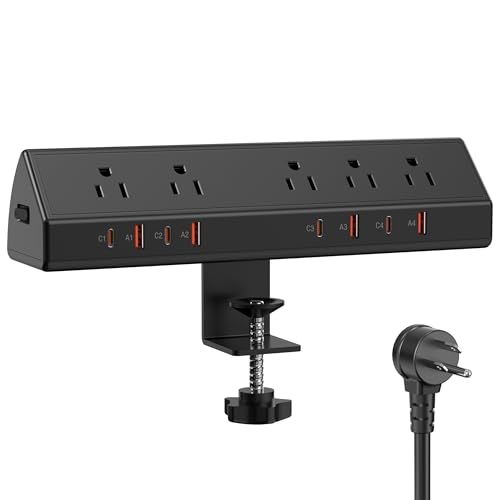
- 5 AC outlets plus 8 USB ports
- 65W USB-C charging for higher-power devices
- Clamp-on edge mount keeps it stable
Best For: Gaming desks that need secure mounting and strong USB-C power
Most Outlets
15-Outlet Desk Clamp Power Strip

- 15 outlets for bigger setups
- Widely spaced sockets for larger plugs
- QC 3.0 and PD 3.0 USB charging
Best For: Large gaming setups that need maximum outlet capacity
Clamp-on Organizer
TROND Clamp Power Strip with 5 Outlets and USB

- 5 widely spaced AC outlets help bulky plugs fit better.
- Clamp mount fits desks up to 1.97 inches thick.
- Includes 3 USB ports and 1440J surge protection.
Best For: Neat gaming desks with bulky adapters
High-Capacity Hub
Desk Clamp Power Strip with 9 Outlets and 8 USB

- Combines 9 AC outlets with 8 USB ports for 17 devices.
- Dual PD20W USB-C ports support faster charging.
- 10-foot flat cord and clamp mount suit desk setups.
Best For: Large gaming setups with many devices
Fast-Charge Mount
Jgstkcity Clamp Power Strip with USB-C Fast Charging

- 5 outlets plus 6 USB ports for mixed gaming gear.
- Dual PD20W USB-C charging supports faster top-ups.
- Clamp mount and 6ft cord help keep desks organized.
Best For: Gaming desks that prioritize USB-C charging speed
Dual-Layer Clamp Hub – HOPOW 13-Outlet Gaming Desk Strip
If you want an under desk power strip for gaming that can handle a crowded setup, this HOPOW clamp-on model is built to keep multiple devices powered without turning your desk into a cable pile. With 13 AC outlets, 4 USB ports, and a removable dual-layer design, it suits larger gaming stations where monitors, chargers, speakers, and peripherals all need a home.
Best For: Larger gaming desks that need lots of outlets, USB charging, and a tidy clamp-mounted layout.
Pros:
- 17-in-1 layout with 13 AC outlets and 4 USB ports, including 2 USB-C
- 1700J surge protection plus 15A overload protection for added device safety
- 10-foot flat cord and ultra-thin plug help with hidden routing
- Clamp design mounts to desks up to 2.75 in thick with no drilling
Cons:
- Larger dual-layer format may be more than you need for a minimal setup
- Clamp fit is limited to desks up to 2.75 in thick
- USB charging is useful, but the notes do not specify fast-charging wattage
Overall, this is a strong pick if your gaming desk needs maximum outlet count and a clean mounted installation. It focuses more on capacity and organization than compactness, which makes it especially appealing for fully loaded setups.
Fast-Charge Desk Mount – 12-Outlet USB-C Gaming Strip
This under desk power strip for gaming is a practical choice if you want a compact mountable unit with strong USB charging. It combines 12 outlets with 4 USB ports and a total 40W USB output, so it works well for keeping controllers, phones, headsets, and other desk gear charged while reducing cord clutter.
Best For: Gaming desks that need a mountable outlet strip with faster USB-C charging and a flat plug.
Pros:
- 12 AC outlets and 4 USB ports support up to 16 devices
- Total 40W USB output includes 2 PD20W USB-C and 2 QC20W USB-A ports
- 4-side design helps big adapters fit without blocking nearby plugs
- Flat 45° plug and 6-foot cord make it easier to tuck behind furniture
Cons:
- 12A max current is lower than some larger-capacity desk strips
- 6-foot cord may be short for some room layouts
- Not a clamp-style organizer, so mounting flexibility is more limited than desk-edge models
For gamers who care about USB-C charging and a cleaner desktop, this is a straightforward utility pick. It is especially appealing in setups where space behind the desk is tight and adapter clearance matters.
Premium Clamp Organizer – Anker Nano 10-Port Gaming Strip
If you want an under desk power strip for gaming that feels more like a premium desk accessory than a basic accessory, the Anker Nano brings a clean clamp-mounted design with useful charging power. Its 6 AC outlets, 2 USB-C ports, and 2 USB-A ports are split into top and bottom zones to help reduce clutter while keeping devices within easy reach.
Best For: Gamers who want a cleaner clamp-mounted desk setup with stronger USB-C charging.
Pros:
- 10-port layout with 6 AC outlets, 2 USB-C, and 2 USB-A ports
- Up to 70W USB-C charging for laptops and other USB-C devices
- Dual-zone design helps reduce cable clutter and simplify access
- Adjustable clamp is designed for one-hand operation and stable mounting
Cons:
- Clamp only fits desk edges from 0.6 to 1.8 inches thick
- 5-foot cord is shorter than many desk-strip options
- Not suitable for curved, sloped, or unclampable desk edges
This is a strong option if your priority is a cleaner, more organized gaming station with better USB-C performance. It gives up some outlet count compared with larger strips, but it makes up for that with a neater layout and higher charging output.
Compact Multiport Clamp – 11-in-1 Gaming Desk Strip
This under desk power strip for gaming is designed for compact desktop organization with a useful mix of AC and USB charging. It combines 5 widely spaced AC outlets with 6 USB ports, including 4 USB-C connections, so it can cover a gaming monitor, accessories, and daily charging without needing a separate hub.
Best For: Smaller gaming or workstation setups that want a clamp-mounted strip with lots of USB-C options.
Pros:
- 11-in-1 design with 5 AC outlets and 6 USB ports
- 4 PD 20W USB-C ports plus 2 USB-A ports for fast charging
- Clamp mounts to desktops, under desks, or table legs up to 2.1 in thick
- Overload and short-circuit protection add basic safety coverage
Cons:
- 10A max current is lower than some higher-capacity desk strips
- Total USB output is 40W, so power is shared across the USB ports
- Fit is limited to desktops up to 2.1 inches thick
For buyers who want a simpler clamp-style layout with plenty of USB-C charging, this model is a sensible fit. It is not the highest-capacity option in the group, but it does a solid job of keeping a gaming desk organized and powered.
Fast-Charging Under-Desk Pick – 40W Under Desk Power Strip with 5 Outlets
If you want an under desk power strip for gaming that also keeps a desk setup cleaner, this 9-in-1 model gives you a practical mix of AC outlets and USB charging. The flat plug and slim cord are designed to disappear behind furniture, while the mountable body helps keep cables off the desktop.
Best For: Gamers and home office users who want a compact, mountable strip with strong USB charging and a tidy under-desk layout.
Pros:
- 5 AC outlets plus 4 USB ports for charging multiple devices at once
- 40W total USB output with 2 USB-C PD ports and 2 QC 3.0 USB-A ports
- Flat plug and thin extension cord help with hidden routing behind furniture
- 1200J surge protection and built-in safety protections
Cons:
- Only 5 AC outlets if you need a larger outlet count for a full battlestation
- USB-C output is 20W max per port, so it is not a high-wattage laptop charger
Overall, this is a solid choice if your priority is keeping a gaming desk organized without giving up fast phone and accessory charging. It is best suited to compact setups where easy mounting and cable hiding matter as much as outlet count.
Clamp-Mounted Power Hub – 65W Desk Clamp Power Strip
For an under desk power strip for gaming that needs strong charging and a stable mount, this clamp-on design is built for busy setups. It combines 5 AC outlets with 8 USB ports, including 4 USB-C ports, and the edge-mount bracket helps keep it secure on the desk instead of loose on the floor.
Best For: Gaming desks, dorm rooms, and shared workstations that need a secure clamp mount and high-output USB-C charging.
Pros:
- 65W USB-C charging is well suited to higher-power devices
- 13-in-1 layout with 5 AC outlets, 4 USB-C ports, and 4 USB-A ports
- Clamp-on edge mount helps keep the strip stable and organized
- 1200J surge protection with fire-resistant ABS casing
Cons:
- Works best with desks up to 1.96 inches thick and requires a small wall gap
- Mounting style is more semi-permanent than a simple drop-in power strip
This is a strong option if you want a more robust desk power hub rather than a basic outlet extender. The combination of clamp mounting and high-watt USB-C charging makes it especially appealing for more device-heavy gaming setups.
Most Outlets – 15-Outlet Desk Clamp Power Strip
If you need an under desk power strip for gaming with lots of room for gear, this clamp-on model stands out for its 15 outlets and tidy edge-mount setup. The flat plug, widely spaced outlets, and small footprint are designed to reduce floor clutter while still leaving space for larger plugs.
Best For: Larger gaming or office setups that need many outlets, spaced sockets, and a clamp-on design for desk-edge mounting.
Pros:
- 15 outlets can support a large number of devices and accessories
- Widely spaced outlet layout helps fit bulkier plugs
- USB-A and USB-C charging with QC 3.0 and PD 3.0 support
- 1200J surge protection plus off/on switch for added convenience
Cons:
- Maximum desk edge width is about 1.6 inches
- Only 3 USB ports total, so USB charging is lighter than on some rivals
For gamers with a lot of peripherals, this is the most outlet-heavy option in the group. It is a smart pick when the main goal is powering many devices neatly from the desk edge instead of using a standard floor strip.
Clamp-on Organizer – TROND Clamp Power Strip with 5 Outlets and USB
If you want an under desk power strip for gaming that keeps bulky adapters off the floor, this TROND desk clamp model is a practical fit. It mounts to the desk edge, gives you widely spaced AC outlets, and adds USB charging so your headset, phone, and other gaming accessories can stay powered without crowding your setup.
Best For: Gaming desks that need a tidy clamp-on power strip with room for larger plugs.
Pros:
- 5 AC outlets are spaced on three sides to better handle bulky adapters.
- Clamp-on design fits desktop edges up to 1.97 inches thick for secure mounting.
- Includes 1 USB-C and 2 USB-A ports for charging up to 8 devices at once.
- 1440J surge protection adds a useful layer of protection for gaming gear and other electronics.
Cons:
- Only 5 AC outlets, so heavier setups may want more socket capacity.
- Clamp fit is limited to desks up to 1.97 inches thick.
- 10A / 1250W rating may be limiting for higher-power equipment.
Overall, this is a straightforward desk-mounted option for keeping a gaming station organized while still leaving room for chunky plugs. It’s especially appealing if you want a cleaner edge-mount setup with built-in USB charging and surge protection.
High-Capacity Hub – Desk Clamp Power Strip with 9 Outlets and 8 USB
For an under desk power strip for gaming with lots of devices to connect, this clamp-on station is built for volume. It combines 9 AC outlets with 8 USB ports, includes a 10-foot flat extension cord, and mounts to the desk edge so your charging setup stays accessible and out of the way.
Best For: Busy gaming desks that need many outlets plus fast USB-C charging.
Pros:
- Massive 17-device capacity with 9 AC outlets and 8 USB ports.
- 40W total USB output includes dual PD20W USB-C ports for faster charging.
- 10-foot flat extension cord gives more flexibility for desk placement.
- Clamp mount fits tabletop edges up to 1.7 inches thick for a secure install.
Cons:
- Clamp size is limited to 1.7-inch desktop edges.
- Total USB output is 40W, so power is shared across all USB ports.
- Larger, more complex design may be more than a minimal setup needs.
This is the strongest pick here if your gaming rig, peripherals, and charging devices all compete for space. The combination of many outlets, multiple USB ports, and a long flat cord makes it easy to build a more centralized power hub at the desk.
Fast-Charge Mount – Jgstkcity Clamp Power Strip with USB-C Fast Charging
If you’re building an under desk power strip for gaming and want both charging speed and a cleaner desk edge, this Jgstkcity model is a balanced option. It mounts directly to the desk, provides five widely spaced outlets, and adds four USB-C ports plus two USB-A ports for a compact power-and-charging station.
Best For: Gaming desks that need fast USB-C charging and a simple clamp-on layout.
Pros:
- 5 widely spaced AC outlets make it easier to plug in larger adapters.
- 4 USB-C ports include dual PD20W fast charging support.
- Clamp mount fits desk edges up to 1.96 inches thick and helps keep cords organized.
- 1200J surge protection and fireproof plastic add practical protection.
Cons:
- Only 5 AC outlets, so it’s not the highest-capacity option.
- Requires the desk to sit 0.4 to 0.5 inches from the wall for proper installation.
- USB power is capped at 40W total across the charging ports.
This model makes sense if your gaming setup needs a tidy mounted strip with solid USB-C support rather than maximum outlet count. It keeps the desktop edge organized while still offering enough AC and USB flexibility for everyday gaming gear.
How We Picked the Best Under Desk Power Strip for Gaming
For an Under Desk Power Strip for Gaming, we focused on practical features that matter in real setups: outlet count, USB-C support, surge protection rating, cord length, clamp or mount fit, and total charging output. We also favored models that help reduce cable clutter and work well with consoles, monitors, controllers, headsets, streaming gear, and phone charging.
Quick Comparison
Most buyers will fall into one of three groups: compact clamp strips for small desks, high-capacity power strips for multi-device battlestations, and USB-C-forward models for fast device charging. If you run a PC, console, monitor, lights, and accessories at once, look for more AC outlets and stronger surge protection. If you mainly need to charge phones, controllers, and a headset, a model with more USB-C ports may be the better fit.
Key Buying Factors for Under Desk Power Strip for Gaming
Outlets and Port Layout
Count the devices you actually use. A gaming PC setup often needs several AC plugs, while consoles and accessories may benefit from widely spaced outlets so larger adapters do not block neighboring ports.
USB-C Power and Total Output
Many newer accessories charge faster over USB-C. Look for enough wattage to support your everyday gear, especially if you want to charge a controller, phone, or earbuds while gaming.
Surge Protection
Gaming equipment is valuable, so surge protection matters. Higher joule ratings generally provide more protection against sudden spikes, though the best choice still depends on your overall setup and local power stability.
Mounting and Desk Fit
Check clamp thickness or edge-mount compatibility before buying. A secure fit keeps the strip out of sight, improves cable routing, and prevents it from shifting when you plug and unplug devices.
Cord Length and Placement
A longer cord gives you more freedom to position the strip where it is most useful. This is especially important if your wall outlet is not directly behind the desk.
Who Should Buy Which Under Desk Power Strip for Gaming?
If you want the cleanest desk possible, choose a clamp-style model that mounts beneath the desktop. If you have multiple power-hungry devices, prioritize more AC outlets and a strong surge rating. If your accessories are mostly USB-powered, a strip with several USB-C ports and higher total charging wattage will be the most convenient choice.
In short, the best Under Desk Power Strip for Gaming is the one that matches your device count, charging habits, and desk layout without adding clutter.