Compact mini PCs have become a smart way to get full desktop capability without giving up desk space. Whether you want a quiet office machine, a home media hub, or a capable everyday computer, the right small system can cover a lot of ground.
In this roundup, we focused on balanced performance, upgrade potential, ports, wireless features, and value so you can choose a compact mini PC that actually fits how you work.
Best 10 Compact Mini PCs Picks for 2026
Gaming Powerhouse

- Ryzen 7 6800H with 8 cores/16 threads
- 16GB LPDDR5 RAM and 1TB SSD
- HDMI + DisplayPort for dual 4K output
Best For: Gaming, creative work, and dual-display productivity
Budget Office Pick
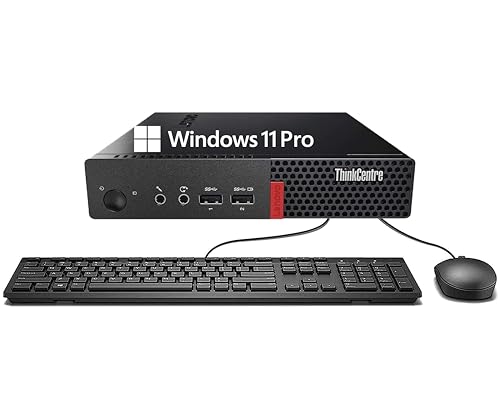
- Compact Tiny desktop with business-class design
- 8GB DDR4 RAM and 256GB SSD
- Includes DisplayPort, WiFi, BT, keyboard, and mouse
Best For: Basic office, browsing, and education use
High-Value Workhorse

- Ryzen 9 6900HX for strong multitasking
- 24GB LPDDR5X RAM and 1TB PCIe 4.0 SSD
- Triple 4K display support plus dual Ethernet
Best For: Power users, creators, and multi-monitor work
Entry-Level Streamer

- Intel N95 for routine everyday tasks
- 8GB RAM, 256GB SSD, and low 15W power use
- Dual HDMI 2.0 outputs for 4K@60Hz
Best For: Budget streaming, browsing, and light office work
High-Value 15W Workhorse
GEEKOM A5 Mini PC, Ryzen 5 7430U

- Ryzen 5 7430U with efficient 15W design
- 16GB RAM and 1TB NVMe SSD included
- Up to 4 displays plus strong expansion options
Best For: home offices, business users, and upgrade-minded buyers
Entry-Level Space Saver
GMKtec G5S Mini PC, Intel N5095

- Intel N5095 for everyday productivity tasks
- Ultra-compact body with low 10W peak power
- Dual HDMI supports two 4K monitors
Best For: basic office work, study, and compact setups
Refurbished Office Mini

- Intel Core i5-8500T hexacore CPU
- 16GB DDR4 RAM with 256GB NVMe SSD
- HDMI + DisplayPort dual-monitor support
Best For: Refurbished office and general-purpose use
Connected Home Office Pick

- Ryzen 5 3501U with 16GB RAM
- 512GB PCIe 3.0 NVMe SSD storage
- Triple display support with WiFi 6
Best For: Home office and everyday computing with strong connectivity
Gaming Powerhouse – Glorlin Ryzen 7 6800H Mini PC
If you want compact mini pcs that can still handle demanding everyday use, this Glorlin model stands out with a Ryzen 7 6800H, Radeon 680M graphics, and fast LPDDR5 memory. It is built for users who need a small desktop that can move between gaming, creative work, office tasks, and multitasking without feeling underpowered.
Best For: Users who want a high-performance small desktop for gaming, work, and dual-monitor setups.
Pros:
- Ryzen 7 6800H with 8 cores and 16 threads for strong desktop-class performance.
- 16GB LPDDR5 RAM at 6400MHz helps with smooth multitasking.
- 1TB SSD and HDMI plus DisplayPort support dual 4K displays.
- WiFi 6, Bluetooth 5.3, and dual Gigabit Ethernet add flexible connectivity.
Cons:
- 16GB RAM maximum may limit future memory growth.
- Geared more toward compact performance than full desktop expandability.
This is a strong pick if you want a quiet, space-saving mini PC that still feels capable for heavier workloads. The included Windows 11 Pro and 1-year warranty add practical value for home, business, or gaming use.
Budget Office Pick – Lenovo ThinkCentre M710q Tiny
For buyers comparing compact mini pcs for basic productivity, this Lenovo ThinkCentre M710q Tiny focuses on reliability over raw speed. Its 6th Gen Core i3-6100T, 8GB DDR4 RAM, and 256GB SSD make it a straightforward choice for office work, web browsing, media use, and education tasks.
Best For: Budget-minded users who need a simple, compact desktop for everyday productivity.
Pros:
- Compact Lenovo Tiny design saves desk space.
- 8GB RAM and 256GB SSD support basic multitasking and quick boot times.
- Includes DisplayPort, WiFi, Bluetooth, keyboard, and mouse.
- Windows 11 Pro adds familiar security and management features.
Cons:
- Older 6th Gen Core i3 platform is best for lighter workloads.
- 256GB storage is modest if you keep lots of files locally.
- Renewed condition may not appeal to buyers wanting brand-new hardware.
This model makes sense when you want a small, practical PC for standard daily tasks without paying for extra performance. It is especially appealing if you value a bundled keyboard and mouse and a proven business-class design.
High-Value Workhorse – BOSGAME P6 Ryzen 9 Mini PC
This BOSGAME option is one of the more capable compact mini pcs in the group, built around a Ryzen 9 6900HX and paired with 24GB LPDDR5X memory plus a 1TB PCIe 4.0 SSD. It is aimed at users who want a fast small desktop for everyday professional work, light content creation, multitasking, and even some light gaming.
Best For: Power users who want a compact desktop for multitasking, creative apps, and three-monitor setups.
Pros:
- Ryzen 9 6900HX delivers strong 8-core/16-thread performance.
- 24GB LPDDR5X RAM and PCIe 4.0 SSD help keep the system responsive.
- Supports three 4K@60Hz displays through HDMI, DisplayPort, and USB-C.
- Dual 1Gbps Ethernet, WiFi 6E, and Bluetooth 5.3 suit advanced networking needs.
Cons:
- High-end features may be more than casual users need.
- Expansion is focused on storage rather than a full desktop tower upgrade path.
If you need a small machine that can handle serious day-to-day workloads, this model offers a lot of capability in a very compact footprint. Its quiet operation and flexible connectivity make it especially practical for workstations and home labs.
Entry-Level Streamer – GMKtec G3S Intel N95 Mini PC
If you are shopping for compact mini pcs with low power draw and simple everyday performance, the GMKtec G3S is built around the Intel N95 processor and 8GB of RAM. It is best suited to office work, browsing, home entertainment, and light-duty setups where dual 4K monitor support is useful.
Best For: Affordable everyday computing, streaming, and basic dual-monitor use.
Pros:
- Intel N95 processor is designed for routine tasks and light productivity.
- 8GB RAM and 256GB SSD provide a responsive basic setup.
- Two HDMI 2.0 ports support dual 4K@60Hz displays.
- WiFi 5, Bluetooth 5.0, and Gigabit Ethernet cover common connectivity needs.
Cons:
- 4-core processor is not aimed at heavy workloads.
- Storage and memory are modest for power users.
- Best results are for basic, not demanding, computing tasks.
This is a sensible choice if you want a small PC that stays focused on the essentials. The added Wake on LAN, PXE Boot, RTC Wake, and Auto Power On features also make it a practical option for simple server or always-on uses.
High-Value 15W Workhorse – GEEKOM A5 Mini PC, Ryzen 5 7430U
If you’re comparing compact mini pcs for a home office or business setup, the GEEKOM A5 stands out for its upgrade-friendly hardware and balanced everyday performance. The Ryzen 5 7430U, 16GB RAM, and 1TB NVMe SSD give it enough headroom for video calls, 4K streaming, office work, and cloud-based AI tasks without feeling locked down like soldered-memory alternatives.
Best For: Users who want a compact, efficient mini PC with strong upgrade potential, multi-display support, and long warranty coverage.
Pros:
- Ryzen 5 7430U with 15W power draw for efficient daily performance
- 16GB RAM and 1TB SSD, both paired with extensive expansion options
- Supports up to 4 displays and 8K output via Type-C
- Backed by a 3-year limited warranty and business-focused support
Cons:
- Higher-end feature set may be more than basic browsing users need
- Some expansion options add complexity compared with simpler plug-and-play models
The A5 is a practical pick if you want a compact desktop that can grow with your workload. Its mix of efficient processing, strong storage flexibility, and durable build makes it especially appealing for workspaces that value reliability over bare-minimum specs.
Entry-Level Space Saver – GMKtec G5S Mini PC, Intel N5095
For shoppers looking at compact mini pcs on a tight budget, the GMKtec G5S focuses on the essentials: light office work, online classes, streaming, and simple business tasks. Its Intel Celeron N5095, 8GB LPDDR4 memory, and 128GB SSD make it a straightforward everyday machine rather than a high-performance desktop replacement.
Best For: Basic productivity, study use, front desks, digital signage, and small spaces.
Pros:
- Very small footprint for desks, counters, and behind-monitor installs
- Low 10W peak power and quiet cooling for peaceful operation
- Dual HDMI 2.0 outputs support two 4K displays
- Fast SSD startup and simple storage expansion support
Cons:
- Onboard memory is not replaceable
- 128GB storage is modest for larger media or project libraries
- Designed for basic tasks, not demanding workloads
The G5S makes sense when size, simplicity, and efficiency matter more than raw speed. It is best viewed as a dependable entry-level mini PC for daily computing, not a machine for heavy multitasking or creative work.
Triple-Display Multitasker – KAMRUI Pinova P2 Mini PC, Ryzen 7330U
If you want compact mini pcs that handle multitasking without wasting desk space, the KAMRUI Pinova P2 is built around efficiency and display flexibility. The Ryzen 7330U, 16GB LPDDR4X RAM, and 256GB SSD give it a strong everyday base, while triple 4K output makes it a smart fit for workstations, presentations, and media-focused setups.
Best For: Multi-monitor users, office power users, and buyers who want efficient performance in a small case.
Pros:
- Ryzen 7330U offers 4-core/8-thread efficiency for smooth multitasking
- Triple 4K@60Hz display support through HDMI, DP, and USB-C
- 16GB LPDDR4X memory with dual storage expansion slots
- Compact chassis includes VESA mount and quiet cooling
Cons:
- 256GB SSD may fill quickly for media-heavy users
- Memory is LPDDR4X, so it is less flexible than upgradeable DIMM-based systems
The Pinova P2 is a strong middle-ground option for buyers who want more display output and multitasking ability than entry-level models provide. It keeps the footprint small while adding the kind of connectivity that makes daily work easier.
Refurbished Office Mini – HP EliteDesk 800 G4 Mini Tiny
If you want compact mini pcs for a desk-bound office setup, this HP EliteDesk 800 G4 Mini keeps the footprint small while still offering a capable Intel Core i5-8500T, 16GB of DDR4 RAM, and an NVMe SSD for fast everyday use. It is a practical pick for general productivity, especially if you need dual-monitor support in a space-saving chassis.
Best For: Home office users and small-business buyers who want a refurbished mini PC with solid multitasking and dual-display support.
Pros:
- Hexa-core Intel Core i5-8500T helps with reliable multitasking.
- 16GB DDR4 RAM and 256GB NVMe SSD support quick startup and responsive use.
- HDMI and DisplayPort make dual-monitor setups easier.
- Very compact 7 x 7 x 1.25-inch mini chassis saves desk space.
Cons:
- Renewed condition may show minor cosmetic wear.
- Storage capacity is modest compared with larger workstations.
- Integrated graphics are best for general computing rather than heavy creative work.
This is a straightforward renewed mini desktop for buyers who want dependable performance without paying for a full-size tower. Its biggest strengths are practical speed, dual-monitor support, and a very small footprint.
Connected Home Office Pick – Getorli Ryzen 5 Mini PC
Among compact mini pcs, the Getorli Mini PC stands out for buyers who want a small desktop with flexible display output and modern connectivity. Its Ryzen 5 3501U processor, 16GB of RAM, and 512GB NVMe SSD make it a sensible fit for office apps, home entertainment, online learning, and general daily computing.
Best For: Home office users and everyday buyers who want triple-display support, WiFi 6, and easy upgrade options.
Pros:
- Ryzen 5 3501U with 4 cores and 8 threads handles common daily tasks smoothly.
- 16GB RAM and 512GB PCIe NVMe SSD provide roomy, responsive storage.
- Dual HDMI plus USB-C support up to three displays.
- WiFi 6, Bluetooth 5.3, Gigabit Ethernet, and VESA mount add flexibility.
Cons:
- Integrated Radeon Vega 8 graphics are aimed at light gaming and media use.
- Performance is best suited to everyday computing, not demanding workloads.
- OS is listed as OS 11 rather than a more specific Windows edition.
This model is a strong match if you value connectivity and upgrade room as much as raw speed. The small size, triple-display support, and 1-year warranty make it a practical choice for modern compact desks.
Upgradeable Work Mini – C4 SE Ryzen 5 Mini PC
The C4 SE is a good fit if you are comparing compact mini pcs for work, study, or a home office and want more than the basics. It pairs a Ryzen 5 3500U with 8GB of DDR4 RAM, a 256GB SSD, triple-display output, and dual Gigabit Ethernet in a compact design that still leaves room for expansion.
Best For: Buyers who need a small desktop with dual LAN, triple-display support, and upgrade flexibility.
Pros:
- Ryzen 5 3500U offers 4-core, 8-thread performance for everyday productivity.
- Two memory slots support upgrades up to 32GB, plus extra SSD expansion.
- Triple-display support via HDMI, DisplayPort, and USB-C improves multitasking.
- Dual Gigabit Ethernet, WiFi 5, and Bluetooth 5.0 add flexible connectivity.
Cons:
- 8GB RAM and 256GB SSD are modest for heavier workloads.
- Integrated graphics are suitable for routine use, not demanding gaming.
- Power and networking features are useful, but the build is still a compact general-use mini PC.
For shoppers who want a small system that can grow with them, the C4 SE is well balanced. Its upgrade paths, dual LAN, and triple-display setup make it especially practical for organized workspaces.
How We Picked These Compact Mini PCs
We prioritized models that offer a sensible mix of speed, memory, storage, and connectivity rather than chasing benchmarks alone. For Compact Mini PCs, the best choices are usually the ones that match your workload without forcing you to overpay for unused power.
We also looked at practical details like dual- or triple-display support, NVMe storage, RAM capacity, Wi‑Fi version, and how well each system fits common use cases such as office work, web browsing, light content creation, and streaming.
Quick Comparison
At a high level, the strongest performance options in this group are the Ryzen 7 and Ryzen 9 systems, which are better for heavier multitasking and more demanding productivity. Midrange AMD and Intel business-class mini PCs tend to be the safest everyday picks for office use, while entry-level Intel N-series and Celeron systems are best for simple tasks like web apps, email, kiosks, and basic media playback.
Key Buying Factors for Compact Mini PCs
Processor Class
Start with the CPU. A modern Ryzen 5, Ryzen 7, or Ryzen 9 chip is a better fit if you want longevity and smoother multitasking. Lower-power Intel N95 or Celeron processors can still work well, but they are best for lighter workloads.
Memory and Storage
For most users, 16GB of RAM and a 512GB or 1TB SSD is the sweet spot. Less memory can be fine for basic use, but upgradeable RAM is a major advantage in Compact Mini PCs because it helps extend the system’s useful life.
Ports and Display Support
Check how many monitors the system supports and what video outputs it includes. If you use dual screens or a multi-monitor desk setup, this matters as much as raw speed. Also look for modern connectivity such as USB-C, HDMI, DisplayPort, Wi‑Fi 6, and Bluetooth 5.x.
Business Features and Reliability
For office buyers, older business mini PCs can still be excellent values if they include stable performance, solid build quality, and Windows support. Newer models usually win on efficiency, wireless performance, and upgrade headroom.
Who Should Buy Which Compact Mini PCs?
If you want the best all-around performance, choose a Ryzen 7 or Ryzen 9 model. If your priority is office work, school, or general home use, a Ryzen 5 or business-class Intel mini PC is often the best balance of price and capability. If you only need a simple desktop for browsing, light apps, or digital signage, an Intel N-series or Celeron system will usually be enough.
In short, the best Compact Mini PCs are the ones that match your workload, display setup, and upgrade needs—not just the one with the highest spec sheet.