Choosing the right laptop for a small business comes down to more than specs. You need reliable performance, enough memory for everyday multitasking, a battery that lasts, and ports that support real work.
This roundup of laptops for small businesses highlights balanced options for owners, teams, and solo professionals who want dependable value in 2026.
Best 10 Laptops for Small Businesses Picks for 2026
Value Business Pick
Lenovo V15 Gen 4 for Everyday Office Work

- Core i5-13420H and 16GB RAM
- 512GB SSD for quick storage and boot times
- HDMI, RJ45, USB-C, webcam, numeric keypad
Best For: everyday small business productivity and office connectivity
Budget Starter Pick
HP 14" Business Laptop for Light Work

- Intel N150 with 4GB RAM
- 14-inch anti-glare display and Office 365
- USB-C, USB-A, HDMI, and SD card reader
Best For: basic office tasks and budget-conscious solo users
High-Performance Workhorse

- Ryzen 7 7730U with 40GB RAM
- 1TB SSD for large business files
- HDMI, RJ45, webcam, Windows 11 Pro
Best For: power users and small teams needing strong multitasking
Certified Refurbished Workhorse
Dell Latitude 5420 14" Business Laptop

- 16GB RAM supports everyday multitasking
- 14-inch FHD matte display with HDMI
- Windows 11 Pro and business ports
Best For: solo owners and small teams needing a portable business laptop
Budget Team Multitasker
Lenovo V15 Gen 5 15.6" FHD Laptop

- 16GB DDR5 RAM and 512GB SSD
- Wi-Fi 6, Bluetooth 5.2, and Ethernet
- 15.6-inch anti-glare FHD display
Best For: budget-conscious businesses wanting modern connectivity and a larger screen
Big-Screen Office Hub
HP 17" Business Laptop with Ryzen 5

- 17.3-inch anti-glare display for multitasking
- 16GB RAM, Ryzen 5, and 512GB SSD
- Numeric keypad plus Windows 11 and Office 365 for Web
Best For: desk-based users who want a roomy screen for spreadsheets and documents
Budget-Friendly Office Starter
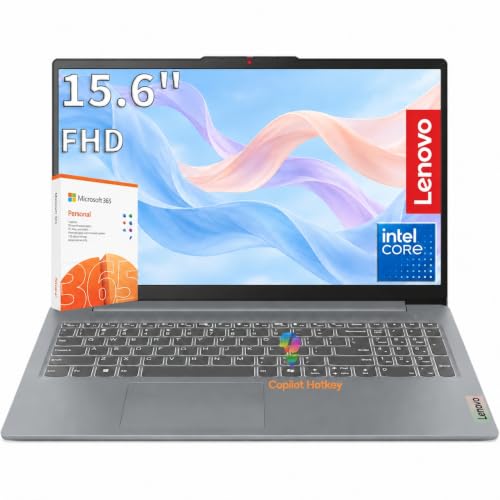
- Intel N100 with 8GB DDR5 and 256GB NVMe SSD
- 15.6-inch FHD anti-glare display for workdays
- Privacy shutter, TPM 2.0, and Ethernet included
Best For: Budget-conscious small businesses needing a simple daily driver
Balanced Hybrid-Work Pick

- Ryzen 3 7330U with 16GB RAM and 512GB SSD
- Windows 11 Pro with Microsoft Copilot included
- 15.6-inch FHD IPS anti-glare display
Best For: Hybrid workers and small teams wanting a practical all-rounder
Value Pro Collaboration Laptop

- 16GB RAM and 512GB SSD for everyday multitasking
- 15.6-inch FHD anti-glare screen with privacy shutter
- WiFi 6, Ethernet, USB-C, and HDMI for offices
Best For: Teams that need a dependable work laptop for calls and productivity
Value Business Pick – Lenovo V15 Gen 4 for Everyday Office Work
If you want laptops for small businesses that balance performance, ports, and a familiar Windows Pro setup, the Lenovo V15 Gen 4 is an easy practical choice. Its Core i5-13420H, 16GB RAM, and 512GB SSD are built for multitasking, while the 15.6-inch FHD screen, numeric keypad, HDMI, and RJ45 make it straightforward to use in an office.
Best For: Small business owners who need a dependable Windows 11 Pro laptop for daily productivity, meetings, and wired office connectivity.
Pros:
- Intel Core i5-13420H with 16GB RAM helps handle multiple apps and browser tabs.
- 512GB SSD supports faster boot times and file access.
- Includes HDMI, RJ45, USB-C, USB-A, webcam, and a numeric keypad.
- Windows 11 Pro adds productivity-focused features for work.
Cons:
- Integrated Intel UHD graphics are basic for demanding creative work.
- The 15.6-inch design is less portable than smaller business laptops.
This Lenovo leans into the essentials that matter most for office use: solid day-to-day speed, useful wired ports, and Pro-level software. It is a strong fit when you want a no-frills business machine rather than a premium ultrabook.
Budget Starter Pick – HP 14" Business Laptop for Light Work
For buyers comparing laptops for small businesses on a tighter budget, this HP 14-inch model covers light work without a lot of complexity. The Intel N150 processor, 4GB RAM, and 128GB UFS storage are best suited to basic office tasks, while the compact 14-inch anti-glare display and included Office 365 year can be appealing for simple productivity.
Best For: Solo users or very small teams that need a basic, low-cost laptop for documents, email, web browsing, and video calls.
Pros:
- Compact 14-inch anti-glare screen is easy to carry and use in bright spaces.
- Includes Wi-Fi, Bluetooth, USB-C, USB-A, HDMI, and an SD card reader.
- Windows 11 Home and 1-year Office 365 add immediate productivity tools.
- Low-power Intel N150 is aimed at everyday computing tasks.
Cons:
- 4GB RAM is limited for heavier multitasking.
- 1366 x 768 display resolution is modest for detailed work.
- 128GB storage may feel tight over time without expansion.
This HP is a budget-first option that works best when your workload stays simple. It makes sense if affordability matters more than speed, screen sharpness, or long-term headroom.
High-Performance Workhorse – Lenovo V15 with Ryzen 7 Power
If your laptops for small businesses need more room to grow, this Lenovo V15 steps up with a Ryzen 7 7730U, 40GB RAM, and 1TB SSD. It is clearly aimed at heavier everyday business workloads, giving you plenty of memory for multitasking, fast storage for files, and the same practical 15.6-inch FHD, numeric keypad, HDMI, and RJ45 setup that office users often want.
Best For: Small business teams and power users who need strong multitasking, lots of storage, and Windows 11 Pro.
Pros:
- Ryzen 7 7730U and 40GB RAM are built for demanding multitasking.
- 1TB SSD gives generous room for apps, files, and fast access.
- Includes HDMI, RJ45, USB-C, webcam, Wi-Fi, and Bluetooth.
- Windows 11 Pro supports business-focused organization and collaboration.
Cons:
- Still uses integrated graphics, so it is not a graphics-heavy workstation.
- At 3.6 pounds, it is portable but not ultra-light.
This is the most capable all-rounder in the group for users who keep many apps open and need plenty of storage. It is a smart pick when you want desktop-like comfort in a standard business laptop form factor.
Portable Everyday Pick – Lenovo 15.6" FHD for Mobile Work
For laptops for small businesses that need to stay light and easy to carry, this Lenovo 15.6-inch model focuses on efficient everyday performance. The Intel N150, 8GB LPDDR5 RAM, and 128GB UFS storage are a practical combo for browsing, documents, and basic office apps, while the FHD anti-glare display, WiFi 6, and Copilot hotkey add convenience for mobile work.
Best For: Mobile professionals, students, or small business users who want a lightweight laptop for everyday tasks and meetings.
Pros:
- 8GB LPDDR5 memory is a clear step up from entry-level 4GB systems.
- 15.6-inch FHD anti-glare display supports comfortable daily use.
- WiFi 6, Bluetooth 5.2, USB-C, HDMI, and SD card reader improve flexibility.
- Light 3.42-pound design makes it easy to travel with.
Cons:
- Intel N150 is best for everyday tasks, not heavier workloads.
- 128GB storage is modest for larger app libraries or local files.
- Windows 11 Home is less business-oriented than Windows Pro.
This Lenovo is the most travel-friendly option here, and it keeps the focus on efficiency rather than raw power. It suits users who want a simple, modern laptop for work on the go.
Certified Refurbished Workhorse – Dell Latitude 5420 14" Business Laptop
For laptops for small businesses, the Dell Latitude 5420 is a practical pick if you want a compact Windows 11 Pro machine with enough memory for everyday multitasking. Its 14-inch FHD display, Intel Core i5 processor, 16GB of RAM, and 256GB SSD give it the basics needed for office apps, video calls, and regular file work.
Best For: Small teams or solo owners who want a portable, business-focused laptop for daily admin work and external display use.
Pros:
- 16GB of RAM helps with smoother multitasking across business apps.
- 14-inch 1080p matte screen is easier to work on in bright spaces.
- Includes HDMI, Thunderbolt ports, Ethernet, and Wi-Fi for flexible connectivity.
- Windows 11 Pro is a good fit for business use.
Cons:
- 256GB SSD is modest if you store lots of files locally.
- Renewed condition may not suit buyers who want brand-new hardware.
- 14-inch display may feel small for long spreadsheet sessions.
Overall, this Latitude 5420 is a solid no-frills business laptop for teams that value portability, wired connectivity, and a professional feature set over maximum storage.
Budget Team Multitasker – Lenovo V15 Gen 5 15.6" FHD Laptop
If you’re comparing laptops for small businesses, the Lenovo V15 Gen 5 stands out for practical work features at a budget-conscious level. It pairs 16GB of DDR5 memory with a 512GB SSD, a 15.6-inch Full HD anti-glare display, Wi-Fi 6, Bluetooth 5.2, and a full port selection for day-to-day office use.
Best For: Budget-conscious businesses that want a larger screen, modern connectivity, and easy expansion potential.
Pros:
- 16GB DDR5 RAM and a 512GB SSD are a strong everyday work combo.
- 15.6-inch FHD anti-glare screen is useful for documents and meetings.
- Wi-Fi 6, Bluetooth 5.2, Ethernet, HDMI, and USB-C support flexible setups.
- Numeric keypad and AI Copilot key add convenience for office workflows.
Cons:
- TN display technology is not ideal if you want premium viewing angles.
- Listed as budget-friendly, so it’s aimed more at efficiency than premium build.
- Storage is good for most work files, but heavy media users may want more later.
This Lenovo is a balanced pick for small business buyers who want a capable, modern laptop that can handle everyday productivity without overspending.
Big-Screen Office Hub – HP 17" Business Laptop with Ryzen 5
For laptops for small businesses, the HP 17-inch model makes sense when screen space matters most. It combines a 17.3-inch FHD anti-glare display, 16GB of RAM, a 512GB SSD, and an AMD Ryzen 5 processor with Windows 11 and Office 365 for Web, giving it a straightforward setup for office tasks, web apps, and multitasking.
Best For: Users who want a roomy display for spreadsheets, documents, and side-by-side work.
Pros:
- Large 17.3-inch anti-glare display is great for multitasking.
- 16GB RAM and Ryzen 5 CPU support everyday business workloads.
- 512GB SSD offers a comfortable amount of local storage.
- Numeric keypad, wide vision camera, and fast charge add work-friendly convenience.
Cons:
- Large 17-inch class design is less portable than 14-inch or 15.6-inch options.
- Native resolution is 1600×900, not full HD at the panel level.
- Best suited to desk use rather than frequent travel.
In short, this HP is a good fit for small businesses that want an easier-to-read, desk-friendly laptop with the basics needed for productive daily work.
Budget-Friendly Office Starter – Lenovo V15 G6 Business Laptop
If you need laptops for small businesses that cover everyday office work without overcomplicating things, this Lenovo V15 G6 keeps the focus on the basics. It pairs a modern Intel N100 processor with 8GB of DDR5 memory and a 256GB PCIe SSD, giving you a practical setup for documents, email, browsing, and routine multitasking.
Best For: Small business owners, remote workers, and teams that want a dependable everyday laptop with business-friendly security features.
Pros:
- Intel N100 chip, 8GB DDR5 RAM, and a fast 256GB NVMe SSD for daily productivity tasks
- 15.6-inch FHD anti-glare display with a 87% screen-to-body ratio for comfortable viewing
- Good connectivity with WiFi 6, Bluetooth 5.2, Gigabit Ethernet, USB-C, USB-A, and HDMI
- Business-focused touches like a privacy shutter, Kensington Nano slot, and TPM 2.0
Cons:
- 256GB storage may feel tight if you keep lots of files locally
- Intel UHD Graphics is aimed at basic media and light tasks, not demanding creative work
- Windows 11 Home is less enterprise-oriented than Pro for some business users
Overall, this is a sensible pick if your priority is dependable office performance, portability, and core security features at a straightforward business-laptop level.
Balanced Hybrid-Work Pick – HP 255 G10 Business Laptop
Among laptops for small businesses, this HP 255 G10 stands out as a balanced option for hybrid work. It combines an AMD Ryzen 3 7330U, 16GB of RAM, and a 512GB SSD with Windows 11 Pro, so it has the specs and software environment needed for day-to-day business apps, meetings, and multitasking.
Best For: Small business users who want a well-rounded Windows 11 Pro laptop with stronger memory and storage.
Pros:
- 16GB RAM and 512GB SSD give it a more comfortable headroom for multitasking and file storage
- Windows 11 Pro plus Microsoft Copilot may help streamline routine workflows
- 15.6-inch FHD IPS anti-glare display offers wide viewing angles and a practical work surface
- Wi-Fi 6, Bluetooth 5.3, and a useful port mix support everyday office setups
Cons:
- Integrated graphics are designed for business use, not heavy visual workloads
- Battery information is modest, so it may not be the best fit for all-day unplugged work
- The processor is geared toward everyday tasks rather than higher-end performance work
This is a strong middle-ground choice for teams that want more memory, more storage, and Windows 11 Pro without moving into a premium price tier.
Value Pro Collaboration Laptop – Lenovo V15 Business Laptop
If your shortlist for laptops for small businesses includes a machine built for everyday collaboration, this Lenovo V15 is worth a close look. It uses an Intel N6000 processor with 16GB of RAM and a 512GB SSD, which is a solid combination for office apps, multiple browser tabs, video calls, and general work-from-anywhere use.
Best For: Small business teams that want a durable, meeting-friendly laptop with strong memory and storage.
Pros:
- 16GB RAM and 512GB SSD support smoother multitasking and quick file access
- 15.6-inch Full HD anti-glare display helps keep long work sessions comfortable
- WiFi 6, Ethernet, USB-C, HDMI, and multiple USB ports offer flexible connectivity
- Business extras like a webcam privacy shutter, quiet keyboard, and military-grade chassis
Cons:
- Intel N6000 is suited to routine productivity, not demanding workloads
- Graphics are integrated, so it is not intended for graphics-heavy work
- At 3.75 lbs, it is portable but not the lightest option in the group
For small businesses that value practicality, this model delivers the storage, memory, and collaboration features needed for reliable everyday office use.
How We Picked the Best Laptops for Small Businesses
We focused on business-friendly features that matter in day-to-day use: processor performance, memory, SSD storage, display size, keyboard quality, webcam and connectivity options, and overall value. For Laptops for Small Businesses, reliability and practicality matter more than flashy extras.
We also looked for models that fit common small-business roles, from administration and sales to field work and general office productivity.
Quick Comparison
Need a simple way to narrow the list? Think in terms of workload. Entry-level models work for web apps, email, and light document use. Midrange systems with 16GB RAM and 512GB SSDs are better for multitasking and growing teams. Higher-memory configurations and larger screens suit heavier spreadsheets, reporting, and all-day desk use.
Key Buying Factors for Laptops for Small Businesses
Performance
For most small business use, look for modern Intel Core or AMD Ryzen processors, or a capable entry-level chip if the workload is simple. If you keep many browser tabs open, use accounting software, or run several apps at once, 16GB RAM is a safer target than 8GB.
Storage
An SSD makes a bigger difference than many buyers expect. A 512GB drive is a practical sweet spot for documents, apps, and local files, while 256GB can work if most data lives in the cloud. Smaller storage sizes are best only for very light users.
Portability and Screen Size
Smaller 14-inch laptops are easier to carry for travel and hybrid work. 15.6-inch models offer a better balance for everyday office tasks, and 17-inch screens can improve comfort for users who spend long hours in spreadsheets or want more on-screen space.
Business Features
Look for a numeric keypad if your team works with invoices or data entry. HDMI, USB-A, USB-C, RJ45, a webcam, and a privacy shutter can all be useful in business environments. Windows 11 Pro is worth prioritizing for organizations that want added management and security options.
Who Should Buy Which Laptops for Small Businesses?
If you want the lowest-cost option for basic office tasks, choose an entry-level system. If your work involves multitasking, choose one of the 16GB/512GB models. If portability matters most, go with a 14-inch laptop. If your job is spreadsheet-heavy or desk-based, a 15.6-inch or 17-inch display may be the better fit.
In short, the best Laptops for Small Businesses are the ones that match your workload today while leaving enough headroom for growth tomorrow.