Managing two or more computers at an office desk should not require duplicate monitors, keyboards, and mice. The right KVM switch lets you share displays and USB peripherals while keeping your workspace cleaner and easier to control.
We selected 10 KVM switches for office monitors covering single-, dual-, and triple-monitor setups, USB-C laptop connectivity, high-refresh 4K, and 8K video. Use the guide below to match the switch to your displays, computers, and daily workflow.
Best 10 Kvm Switches for Office Monitors Picks for 2026
Best Dual-Connection Pick
Unitek 2-Monitor HDMI/DisplayPort KVM

- Connects two desktops to two monitors
- Supports HDMI and DisplayPort with 4K@60Hz
- Offers USB 3.0 sharing and wired switching
Best For: Desktop users needing mixed HDMI/DisplayPort dual-monitor control
Best HDMI Dual-Monitor Value

- Shares two HDMI monitors between two computers
- Supports 4K@60Hz and extend or mirror modes
- Includes four USB 3.0 ports and required cables
Best For: HDMI-equipped offices with two-computer dual-screen setups
Best Triple-Monitor Performance
3-Monitor HDMI/DisplayPort KVM

- Shares three monitors between two computers
- Supports 8K and 4K high-refresh output
- Includes extended and mirrored display modes
Best For: Multi-screen professionals with high-performance desktop systems
Best for Four Computers
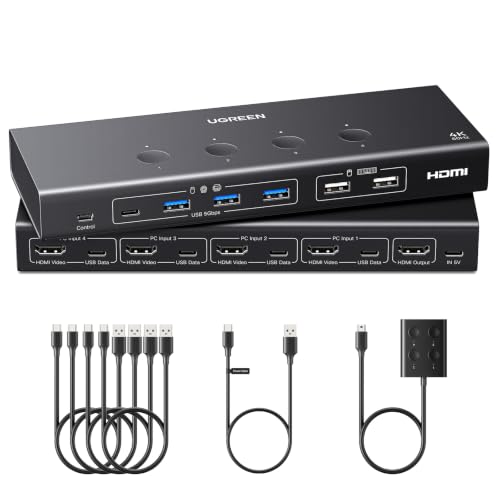
- Controls four computers from one HDMI monitor
- Supports 4K@60Hz with EDID emulation
- Includes six USB ports for shared accessories
Best For: Multi-system offices and test stations using one monitor
Best for Everyday Use

- Supports three monitors up to 8K at 60Hz
- Four USB 3.0 peripheral ports
- Includes desktop controller and cables
Best For: High-resolution triple-monitor office and creator setups
Best Single-Monitor Office Value

- Shares one monitor between two computers
- 4K at 60Hz HDMI output
- Four USB 3.0 peripheral ports
Best For: Single-monitor office desks with shared USB devices
High-Resolution Pick

- Supports high-resolution and high-refresh-rate HDMI output.
- Shares three USB 3.0 ports between two computers.
- Switches by button or wired remote, not hotkeys.
Best For: Two-PC office setups needing high-resolution display support and USB 3.0 sharing
Simple Office Value
4K HDMI KVM with Wired Controller

- Supports 4K@60Hz over HDMI.
- Includes button and wired-controller switching.
- Uses USB 2.0 and needs no external power.
Best For: Basic HDMI-based two-PC office workstations with wired peripherals
Dual-Display Workstation Pick

- Supports mirrored or extended output across two monitors.
- Offers up to 8K@60Hz and 4K@120Hz.
- Includes four USB 3.0 ports and a 12V power adapter.
Best For: Two-monitor workstations with computers that provide dual HDMI outputs
Best Dual-Connection Pick – Unitek 2-Monitor HDMI/DisplayPort KVM
For office setups that mix HDMI and DisplayPort, this Unitek model is among the more flexible kvm switches for office monitors. It connects two desktop computers to two monitors while sharing USB peripherals, with switching available from the unit or a wired desktop controller.
Best For: Desktop users who need dual-monitor HDMI/DisplayPort support and fast USB peripheral sharing.
Pros:
- Supports two computers, two monitors, and HDMI plus DisplayPort connections.
- Handles resolutions up to 4K at 60Hz and supports HDR, 3D, and HDCP 2.2/1.4.
- Includes USB 3.0 ports with data speeds up to 5Gbps, plus a wired controller.
- Includes a 5V/2A power adapter for use with multiple USB devices.
Cons:
- Designed for desktop hosts and explicitly not compatible with laptops.
- Simultaneous HDMI and DisplayPort output requires the necessary video and USB connections on both hosts.
This is a strong fit when your office computers use different video standards. Confirm that both systems are desktops and have the required HDMI, DisplayPort, and USB connections before buying.
Best HDMI Dual-Monitor Value – UGREEN 2-Computer HDMI KVM
This UGREEN switch is a practical choice among kvm switches for office monitors when both computers and monitors use HDMI. It supports dual-monitor extend or mirror modes, 4K at 60Hz, and shared USB peripherals without requiring software installation.
Best For: HDMI-based home and professional offices that need two computers to share two monitors and USB devices.
Pros:
- Controls two computers across two HDMI monitors with extend and mirror modes.
- Supports up to 4K at 60Hz along with HDR, HDR10+, 3D, and HDCP 2.2/1.4.
- Provides three USB-A and one USB-C USB 3.0 ports for shared peripherals.
- Includes HDMI cables, USB cables, power adapters, and a desktop controller.
Cons:
- HDMI-only; it is not a DisplayPort KVM.
- Does not support EDID emulation or keyboard hotkey switching.
- Each computer needs two HDMI cables and one USB-A connection.
Choose this model if your office equipment is already HDMI-based and you prefer physical or wired-controller switching. Check cable lengths and verify that each computer supports dual-screen output.
Best Triple-Monitor Performance – 3-Monitor HDMI/DisplayPort KVM
For demanding workstations, this triple-monitor model expands the usual kvm switches for office monitors setup to three screens per computer. It uses two DisplayPort connections and one HDMI connection for each host, while supporting high refresh rates suited to multitasking, design, and gaming.
Best For: Traders, programmers, designers, and other users who need three displays shared between two high-performance computers.
Pros:
- Supports two computers with three monitors each using HDMI and DisplayPort.
- Supports 8K and high-refresh output, including 4K at 144Hz and 4K at 120Hz.
- Offers extended or mirrored display modes for productivity and presentations.
- Shares USB 3.0 peripherals and works with Windows, macOS, and Linux.
Cons:
- Each computer requires two DisplayPort connections and one HDMI connection.
- Keyboard hotkey switching is not supported.
- Achieving 8K requires compatible monitors, computers, and cables.
This is the specialized option for a three-screen office or mixed work-and-gaming desk. Its bandwidth and connection requirements make it less suitable for simple setups, so verify your graphics outputs and monitor capabilities first.
Best for Four Computers – UGREEN 4-Port HDMI KVM
If your office needs to consolidate several systems, this UGREEN unit stands out among kvm switches for office monitors by letting four computers share one HDMI monitor and a group of USB peripherals. It also offers EDID emulation to help preserve display settings during switching.
Best For: Offices, test stations, meeting rooms, and users managing four HDMI-equipped computers from one monitor.
Pros:
- Switches one HDMI monitor between four computers.
- Supports up to 4K at 60Hz, plus HDR, 3D, and HDCP 2.2/1.4.
- Provides four USB 3.0 and two USB 2.0 ports for shared peripherals.
- EDID emulation can help retain monitor identification, resolution, and display configuration.
Cons:
- HDMI cables and the power adapter are not included.
- Each computer requires an HDMI cable and a USB-A-to-C data cable.
- It is not supported with docking stations.
This model makes the most sense when four systems must share a single display and control set. Budget for the required cables and power connection, and ensure any laptop is awake before switching.
Best USB-C Dual-Monitor Pick – USB-C and HDMI KVM for Laptop and Desktop
For office setups that combine a USB-C laptop with an HDMI desktop, this KVM switch for office monitors shares two displays, a keyboard, and a mouse between both computers. It supports up to 4K at 60Hz, offers copy and extend modes on Windows, and includes 60W PD charging for the laptop.
Best For: Work-from-home users, programmers, and office workers with one USB-C laptop and one HDMI desktop.
Pros:
- Supports two monitors with copy and extend modes on Windows.
- Handles resolutions up to 4K at 60Hz.
- Provides real-world 60W USB-C PD charging.
- Includes a wired controller for convenient switching away from the main unit.
Cons:
- The USB-C computer must support video through DP Alt Mode or Thunderbolt.
- macOS supports mirrored output only.
- It does not support HDMI-to-USB-C adapters, and charging-only USB-C cables will not carry video.
This is a focused choice for a mixed laptop-and-desktop workspace, especially when laptop charging and dual-monitor support matter. Check your USB-C video capability and cable specifications before buying.
Best for Everyday Use – UGREEN 8K Triple-Monitor KVM
This UGREEN KVM switch for office monitors is built for demanding desks with two computers and three displays. Its two DisplayPort 1.4 outputs and HDMI 2.1 output support up to 8K at 60Hz, while four USB 3.0 ports let you share peripherals such as a keyboard, mouse, printer, or webcam.
Best For: Content creators, IT professionals, and office users with triple-monitor computers and high-resolution displays.
Pros:
- Supports three monitors and up to 8K at 60Hz on each output.
- Offers mirror and extend display modes.
- Includes four USB 3.0 peripheral ports.
- Comes with a desktop controller and the required DP, HDMI, and USB cables.
Cons:
- Each computer needs two DisplayPort outputs and one HDMI output to use all three monitors.
- Both computers must support triple-monitor output.
- It does not support keyboard hotkey switching or EDID emulation.
This is the most capable option here for a three-screen office or creator setup, but it requires careful hardware matching. Verify your computers, monitors, cables, and power connections before purchasing.
Best Single-Monitor Office Value – 4K HDMI KVM for Two Computers
For a straightforward two-computer desk, this KVM switch for office monitors shares one HDMI display, keyboard, mouse, and other USB peripherals. It supports 4K at 60Hz, provides four USB 3.0 ports with speeds up to 5Gbps, and includes a wired desktop controller for quick switching.
Best For: Office users who need to alternate between two computers on one 4K monitor while sharing peripherals.
Pros:
- Supports HDMI video up to 4K at 60Hz.
- Provides four USB 3.0 ports for devices such as printers, webcams, and flash drives.
- Offers a wired controller and LED indicators for easy source selection.
- Includes a 12V power adapter and two USB 3.0 cables.
Cons:
- It supports one monitor only.
- Keyboard hotkey switching is not supported.
- Achieving 4K at 60Hz requires compatible computers, HDMI cables, and monitor.
This is a practical, compact choice when a single-monitor workflow is enough and USB peripheral sharing is important. It is less suitable for dual- or triple-display office layouts.
High-Resolution Pick – 8K HDMI KVM for Two PCs
If you need kvm switches for office monitors with fast peripherals and high-resolution displays, this two-port HDMI model is a flexible choice. It connects two computers to one monitor and shares a keyboard, mouse, and other USB devices through three USB 3.0 ports.
Best For: Office users switching between two computers while sharing USB 3.0 accessories and a high-resolution monitor.
Pros:
- Supports up to 8K@30Hz and high refresh rates including 4K@240Hz, 144Hz, and 120Hz.
- Offers USB 3.0 connectivity for peripherals, storage devices, printers, scanners, and more.
- Includes both front-button and wired-remote switching with adaptive EDID and plug-and-play setup.
Cons:
- Does not support hotkey switching.
- Requires three HDMI cables, which are not included.
- 8K@60Hz performance depends on using high-quality HDMI 2.1 cables.
This is the strongest fit for a modern office that values high refresh rates and USB 3.0 sharing. Just verify your cables and remember that switching is limited to the button or wired remote.
Simple Office Value – 4K HDMI KVM with Wired Controller
For straightforward kvm switches for office monitors, this compact two-computer HDMI KVM keeps switching simple. It shares one monitor, keyboard, mouse, and USB devices, while its wired desktop controller lets you change sources without reaching behind your desk.
Best For: Basic two-PC office workstations using HDMI connections and wired keyboard-and-mouse peripherals.
Pros:
- Supports up to 4K@60Hz and lower resolutions.
- Provides both on-device and wired-controller switching.
- Compact, plug-and-play design requires no external power supply or driver software.
Cons:
- Does not support hotkey switching.
- USB ports are USB 2.0, with speeds up to 480Mbps.
- HDMI cables are not included, and the product is not recommended for Mac devices.
This model makes sense when your office needs dependable 4K switching without extra features. Confirm that both computers and the monitor have HDMI ports, and use a suitable HDMI 2.0 cable no longer than 3.3 feet for 4K operation.
Dual-Display Workstation Pick – 8K KVM for Two Monitors
Among kvm switches for office monitors, this dual-monitor model is designed for users who need more screen space. It connects two computers to two HDMI monitors, supports mirrored or extended display modes, and shares four USB 3.0 devices through a powered hub.
Best For: Dual-monitor office workstations that need independent extended displays and shared high-speed USB peripherals.
Pros:
- Supports two monitors with copy and extended display modes.
- Handles up to 8K@60Hz and 4K@120Hz video output.
- Includes four USB 3.0 ports and a 12V power supply for more stable support of high-power USB devices.
Cons:
- Each computer must have two HDMI outputs and support dual-monitor copy or extend modes.
- Does not support keyboard-hotkey switching.
- The 12V adapter is required for a stable setup with high-power USB devices.
This is the most capable option for a two-screen productivity desk, but it has the strictest hardware requirements. Check your computers’ graphics outputs before buying, especially if you need true extended display functionality.
How We Picked the Best Kvm Switches for Office Monitors
We focused on the features that matter most in a real office: monitor capacity, supported resolutions and refresh rates, computer count, video input types, USB connectivity, switching convenience, and compatibility with modern desktops and laptops. The selection includes straightforward two-computer switches as well as models built for multiple monitors, several computers, or USB-C setups.
Specifications such as “4K at 60Hz” or “8K at 60Hz” describe maximum video support, but actual results depend on the computer, cable, monitor, and connection standard used. Confirm the complete signal path before buying.
Quick Comparison
- Single-monitor, two-computer setups: Choose a compact HDMI KVM with USB 3.0 if you share one display, keyboard, and mouse.
- Dual-monitor workstations: Look for a switch explicitly supporting two monitors and the required HDMI or DisplayPort combination.
- Triple-monitor desks: Select a three-monitor model and verify that both computers can drive all displays at your intended resolution.
- USB-C laptops: A USB-C KVM with power delivery can reduce adapters, but check its charging wattage and video-mode requirements.
- Several computers: A four-computer KVM is useful when one monitor and one set of peripherals must serve multiple systems.
Key Buying Factors for Kvm Switches for Office Monitors
Monitor Layout and Video Standards
Start with the number of monitors you need to share. Then match every port: HDMI and DisplayPort are not interchangeable without the correct adapters, and adapters may limit resolution or refresh rate. For office productivity, 4K at 60Hz is often sufficient; 8K or 4K at 120Hz is more relevant for high-resolution, high-refresh workflows.
USB and Peripheral Support
Check whether the switch offers USB 2.0 or USB 3.0. USB 3.0 is preferable for storage devices, printers, webcams, and other data-heavy peripherals. Also confirm the number of available ports and whether audio, microphone, or wired switching is included.
Power and Compatibility
Some KVMs need external power, particularly models handling multiple monitors or USB-C power delivery. Verify operating-system support, laptop charging requirements, graphics-output capabilities, and whether the switch supports extended displays rather than mirroring only.
Switching Method and Desk Fit
Buttons, wired remotes, keyboard hotkeys, and software controls each suit different desks. Measure cable distances and allow room for the KVM, power adapter, and connected cables. High-bandwidth video cables should meet the specification required by your chosen resolution.
Who Should Buy Which Kvm Switches for Office Monitors?
Choose a basic single-monitor KVM if you alternate between two computers and only need one display, keyboard, and mouse. Choose a dual-monitor model for a conventional productivity workstation that keeps two screens active across two systems.
Choose a triple-monitor KVM if your work depends on a broad, persistent desktop and both computers support three outputs. Choose USB-C with power delivery for a laptop-centered desk where simplified docking is more important than maximum flexibility.
Choose a four-computer model for a shared monitor-and-peripheral station serving several systems. Finally, consider an 8K-capable switch only when your monitors and computers can use that bandwidth; otherwise, a dependable 4K model may deliver better value.