Gaming laptops run hot, and thermal throttling can quickly drag down frame rates, fan noise, and comfort. A well-chosen cooling pad helps keep temperatures steadier during long sessions.
In this roundup, we focused on high-airflow designs, laptop fit, stability, and features that actually matter for performance-minded players.
Best 10 High Performance Gaming Laptop Cooling Pad Picks for 2026
Turbo-Chamber RGB Workhorse

- 5.5-inch turbo fan with airtight chamber
- 3 USB ports plus adjustable RGB
- Dust filter and three tilt angles
Best For: Large gaming laptops and users who want cooling plus desk hub features
Turbo-Fan Performance Pick

- Two 4500 RPM turbo fans
- Rubber seal boosts air pressure
- Three speeds and RGB lighting
Best For: Performance-focused gamers who want powerful cooling and can tolerate more noise
Smart Adaptive Option

- Automatic fan speed control
- Airtight chamber with foam seals
- Synapse presets and custom curves
Best For: Users who want smart, software-tuned cooling across many laptop sizes
Sealed Turbo Cooling Pick

- 4200 RPM turbofan with sealed foam
- Infinitely variable speed control
- Dust filter and rear-exhaust support
Best For: Noise-tolerant gamers who want aggressive cooling for 13-17.3 inch laptops
RGB 9-Fan Cooling Max

- 9 fans with selectable modes
- 8 height settings for comfort
- 10 RGB light modes and LCD speed display
Best For: Large gaming laptops needing strong cooling and adjustable ergonomics
Quiet 360° Cooling Stand

- 9 fans with up to 2600 RPM control
- Whisper-quiet cooling below 40 dB
- 5 heights, 2 USB ports, and phone holder
Best For: Quiet gaming setups that need ergonomic adjustment and device convenience
Best for Comfort

- 5.5-inch turbo-fan with high wind pressure
- Sealed foam helps lock in airflow
- Can be loud at up to 65 dB
Best For: Users who want maximum cooling strength for demanding gaming laptops
Power Cooling Pick
llano V12 Gaming Cooler with 5.5" Turbo Fan

- 5.5-inch turbo fan for fast heat reduction
- Touch controls with real-time LED fan-speed display
- Includes dust filter, extra filter, and height adjustment
Best For: Large gaming laptops and users who want straightforward, high-airflow cooling
Turbo Seal Choice
KLIM Everest 4300 RPM Cooling Pad
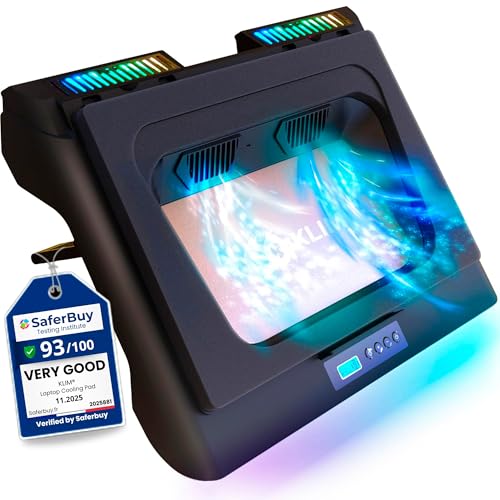
- Two 4300 RPM turbo fans for strong airflow
- Sealed foam design helps boost pressure and cooling
- Six speeds, RGB lighting, and an extra USB port
Best For: Compatible gaming laptops that need fast, high-pressure cooling
Smart Control Upgrade
llano V12 Ultra with AI Cooling

- AI cooling modes adjust fan speed automatically
- 5.5-inch turbo fan targets large gaming laptops
- RGB lighting plus 1-in-3 USB 3.0 hub
Best For: Large gaming laptops and users who want smart software-assisted cooling
Turbo-Chamber RGB Workhorse – llano V12 5.5" Cooling Pad
If you want a high performance gaming laptop cooling pad that also works as a desk upgrade, the llano V12 leans hard into raw airflow and convenience. Its 5.5-inch turbo fan, airtight pressure chamber, and dust filter are aimed at lowering temps fast while keeping the setup organized with extra USB ports and adjustable lighting.
Best For: Gamers and power users with larger 15.6-19 inch laptops who want strong cooling, RGB, and hub functionality in one stand.
Pros:
- Large 5.5-inch turbo fan with sealed foam design for focused cooling
- Three USB 2.0 ports turn it into a practical workstation hub
- Removable dust filter helps keep internal laptop fans cleaner
- Three tilt angles and RGB modes add comfort and customization
Cons:
- Built for larger laptops, so smaller systems are outside its target range
- At up to 70dB, it may be noticeable during heavy use
- The included USB ports are for peripherals, not device charging
Overall, the V12 is a strong fit if you care more about cooling power and desk utility than portability. It combines aggressive airflow with practical extras, making it a well-rounded choice for gaming sessions and long rendering workloads.
Turbo-Fan Performance Pick – KLIM Mistral Gaming Cooler
The KLIM Mistral is built for buyers who want a high performance gaming laptop cooling pad with a straightforward focus on airflow. Its twin 4500 RPM turbo fans and rubber seal are designed to push a lot of air through the chassis quickly, which makes it a strong option for reducing overheating during demanding games.
Best For: Gamers with 15.6-17.3 inch laptops who want maximum cooling and don’t mind extra fan noise.
Pros:
- Two 4500 RPM turbo fans deliver very strong airflow
- Rubber ring seal helps concentrate air pressure for better cooling
- Three fan speed levels let you balance noise and performance
- Built-in USB port and adjustable RGB lighting add convenience
Cons:
- It is louder than average, especially at max speed
- Compatibility is limited to laptops with bottom ventilation grills
- Best suited to 14-17 inch models, not larger systems
If raw cooling performance is the priority, the Mistral is one of the more aggressive options here. Just be aware that its cooling strength comes with a noise tradeoff, so it suits headphone users and performance-focused setups best.
Smart Adaptive Option – Razer Intelligent Cooling Pad
The Razer Laptop Cooling Pad takes a more automated approach to high performance gaming laptop cooling pad design. Instead of relying only on fixed fan settings, it adjusts fan speed automatically and also supports presets and custom curves, making it a flexible choice for users who want thermal control without constant manual tweaks.
Best For: Laptop owners who want smart automatic cooling, RGB, and software-based control across a wide laptop size range.
Pros:
- Automatic fan control adapts cooling from idle to full load
- Airtight pressure chamber and foam seals help reduce air leakage
- Fits most 14-inch to 18-inch laptops with three magnetic frames
- Razer Synapse support allows preset and custom fan curves
Cons:
- The 3000 RPM fan is less aggressive on paper than some turbo-fan rivals
- Requires software for deeper customization through Synapse
- It is a heavier, larger unit than basic cooling stands
This model stands out if you value smart control over brute force. It offers a more refined cooling experience with broad compatibility, making it a practical pick for users who like tuning performance through software.
Sealed Turbo Cooling Pick – IETS GT500 High-Airflow Pad
The IETS GT500 is a serious high performance gaming laptop cooling pad built around a 4200 RPM industrial-grade turbo fan and sealed foam design. It focuses on aggressive heat removal, especially for laptops with rear exhaust setups, and its infinitely variable speed control makes it easy to dial cooling up or down depending on the workload.
Best For: Gamers who want maximum cooling in a sealed, adjustable design and are comfortable with more fan noise.
Pros:
- 4200 RPM turbofan with combined sealed foam for powerful cooling
- Infinitely variable speed gives precise control from office to gaming use
- Bottom air intake design helps with rear exhaust laptop heat backflow
- Dust filter adds protection for the laptop’s internals
Cons:
- Noise rises with speed and can reach 55 dB at maximum
- Best suited to users who can accept a performance-first noise profile
- Compatibility tops out at 17.3-inch laptops
The GT500 is the most obvious pick for buyers who prioritize cooling strength above all else. It is especially appealing for thermally stressed gaming laptops, but the noise level means it is not the quietest choice for shared spaces.
RGB 9-Fan Cooling Max – ChillCore 9-Fan RGB Cooler
If you want a high performance gaming laptop cooling pad that leans hard into strong airflow and style, the ChillCore A21 is built around 9 fans, adjustable fan modes, and RGB lighting. It also adds 8 height settings, so you can tune both cooling and comfort for longer gaming sessions.
Best For: Gamers with larger laptops who want aggressive cooling, RGB flair, and ergonomic adjustment.
Pros:
- 9-fan layout with multiple fan modes for efficient cooling
- 8 height adjustments for a better typing and viewing angle
- LCD display shows fan speed clearly
- 10 RGB light modes for a more immersive setup
Cons:
- Best suited to larger laptops in the 15.6-19.3 inch range
- RGB lighting may be unnecessary if you prefer a plain setup
- Focus is more on cooling and features than portability
The ChillCore A21 is a strong pick if you want a feature-rich cooling stand with solid adjustability and a gamer-friendly look. Its quiet operation and multi-fan design make it a practical option for keeping heat under control during play.
Quiet 360° Cooling Stand – TECKNET 9-Fan Phone Stand
The TECKNET laptop cooling pad is a practical choice if you want a high performance gaming laptop cooling pad with broad compatibility and quiet operation. Its 9 fans, stepless speed control up to 2600 RPM, and 360-degree airflow are designed to help keep heat down during long work or gaming sessions.
Best For: Users who want quiet cooling, extra device support, and a comfortable adjustable stand.
Pros:
- 9 fans with stepless speed control up to 2600 RPM
- Whisper-quiet operation rated below 40 dB
- 5 height settings for ergonomic positioning
- 2 USB ports plus built-in phone holder
Cons:
- Fan speed and airflow tuning may be more than some casual users need
- Smaller than some heavy-duty cooling pads at 14.4 x 10.5 inches
- Best fit is limited to laptops up to 17.3 inches
Overall, this TECKNET model balances cooling power and everyday usability well. The quiet design, dual USB ports, and phone stand make it especially appealing if you want a gaming cooling pad that also works cleanly on a desk.
Best for Comfort – IETS GT600 Sealed Foam Cooler
If raw cooling is the priority, this high performance gaming laptop cooling pad takes a different approach with a single gigantic 5.5-inch turbo-fan, sealed foam, and 360-degree cooling. The IETS GT600 is aimed at serious heat control for 14.1-19.3 inch gaming laptops, especially those with rear exhaust layouts.
Best For: Power users and gamers who want maximum cooling performance and can tolerate more noise.
Pros:
- Large 5.5-inch turbo-fan with strong wind pressure
- Sealed foam helps lock in airflow for better cooling
- 3-port USB hub adds useful connectivity
- Bottom air intake helps avoid rear-exhaust heat backflow
Cons:
- Can reach 65 dB at top speed, so noise-sensitive users should be cautious
- Heavier and more industrial in design than typical cooling pads
- Cooling strength may be overkill for lighter-use laptops
The GT600 stands out as the most aggressive cooling option in this group, with hardware built for stronger airflow and better heat extraction. If you value cooling performance above quietness, it is the most specialized choice here.
Power Cooling Pick – llano V12 Gaming Cooler with 5.5" Turbo Fan
If you want a high performance gaming laptop cooling pad that prioritizes raw airflow, the llano V12 is built for heavy sessions on 15.6-19 inch laptops. Its 5.5-inch turbo fan, adjustable speed control, and included dust filter make it a practical option for keeping heat in check during gaming or demanding work.
Best For: Gamers and power users who want strong cooling, a larger laptop fit, and easy touch controls.
Pros:
- 5.5-inch turbo fan is rated for a rapid 44°C temperature drop in 90 seconds.
- Touch controls and LED display make fan-speed adjustments straightforward.
- Includes a dust filter plus an extra filter in the box for easier maintenance.
- Adjustable height and non-slip baffles add comfort and stability.
Cons:
- Only has one fan, so the design depends on that single large blower.
- Best suited to larger laptops, not compact models.
- Weight is relatively substantial at 2.15 kg.
Overall, the llano V12 is a strong pick if your priority is serious cooling power with simple controls and broad large-laptop compatibility. It balances performance and usability well for long gaming or work sessions.
Turbo Seal Choice – KLIM Everest 4300 RPM Cooling Pad
The KLIM Everest is a high performance gaming laptop cooling pad designed to push a lot of air through compatible laptops quickly. Its sealed foam design helps create pressure for stronger cooling, and the 4300 RPM turbo fans are aimed at reducing heat fast during intensive use.
Best For: Gamers who want aggressive cooling performance and have a laptop with bottom ventilation.
Pros:
- Two 4300 RPM turbo fans are designed for very high airflow.
- Detachable foam seal helps maximize cooling pressure.
- Six fan speeds and RGB lighting add flexibility and style.
- Extra USB port is useful for peripherals like a mouse or keyboard.
Cons:
- Requires underside ventilation openings to work properly.
- Not suitable for laptops without bottom grids, including MacBook models.
- Compatibility tops out at 17.3 inches.
If your laptop supports bottom airflow and you want an aggressively engineered cooler, the Everest stands out for its sealed design and powerful fan setup. Just double-check compatibility before buying.
Smart Control Upgrade – llano V12 Ultra with AI Cooling
For buyers looking for a high performance gaming laptop cooling pad with more automation, the llano V12 Ultra adds smart software control to a powerful turbo-fan design. It supports 15.6-19 inch gaming laptops and offers manual or AI-based fan modes so cooling can adapt to workload without constant tweaking.
Best For: Users who want smart, adjustable cooling for large gaming laptops with convenient software control.
Pros:
- AI temperature control offers Low, Medium, and High modes that adjust automatically.
- 5.5-inch turbo fan is lab-tested to reduce CPU/GPU temperatures by 22°C in 90 seconds.
- Three adjustable heights help improve ergonomics during long sessions.
- Includes RGB lighting and a 1-in-3 USB 3.0 hub for extra connectivity.
Cons:
- Software control depends on downloading the Myth.cool app.
- Built specifically for larger 15.6-19 inch laptops.
- Heavier than typical pads at 4 pounds.
The V12 Ultra is a strong choice if you want cooling that can be both powerful and more hands-off. Between the smart modes, removable dust filter, and USB hub, it feels aimed at serious laptop users who value convenience as much as airflow.
How We Picked the Best High Performance Gaming Laptop Cooling Pad
For a High Performance Gaming Laptop Cooling Pad, raw airflow is only part of the story. We prioritized models with strong fan output, good sealing or concentrated airflow where relevant, reliable laptop support, adjustable positioning, and practical controls such as variable fan speed or smart fan management. We also considered build quality, noise behavior, and compatibility with larger gaming laptops.
Quick Comparison
Turbo-fan and sealed-foam designs tend to deliver the most aggressive cooling for performance laptops, especially when the goal is lowering GPU and CPU temperatures under sustained load. Multi-fan pads can be a better fit if you want a broader cooling surface, lighter operation, or added extras like RGB lighting and phone stands. If you use a thicker 15.6-inch-plus gaming laptop, confirm the pad’s size range and support height before buying.
Key Buying Factors for a High Performance Gaming Laptop Cooling Pad
Airflow Type
High-speed turbo fans usually push air more forcefully into the laptop intake zones, while multi-fan layouts spread cooling across a larger area. Choose based on whether your laptop benefits more from concentrated pressure or wider coverage.
Seal and Air Control
Sealed foam, airtight chambers, and rubber gaskets can improve efficiency by directing more air into the chassis instead of letting it escape. This matters most for laptops with bottom intake vents.
Noise and Speed Control
More RPM can mean more cooling, but also more noise. Stepless or adaptive speed control helps you balance temperature reduction against comfort, especially for daily use or shared spaces.
Size, Stability, and Ergonomics
A good pad should fit your laptop securely and keep it stable at an angle that feels comfortable for typing and gaming. Adjustable height and non-slip surfaces are useful for longer sessions.
Extras That Matter
RGB lighting, USB hubs, dust filters, and phone stands are nice additions, but they should come after cooling performance and fit. If you want the best results, make performance the first priority.
Who Should Buy Which High Performance Gaming Laptop Cooling Pad?
If you want maximum cooling for a large gaming laptop, look first at turbo-fan models with sealed airflow designs. If you prefer a quieter, more versatile setup, a multi-fan pad with adjustable speed may be the better balance. Budget-conscious buyers should focus on stable fit and dependable airflow before paying for premium extras. For power users who game or stream for hours, the best choice is usually the pad that combines strong airflow, adjustable control, and a secure seal for sustained thermal relief.