If your gaming laptop runs hot, a good cooling pad can help sustain performance, reduce throttling, and make long sessions more comfortable.
This roundup focuses on models that combine strong airflow with built-in USB expansion, so you get better cooling and fewer port tradeoffs.
Best 10 Gaming Laptop Cooling Pad with USB Hub Picks for 2026
Turbo-Cooled Workstation Pick
llano V12 Gaming Laptop Cooling Pad

- 5.5-inch turbofan with sealed foam chamber
- Three USB 2.0 ports for peripherals
- Dust filter, RGB lighting, and tilt adjustment
Best For: Large gaming laptops needing strong cooling and hub expansion
Quiet Budget Multifan Choice

- Five fans with blue LED accents
- Dual USB hub for extra peripherals
- Six height settings for ergonomic use
Best For: Affordable cooling and comfort for 12-17 inch laptops
Smart Premium Auto-Cooling Pick
Razer Adaptive Laptop Cooling Pad

- Automatic fan control based on temperature
- Three USB Type-A ports for accessories
- Preset and custom curves via Synapse
Best For: Premium users wanting smart cooling and USB expansion
High-Output Performance Pick
IETS GT500 Turbo Laptop Cooler

- 5000 RPM turbo fan with sealed foam
- Infinitely variable speed control
- Three-port USB hub and rear-exhaust support
Best For: Power users needing maximum cooling even with more noise
Performance Cooling Pick

- 5.5-inch turbo fan with airtight pressure chamber
- Built-in 3-port USB hub and touch controls
- Fits 15-19 inch gaming laptops
Best For: Large gaming laptops needing strong cooling and extra USB ports
Heavy-Duty RGB Choice
IETS GT600 RGB Laptop Cooling Pad

- 5.5-inch turbo fan with high wind pressure
- Sealed foam design for focused cooling
- 3-port USB hub plus RGB lighting
Best For: Noise-tolerant gamers wanting maximum cooling and RGB flair
Practical Workstation Pick
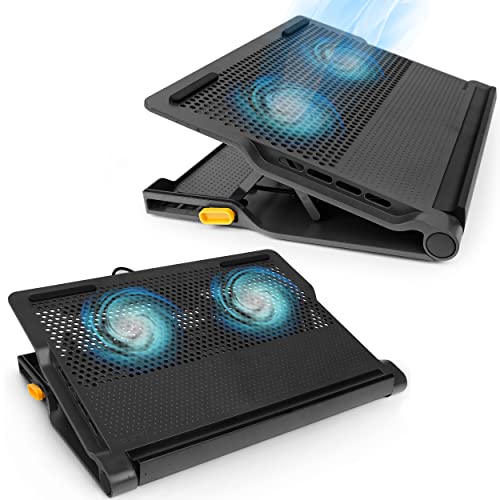
- Dual fans with a simple USB-A powered setup
- 4-port USB hub for accessories and peripherals
- Adjustable height for better desk ergonomics
Best For: Desk users who want cooling plus extra USB connectivity
High-Airflow RGB Cooler
llano V11 Pro 4.7-inch turbofan cooler

- 4.72-inch turbofan with sealed airflow design
- 3-port USB 2.0 hub for peripherals
- Runs from its own 12W AC adapter
Best For: Users who want strong cooling and basic USB expansion for 14-17.3 inch laptops
Expanded Hub Stand
Tilted Nation laptop cooler with USB-C and USB-A hub
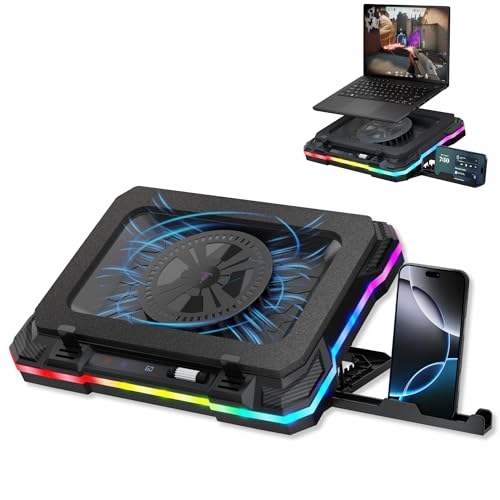
- 600 to 2800 RPM fan speed range
- 2 USB-A 3.0 and 2 USB-C ports
- 7 tilt levels plus built-in phone holder
Best For: Gamers who want adjustable cooling and lots of desk-side connectivity
Smart-Control Power Pad
llano V12 Ultra 5.5-inch turbo fan

- Software-controlled low, medium, and high cooling modes
- 5.5-inch turbo fan with 36W power adapter
- 1-in-3 USB 3.0 hub and removable dust filter
Best For: Owners of 15.6-19 inch gaming laptops who want smart cooling and fast USB expansion
Turbo-Cooled Workstation Pick – llano V12 Gaming Laptop Cooling Pad
If you want a gaming laptop cooling pad with usb hub that leans hard toward raw cooling and desk utility, the llano V12 is built for exactly that. Its 5.5-inch turbofan, sealed foam chamber, and 36W power setup are aimed at reducing heat quickly on larger gaming laptops while the built-in hub keeps peripherals connected.
Best For: Gamers and creators using 15.6- to 19-inch laptops who want strong cooling plus extra USB ports on the same stand.
Pros:
- 5.5-inch turbofan with airtight chamber for powerful cooling performance
- Three USB 2.0 ports help support a mouse, keyboard, and drive at once
- Dust filter and foam seal are designed to reduce debris buildup
- RGB lighting and three tilt angles add desk appeal and comfort
Cons:
- Uses USB 2.0 ports, and the hub is for peripherals only, not charging
- Larger, heavier design may be less convenient for compact setups
- Noise is listed at up to 70dB, so it may not suit quiet-first users
Overall, the llano V12 is a strong pick if cooling performance and desk expansion matter more than portability. It combines serious airflow with a practical USB hub, making it a good fit for demanding gaming or rendering sessions.
Quiet Budget Multifan Choice – Kootek 5-Fan Cooling Pad
The Kootek is a straightforward gaming laptop cooling pad with usb hub support for users who want broad coverage and simple extra connectivity. With five fans, six height settings, and a dual USB hub, it focuses on everyday comfort and dependable airflow rather than flashy extras.
Best For: Budget-minded buyers who want a quiet, adjustable cooling stand for 12- to 17-inch laptops.
Pros:
- Five fans provide wide cooling coverage across the laptop base
- Two USB hub ports add useful peripheral connectivity
- Six adjustable height settings improve ergonomic comfort
- Anti-slip stops help keep the laptop secure during use
Cons:
- USB hub is only dual-port, so it is less expandable than some rivals
- Type-C devices need an adapter for the included USB connection
- Best suited to mid-size laptops rather than oversized machines
For a simple, low-fuss cooling stand, the Kootek delivers a solid balance of airflow, comfort, and extra ports. It is especially appealing if you want broad fan coverage without moving into premium pricing.
Smart Premium Auto-Cooling Pick – Razer Adaptive Laptop Cooling Pad
If you want a gaming laptop cooling pad with usb hub that feels more advanced than a basic fan stand, the Razer model stands out for its smart, automatic approach. It uses adaptive fan control, an airtight pressure chamber, and a three-port USB hub to keep a laptop cooler while preserving a cleaner, more organized setup.
Best For: Users who want premium smart cooling for 14- to 18-inch laptops and are already in the Razer ecosystem.
Pros:
- Automatic fan control adjusts speed based on system temperatures
- Three USB Type-A ports expand connectivity for accessories
- Magnetic frames support different laptop sizes from 14 to 18 inches
- Preset and custom fan curves add tuning flexibility via Synapse
Cons:
- Premium positioning makes it less of a value buy than simpler pads
- Best features depend on Razer Synapse for deeper customization
- Single-fan design may appeal less to buyers who want a multi-fan look
This is a strong choice if you value automatic thermal management and software control over a more basic manual cooler. The Razer approach is especially appealing for users who want a refined desk accessory with built-in USB expansion.
High-Output Performance Pick – IETS GT500 Turbo Laptop Cooler
The IETS GT500 is a performance-first gaming laptop cooling pad with usb hub support for buyers who care most about aggressive heat reduction. Its 5000 RPM turbo fan, sealed foam design, and variable speed control make it a serious option for demanding gaming laptops, especially those with rear exhaust layouts.
Best For: Power users who want maximum cooling performance and can tolerate more fan noise.
Pros:
- Industrial-grade turbo fan reaches up to 5000 RPM
- Infinitely variable speed lets you tune cooling for different tasks
- Three-port USB hub adds practical connectivity
- Bottom air intake design is meant to help with rear exhaust laptops
Cons:
- Noise can reach 65dB at the highest speed
- Performance-focused design may be overkill for lighter laptop use
- Best fit is limited to 13- to 17.3-inch laptops
If cooling performance is your top priority, the GT500 is the most aggressive option in this group. It trades quiet operation for strong airflow and fine speed control, making it a better match for heavy gaming sessions than casual desk use.
Performance Cooling Pick – llano V12 Laptop Cooling Pad
If you want a gaming laptop cooling pad with usb hub that focuses on raw cooling power, the llano V12 is built around a 5.5-inch turbo fan and an airtight pressure chamber. It’s designed for larger gaming laptops and heavy workloads, with adjustable speed and a real-time display to help you balance airflow and noise.
Best For: Gamers and creators with 15.6-19 inch laptops who want strong cooling, a built-in 3-port hub, and simple touch controls.
Pros:
- 5.5-inch turbo fan and airtight chamber for fast cooling performance
- Claims up to a 44℃ temperature drop in 90 seconds
- Built-in 3-port hub for extra USB connectivity
- Touch controls, LED display, and adjustable height for easier use
Cons:
- Designed for 15-19 inch laptops, so smaller models may not fit as well
- Needs the included power adapter for full performance
Overall, the llano V12 is a strong pick if cooling speed matters more than extras. It combines serious airflow with practical features like dust protection and ergonomic adjustment, making it a solid fit for long gaming sessions.
Heavy-Duty RGB Choice – IETS GT600 RGB Laptop Cooling Pad
The IETS GT600 RGB is a gaming laptop cooling pad with usb hub that leans into maximum airflow and a sealed design. Its 5.5-inch turbo fan, magnetic sealing foam, and 360-degree cooling approach are aimed at laptops that need aggressive heat removal, especially models with rear exhaust vents.
Best For: Gamers who want a high-pressure cooler with RGB lighting, a 3-port hub, and strong support for 14.1-19.3 inch laptops.
Pros:
- Gigantic 5.5-inch turbo fan with 71.9 MmH2O wind pressure
- Sealed foam and bottom intake design for concentrated cooling
- Includes a 3-port USB hub and seven height-adjustable brackets
- RGB lighting with multiple modes and adjustable speed
Cons:
- Can reach up to 65 dB at the highest speed
- Bulkier metal build may be less convenient for travel
If you prioritize cooling performance and don’t mind more noise, the GT600 stands out. Its sealed foam setup and high-pressure fan make it a specialized option for demanding gaming rigs.
Practical Workstation Pick – Targus Chill Mat+ 4-Port Hub
If you need a gaming laptop cooling pad with usb hub that also works well as an everyday desk accessory, the Targus Chill Mat+ keeps things straightforward. Its dual high-speed fans, 4-port USB hub, and adjustable height make it a practical option for laptops up to 17 inches.
Best For: Users who want a simple, portable cooling stand with four USB ports and ergonomic height adjustment.
Pros:
- Dual high-speed fans for everyday laptop cooling
- 4-port USB hub for connecting peripherals
- Adjustable height, including a 4-inch setting
- Lightweight and portable design for desk use
Cons:
- Uses the laptop’s USB-A connection for power
- Best suited for laptops up to 17 inches
The Targus Chill Mat+ is the most utility-focused pick here. It doesn’t chase extreme cooling specs, but it offers a useful mix of airflow, hub expansion, and ergonomic flexibility for regular work or play.
High-Airflow RGB Cooler – llano V11 Pro 4.7-inch turbofan cooler
If you want a gaming laptop cooling pad with usb hub that prioritizes raw airflow, the llano V11 Pro is built for heavy use. Its 4.72-inch turbofan, sealed airflow design, and included memory foam seal are aimed at rapid heat reduction while keeping noise more controlled than open-fan designs.
Best For: Gamers and creators who want strong cooling, RGB lighting, and a simple 3-port USB passthrough for desk peripherals.
Pros:
- High-speed turbofan is designed to drop CPU and GPU temperatures quickly during demanding sessions.
- 3-port USB hub adds convenient passthrough connectivity for mouse, keyboard, headset, and more.
- Independent 12W AC adapter means the cooler does not draw power from your laptop.
- Adjustable height and dust filter help with comfort and ongoing maintenance.
Cons:
- The USB hub does not support charging.
- Requires its own wall power adapter, so it is less portable than USB-powered pads.
- Fits laptops from 14 to 17.3 inches, so larger systems are out of range.
This is a solid pick if you want a cooling pad that leans into performance and desk convenience. It stands out most when thermal throttling, peripheral access, and stable power matter more than minimalism.
Expanded Hub Stand – Tilted Nation laptop cooler with USB-C and USB-A hub
The Tilted Nation gaming laptop cooling pad with usb hub focuses on practical desk upgrades as much as cooling. With fan speeds from 600 to 2800 RPM, multiple USB-A and USB-C ports, and a built-in phone holder, it is designed to help your laptop run cooler while keeping accessories organized.
Best For: Players who want adjustable cooling, a fuller USB hub, and a stand that adds everyday convenience.
Pros:
- Fan speed range lets you tune airflow for lighter use or more intense gaming.
- Built-in USB hub includes 2 USB-A 3.0 and 2 USB-C ports.
- 7 tilt levels help you find a more comfortable viewing angle.
- Integrated phone holder keeps a second screen or chat device close at hand.
Cons:
- The hub is not intended for charging.
- Its 15.6-19 inch fit makes it better suited to medium and large laptops.
- RGB and extra features add utility, but this is not the most minimal setup.
This model is a strong choice if you want cooling plus desk organization in one accessory. The broader port mix makes it especially useful when you run several peripherals during play or work.
Smart-Control Power Pad – llano V12 Ultra 5.5-inch turbo fan
For buyers comparing a gaming laptop cooling pad with usb hub for larger rigs, the llano V12 Ultra leans hard into smart control and high output. Its software-driven cooling modes, 5.5-inch turbo fan, and 36W power adapter are aimed at keeping high-performance laptops cooler during gaming, streaming, or multitasking.
Best For: Users with 15.6-19 inch gaming laptops who want automated cooling control and USB 3.0 expansion.
Pros:
- Myth.cool software offers low, medium, and high smart cooling modes.
- 5.5-inch turbo fan is rated to reduce CPU and GPU temperatures quickly.
- 1-in-3 USB 3.0 hub supports fast data transfer for peripherals and drives.
- Three adjustable heights and removable dust filter add comfort and easier upkeep.
Cons:
- Designed for larger laptops, so it is not ideal for smaller systems.
- Software control adds more setup than a simple plug-and-play pad.
- Its 36W powered design is less travel-friendly than lightweight USB-only options.
This is the most feature-heavy option in the group and makes sense if you want performance plus software control. It is best viewed as a cooling station for serious gaming laptops rather than a basic fan stand.
How We Picked These Gaming Laptop Cooling Pad with USB Hub Options
We prioritized cooling design first, then looked at practical extras that matter to gamers: USB hub functionality, laptop size support, noise level, adjustability, and build quality. For a Gaming Laptop Cooling Pad with USB Hub, airflow design matters most, but the number and placement of ports can be just as useful if your laptop has limited connectivity.
We also favored models that are easy to set up and compatible with a wide range of gaming laptops and larger mainstream notebooks.
Quick Comparison
Broadly speaking, these products fall into three groups: high-airflow turbo-fan coolers for maximum thermal support, multi-fan chill mats for quieter everyday use, and adjustable stands that combine cooling with better ergonomics. Turbo-fan designs tend to be the strongest choice for heavy gaming, while fan arrays may offer a simpler feel and lower noise.
Key Buying Factors for a Gaming Laptop Cooling Pad with USB Hub
Cooling Type
Look for whether the pad uses a large turbine-style fan, multiple smaller fans, or a sealed-air pressure design. Turbo-fan models often move air more aggressively, which can be helpful for high-power gaming laptops. Multi-fan options can be a better fit if you want balanced cooling with less emphasis on maximum output.
USB Hub Utility
A built-in USB hub should add real convenience, not just extra ports on paper. Check how many ports are included and whether they support your peripherals, such as a mouse, keyboard, headset dongle, or external storage. If your laptop has limited I/O, this feature can be a major advantage.
Fit and Laptop Size
Make sure the stand supports your laptop’s size and chassis depth. Larger gaming laptops often need wider surfaces and stronger support, especially if you use a bulky power brick and external devices during play.
Noise, Ergonomics, and Control
Noise can matter more than you expect during long sessions. Adjustable fan speed, touch controls, software control, or angle adjustment can improve day-to-day usability. If you game for hours, a raised typing angle and stable base are worth prioritizing.
Who Should Buy Which Gaming Laptop Cooling Pad with USB Hub?
If you want the strongest possible cooling for demanding games, choose a turbo-fan or sealed-pressure model. If you prefer a more traditional desk setup with several peripherals connected at once, a multi-fan pad with a USB hub is usually the better fit. If comfort and desk ergonomics matter most, look for a model with height adjustment and stable support.
In short, the best choice depends on whether you value maximum thermal performance, extra USB connectivity, or a more comfortable all-in-one laptop stand for daily gaming and work.