The right FPV goggles can make the difference between a responsive, immersive flight and a frustrating one filled with delay, blur, or compatibility problems. This roundup compares 10 options across DJI, Walksnail, analog, and camera-viewing setups.
Use the buying guide below to match latency, video system, display quality, fit, and features to the way you fly—whether you race, explore, practice indoors, or simply want a clearer view from a camera drone.
Best 10 Fpv Goggles with Low Latency Picks for 2026
Premium O4 Pick

- Up to 24 ms latency with Avata 2 and O4 transmission
- 1080p Micro-OLED screens with up to 100 Hz refresh
- Adjustable diopters and Real View PiP
Best For: DJI pilots wanting premium O4 video and broad compatible-device support
Entry-Level Ascent Choice
CADDXFPV Walksnail Ascent Goggles

- 1080p/60FPS display with 58-degree FOV
- Average 32 ms latency for responsive flying
- Up to 4 km Ascent digital transmission range
Best For: Beginners and hobbyists committed to the Walksnail Ascent system
Versatile DJI Value

- Latency as low as 30 ms
- 1920×1080 Micro-OLED displays
- Diopter adjustment from +2.0 to -8.0
Best For: DJI pilots prioritizing portability, vision correction, and broad compatibility
Budget Walksnail Pick
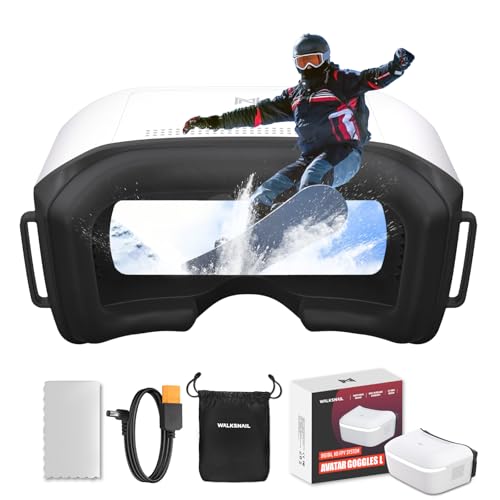
- 1080p/60fps display with average latency as low as 32 ms
- Up to 50Mbps bitrate and more than 4 km rated range
- Head tracking and Micro SD DVR support
Best For: Budget-conscious pilots upgrading to the Walksnail Avatar HD system
Premium Wireless Pick

- 1920×1080 Micro-OLED displays with a 100Hz refresh rate
- Lightweight design with adjustable diopters
- Includes DJI RC Motion 2 controller
Best For: DJI pilots wanting immersive motion-controlled flying
HD Recording Choice

- 1920×1080 display with 1080p 60fps recording
- Up to three hours of use with included batteries
- Compatible with the P1 Air Unit
Best For: P1 Air Unit pilots who record HD flights
Budget Analog Racer

- 5.8GHz 40-channel diversity receiver
- Separate display and DVR chipsets for responsive viewing
- Built-in DVR with an 800×480 LCD
Best For: Analog FPV racing and RC pilots on a budget
Best OLED Detail
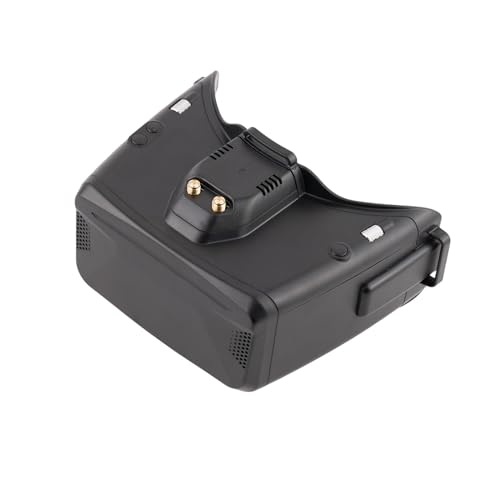
- 1280x960 OLED display
- 5.8G wireless reception
- Adjustable diopter and 60Hz refresh
Best For: High-detail FPV flying and racing
Best Smartphone Compatibility

- Works with many camera drones
- Patented unibody lens
- Adjustable focal length and headband
Best For: Immersive smartphone-based drone viewing
Premium O4 Pick – DJI Goggles 3
For pilots seeking fpv goggles with low latency and a polished DJI setup, the DJI Goggles 3 combine O4 HD transmission, Micro-OLED displays, adjustable diopters, and a built-in Real View PiP mode. With Avata 2, the listed latency is as low as 24 ms.
Best For: DJI pilots who want premium image quality, broad DJI compatibility, and an integrated viewing experience.
Pros:
- O4 transmission delivers up to 60Mbps bitrate and 24 ms latency with Avata 2.
- 1080p Micro-OLED screens support refresh rates up to 100 Hz.
- Adjustable -6.0 D to +2.0 D diopters and Real View PiP improve convenience and situational awareness.
- Integrated headband battery provides up to three hours of operating time.
Cons:
- Not compatible with DJI RC Motion 2 or DJI FPV Remote Controller 2.
- Designed primarily around compatible DJI drones, air units, and controllers.
The Goggles 3 are the strongest choice here for users already invested in DJI O4 hardware. Confirm your drone and controller compatibility before ordering.
Entry-Level Ascent Choice – CADDXFPV Walksnail Ascent Goggles
The CADDXFPV Walksnail Ascent goggles offer a straightforward route into digital FPV, with a 1080p display, 58-degree field of view, and average latency of 32 ms. They are a practical option for beginners seeking fpv goggles with low latency within the Ascent ecosystem.
Best For: Beginners and hobbyists using Walksnail Ascent equipment who want a simple digital HD setup.
Pros:
- 1080p/60FPS display with a wide 58-degree field of view.
- Average 32 ms latency supports responsive FPV flying.
- Rated digital transmission range reaches up to 4 km under suitable conditions.
- Supports DVR recording with a Micro SD card up to 256GB.
Cons:
- Compatible only with the Walksnail Ascent system, including specified Ascent kits.
- Battery is not included.
- Does not support video input or connection with Apple iOS devices.
These goggles make sense when your aircraft already uses the Ascent system. They are less suitable for pilots who need Avatar compatibility, analog input, or a more flexible video platform.
Versatile DJI Value – DJI Goggles 2
The DJI Goggles 2 remain a capable option for pilots comparing fpv goggles with low latency, offering latency as low as 30 ms, dual-band connectivity, and bright Micro-OLED screens. Adjustable diopters and a lightweight 270-gram design add flexibility for regular flying and travel.
Best For: DJI users who want a lightweight headset with adjustable vision correction and wide device compatibility.
Pros:
- Latency can reach as low as 30 ms for real-time viewing.
- Two Micro-OLED screens provide 1920×1080 resolution and vivid color.
- Diopter adjustment ranges from +2.0 to -8.0.
- Supports switching between 2.4GHz and 5.8GHz bands for a stable signal.
Cons:
- Listed battery life is about 90 minutes.
- Compatibility depends on the specific DJI drone, air unit, or controller.
- It lacks the newer Goggles 3 features such as Real View PiP in the supplied specifications.
Choose Goggles 2 if you value portability, vision adjustment, and an established DJI-compatible platform. Check the compatibility list carefully, particularly when pairing with newer DJI equipment.
Budget Walksnail Pick – CADDXFPV Walksnail Goggles L
The CADDXFPV Walksnail Goggles L target cost-conscious pilots moving from analog to digital FPV. They provide a 1080p/60fps display, average latency as low as 32 ms, and a rated range above 4 km, making them a practical contender among fpv goggles with low latency.
Best For: Beginners and analog pilots upgrading to Walksnail Avatar HD for freestyle, fixed-wing, or RC vehicles.
Pros:
- 1080p/60fps display on a 4.5-inch 1920×1080 LCD.
- Average latency as low as 32 ms and up to 50Mbps bitrate.
- Head tracking uses a nine-axis gyro and PPM output with compatible equipment.
- Built-in DVR supports Micro SD cards up to 256GB.
Cons:
- Works only with Walksnail Avatar HD air units.
- Does not receive analog video and has no HDMI input.
- External battery and Micro SD card are not included.
Goggles L are a sensible budget digital upgrade when your build uses Avatar HD hardware. They are not a universal replacement for analog or HDMI-equipped goggles, so verify the video system before buying.
Premium Wireless Pick – DJI Goggles 2 Motion Combo
The DJI Goggles 2 Motion Combo is a strong choice for pilots seeking FPV goggles with low latency in a lightweight, wireless setup. Its Micro-OLED displays, 100Hz refresh rate, motion controller, adjustable diopters, and compatibility with several DJI drones make it especially suited to immersive recreational flying.
Best For: DJI drone pilots who want an immersive, portable motion-control experience.
Pros:
- Micro-OLED screens provide 1920×1080 resolution and vibrant image quality.
- Lightweight 86g design with replaceable foam padding and adjustable diopters.
- Includes DJI RC Motion 2 for intuitive wrist-based flight control.
- Supports wireless movie streaming and works with multiple compatible DJI drones.
Cons:
- Designed primarily for compatible DJI devices rather than broad analog FPV systems.
- The motion-control experience may not suit pilots who prefer traditional stick controls.
Choose this combo if comfort, portability, and a polished DJI ecosystem matter more than universal FPV compatibility. It is a particularly compelling option for Avata and other supported DJI drone owners.
HD Recording Choice – BETAFPV VR04 HD FPV Goggles
For pilots comparing FPV goggles with low latency for HD whoop flying, the BETAFPV VR04 HD combines a large 4.5-inch 1080p display with built-in recording. Its glasses-friendly fit, included batteries, and compatibility with the P1 Air Unit make it a practical option for supported custom builds and bind-and-fly models.
Best For: P1 Air Unit users who want HD viewing and onboard flight recording.
Pros:
- 1920×1080 LCD displays flight footage in high definition.
- Records 1080p video at 60fps directly to a microSD card, with support up to 1TB.
- Includes two 2600mAh batteries and offers up to three hours of use.
- Glasses-friendly interior, PU face padding, and a soft silicone nose bridge improve comfort.
Cons:
- Designed for P1 Air Unit compatibility, so system compatibility should be checked before buying.
- microSD card is not included.
This model stands out when recording and extended sessions are priorities. Confirm that your drone or custom build uses the supported P1 Air Unit before choosing it.
Budget Analog Racer – EV800D FPV Goggles with DVR
The EV800D is a straightforward analog option for shoppers seeking FPV goggles with low latency for racing and RC use. Its 5.8GHz 40-channel diversity receiver, automatic search, separated display and recording chipsets, and built-in DVR make it practical for analog FPV cameras and transmitters.
Best For: Budget-conscious analog FPV pilots and RC racers.
Pros:
- 40-channel RaceBand diversity reception with automatic frequency searching.
- Separate display and recording chipsets are designed to avoid display delay and dropped recording frames.
- 5-inch 800×480 LCD offers an 82-degree viewing angle.
- Built-in DVR records at up to 720×576 resolution.
Cons:
- Lower 800×480 resolution than newer HD goggles.
- Approximately two hours of battery life may limit longer sessions.
- Uses button controls and a proprietary analog-focused system.
This is a sensible entry-level choice for analog setups where responsiveness and affordability matter more than HD image quality. Use a Class 10 high-speed card to support full-frame recording as recommended in the supplied notes.
Best OLED Detail – SKYZONE Cobra X V4
For pilots seeking FPV goggles with low latency and a sharper view, the SKYZONE Cobra X V4 combines a 1280×960 OLED display with 5.8G wireless video reception. Its 60Hz refresh rate, vivid colors, and high contrast are suited to detailed FPV flying and racing.
Best For: FPV pilots who prioritize high-resolution OLED visuals, adjustable diopter support, and stable wireless reception.
Pros:
- 1280×960 OLED display provides sharp, detailed imagery.
- Vivid colors and high contrast help reveal more flight-scene detail.
- Designed to reduce tearing, flickering, and rolling during signal switching.
- Includes adjustable diopter and headband features.
Cons:
- The supplied specifications do not state a measured latency figure.
- Its 46-degree field of view may not suit pilots seeking a wider view.
The Cobra X V4 is the strongest choice here for image quality. It is especially appealing when a clear OLED picture matters as much as responsive FPV viewing.
Best Smartphone Compatibility – DroneMask 2
The DroneMask 2 takes a different approach to FPV goggles with low latency: it uses a smartphone inside a unibody-lens headset rather than a built-in FPV receiver. It works with many camera drones and offers an immersive, glare-reduced viewing setup.
Best For: Camera-drone owners who want broad smartphone compatibility, an immersive view, and adjustable comfort features.
Pros:
- Compatible with a wide range of DJI, Autel, Potensic, Fimi, Hubsan, Skydio, Xiaomi, and Parrot drones.
- Patented unibody lens is designed to provide four times the resolution of standard split-screen VR headsets.
- Adjustable focal length, headband, soft padding, and eyeglass compatibility support comfortable use.
- Lightproof screen-access holes help reduce glare and allow phone adjustments during flight.
Cons:
- Requires a smartphone and standard controller rather than providing its own FPV receiver.
- The supplied specifications do not provide a measured latency figure.
- At 1.3 kg, it is considerably heavier than the Speedybee goggles listed here.
DroneMask 2 is best viewed as a smartphone-based immersive headset for GPS camera drones. It offers broad compatibility, but it is less directly suited to traditional analog FPV setups.
Best Analog FPV Value – Speedybee 5.8G FPV Goggles
For analog pilots comparing FPV goggles with low latency, these Speedybee goggles focus on practical live video performance. They include dual antennas, 40 RaceBand channels, auto-search, and a 3-inch high-brightness LCD for FPV drones, RC cars, and airplanes.
Best For: Intermediate analog FPV users who want a compact, battery-powered headset with broad channel coverage.
Pros:
- Dual antennas are designed to improve reception stability.
- 40 RaceBand channels and auto-search simplify channel selection.
- 3-inch 480×320 high-brightness LCD supports live video viewing.
- Built-in 1200mAh battery, low power consumption, DVR recording, and AV input/output add practicality.
Cons:
- The 480×320 display is lower resolution than the SKYZONE Cobra X V4.
- The supplied notes describe minimal time delay but do not provide a measured latency figure.
- Designed for analog FPV equipment rather than the digital camera-drone compatibility of the DroneMask 2.
The Speedybee is the most straightforward option for analog FPV flying. Its compact 180g design, dual antennas, and extensive channel support make it practical for pilots who value portability and functionality over display resolution.
How We Picked the Best Fpv Goggles with Low Latency
We selected these models to cover the main FPV viewing systems and budgets, including DJI and Walksnail digital goggles, dedicated analog headsets, and versatile camera-drone viewers. We focused on the features that most affect real-world flight: end-to-end latency, video resolution, field of view, receiver compatibility, screen quality, antenna setup, comfort, recording options, and ease of adjustment.
Because goggles are tied closely to the aircraft’s video transmitter and receiver ecosystem, compatibility received equal weight with headline specifications. A high-resolution headset is not a practical choice if it cannot connect to your existing air unit or camera system.
Quick Comparison
| Best for | What to prioritize | Likely choice |
|---|---|---|
| DJI digital pilots | O4 or compatible DJI transmission, sharp OLED screens, adjustable diopters | DJI Goggles 3 |
| Walksnail pilots | Walksnail receiver compatibility, HD video, broad field of view | Walksnail Ascent HD or Goggles L |
| Analog FPV | 5.8GHz channel range, receiver sensitivity, antenna quality, DVR | SKYZONE Cobra X V4 or EV800D |
| Value-focused beginners | Simple setup, built-in battery, forgiving fit, low replacement cost | BETAFPV VR04 or an EV800D-style headset |
| Camera-drone viewing | Wide viewing area, lens clarity, compatibility with the camera feed | DroneMask 2 |
Key Buying Factors for Fpv Goggles with Low Latency
Transmission System and Compatibility
Start with the transmitter installed on the aircraft. DJI, Walksnail, and analog 5.8GHz systems generally require different goggles or receivers. Confirm the exact air unit, firmware support, frequency bands, and required antennas before buying.
Latency and Image Reliability
Low latency matters most for racing, freestyle, and flying close to obstacles. Look beyond a quoted minimum figure: resolution, frame rate, signal strength, interference, recording modes, and processing settings can all affect responsiveness. A stable feed with consistent delay is usually more useful than a higher-resolution image that freezes or breaks up.
Display, Field of View, and Optics
OLED panels typically provide strong contrast and deep blacks, while larger LCD screens can offer good value. A wider field of view feels more immersive, but an overly wide image may make small obstacles harder to judge. Check interpupillary adjustment, diopter support, focus range, and whether glasses can be worn comfortably.
Comfort, Power, and Antennas
Weight, balance, face padding, ventilation, and cable placement become important during long sessions. Compare battery runtime and charging arrangements, then check whether antennas are included and removable. Replaceable antennas make it easier to tailor range and polarization to your flying environment.
DVR and Extra Features
A built-in DVR is useful for reviewing flights and diagnosing video dropouts. Head tracking, motion control, HDMI or USB support, screen adjustment, and digital recording can add value, but they should not outweigh basic compatibility and dependable video reception.
Who Should Buy Which Fpv Goggles with Low Latency?
Choose DJI Goggles 3 if you want a current DJI setup with strong image quality, modern transmission support, and adjustable optics. DJI Goggles 2 models remain attractive for pilots already using compatible DJI equipment or seeking a lighter headset.
Walksnail options suit pilots building around the Walksnail digital ecosystem and wanting HD video without switching platforms. The Ascent HD is aimed at a more feature-focused experience, while Goggles L can make sense when comfort, simplicity, and value matter.
For analog pilots, SKYZONE’s Cobra X V4 is the more feature-rich direction, while EV800D-style goggles are practical for beginners, spare aircraft, and lower-cost builds. BETAFPV’s VR04 is a sensible match for compatible compact digital setups. Finally, DroneMask 2 is better suited to viewers who want an immersive way to watch a camera-drone feed rather than a specialized racing headset.