The best box FPV goggles make drone flying easier to follow by combining a large viewing area with a head-mounted design. The right model depends on your video system, preferred image quality, comfort needs, and budget.
This roundup covers premium DJI and HDZero options alongside affordable analog goggles, so you can choose a practical fit for freestyle, racing, casual flying, or passenger viewing.
Best 10 Box Fpv Goggles Picks for 2026
Premium O4 Choice

- 1080p Micro-OLED screens up to 100 Hz
- O4 HD transmission with low latency
- Adjustable diopters and Real View PiP
Best For: DJI pilots wanting premium digital FPV viewing
Versatile Digital Pick

- Supports digital and analog FPV video
- 100Hz, 1800-nit LCD display
- Includes WiFi, ELRS Backpack, and HDMI support
Best For: FPV users needing broad video-input support
Lightweight DJI Alternative

- 270 g lightweight design
- 1920 × 1080 Micro-OLED resolution
- Adjustable diopters and low-latency transmission
Best For: DJI pilots prioritizing portability and comfort
Analog Budget Workhorse

- 5-inch 800 × 480 LCD
- 40-channel diversity auto-searching
- Built-in DVR for flight recording
Best For: Analog FPV racing and beginner setups
Premium Digital Pick
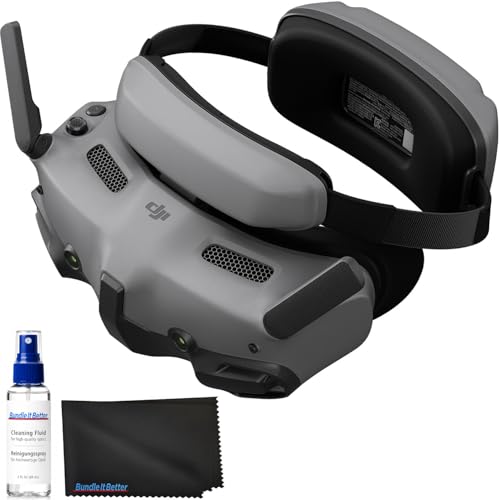
- Dual 1080p Micro-OLED screens with up to 100 fps
- O4 HD transmission rated up to 8.1 miles under FCC conditions
- Adjustable diopters, Real View PiP, and one-tap defogging
Best For: DJI pilots wanting premium visuals and extensive flight features
HD Recording Value

- 4.5-inch 1920×1080 LCD with a 60 Hz refresh rate
- Records 1080p at 60 fps to microSD cards up to 1TB
- Two 2600mAh batteries provide up to 3 hours of use
Best For: P1 Air Unit pilots who want recording and glasses-friendly comfort
Smartphone-Compatible Choice

- Unibody lens system with a stated 120-degree field of view
- Works with many camera drones through a standard controller and phone
- Adjustable focal length and glasses-compatible comfort features
Best For: Camera-drone owners seeking a flexible smartphone-based headset
Feature-Packed Pick

- 5-inch 800×480 LCD display
- Built-in MP4 DVR recording
- Dual antennas with 40-channel auto-search
Best For: Larger-screen FPV viewing and onboard recording
Lightweight Comfort Pick

- Lightweight 183 g design
- 3-inch 480×320 LCD screen
- Dual antennas and 40-channel receiver
Best For: Portable FPV racing and comfortable wear
Premium O4 Choice – DJI Goggles 3
The DJI Goggles 3 are a strong choice if you want box FPV goggles with sharp Micro-OLED screens, modern DJI compatibility, and an immersive flight setup. They pair with DJI Avata 2 and other supported drones while adding adjustable diopters, Real View PiP, and wireless streaming.
Best For: DJI pilots seeking premium O4 HD transmission, immersive viewing, and broad compatibility.
Pros:
- 1080p Micro-OLED screens with refresh rates up to 100 Hz
- O4 transmission offers low latency and up to 60Mbps bitrate with Avata 2
- Adjustable diopters from -6.0 D to +2.0 D
- Real View PiP, one-tap defogging, and integrated headband battery
Cons:
- Not compatible with DJI RC Motion 2 or DJI FPV Remote Controller 2
- Its feature set is most useful within the DJI ecosystem
Choose the Goggles 3 when display quality, convenience, and newer DJI O4 compatibility matter more than a basic analog setup.
Versatile Digital Pick – HDZero BoxPro+ Goggles
The HDZero BoxPro+ is a practical option for shoppers comparing box FPV goggles with support for multiple video sources. Its 100Hz, 1800-nit LCD is designed for bright, fluid viewing, while compatibility with digital, analog, WiFi streaming, ELRS Backpack, and HDMI expands its usefulness.
Best For: FPV users who want one bright headset for varied video and connectivity options.
Pros:
- Supports digital and analog FPV video
- Also supports WiFi video streaming, ELRS Backpack, and HDMI
- 100Hz LCD display with a stated 1800-nit brightness
Cons:
- At 1.6 pounds, it is heavier than lightweight goggle designs
- The supplied notes do not specify resolution, battery life, or detailed compatibility lists
The BoxPro+ stands out for flexibility and screen brightness, making it worth considering when input support is a higher priority than minimal weight.
Lightweight DJI Alternative – DJI Goggles 2
The DJI Goggles 2 offer a compact route into immersive digital flight if you are comparing box FPV goggles for DJI drones. They use dual Micro-OLED screens, provide adjustable diopters from +2.0 to -8.0, and support wireless movie streaming alongside low-latency flight viewing.
Best For: DJI users who value a lightweight headset, adjustable vision correction, and wireless streaming.
Pros:
- Lightweight 270 g design with replaceable foam padding
- 1920 × 1080 Micro-OLED display resolution
- Diopter adjustment from +2.0 to -8.0
- Latency as low as 30 ms and dual-band switching between 2.4GHz and 5.8GHz
Cons:
- Listed battery average life is 90 minutes
- Designed primarily around compatible DJI drones and controllers
These goggles are a sensible fit for pilots who want an easier-to-carry DJI headset with strong screen clarity, though the shorter stated battery life may require planning for longer sessions.
Analog Budget Workhorse – EV800D FPV Goggles
The EV800D is a straightforward choice for shoppers seeking box FPV goggles for analog racing and RC use. It combines a 5-inch 800 × 480 LCD with 5.8G 40-channel auto-searching, diversity reception, and a built-in DVR for recording flights.
Best For: Analog FPV beginners and racers who want integrated recording and broad channel searching.
Pros:
- 5-inch 800 × 480 high-brightness LCD with an 82-degree field of view
- 5.8G 40-channel RaceBand diversity and automatic searching
- Built-in DVR records up to 720 × 576 resolution
- Supports external video input and offers up to two hours of stated battery life
Cons:
- Analog resolution is lower than the supplied DJI and HDZero digital options
- Heavier and bulkier than lightweight headset-style goggles at 375 g
- DVR recording requires a C10 high-speed card for full-frame recording
The EV800D makes the most sense for analog FPV flying, especially when automatic channel scanning and onboard DVR recording are more important than high-definition video.
Premium Digital Pick – DJI Goggles 3
For pilots seeking high-end box FPV goggles for compatible DJI aircraft, the DJI Goggles 3 combine dual Micro-OLED displays with O4 HD transmission. Adjustable diopters, Real View PiP, and one-tap defogging make them especially practical for frequent flights.
Best For: DJI pilots who want sharp, low-latency video, broad compatible-device support, and a premium cockpit-style experience.
Pros:
- Dual 1080p Micro-OLED screens support smooth visuals up to 100 fps.
- O4 HD transmission offers a stated range of up to 8.1 miles under FCC conditions.
- Adjustable -6.0D to +2.0D diopters, Real View PiP, and one-tap defogging improve usability.
- Up to 3 hours of operation and a lens cleaning kit are included.
Cons:
- Compatibility is focused on supported DJI drones, air units, and controllers.
- It does not work with DJI RC Motion 2 or DJI FPV Remote Controller 2.
The DJI Goggles 3 are a strong choice when image quality, transmission range, and integrated flight-awareness features matter more than universal compatibility.
HD Recording Value – BETAFPV VR04 HD
The BETAFPV VR04 HD is a practical option for pilots comparing box FPV goggles with a large screen and built-in recording. Its 4.5-inch 1080p LCD, glasses-friendly fit, and included batteries make it well suited to ready-to-fly sessions and custom P1 Air Unit builds.
Best For: Pilots who want a comfortable, record-capable HD setup for P1 Air Unit-compatible builds and whoops.
Pros:
- 1920×1080 display resolution with a 60 Hz refresh rate.
- Records 1080p footage at 60 fps directly to a microSD card, supporting up to 1TB.
- Includes two 2600mAh batteries and provides up to 3 hours of use.
- Glasses-friendly interior and adjustable headband support extended wear.
Cons:
- MicroSD card is not included.
- Compatibility is centered on the P1 Air Unit and compatible whoops.
Choose the VR04 HD if a roomy LCD, onboard recording, and flexible battery options are more important than OLED display technology or broad drone compatibility.
Smartphone-Compatible Choice – DroneMask 1
DroneMask 1 | Patented Unibody Lens FPV Goggles | Immersive VR Headset for DJI & GPS Drones
Check Price On AmazonThe DroneMask 1 takes a different approach to box FPV goggles by using a smartphone as the display source. Its unibody lens system, adjustable focal length, and broad compatibility with camera drones make it a flexible choice for pilots who already use a standard controller and phone.
Best For: Drone owners who want an immersive smartphone-based headset for DJI, Autel, and other supported camera drones.
Pros:
- Unibody lens design provides a full-screen viewing experience with a stated 120-degree field of view.
- Works with many camera drones using a standard controller and smartphone.
- Adjustable focal length and eyeglasses compatibility improve fit flexibility.
- Soft face padding, breathable fabric, and adjustable straps support comfort.
Cons:
- Requires a compatible smartphone and standard drone controller.
- Its 1600×1200 LCD-based design is less specialized than dedicated digital FPV systems.
- Compatibility depends on the listed drone and smartphone setup.
The DroneMask 1 is best viewed as a versatile phone-based headset rather than a dedicated digital FPV receiver, making it appealing for casual and cross-platform camera-drone use.
Feature-Packed Pick – EV800D 5-Inch DVR FPV Goggles
If you want box FPV goggles with a larger display and built-in recording, the EV800D combines a 5-inch 800×480 screen with DVR functionality. Its dual antennas, 40-channel support, and auto-search tuning make it a versatile option for analog FPV cameras and transmitters.
Best For: Pilots who prioritize a larger viewing area, onboard DVR recording, and flexible analog FPV connectivity.
Pros:
- Built-in DVR records video in MP4 format.
- Large, bright 5-inch 800×480 LCD screen.
- Dual antennas support more stable reception.
- Supports auto-search, external video input, and headphone audio output.
Cons:
- At 393 g, it is heavier than the smaller alternatives.
- The supplied specifications identify it for advanced users, which may not suit beginners.
The EV800D is the strongest choice here for screen size and recording features. Choose it if a more substantial headset is worthwhile for your flying or driving setup.
Lightweight Comfort Pick – DIXII 3-Inch 40CH FPV Goggles
For portable box FPV goggles, the DIXII emphasizes a lightweight 183 g design and a compact 3-inch display. It includes a 5.8GHz 40-channel receiver, dual antennas, auto-search, and support for external AV connections.
Best For: FPV users who want a lightweight headset for racing drones and extended carrying or wearing comfort.
Pros:
- Lightweight 183 g construction is easy to carry.
- 3-inch 480×320 high-brightness LCD with a 92% transparent lens.
- Dual antennas and a 40-channel receiver support stable RaceBand reception.
- Offers AV input and output for external video equipment.
Cons:
- The 3-inch screen is smaller than the EV800D’s 5-inch display.
- The supplied notes list a built-in 1200mAh battery but do not specify runtime.
The DIXII is a sensible fit when low weight matters more than a large screen. Its AV output also gives it practical flexibility for setups using an external DVR.
Compact Value Pick – Speedybee 3-Inch 40CH FPV Goggles
The Speedybee is a compact set of box FPV goggles for analog FPV cameras, drones, RC cars, and airplanes. Its 3-inch 480×320 screen, 40-channel RaceBand coverage, dual antennas, and low 360–400mA operating draw make it suited to straightforward mobile FPV use.
Best For: Intermediate users seeking compact analog FPV goggles with efficient power usage and flexible video connections.
Pros:
- Compact, lightweight 180 g design is convenient for transport.
- 3-inch high-brightness 480×320 display provides live video with low delay.
- Dual antennas and auto-search cover 40 RaceBand channels.
- Supports external video input and AV signal output.
Cons:
- The smaller 3-inch screen offers less viewing area than a 5-inch model.
- The supplied specifications list a 1200mAh battery but do not provide a runtime estimate.
The Speedybee balances portability, channel coverage, and efficient power use. It is a practical pick for intermediate pilots who want a compact analog headset without moving to a larger display.
How We Picked the Best Box Fpv Goggles
We compared these Box Fpv Goggles across the factors that most affect real-world flying: video-system compatibility, display quality, latency, field of view, comfort, battery design, antenna configuration, recording features, and overall value. The selection includes digital goggles for DJI and HDZero ecosystems as well as 5.8GHz analog models with built-in DVRs.
Compatibility comes first. A high-end headset cannot display a signal from an incompatible air unit or analog camera without the correct receiver or adapter. We also considered whether each product is best suited to pilots, spectators, beginners, or users who want an inexpensive backup headset.
Quick Comparison
| Type | Best For | What to Expect |
|---|---|---|
| DJI digital | Clear HD flight video | Excellent image quality and ecosystem integration; check air-unit compatibility. |
| HDZero digital | Low-latency digital FPV | Fast response and sharp video with a dedicated system requirement. |
| Analog 5.8GHz | Budget builds and older drones | Broad compatibility, lower cost, and softer image quality than digital systems. |
| Video headset or viewer | Casual use and spectators | Large viewing experience, but often with fewer pilot-focused features. |
Key Buying Factors for Box Fpv Goggles
Video Compatibility
Confirm whether the goggles support DJI, HDZero, or analog 5.8GHz video before buying. Analog models may advertise 40 channels, but channel availability and antenna connectors still matter. DJI goggles also vary by generation and supported air units.
Screen and Image Quality
Resolution, contrast, field of view, and screen size determine how clearly you can spot obstacles and judge distance. Micro-OLED displays generally provide stronger contrast and detail, while larger LCD screens can be appealing for beginners and spectators.
Latency and Reception
Racing and fast freestyle favor low latency and stable reception. Check the transmission system, antenna arrangement, and receiver design rather than judging performance from screen resolution alone. Removable antennas can make upgrades or replacements easier.
Comfort, Fit, and Adjustments
Look for a secure face seal, manageable weight, adjustable straps, and enough room for glasses if needed. Adjustable diopters can reduce the need for prescription inserts, while a large box design may feel more comfortable for extended viewing.
Battery and Recording Features
Review battery capacity, charging method, expected runtime, and whether the battery is replaceable. A built-in DVR is useful for reviewing flights or diagnosing video problems, but recording quality and storage support vary significantly.
Who Should Buy Which Box Fpv Goggles?
Choose DJI Goggles 3 if you already fly compatible DJI equipment and want modern HD video, immersive displays, and convenient adjustment features. Choose DJI Goggles 2 when you want a lighter previous-generation DJI option at a potentially lower price.
Choose HDZero BoxPro+ for an HDZero setup where low latency is more important than broad analog compatibility. Choose BETAFPV VR04 for compatible HD video in a relatively straightforward box-style design.
Choose an EV800D, DIXII, or similar 5.8GHz analog model for a budget build, beginner setup, or older analog drone. These are practical choices when affordability and wide analog support matter more than premium image quality.
Choose DroneMask 1 when immersive viewing and broad recreational use are the priority, especially for sharing a drone experience rather than optimizing a racing setup. Before ordering, match the goggles to your drone’s transmission standard, connector type, and required channel range.