The best FPV goggles with HDMI input can do more than display a drone feed. They may also connect to simulators, laptops, media players, and compatible video sources, making them useful for both flying and entertainment.
This roundup compares 10 options across digital and analog FPV systems, display quality, comfort, connectivity, and price. Because HDMI support and compatibility vary widely, check each model’s input type and required adapters before buying.
Best 10 Fpv Goggles with Hdmi Input Picks for 2026
Premium DJI Pick

- 1080p Micro-OLED displays up to 100 Hz
- O4 transmission with low latency
- Real View PiP and adjustable diopters
Best For: DJI drone pilots wanting wireless FPV immersion
Budget HDMI Viewer

- Universal HDMI interface
- Independent dual LCD screens
- Up to three hours of playback
Best For: Private movies, gaming, and HDMI video sources
Walksnail Entry Pick

- 1080p display with 58° FOV
- Up to 4 km digital transmission
- 32 ms latency and microSD DVR
Best For: Pilots using the Walksnail Ascent system
HDMI FPV Alternative

- HDMI input up to 1080p
- Works with HDMI-output FPV controllers
- About 4.5 hours of battery life
Best For: HDMI-equipped FPV controllers and private media
Budget Walksnail HD Pick
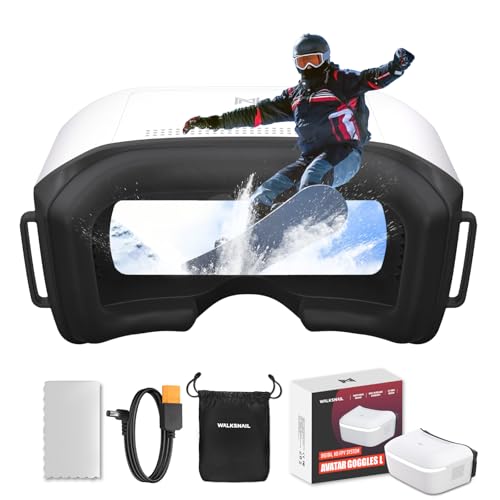
- 1080p/60fps display with built-in DVR
- Head tracking and 2S-6S power support
- Walksnail-only; no HDMI or analog input
Best For: Budget-conscious Walksnail Avatar HD pilots
Premium DJI Flight Choice
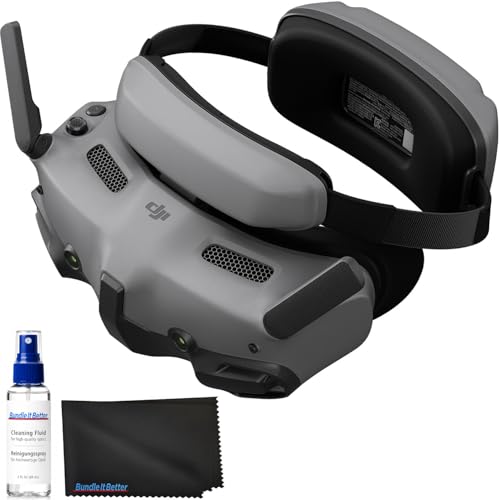
- Dual 1080p Micro-OLED screens up to 100 fps
- O4 HD transmission with broad DJI compatibility
- Real View PiP and adjustable diopters
Best For: DJI pilots wanting premium immersive viewing
Comfortable P1 Air Unit Option

- 1080p/60fps screen with HD recording
- Glasses-friendly fit and comfortable padding
- Includes batteries with up to 3 hours of use
Best For: BETAFPV P1 Air Unit pilots and custom builds
Best Phone-Compatible Pick

- Unibody lens for an immersive view
- Works with many camera drones and smartphones
- Adjustable fit with eyeglass compatibility
Best For: Smartphone-based FPV viewing and versatile drone use
Best Digital Racing System

- OcuSync dual-band digital video transmission
- Wide 148° field of view and low-distortion lens
- Advanced controls for compatible DJI aircraft
Best For: Experienced DJI pilots and drone racing
Premium DJI Pick – DJI Goggles 3
For pilots seeking fpv goggles with hdmi input, note that DJI Goggles 3 is primarily a wireless O4 FPV headset rather than a traditional HDMI-input viewer. It pairs with DJI’s supported drones and controllers for low-latency video, while adding adjustable diopters, Real View PiP, and integrated battery convenience.
Best For: DJI drone pilots who want an immersive, low-latency wireless FPV setup.
Pros:
- 1080p Micro-OLED displays with refresh rates up to 100 Hz.
- O4 transmission offers 24 ms latency and up to 60 Mbps with Avata 2.
- Adjustable diopters, Real View PiP, one-tap defogging, and about three hours of operation.
- Compatible with DJI Neo, Avata 2, Mini 4 Pro, Air 3, and selected DJI air units and controllers.
Cons:
- Does not work with DJI RC Motion 2 or DJI FPV Remote Controller 2.
- Not presented as a standard wired HDMI-input headset.
Goggles 3 is a strong choice when your priority is a polished DJI ecosystem experience rather than broad HDMI source compatibility. Confirm your drone and controller are supported before buying.
Budget HDMI Viewer – Bigeyes H3
The Bigeyes H3 is a practical option for shoppers comparing fpv goggles with hdmi input, although it is designed primarily as a personal cinema and video viewer. Its universal HDMI interface connects to game consoles, PCs, TV devices, DVD players, and compatible phones through the appropriate adapter.
Best For: Private movie viewing, console gaming, and portable HDMI entertainment.
Pros:
- Universal HDMI connectivity for several video-source devices.
- Large virtual-screen presentation with independent dual LCD screens.
- Adjustable diopters from 0 to 500 degrees and adjustable pupil distance.
- Built-in rechargeable battery supports up to three hours of playback.
Cons:
- Not ideal for text, office work, or CAD drawing.
- Its 1280 × 720 per-panel display is less suited to demanding FPV detail.
- Phone connectivity requires a device and adapter that support video output.
Choose the H3 if HDMI flexibility and private entertainment matter more than dedicated drone features. It can suit an HDMI-equipped FPV controller, but it lacks an integrated FPV receiver.
Walksnail Entry Pick – Ascent HD FPV Goggles
The CADDXFPV Ascent goggles target pilots entering digital FPV, but they are not a match for shoppers specifically requiring fpv goggles with hdmi input. The supplied specifications describe a dedicated Walksnail Ascent 5.8GHz system with 1080p viewing, rather than video-input support.
Best For: Beginners and hobbyists using the Walksnail Ascent Lite or Protos system.
Pros:
- 1080p display with a wide 58-degree field of view.
- Up to 4 km digital transmission and approximately 32 ms latency.
- Supports DVR recording to a microSD card up to 256GB.
- Accepts 6–25.2V input for 2S–6S power setups.
Cons:
- Does not support video input or connection with Apple iOS devices.
- Designed exclusively for the Ascent system and not compatible with Avatar systems or other third-party FPV systems.
- Battery is not included.
These goggles make sense as a focused Ascent-system purchase, not as a general-purpose HDMI display. Verify that your aircraft and transmitter use the Ascent platform before ordering.
HDMI FPV Alternative – Bigeyes H3 Pro
The Bigeyes H3 Pro is the clearest fit here for shoppers searching for fpv goggles with hdmi input. It is a wired personal display rather than a complete FPV system, so it needs an HDMI-equipped source such as a controller, media player, or compatible adapter.
Best For: HDMI-equipped drone controllers, private 2D/3D movie viewing, and console use.
Pros:
- HDMI input supports 720p, 1080i, and 1080p video signals.
- Can work as FPV goggles with a drone controller that provides HDMI output.
- Supports compatible frame-packing Blu-ray 3D and side-by-side 3D formats.
- Built-in battery provides about 4.5 hours of playback, with adjustable IPD and myopia correction.
Cons:
- An RF receiver is not included, so it cannot receive an FPV signal by itself.
- Requires an HDMI-output source and the correct adapter for phones or certain consoles.
- Not ideal for text, office work, or CAD drawing.
Among these products, the H3 Pro most directly addresses the HDMI-input requirement. It is best viewed as a comfortable HDMI monitor for FPV and media, not as a wireless drone receiver.
Budget Walksnail HD Pick – Walksnail Goggles L
For shoppers comparing FPV goggles with HDMI input, compatibility is essential: despite some listing details, these Walksnail Goggles L have no HDMI input and are designed only for the Walksnail Avatar HD System. Within that ecosystem, they offer a budget-friendly 1080p/60fps view for digital FPV flying.
Best For: Cost-conscious Walksnail pilots, fixed-wing users, freestyle practice, and RC vehicle exploration.
Pros:
- 1080p/60fps display on a 4.5-inch 1920 x 1080 LCD.
- Up to 50Mbps bitrate, low average latency, and a rated range over 4 km under suitable conditions.
- Head tracking, built-in DVR, replay support, and 2S-6S battery input.
Cons:
- No HDMI input and no analog-video reception.
- Requires a compatible Walksnail Avatar HD air unit.
- External battery and microSD card are not included.
The Goggles L make sense when you already use Walksnail hardware and want clearer digital video without moving to a higher-priced setup. They are not a general-purpose HDMI or analog goggle solution, so verify your VTX compatibility before ordering.
Premium DJI Flight Choice – DJI Goggles 3
If you are seeking FPV goggles with HDMI input, note that this DJI Goggles 3 bundle lists Wi-Fi connectivity rather than an HDMI input. Its strengths are the DJI ecosystem, dual 1080p Micro-OLED screens, O4 HD transmission, and broad compatibility with supported DJI drones, air units, and controllers.
Best For: DJI drone pilots who want an immersive display, long-range O4 video, and convenient flight-awareness features.
Pros:
- Dual 1080p Micro-OLED screens with visuals up to 100 fps.
- Compatible with selected DJI Neo, Avata 2, Mini 4 Pro, Air 3, O3, and O4 equipment.
- Adjustable -6.0D to +2.0D diopters, Real View PiP, one-tap defogging, and up to 3 hours of operation.
Cons:
- Does not list HDMI input; connectivity is specified as Wi-Fi.
- Not compatible with DJI RC Motion 2 or DJI FPV Remote Controller 2.
- Requires compatible DJI hardware for its advertised flight features.
Goggles 3 are a strong choice for pilots already invested in compatible DJI products and prioritize display quality and situational awareness. Check the exact drone and controller pairing before buying, especially if you need wired HDMI connectivity.
Comfortable P1 Air Unit Option – BETAFPV VR04 HD
For buyers researching FPV goggles with HDMI input, the BETAFPV VR04 HD uses Type-C connectivity and is built around the P1 Air Unit rather than a stated HDMI connection. It delivers a 1080p/60fps view, onboard recording, and a glasses-friendly fit for compatible whoops and custom builds.
Best For: P1 Air Unit users who want comfortable extended wear, onboard HD recording, and flexible battery options.
Pros:
- 1920 x 1080 resolution with 60Hz refresh and 1080p recording.
- Glasses-friendly design, PU face padding, and a silicone nose bridge.
- Includes two 2600mAh batteries and supports up to 3 hours of use.
- Records and replays footage using microSD cards up to 1TB.
Cons:
- Designed for the BETAFPV P1 Air Unit and compatible whoops, not a universal goggle platform.
- HDMI input is not specified; connectivity is listed as Type-C.
- microSD card is excluded.
The VR04 HD is practical for pilots building around BETAFPV’s P1 system, especially those who value comfort and long sessions. Confirm that your aircraft uses the P1 Air Unit and do not assume the Type-C port provides HDMI input.
Best Phone-Compatible Pick – DroneMask 2
If you want FPV goggles with HDMI input for drone viewing, entertainment, and smartphone use, the DroneMask 2 offers a flexible, immersive design. Its unibody lens, adjustable fit, and phone compatibility make it a practical choice for pilots who want a large, glare-reduced view without relying on third-party apps.
Best For: Smartphone-based FPV viewing, GPS camera drone pilots, and users who also want a personal cinema or gaming display.
Pros:
- Patented unibody lens is designed to provide four times the resolution of standard split-screen VR headsets.
- Works with a wide range of camera drones when paired with a standard controller and smartphone.
- Adjustable focal length, headstraps, soft padding, and eyeglass compatibility improve fit flexibility.
- Screen-access holes help reduce glare while allowing mid-flight phone adjustments.
Cons:
- Requires a compatible smartphone for drone viewing.
- At 1.3 kg, it is heavier than compact FPV headsets.
- The supplied notes do not specify the HDMI input version or supported resolution.
The DroneMask 2 is a versatile option when comfort and broad phone-camera-drone compatibility matter more than a dedicated racing setup. Its HDMI connectivity and unibody lens also make it appealing for non-drone media use.
Best Analog Value – Speedybee 5.8G FPV Goggles
For shoppers comparing FPV goggles with HDMI input against simpler analog equipment, the Speedybee 5.8G model focuses on practical flight performance. It combines a 3-inch high-brightness screen, 40-channel reception, dual antennas, and external video input in a compact headset for analog FPV drones, RC cars, and airplanes.
Best For: Intermediate analog FPV pilots who want a lightweight headset with broad channel coverage and external video connectivity.
Pros:
- 40 RaceBand channels and auto-search simplify finding an available signal.
- Dual antennas are designed to improve reception stability.
- 3-inch 480×320 high-brightness LCD provides real-time video with minimal delay.
- Built-in 1200 mAh battery, DVR recording, external video input, and AV output add flexibility.
Cons:
- This is an analog 5.8G headset, not a high-resolution digital FPV system.
- The listed video capture resolution is 480p.
- The supplied connectivity details mention USB and external video input rather than HDMI specifically.
The Speedybee is a sensible choice for analog FPV users who value low power consumption, portability, and channel flexibility. It is less suitable if your priority is HDMI-native connectivity or HD digital video.
Best Digital Racing System – DJI Goggles Racing Edition
The DJI Goggles Racing Edition is aimed at pilots who want a more advanced digital FPV setup rather than basic FPV goggles with HDMI input. Its OcuSync transmission module supports dual-band 2.4 and 5.8 GHz video, while the wide field of view, flight controls, and antenna options are tailored to drone racing and flight control.
Best For: Professional or experienced DJI pilots using compatible Mavic Pro, Spark, Phantom 4, or Inspire 2 aircraft.
Pros:
- OcuSync supports 1280×960 HD transmission with latency as low as 50 ms and a stated range of up to 7 km.
- Dual-band 2.4/5.8 GHz transmission and FHSS help support reliable video links.
- 148° field of view, global-shutter camera module, and low-distortion lens support immersive flight control.
- Provides flight setting adjustments, gimbal control, flight data, head tracking, and multiple antenna options.
Cons:
- Compatibility is focused on specified DJI aircraft rather than general camera drones.
- The supplied notes do not confirm an HDMI input.
- At 2.2 pounds, it is relatively heavy for a head-mounted FPV system.
The DJI Goggles RE is the strongest fit here for users invested in supported DJI platforms and advanced flight features. However, shoppers specifically requiring HDMI input should verify the connection options before purchasing.
How We Picked the Best Fpv Goggles with Hdmi Input
We focused on goggles and head-mounted displays that offer HDMI connectivity directly or fit common HDMI-based FPV and viewing setups. The selection includes digital systems from DJI and Walksnail, analog 5.8GHz models, and general-purpose video glasses. We compared screen resolution, field of view, battery design, receiver compatibility, comfort features, and the practical needs of pilots using simulators or external video sources.
Not every product uses HDMI in exactly the same way. Some are designed primarily for FPV video, while others function more like a private cinema display. Always verify whether HDMI is an input, output, adapter-supported connection, or part of a separate accessory bundle.
Quick Comparison
| Best For | What to Prioritize | Models to Consider |
|---|---|---|
| Digital FPV flying | Low latency, compatible air unit, clear display | DJI Goggles 3, Walksnail Ascent, Walksnail Goggles L |
| Analog FPV | 5.8GHz receiver, channel selection, antenna quality | BETAFPV VR04, 5.8G 40CH goggles |
| Simulator and HDMI viewing | Confirmed HDMI input, battery life, comfort | Bigeyes H3, Personal 3D Movie Cinema |
| General drone viewing | Broad compatibility and simple setup | DroneMask 2, DJI Goggles 1080p |
Key Buying Factors for Fpv Goggles with Hdmi Input
HDMI Compatibility
Check the connector type, supported resolution and refresh rate, HDCP requirements, and whether an adapter is necessary. A product marketed as “HD” may not accept a direct HDMI signal.
FPV System and Latency
Digital goggles must match the drone’s air unit or video transmitter. For racing and freestyle, low latency matters more than maximum resolution. Analog goggles offer broad transmitter compatibility but generally provide a softer image.
Display Quality and Fit
OLED panels usually deliver stronger contrast, while LCD screens can provide good value and brightness. Look for adjustable diopters, interpupillary adjustment, a suitable field of view, and enough room for glasses if needed.
Power and Comfort
Compare battery runtime, charging method, weight, ventilation, and cable placement. A lighter headset is often more comfortable for long flights, but external batteries can extend runtime on some systems.
Who Should Buy Which Fpv Goggles with Hdmi Input?
Choose DJI Goggles 3 if you want a premium digital FPV ecosystem and compatible DJI O4 equipment. Walksnail options make more sense for pilots already invested in Avatar hardware or seeking a flexible digital alternative. BETAFPV VR04 and 5.8GHz goggles are better starting points for analog transmitters and budget builds.
For simulator sessions, laptop viewing, or private media playback, prioritize the Bigeyes H3 or a dedicated HDMI video-glasses model after confirming signal compatibility. DroneMask 2 is worth considering when broad camera-device compatibility and a simple viewing experience matter more than an integrated FPV receiver. Buyers who already own older DJI equipment should verify generation and firmware compatibility before choosing the DJI 1080p model.