If you’re serious about gaming, you know how important it is to keep your setup organized. A reliable controller dock can make all the difference, ensuring your controllers are always charged and ready to go. With so many options available, it can be tough to choose the right one. Let’s explore some of the best controller docks for multiple controllers that not only enhance functionality but also add a touch of style to your gaming space.
Switch 2 Charging Station for Joy-Con & Pro Controllers
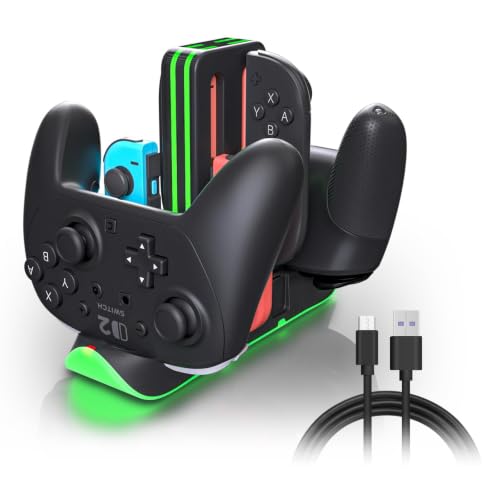
If you’re a Nintendo Switch enthusiast looking to keep your gaming gear organized and charged, the Switch 2 Charging Station is your ideal solution. This 6-in-1 fast charging dock can charge up to four Joy-Con and two Pro Controllers simultaneously, fully charging them in just 2.5 hours. It features independent LED indicators to show charging status and a sleek design with a 9-mode RGB light ring for added flair. Plus, with touch control for easy mode-switching, portability, and a solid warranty, this charging station guarantees your setup remains tidy and your controllers always ready for action.
Best For: Nintendo Switch gamers who want an efficient and stylish way to charge multiple controllers at once.
Pros:
- Simultaneous Charging: Can charge up to 4 Joy-Con and 2 Pro Controllers at the same time, saving time and reducing clutter.
- Fast Charging: Fully charges controllers in just 2.5 hours, ensuring you’re always ready to play.
- Aesthetic Appeal: Features a customizable 9-mode RGB light ring and touch control for an engaging and modern look.
Cons:
- Limited USB Ports: Only has 2 USB ports, which may not be sufficient for users with additional charging needs.
- Corded Power Source: Requires a constant power outlet, making it less portable compared to battery-operated options.
- Compatibility Limitations: While compatible with Nintendo Switch 2, Switch 1, and OLED, it may not work with other gaming systems or accessories.
FASTSNAIL Controller Charging Dock for Nintendo Switch

The FASTSNAIL Controller Charging Dock is ideal for Nintendo Switch enthusiasts looking to streamline their gaming setup. It’s compatible with Switch 1, OLED models, and Joy-Con controllers, accommodating up to six controllers at once. You’ll appreciate the fast charging feature, taking only 3-3.5 hours for a full charge. Plus, the LED indicators keep you informed on charging status. With 11 customizable RGB lighting modes, you can set the perfect ambiance. The built-in safety features guarantee your controllers are protected. Enjoy the added convenience of USB ports for other devices, all while keeping your space organized and clutter-free.
Best For: Nintendo Switch gamers seeking an efficient and stylish charging solution for multiple controllers.
Pros:
- Fast charging capability, fully charging controllers in just 3-3.5 hours.
- Supports simultaneous charging of multiple Joy-Con and Pro controllers, keeping your setup organized.
- Customizable RGB lighting modes enhance the aesthetic appeal of your gaming space.
Cons:
- Requires NS2 Official Dock as a power source, limiting compatibility with NS1 dock.
- May not be suitable for users with fewer than four controllers due to its charging capacity.
- RGB lighting customization might be unnecessary for gamers who prefer a simpler design.
Switch 2 Pro Controller Charger Dock for Dual USB-C Charging
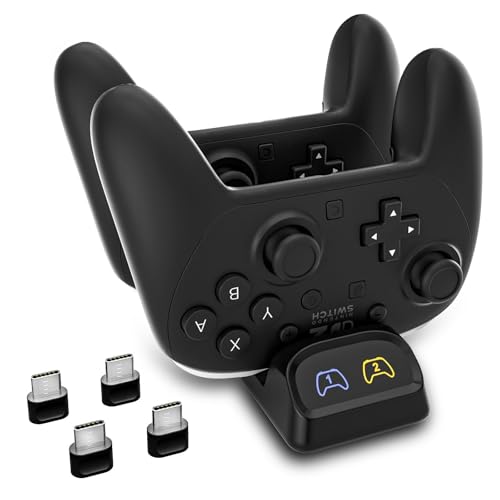
For gamers who juggle multiple controllers, the Switch 2 Pro Controller Charger Dock is a must-have accessory. This dual USB-C charging station lets you charge two controllers simultaneously, slashing downtime. It’s compatible with Switch Pro, Switch 2 Pro, PS5, and Xbox Series X|S controllers, but not compatible with PowerA or some third-party models. The compact design fits neatly on your desk, while LED indicators keep you updated on charging status. Just plug it into a 5V/2A power source, and you’re good to go. With a one-year warranty and solid customer ratings, it’s a reliable choice for any gaming setup.
Best For: Gamers who own multiple controllers and want a convenient solution to charge them simultaneously.
Pros:
- Dual charging capability allows for simultaneous charging of two controllers, reducing downtime.
- Compact design fits neatly on desks and gaming stations, saving space.
- LED indicators provide clear visibility of charging status at a glance.
Cons:
- Not compatible with PowerA, Luna, or some third-party controllers, limiting usability for some gamers.
- Requires a 5V/2A USB power adapter for optimal performance, which may not be included.
- Average customer rating of 3.9 out of 5 stars, indicating mixed reviews from users.
KDD Charging Station for Multiple Devices

Gamers seeking a streamlined setup will appreciate the KDD Charging Station, which offers a 6 in 1 design that combines four charging ports, a controller stand, and a headphone holder. This multi-purpose solution reduces cable clutter, keeping your gaming space neat. With three USB A and one USB C port, it charges smartphones and tablets without needing a wall plug. The station features automatic device detection for peak charging speeds and an on/off button for easy power control. Plus, its sturdy base and soft protective pads guarantee your devices stay safe while looking great in your setup.
Best For: Gamers and tech enthusiasts looking for an organized and efficient charging solution for multiple devices.
Pros:
- Versatile 6 in 1 design with multiple charging ports and device storage.
- Automatic device detection ensures optimal charging speeds for various devices.
- Sturdy construction with protective pads prevents scratches and maintains stability.
Cons:
- Limited to four charging ports, which may not suffice for users with many devices.
- Some users may find the design bulky for smaller spaces.
- Average customer ratings may suggest room for improvement in performance or durability.
FastSnail Charging Dock for Nintendo Switch Controllers

Looking for a reliable solution to keep your Nintendo Switch Joy-Cons charged and organized? The FastSnail Charging Dock is perfect for you. It charges up to four Joy-Cons simultaneously and features individual LED indicators for each controller’s charging status. Its lightweight, portable design makes it easy to slide in your Joy-Cons, and you can plug it into any USB port. With a durable build and included 3FT charging cable, it not only keeps your controllers ready for play but also serves as a stylish display stand. Plus, it comes with a 180-day warranty for added peace of mind.
Best For: Gamers who own multiple Joy-Con controllers and want an efficient way to charge and organize them.
Pros:
- Charges up to four Joy-Cons simultaneously, ensuring all controllers are ready for use.
- LED indicators for each controller’s charging status, making it easy to see when they’re fully charged.
- Lightweight and portable design, allowing for easy transportation and use with any USB port.
Cons:
- Joy-Cons are not included, requiring separate purchases for complete functionality.
- Limited to USB Type C connection, which may not be compatible with all setups.
- Short cord length (3FT), which may limit placement options for the charging dock.
PowerA Joy-Con Charging Dock for Nintendo Switch
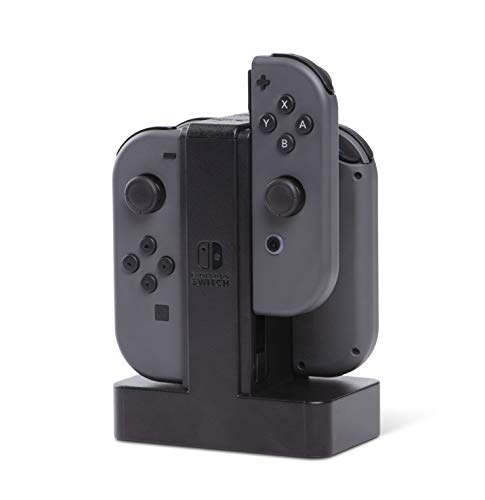
If you own a Nintendo Switch and frequently play with friends, the PowerA Joy-Con Charging Dock is an essential addition to your gaming setup. This dock charges up to four Joy-Con controllers simultaneously, ensuring you’re always ready for multiplayer sessions. Individual LEDs show the charge level, while the easy slide-in design makes connecting your controllers a breeze. With a weighted base for stability, it stays securely in place during use. Officially licensed for Nintendo Switch, it also comes with a two-year limited warranty. With a stellar customer rating of 4.7 out of 5, you’ll appreciate this reliable charging solution.
Best For: Gamers who frequently play multiplayer on the Nintendo Switch and need a reliable charging solution for multiple Joy-Con controllers.
Pros:
- Charges up to four Joy-Con controllers at once, perfect for group gaming sessions.
- Individual LEDs display the charge level for each controller, allowing for easy monitoring.
- Sturdy design with a weighted base ensures stability during use.
Cons:
- Only compatible with Joy-Con controllers, limiting its use for other accessories.
- Requires a power source, which may not be convenient for portable use.
- The plastic enclosure may not appeal to users looking for a more premium feel.
Controller Charging Dock for Switch Pro & PS5 & Xbox Series X|S

For those who own multiple consoles like the Switch Pro, PS5, or Xbox Series X|S, the Controller Charging Dock stands out as an essential accessory. This 2-port LED charging station lets you charge two controllers simultaneously, ensuring you’re always ready for action. It features removable USB Type-C adapters for easy drop-in charging and an LED indicator that shows charging status—red for charging and green for full. Although it’s not compatible with PowerA or other third-party controllers, its built-in smart chip protects against short circuits. With a customer rating of 4.1 stars, it’s a reliable choice for your gaming setup.
Best For: Gamers who own multiple consoles like the Switch Pro, PS5, or Xbox Series X|S and need a convenient charging solution for their controllers.
Pros:
- Dual controller charging capability allows simultaneous charging of two controllers.
- LED indicators provide clear charging status with red for charging and green for full.
- Built-in smart chip offers protection against short circuits for safer charging.
Cons:
- Not compatible with PowerA or other third-party controllers, limiting its use.
- USB wall adapter is not included, which may require an additional purchase.
- Some users may find the charging speed less optimal without the recommended power adapter.
Switch Controller Charger Dock for Nintendo Switch

With its impressive ability to charge up to four JoyCons and two controllers simultaneously, the Switch Controller Charger Dock for Nintendo Switch is a must-have for avid gamers. This 6-in-1 charging dock supports not only JoyCons but also the Nintendo Pro and PS5 DualSense controllers. It features a smart IC chip for protection against overcharging and short circuits, ensuring safe use. The LED indicator keeps you informed about the charging status, while its compact design makes it portable. With a one-year quality promise and a solid 4.6-star rating, this charger is perfect for keeping your gaming setup organized.
Best For: Avid gamers looking for an efficient and safe way to charge multiple controllers simultaneously.
Pros:
- Charges up to 4 JoyCons and 2 controllers at the same time, keeping your gaming setup organized.
- Features a smart IC chip for protection against overcharging and short circuits, ensuring safety during use.
- Compact and portable design makes it easy to transport and fits well in any gaming environment.
Cons:
- Limited to specific controllers (Nintendo Switch JoyCons, Pro Controllers, and PS5 DualSense), which may not suit all gamers.
- Only one USB port available, which could limit charging options for additional devices.
- Requires a power source such as a game console or wall charger, which might not always be convenient.
Switch 2 Controller Charging Dock, 6-in-1 Charging Station for Joy-Con & Pro Controllers

Gamers looking for a convenient and stylish way to charge multiple controllers will find the Switch 2 Controller Charging Dock to be an essential addition to their setup. This 6-in-1 charging station can simultaneously charge up to four Joy-Cons or two Pro Controllers, making it perfect for gaming marathons. Its sleek design not only enhances your desk aesthetics but also keeps your controllers organized in vertical slots, reducing clutter. With built-in RGB LED lighting, it creates an immersive atmosphere. Plus, its compact, USB-powered design makes it travel-friendly, ensuring you stay charged whether at home or on the go.
Best For: Gamers who need a stylish and efficient solution to charge multiple controllers simultaneously.
Pros:
- Versatile charging capability allows for simultaneous charging of up to four Joy-Cons or two Pro Controllers.
- Dynamic RGB LED lighting enhances the gaming atmosphere and adds a stylish touch to your setup.
- Compact and portable design makes it easy to transport for gaming sessions on the go.
Cons:
- Limited to Nintendo Switch controllers, so it may not be useful for gamers with other console brands.
- Only supports USB Type C, which could be a drawback for users with different connector types.
- Charging dock may require additional power sources if using multiple ports simultaneously, potentially leading to clutter.
OIVO PS4 Controller Charger Dock Station

The OIVO PS4 Controller Charger Dock Station is perfect for PlayStation 4 enthusiasts looking for a reliable and efficient charging solution. Weighing just 196 grams, this sleek black dock accommodates DualShock 4 controllers, fully charging them in only 1.8 hours. You can easily power it via a USB port from your PS4 console, PC, or wall outlet. With built-in protection against overcharging and overheating, your controllers are safe while charging. Plus, LED indicators let you know when charging is complete or in progress. With a 4.7-star rating from over 44,000 reviews, it’s a must-have for any serious gamer.
Best For: PlayStation 4 gamers seeking a fast and safe charging solution for their DualShock 4 controllers.
Pros:
- Fast charging capability, fully charging controllers in just 1.8 hours.
- Built-in safety features protect against overcharging, overheating, and other power issues.
- LED indicators provide clear visual feedback on charging status.
Cons:
- Adapter not included for wall power charging, requiring a separate purchase.
- Limited to DualShock 4 controllers, not compatible with other controller types.
- Single USB port may limit simultaneous charging options.
Factors to Consider When Choosing a Controller Dock for Multiple Controllers
When picking a controller dock for multiple controllers, you should consider several key factors. Charging capacity and speed are essential, as is compatibility with your controllers. Don’t forget to check the design, safety features, and price to guarantee you get the best value for your gaming setup.
Charging Capacity and Speed
Choosing the right controller dock hinges on understanding its charging capacity and speed, especially if you’ve got multiple controllers in play. Look for docks that can charge up to 4 Joy-Con controllers and 2 Pro controllers at the same time, which is perfect for group gaming. Fast charging is also essential; some docks can fully charge your controllers in as little as 2.5 hours, reducing downtime considerably. LED indicators are a helpful feature, providing real-time feedback on charging status—red means charging, green means ready to go. Don’t forget to check for safety features that protect against over-charging and short-circuits. Finally, make sure you have the right power source, as some docks require a specific adapter for peak performance.
Compatibility With Controllers
Understanding the compatibility of your controller dock with your gaming setup is key to maximizing its utility. Make certain the dock supports the specific console and controller models you own, whether it’s a Nintendo Switch, PlayStation, or Xbox. If you have multiple controllers, check if the dock can charge them simultaneously and supports the number you need. Look for individual charging indicators for each controller, giving you clear updates on their charge levels. Fast charging is another essential feature, so verify the dock meets the required power input, typically 5V/2A. By keeping these compatibility factors in mind, you’ll select a dock that enhances your gaming experience while keeping your setup organized.
Design and Portability
While selecting a controller dock for multiple controllers, prioritizing design and portability can greatly enhance your gaming experience. A compact and sleek form factor guarantees it fits neatly on your desk without consuming too much space. Opt for a lightweight dock that easily slides into your backpack, making it perfect for gaming on-the-go. Look for vertical holder slots that securely organize your controllers, reducing clutter while presenting an eye-catching display. Consider docks featuring dynamic RGB lighting, allowing you to customize the visual appeal to match your setup. Finally, verify the dock offers universal USB-powered connectivity, providing versatility for various power sources and keeping your controllers charged no matter where you play.
Safety Features Included
When setting up your gaming station, safety features in a controller dock can’t be overlooked. Look for docks with built-in protection chips that guard against over-charge, short-circuit, over-voltage, and over-current, guaranteeing safe charging. Many quality docks use fire-resistant materials and hardened plastic, enhancing durability and safety during use. Automatic device detection is another great feature; it adjusts the charging speed for ideal performance without risking damage to your controllers. LED indicators provide real-time feedback on charging status, so you can easily monitor the safety of your devices. Finally, multi-protection systems help prevent overheating and guarantee stable power delivery, giving you peace of mind while you enjoy your gaming experience.
Price and Warranty Options
Choosing the right controller dock for your gaming setup involves careful consideration of both price and warranty options. Prices can vary considerably, ranging from around $10 to over $50, depending on features like charging capabilities. When you’re comparing docks, don’t overlook warranty options. Some manufacturers offer a standard 1-year warranty, while others provide extended coverage of 2 years or more. Many docks also come with a 30-day return policy, allowing you to test them out. Checking customer reviews can give you insight into reliability and satisfaction, often linked to warranty support. Finally, consider any additional features, like built-in safety protections or customizable lighting, as these can affect both the price and your overall experience.