The best FPV goggles make a noticeable difference in flight awareness, control, and immersion. In 2026, shoppers can choose among premium digital headsets, racing-focused OLED models, and affordable analog goggles with built-in DVRs.
This roundup compares 10 popular options across DJI, Walksnail, Skyzone, BETAFPV, and budget-friendly platforms. Use the guide below to match screen quality, video-system compatibility, comfort, and features to the way you fly.
Best 10 Fpv Goggles Picks for 2026
Premium Pick

- 1080p Micro-OLED displays with up to 100 Hz refresh
- O4 HD transmission with low latency and high bitrate
- Adjustable diopters, Real View PiP, and up to 3-hour use
Best For: DJI pilots wanting a premium, immersive FPV experience
Value Digital Pick
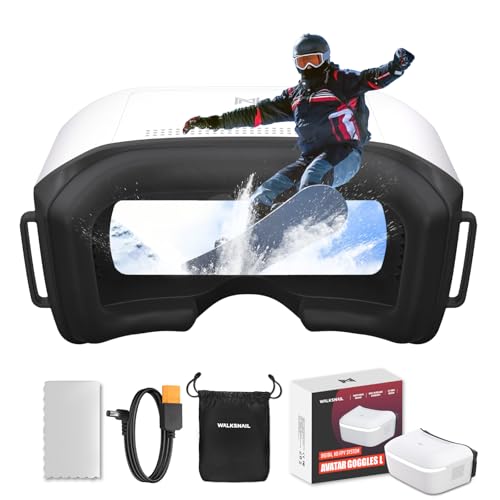
- 1080p/60fps digital video on a 4.5-inch LCD
- Head tracking supports fixed-wing and RC applications
- Built-in DVR with flexible 2S-6S power input
Best For: Budget-conscious Walksnail Avatar HD pilots
Classic DJI Racing Pick

- 1920 x 1080 maximum display resolution
- Portable 420-gram headset design
- Built-in accelerometer, gyroscope, Wi-Fi, and USB
Best For: Pilots seeking a compact DJI FPV headset
OLED Analog Pick

- Dual OLED screens with strong contrast and rich detail
- 5.8GHz 48CH transmission at 720p/60fps
- DVR, head tracking, and 4:3/16:9 support
Best For: Pilots wanting OLED quality and versatile 5.8GHz FPV viewing
Best Analog Value

- 5-inch 800x480 LCD
- 40-channel auto-searching receiver
- Built-in DVR recording
Best For: Analog FPV pilots seeking a large display and simple recording
Best HD Comfort Pick

- 1920x1080 display at 60Hz
- 1080p/60fps recording support
- Glasses-friendly design
Best For: P1 Air Unit pilots wanting comfortable HD viewing and recording
Best OLED Upgrade

- Dual 1920x1080 OLED displays
- 5.8G 48-channel receiver
- DVR, head tracker, and cooling fans
Best For: Experienced pilots wanting advanced reception and OLED viewing
Best All-Drone FPV Goggles

- Unibody lens for immersive viewing
- Works with many camera-drone brands
- Adjustable fit with eyeglass support
Best For: Broad drone compatibility and smartphone-based FPV viewing
Best Motion-Control FPV Goggles

- 1920×1080 Micro-OLED displays
- Includes DJI RC Motion 2 controller
- Adjustable diopters for glasses-free use
Best For: Compatible DJI drones and immersive motion-controlled flight
Premium Pick – DJI Goggles 3
The DJI Goggles 3 are premium FPV goggles for pilots who want high-resolution viewing, low-latency O4 transmission, and broad compatibility within DJI’s current ecosystem. Their adjustable diopters, integrated battery, and Real View PiP also make them practical for longer, more safety-conscious flights.
Best For: DJI pilots seeking an immersive, feature-rich FPV setup for Avata 2, Neo, Air 3, or Mini 4 Pro.
Pros:
- 1080p Micro-OLED screens with refresh rates up to 100 Hz
- O4 transmission offers 24 ms latency and up to 60Mbps bitrate with Avata 2
- Adjustable -6.0 D to +2.0 D diopters and Real View PiP
- Integrated headband battery provides up to three hours of operation
Cons:
- Not compatible with DJI RC Motion 2 or DJI FPV Remote Controller 2
- Best suited to users already invested in compatible DJI equipment
Choose these FPV goggles if display quality, convenience, and DJI ecosystem compatibility matter more than minimizing cost. The built-in defogging and wireless streaming add useful everyday flexibility.
Value Digital Pick – CADDXFPV Walksnail Goggles L
The CADDXFPV Walksnail Goggles L offer a relatively affordable route to digital FPV, replacing the soft, noisy view of analog goggles with a 1080p/60fps image. They are especially appealing for pilots who need head tracking, onboard recording, and flexible field power.
Best For: Budget-conscious Walksnail Avatar HD pilots flying freestyle, fixed-wing aircraft, RC cars, or custom FPV platforms.
Pros:
- 1080p/60fps viewing on a 4.5-inch 1920 x 1080 LCD
- Up to 50Mbps bitrate, latency as low as 32 ms, and a rated range above 4 km
- Head tracking with a nine-axis gyro and PPM output
- Built-in DVR, replay support, and 2S-6S battery input
Cons:
- Works only with Walksnail Avatar HD air units
- Does not receive analog video and has no HDMI input
- External battery and Micro SD card are not included
These FPV goggles make sense when you want digital clarity without moving into a premium DJI setup. Confirm your aircraft uses a compatible Walksnail Avatar HD camera or VTX before ordering.
Classic DJI Racing Pick – DJI FPV Goggles V2
The DJI FPV Goggles V2 are a compact, established option for drone racing and immersive FPV flying. The supplied specifications highlight a 1920 x 1080 display, built-in controls, Wi-Fi connectivity, and motion-sensing hardware in a portable 420-gram design.
Best For: Pilots looking for a lightweight DJI-branded headset for immersive FPV use and racing-oriented setups.
Pros:
- 1920 x 1080 maximum display resolution
- Portable 420-gram design
- Built-in accelerometer and gyroscope
- USB connectivity and Wi-Fi support
Cons:
- The supplied notes provide limited details about current drone and transmission compatibility
- Display specifications list a 2-inch screen, which may feel compact to some users
The V2 remains worth considering for shoppers who specifically want DJI FPV goggles in a compact form factor. Because the supplied listing information is limited, verify compatibility with your aircraft and video system before buying.
OLED Analog Pick – Skyzone Sky 04O PRO
The Skyzone Sky 04O PRO uses dual OLED screens and 5.8GHz 48CH wireless transmission to deliver a bright, high-contrast FPV view. Its switchable aspect ratios, head tracker, DVR, and ergonomic design make it versatile for drones, RC cars, and airplanes.
Best For: FPV users who prioritize OLED contrast, broad 5.8GHz channel selection, and recording during flights.
Pros:
- Dual OLED screens provide rich detail, bright colors, and deep blacks
- Supports both 4:3 and 16:9 aspect ratios
- 5.8GHz 48CH transmission with 720p at 60fps
- Built-in DVR and head tracker
Cons:
- Listed video capture resolution is 720p
- At two pounds, it is heavier than some competing FPV goggles
- The supplied notes do not specify digital-system compatibility
These FPV goggles are a strong fit for pilots who value OLED image quality and analog-style 5.8GHz flexibility. Their recording and head-tracking features add capability, though buyers should confirm system compatibility and consider the listed weight.
Best Analog Value – EV800D FPV Goggles
These EV800D fpv goggles are a practical choice for analog drone racing and RC flying. They combine a 5-inch 800×480 LCD with a 40-channel auto-searching receiver, built-in DVR, and an 82-degree viewing angle.
Best For: Analog FPV pilots who want a large screen, simple channel searching, and onboard recording.
Pros:
- Built-in DVR records at up to 720×576 resolution.
- 40-channel RaceBand receiver with automatic searching.
- Large 5-inch LCD and wide 82-degree field of view.
- Supports external video input and includes dual antennas.
Cons:
- Resolution is lower than the HD models in this roundup.
- Battery life is listed at about two hours.
- A high-speed C10 memory card is recommended for full-frame recording.
The EV800D makes sense for analog setups where screen size, straightforward controls, and integrated DVR recording matter more than HD image quality.
Best HD Comfort Pick – BETAFPV VR04 HD Goggles
The BETAFPV VR04 HD is among the more accessible HD fpv goggles for pilots using the P1 Air Unit. Its 4.5-inch 1920×1080 display, glasses-friendly fit, and 1080p recording make it suited to both viewing and capturing flights.
Best For: P1 Air Unit users who prioritize HD clarity, comfortable wear, and built-in flight recording.
Pros:
- 1920×1080 LCD with a 60Hz refresh rate.
- Records 1080p video at 60fps to a microSD card.
- Glasses-friendly interior, PU face padding, and silicone nose bridge.
- Includes two 2600mAh batteries and supports up to three hours of use.
Cons:
- Designed for compatibility with the P1 Air Unit rather than universal FPV systems.
- microSD card is not included.
- Its HD features may be unnecessary for analog-only pilots.
Choose the VR04 HD when you want a comfortable, high-resolution setup with replay capability and the flexibility to power it from a compatible 2–6S whoop battery.
Best OLED Upgrade – SKYZONE SKY 04X PRO
The SKYZONE SKY 04X PRO fpv goggles target pilots who want a more advanced viewing setup. They feature dual 1920×1080 OLED displays, a 5.8G 48-channel receiver, DVR, head tracking, and cooling fans for the OLED panel.
Best For: Experienced FPV pilots seeking OLED image quality, receiver flexibility, and extra flight features.
Pros:
- Dual 1920×1080 OLED displays provide high-resolution viewing.
- Includes a 5.8G 48-channel receiver and supports dual reception.
- Built-in DVR and head tracker add recording and control options.
- Cooling fans help dissipate heat around the OLED panel.
Cons:
- Receiver compatibility can vary between brands and pin definitions.
- At 900g, it is substantially heavier than the EV800D listed here.
- The advanced feature set may be more than a beginner needs.
The SKY 04X PRO is the strongest fit for pilots building a feature-rich 5.8G setup and willing to verify receiver compatibility before purchasing.
Best All-Drone FPV Goggles – DroneMask 2
The DroneMask 2 is a versatile choice for pilots seeking FPV goggles that work with a wide range of camera drones. Its unibody lens, adjustable fit, and smartphone-based setup are designed for immersive viewing without requiring third-party apps.
Best For: Drone owners who want broad compatibility, glare reduction, and an adjustable fit that can accommodate eyeglasses.
Pros:
- Patented unibody lens is designed to provide higher resolution than standard split-screen VR headsets.
- Compatible with many DJI, Autel, Potensic, Fimi, Hubsan, Skydio, Xiaomi, and Parrot camera drones.
- Adjustable focal length, headstraps, soft face padding, and eyeglass compatibility support a more personalized fit.
- Lightproof screen-access holes help reduce glare while allowing access to phone settings.
Cons:
- Requires a standard controller and smartphone for drone use.
- At 1.3 kg, it is substantially heavier than the dedicated FPV goggles in this roundup.
- Its HDMI connectivity and included adapters may require checking your phone and cable setup before use.
The DroneMask 2 stands out for flexibility rather than drone-specific transmission hardware. It is a practical pick if you want one headset for compatible camera drones, phone-based entertainment, and adjustable viewing comfort.
Best Analog Value FPV Goggles – SpeedyBee 5.8G FPV Goggles
These SpeedyBee FPV goggles are built for analog 5.8G systems used with FPV drones, RC cars, and airplanes. Dual antennas, 40-channel RaceBand coverage, and auto-search make them a straightforward option for intermediate hobbyists.
Best For: Analog FPV pilots who prioritize compact size, broad channel coverage, and built-in battery operation.
Pros:
- Dual antennas are designed to support steadier signal reception.
- 40 RaceBand channels and auto-search simplify finding an available video signal.
- The 3-inch, 480×320 high-brightness LCD provides live video with minimal stated delay.
- Built-in 1200mAh battery, low power consumption, DVR recording, and AV input/output add useful flexibility.
Cons:
- Designed for analog 5.8G FPV systems rather than the digital DJI ecosystem.
- The 480p capture resolution is less detailed than higher-resolution digital goggles.
- Its listed intermediate skill level may be less suitable for complete beginners.
For analog setups, the SpeedyBee offers a practical feature set in a compact 180-gram design. Choose it when channel access, portability, and recording matter more than high-definition digital image quality.
Best Motion-Control FPV Goggles – DJI Goggles 2 Motion Combo
The DJI Goggles 2 Motion Combo pairs lightweight OLED FPV goggles with the DJI RC Motion 2 controller. It is aimed at pilots who want low-latency DJI O3+ transmission, high-resolution viewing, and intuitive motion-based flight control.
Best For: DJI drone pilots seeking immersive digital FPV flight with motion-sensing control and adjustable vision correction.
Pros:
- Two Micro-OLED screens deliver 1920×1080 resolution with a listed 100 Hz refresh rate.
- RC Motion 2 enables wrist-tilt navigation alongside joystick control.
- Diopter adjustment from +2.0 to -8.0 can help users fly without glasses.
- Lightweight 86-gram goggles include replaceable foam padding and support wireless movie streaming.
Cons:
- Compatibility is centered on listed DJI drones and does not cover general analog FPV systems.
- The motion-control experience may be less familiar than conventional dual-stick control.
- The combo’s advanced DJI features make it a more specialized choice than basic FPV goggles.
This combo is the strongest fit for pilots already using compatible DJI aircraft or planning a DJI-based FPV setup. Its high-resolution OLED display, vision adjustment, and motion controller create a polished, immersive flying experience.
How We Picked the Best Fpv Goggles
We evaluated these Fpv Goggles by looking at the features that most affect real-world flying: video system compatibility, display quality, latency, field of view, receiver performance, comfort, adjustability, recording features, and overall value. We included both digital and analog models because goggles are not universally interchangeable. A headset designed for DJI O4 or a Walksnail system may not work with an analog camera and transmitter without additional hardware.
We also considered practical details such as diopter adjustment, head tracking, cooling fans, battery arrangements, antenna support, and portability. These features can matter as much as headline resolution when you fly for long sessions or frequently transport your equipment.
Quick Comparison of These Fpv Goggles
| Type | Best suited to | Features to prioritize |
|---|---|---|
| Premium digital | Newer DJI or Walksnail builds | High-resolution displays, low-latency transmission, system compatibility |
| Digital midrange | HD pilots balancing cost and performance | Screen quality, receiver range, recording, comfort |
| Analog | Racing, micro quads, and budget builds | Receiver sensitivity, channel support, DVR, antenna options |
| General camera viewing | Casual users and non-FPV drones | Input compatibility, lens clarity, fit, and ease of use |
Key Buying Factors for Fpv Goggles
Video-System Compatibility
Check the goggles against the air unit, VTX, or camera system in your drone before buying. DJI, Walksnail, HDZero, and analog ecosystems use different transmission hardware, and a high-end headset is not useful if it cannot receive your aircraft’s signal.
Display and Image Quality
OLED panels generally provide deeper blacks and stronger contrast, while larger LCD screens can offer good value. Resolution matters, but image clarity also depends on optics, compression, field of view, and the quality of the camera and video link.
Comfort and Adjustability
Look for a secure head strap, manageable weight, adequate ventilation, and adjustable interpupillary distance. Diopter adjustment can eliminate the need for glasses for some users. A comfortable fit is especially important during extended freestyle or racing sessions.
Receiver, DVR, and Extra Features
Analog pilots should pay attention to receiver sensitivity, channel count, diversity or signal-stabilization technology, and antenna connectors. A built-in DVR is useful for reviewing flights and diagnosing crashes. Head tracking, motion control, and integrated batteries are convenient but should not outweigh compatibility and image performance.
Who Should Buy Which Fpv Goggles?
Choose premium DJI goggles if you fly a compatible DJI digital system and want a polished, high-clarity experience with modern transmission features. Choose Walksnail or comparable HD goggles if your aircraft uses that ecosystem or you want a flexible digital platform.
Choose Skyzone OLED goggles if you primarily fly analog and value contrast, receiver performance, and advanced controls. Choose an entry-level analog model if you are building a first quad, flying indoors, or want an inexpensive backup headset. Choose a general-purpose camera headset if you need broad viewing compatibility rather than a dedicated racing setup.
Before ordering, confirm the exact video standard, connector requirements, included antennas, battery arrangement, and return policy. Those checks will prevent most compatibility surprises and help you get the best experience from your chosen Fpv Goggles.