If you want cleaner monitoring, real-time vocal processing, or a smarter streaming setup, an audio interface with onboard dsp can make a big difference. These models handle effects and routing inside the hardware, so your computer stays lighter and your latency stays low.
Below, we’ve narrowed the field to 10 strong picks for home studios, podcasting, streaming, and hybrid creator workflows.
Best 10 Audio Interface with Onboard Dsp Picks for 2026
Portable DSP Studio Hub

- 4 discrete preamps with up to 75 dB gain
- Synergy Core DSP/FPGA effects for near-zero-latency tracking
- Dual USB-C, loopback, and expandable 14-in/10-out routing
Best For: Mobile creators and small studios
Creator-Friendly Hybrid Interface

- Dual USB ports connect to computer and phone/iPad at once
- Up to 70 dB gain with -130 dB EIN for quiet recording
- Auto-gain, loopback, and ProStudio2 streamline streaming
Best For: Streamers and solo creators
Full-Featured Mixing Interface
MOTU UltraLite-mk5 18x22 USB Interface

- 18x22 I/O with analog, S/PDIF, and optical connections
- DSP monitor mixing with six separate mix busses
- Built-in reverb, parametric EQ, and dynamics processing
Best For: Producers needing deep routing and monitoring
Dual-PC DSP Mic Interface
BEACN Studio Dark USB XLR Interface

- On-board DSP for EQ, compression, gate, and noise suppression
- Dual USB tech moves up to 8 channels between devices
- Built for streaming, gaming, and podcasting workflows
Best For: Voice-focused streamers and podcasters
Compact Studio Workhorse
Yamaha URX22C USB-C Audio/MIDI Interface

- Onboard DSP monitoring with REV-X, Channel Strip, and Guitar Amp Classics
- 32-bit/192kHz USB-C interface with 2-in/2-out analog I/O and MIDI
- Two Class-A D-PRE combo inputs with +48V phantom power
Best For: Singer-songwriters and small studios needing simple DSP monitoring
Streamer Routing Hub
Elgato Wave XLR Pro Dual XLR Interface
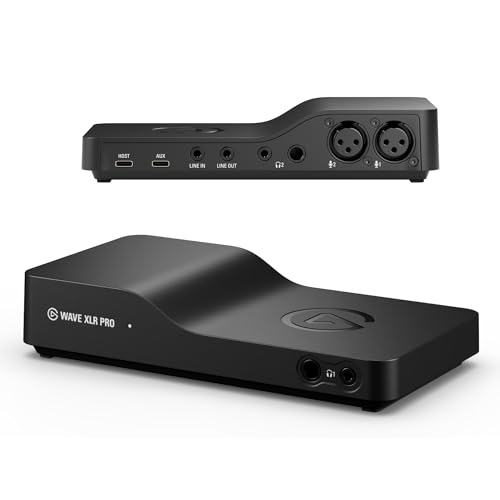
- Onboard DSP effects and VST plugins in one signal chain
- Dual XLR inputs with up to 80dB gain and low-latency monitoring
- Up to five hardware mixes plus flexible dual USB-C routing
Best For: Streamers and creators who need advanced routing and mic control
Budget FX Mixer Interface
Pyle PMUX9 USB Audio Interface

- 24 preset digital effects for voice and instrument processing
- Multiple inputs including XLR/6.35, AUX, RCA, and stereo options
- 48V phantom power and compact footprint
Best For: Beginners who want built-in effects and lots of connectivity
Creator-Centered USB Audio Interface
Elgato Wave XLR MK.2 USB Audio Interface and DSP Mixer

- 80dB gain for XLR microphones
- Built-in voice enhancer, compressor, EQ, and Wave FX
- Ultra-low-latency monitoring with touch control
Best For: Streamers and podcasters who want simple DSP-driven vocal control
Standalone DSP Streaming Interface
Antelope Audio Zenith 2 USB-C Audio Interface for Streaming & Podcasting

- Onboard DSP for vocals, guitar, and studio effects
- Dual independent headphone mixes
- USB-C, class-compliant support for PC, Mac, iOS, and Android
Best For: Streamers and podcasters who want standalone effects and flexible monitoring
Portable DSP Studio Hub – Antelope Audio Zen Quadro
If you want an audio interface with onboard dsp that still travels well, the Antelope Audio Zen Quadro is built for compact pro setups. It combines four discrete mic preamps, real-time Synergy Core effects, and dual USB-C connectivity so you can record, stream, or route audio between devices without tying up your computer’s CPU.
Best For: Mobile creators, small studios, and hybrid streaming/recording setups.
Pros:
- Four discrete preamps with up to 75 dB of gain for vocals, instruments, and small sessions.
- 37 included real-time effects, with 90+ available, running on dedicated DSP and FPGA hardware.
- Dual USB-C supports computer plus phone/tablet workflows, or two computers, with loopback for streaming.
- Up to 14-in/10-out routing with ADAT expansion, S/PDIF, dual headphone outputs, and standalone presets.
Cons:
- More feature-rich than a simple plug-and-play interface.
- Best value comes if you will actually use the onboard processing and routing options.
Overall, this is a strong pick if you want premium conversion, low-latency effects, and flexible I/O in one compact unit. It stands out for creators who need serious routing without a bulky desktop interface.
Creator-Friendly Hybrid Interface – MAONO P1 USB Audio Interface
The MAONO P1 is a practical audio interface with onboard dsp for creators who split time between recording, streaming, and mobile content. Its ProStudio2 software, built-in loopback, and onboard tools like auto-gain and noise reduction help keep workflows simple while still delivering 24-bit/192kHz capture.
Best For: Streamers, podcasters, and solo creators who want easy routing across devices.
Pros:
- Dual USB ports with MFi-certified connectivity for computer plus phone or iPad use.
- Up to 70 dB gain and -130 dB EIN for dynamic mics and quiet recordings.
- Auto-gain, stream mode, mute controls, and loopback simplify live and recorded workflows.
- ProStudio2 supports routing desktop and app audio into dedicated channels.
Cons:
- More focused on creator workflows than on multi-input studio expansion.
- Best suited to solo recording and streaming rather than complex band sessions.
For creators who want a straightforward interface that reduces setup friction, the P1 offers useful onboard control without overwhelming features. It is especially appealing if you need one device for recording, streaming, and mobile capture.
Full-Featured Mixing Interface – MOTU UltraLite-mk5 18×22 USB Interface
MOTU UltraLite-mk5 18x22 USB Audio Interface 3 for Mac, Windows and iOS with mixing and effects
Check Price On AmazonThe MOTU UltraLite-mk5 is an audio interface with onboard dsp built for users who need serious I/O and flexible monitoring. With 18×22 connectivity, DSP-driven monitor mixing, and onboard effects for reverb, EQ, and dynamics, it works well as a central hub for recording and live playback.
Best For: Producers and musicians who need extensive routing, mixing, and low-latency monitoring.
Pros:
- 18×22 I/O includes mic/line/hi-Z inputs, analog outs, S/PDIF, and 8-channel optical I/O.
- DSP monitor mixing supports six separate mix busses with computer channels in each mix.
- On-board effects include reverb, 4-channel parametric EQ, and dynamics processing.
- High-resolution OLED metering and CueMix 5 make setup and control easier.
Cons:
- More interface than casual users may need for simple two-channel recording.
- Works best if you want to take advantage of its mixing, routing, and effects tools.
As a studio centerpiece, the UltraLite-mk5 offers a strong mix of conversion quality, routing depth, and DSP-powered monitoring. It is a compelling choice when flexibility matters as much as raw input count.
Dual-PC DSP Mic Interface – BEACN Studio Dark USB XLR Interface
The BEACN Studio is a focused audio interface with onboard dsp for streamers, gamers, and podcasters who want hands-on control over vocal processing. Its built-in EQ, compression, gate, noise suppression, and low-frequency enhancement make it easy to shape mic sound before it reaches your stream or recording software.
Best For: Streamers and gamers who want a USB XLR mic interface with vocal processing.
Pros:
- On-board DSP includes EQ, compression, expander/gate, noise suppression, and low-frequency enhancement.
- Dual USB technology sends up to 8 channels between computers, consoles, and phones.
- BEACN App and BEACN Link App simplify routing and remote app assignments across PCs.
- Built for streaming, gaming, and podcasting with an ultra-low-noise preamp.
Cons:
- Primarily centered on microphone and content-creation workflows.
- Not the right choice if you need broad instrument I/O or large studio expansion.
If your main goal is polished voice capture with minimal setup friction, the BEACN Studio keeps the workflow tight and creator-oriented. Its DSP processing and dual-PC features make it especially useful in multi-device streaming environments.
Compact Studio Workhorse – Yamaha URX22C USB-C Audio/MIDI Interface
If you want an audio interface with onboard dsp for clean tracking and low-latency monitoring, the Yamaha URX22C is built around practical studio basics. It combines two Class-A D-PRE combo inputs, MIDI I/O, and DSP-powered monitoring with included effects, making it a strong fit for small recording setups and mobile rigs.
Best For: Singer-songwriters, home studios, and players who want simple recording with onboard DSP monitoring.
Pros:
- Latency-free DSP monitoring with REV-X reverb, Channel Strip, and Guitar Amp Classics
- 32-bit/192kHz USB-C connectivity with 2-in/2-out analog I/O and MIDI I/O
- Two XLR/TRS combo inputs with Class-A D-PRE mic preamps and +48V phantom power
- Full-metal housing for added durability
Cons:
- Only two analog input channels, so it is not ideal for larger sessions
- Its feature set is focused on straightforward recording rather than complex routing
The URX22C is a sensible pick if you want reliable conversion, onboard effects, and a rugged build without moving into a more complicated interface workflow. It keeps the essentials in place while adding DSP tools that help with monitoring during recording.
Streamer Routing Hub – Elgato Wave XLR Pro Dual XLR Interface
The Elgato Wave XLR Pro is an audio interface with onboard dsp aimed at creators who want mic processing and flexible routing in one box. It offers dual XLR support, ultra-low latency monitoring, and DSP effects in the signal chain, which makes it especially useful when managing a streaming or multi-device setup.
Best For: Streamers and creators who need advanced mic control, routing, and multiple mixes.
Pros:
- Runs DSP effects and VST plugins in one signal chain
- Up to 80dB of gain per XLR input with ultra-low latency monitoring
- Dual USB-C and flexible routing across inputs and outputs
- Supports up to five independent hardware mixes
Cons:
- Designed for Windows and macOS only
- Its routing and mix features may be more than casual users need
This model stands out if your priority is control rather than basic recording alone. The onboard DSP and mix workflow are a strong match for creators who want to shape audio, manage several sources, and keep monitoring responsive.
Budget FX Mixer Interface – Pyle PMUX9 USB Audio Interface
If you want an affordable audio interface with onboard dsp-style effects for basic recording and playback, the Pyle PMUX9 offers a wide set of inputs and preset processing. It is built for PC-based use and includes multiple mic, instrument, and stereo connections, making it practical for simple home projects and casual live setups.
Best For: Beginners and budget-minded users who want many inputs and built-in preset effects.
Pros:
- 24 preset digital effects including reverb, delay, echo, chorus, and more
- Multiple input options: combo XLR/6.35, AUX, RCA, and instrument input
- 48V phantom power for compatible microphones
- Compact design for small spaces
Cons:
- Limited to 24-bit/48kHz resolution
- Windows-focused compatibility only
- Feature set is more basic than higher-end DSP interfaces
The PMUX9 makes sense if you care more about input variety and built-in effects than advanced recording specs. It is a straightforward option for users who want an inexpensive interface with plenty of connectivity.
Creator-Centered USB Audio Interface – Elgato Wave XLR MK.2 USB Audio Interface and DSP Mixer
If you want an audio interface with onboard dsp that keeps a streaming or podcast setup simple, the Elgato Wave XLR MK.2 is built around voice-first control. It offers 80dB of gain for XLR microphones, built-in voice effects, and ultra-low-latency monitoring, so it works well when you need clean capture and fast feedback.
Best For: Streamers, podcasters, and voice creators who want easy DSP control and strong mic gain in a compact USB interface.
Pros:
- 80dB gain helps power demanding XLR microphones.
- Onboard voice enhancer, compressor, EQ, and Wave FX processing add built-in DSP control.
- Ultra-low-latency monitoring supports real-time listening while recording.
- Touch control with LED feedback makes level changes and muting quick.
Cons:
- Only one XLR input and 2-channel design limit larger recording setups.
- Requires Wave Link software for the full routing and effects workflow.
This is a practical pick if your priority is a streamlined interface for vocals, streaming, and simple routing. It focuses on microphone performance and onboard effects rather than multi-input expansion.
Standalone DSP Streaming Interface – Antelope Audio Zenith 2 USB-C Audio Interface for Streaming & Podcasting
The Antelope Audio Zenith 2 is an audio interface with onboard dsp designed for creators who want processing without relying on the computer. Its class-compliant USB-C design, vocal chain tools, guitar processing, and zero-lag monitoring make it a flexible option for streaming, podcasting, and music work.
Best For: Creators who want standalone DSP effects, dual headphone mixes, and broad device compatibility for streaming or recording.
Pros:
- Onboard DSP supports vocal processing, guitar effects, and studio shaping in real time.
- Dual independent headphone outputs are useful for collaboration or podcast sessions.
- Class-compliant USB-C operation works with PC, Mac, iOS, and Android.
- High-end conversion and 75 dB gain are aimed at clean, detailed recordings.
Cons:
- Optional software control is not required, but the feature set may feel broad if you only need a simple interface.
- Many advanced functions are centered on Antelope’s ecosystem and effects workflow.
Zenith 2 stands out if you want DSP processing that stays active on the interface itself, including live vocal and instrument shaping. It is especially appealing for users who value portable setup flexibility and zero-latency monitoring.
Hybrid Mobile Creator Interface – MAONO P2 Hybrid USB Audio Interface Dual XLR for PC Phone iPad Guitar
The MAONO P2 is an audio interface with onboard dsp-style creator tools for users who want flexible routing and processing across computer and mobile devices. With dual USB connectivity, loopback, VST support in ProStudio 2, and direct monitoring, it is aimed at streamers and musicians who need a compact all-in-one workflow.
Best For: Solo creators, streamers, and musicians who want a compact interface that works with computers, phones, and tablets.
Pros:
- Dual USB ports let you connect a computer and phone or iPad at the same time.
- 56dB dual XLR input and 24-bit/192kHz support fit podcasting, vocals, and guitar recording.
- Loopback and ProStudio 2 help route desktop audio, backing tracks, and VST effects.
- Independent mute controls and direct monitoring support live streaming and recording.
Cons:
- 56dB gain may be less than some higher-output interfaces for very demanding microphones.
- The compact two-input layout is best for smaller setups rather than larger multi-source rigs.
This model is a good fit if you want an easy hybrid workflow between PC and mobile recording without sacrificing creator-focused features. Its strengths are versatility, loopback routing, and a desk-friendly form factor.
How We Picked the Best Audio Interface with Onboard Dsp
We focused on interfaces that include useful onboard DSP features such as compression, EQ, reverb, voice processing, cue mixing, or virtual routing. We also weighed I/O flexibility, driver stability, monitoring options, software support, and whether the interface makes sense for streaming, vocal recording, podcasting, or instrument input.
Quick Comparison
For simple voice-first setups, compact USB models with built-in DSP are often the easiest choice. If you need more channels, more complex routing, or higher-end sound shaping, look at interfaces with stronger software mixers and multi-input designs. Creators using a dual-PC workflow or live show routing should prioritize models with flexible loopback and mix control.
Key Buying Factors for an Audio Interface with Onboard Dsp
DSP Features
Not all DSP is the same. Some interfaces offer basic effects for monitoring, while others include channel-strip style processing, routing tools, and saved presets. Choose the level of control that matches your workflow.
Inputs and Connectivity
Consider how many microphones, instruments, or line sources you need today and in the near future. USB-C, iOS support, and dual-PC compatibility can matter more than raw sample rate if your setup is creator-focused.
Monitoring and Latency
One of the biggest advantages of an Audio Interface with Onboard Dsp is near-zero-latency monitoring with effects. If you record vocals or stream live, this can improve comfort and consistency.
Software and Workflow
The best interfaces pair hardware DSP with intuitive software. Look for easy mixer control, saved scenes, routing presets, and clear metering so you can set up quickly and troubleshoot easily.
Who Should Buy Which Audio Interface with Onboard Dsp?
Podcasters and streamers should prioritize DSP voice processing, loopback, and easy monitoring. Musicians and singer-songwriters may prefer stronger preamps, better conversion, and more I/O. If you want a lightweight creator rig, a compact two-channel model is usually enough. If you run a more advanced studio or multi-device setup, choose a unit with deeper routing and stronger software control.