Choosing the right scanner can make the difference between a usable digital sculpture and a frustrating cleanup job. For artists, the best options balance fine detail, stable tracking, and practical file output.
This roundup of the best 3D scanners for sculpture in 2026 focuses on models that can handle texture, medium-sized forms, and real-world studio workflows.
Best 10 3d Scanners for Sculpture Picks for 2026
Precision Metrology Pick
Revopoint MetroX Pro Blue Laser Scanner

- 0.01 mm single-frame precision
- Four scan modes with turntable automation
- Scans shiny or dark surfaces without spray
Best For: Detailed sculpture capture and precision modeling
Wireless Runner-Up
Creality CR-Scan Ferret Pro Wireless Scanner

- 0.1 mm accuracy with 30FPS scanning
- WiFi 6 wireless bridge for stable transfer
- Anti-shake tracking helps beginners
Best For: Portable sculpture scanning with wireless convenience
Industrial Inspection Choice
Revopoint MetroY Ultra CMM Scanner

- 0.01 mm precision with verified metrology workflow
- Up to 90 FPS for faster capture
- Includes CMM ball plate and Revo Measure license
Best For: Sculpture scanning with inspection and reporting needs
Lightweight Value Pick
3DMakerpro Moose Lite 3D Scanner

- 0.05 mm accuracy for detailed models
- AI visual tracking with JMStudio workflow
- Lightweight and quiet for easy handling
Best For: Medium sculpture projects and portable scanning
Industrial-Grade Detail
Creality CR-Scan Raptor for precision sculpture capture
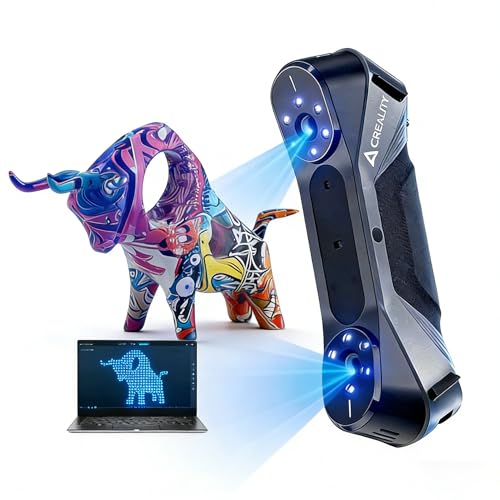
- 0.02mm max accuracy for fine detail
- Blue laser and infrared modes for varied subjects
- 24-bit RGB color with Windows/macOS support
Best For: Sculptors who need high accuracy and flexible scanning modes
Portable Full-Color Workflow
Revopoint POP3 Plus for portable sculpture scanning
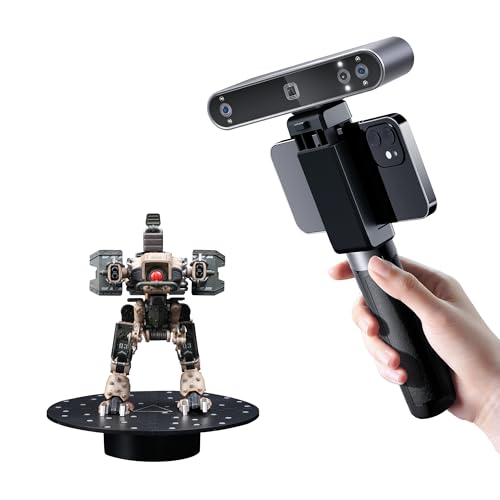
- Up to 20 microns of accuracy
- 18 fps with 9-axis IMU stabilization
- Full-color scans with broad export support
Best For: Artists who want a lightweight scanner for medium-sized sculptures
Beginner-Friendly Wireless Scan
Creality Ferret Pro for easy wireless sculpture scanning

- Easy setup for beginners and DIY creators
- WiFi 6 wireless scanning across multiple platforms
- 105g portable body with 24-bit color capture
Best For: Beginners wanting a portable scanner for larger sculptures
Premium Wireless Precision

- WiFi 6 wireless scanning and streaming
- 0.05 mm accuracy, 0.03 mm precision
- Includes tripod, markers, turntable, and filters
Best For: Sculptors who want a portable, feature-rich scanner bundle
Portable Color Capture

- Handheld scanner with full-color texture capture
- Dual modes for wide-range and fine-detail scans
- Up to 60 FPS image processing with ASIC chip
Best For: Artists who need a portable scanner for colored sculptural models
Studio-to-Field Detail

- WiFi 6 wireless scanning with streaming
- RGB color capture for textured models
- 190 g body with outdoor scanning support
Best For: Sculptors and archivists needing lightweight color capture
Precision Metrology Pick – Revopoint MetroX Pro Blue Laser Scanner
If you need one of the most capable 3d scanners for sculpture, the Revopoint MetroX Pro is built for capturing fine surface detail with industrial-grade precision. Its blue laser and structured-light modes make it a strong fit for sculptural forms that need accurate geometry, sharp edges, and dependable data for 3D printing or modeling.
Best For: Sculptors, modelers, and makers who want high-precision scans for detailed forms, prototypes, and measured digital replicas.
Pros:
- Up to 0.01 mm single-frame precision and 0.02 mm accuracy for detailed capture
- Four scan modes, including laser lines, structured light, and auto turntable scanning
- Handles shiny or dark surfaces without scanning spray in laser modes
- Real-time scan streaming to phone, tablet, or display via Revo Mirror
Cons:
- Revo Design and Revo Measure are paid software sold separately
- Some workflows are Windows-only
- Large, more industrial setup than a simple casual handheld scanner
For sculpture work where fine surface detail and measurement-grade output matter, the MetroX Pro stands out as a serious, workflow-oriented option. It is best when precision and versatility matter more than portability.
Wireless Runner-Up – Creality CR-Scan Ferret Pro Wireless Scanner
The Creality CR-Scan Ferret Pro is a practical choice if you want flexible 3d scanners for sculpture without staying tethered to a desk. Its wireless WiFi 6 bridge, anti-shake tracking, and full-color scan workflow make it easier to capture medium-sized sculptural objects with less setup friction.
Best For: Makers who want a portable scanner for sculptural objects, especially when wireless workflow and easy handling matter.
Pros:
- Up to 0.1 mm accuracy and 30FPS scanning for smooth capture
- WiFi 6 transmission for faster, more stable wireless transfer
- Anti-shake tracking helps beginners keep scans on target
- Works with iOS, Android, and PC support for flexible use
Cons:
- Not intended for highly reflective, transparent, or extremely dark surfaces
- Accuracy is lower than the most metrology-focused scanners here
- Best results depend on compatible devices and software versions
For sculpture scanning where convenience and mobility matter, the Ferret Pro offers a balanced mix of speed and ease of use. It is a solid pick when you want to move around an object and build clean models without a complicated workstation setup.
Industrial Inspection Choice – Revopoint MetroY Ultra CMM Scanner
For users who need more than basic 3d scanners for sculpture, the Revopoint MetroY Ultra is a high-end system built for accuracy, speed, and controlled workflows. Its laser and structured-light modes, plus the included metrology kit in the CMM edition, make it especially useful when sculptural forms also need measurable, report-ready inspection data.
Best For: Advanced users who want sculpture capture plus metrology-grade verification and inspection workflows.
Pros:
- 0.01 mm single-frame precision with 0.015 mm + 0.04 mm/m volumetric accuracy
- Up to 90 FPS scanning for fast capture
- Five scan modes, including lasers, single-line, structured light, and auto turntable
- Includes Revo Measure software license and carbon fiber ball plate in CMM edition
Cons:
- Revo Measure only supports Windows 10/11
- Minimum system requirements are demanding
- More scanner than many casual sculpture users will need
The MetroY Ultra is best when sculpture digitizing is part of a stricter measurement or inspection workflow. If you need accuracy verification and professional reporting alongside scanning, this model is one of the most capable options in the group.
Lightweight Value Pick – 3DMakerpro Moose Lite 3D Scanner
The 3DMakerpro Moose Lite is a compact option for creators looking for approachable 3d scanners for sculpture. With blue light scanning, AI visual tracking, and integrated pre/post processing in JMStudio, it is aimed at users who want detailed models for printing or display without a heavy, noisy setup.
Best For: Hobbyists and small studios that want a lightweight scanner for medium sculpture projects and display-ready models.
Pros:
- 0.05 mm accuracy and 0.10 mm resolution for detailed scans
- AI visual tracking helps simplify the scanning process
- JMStudio combines scanning, editing, and optimizing in one workflow
- Lightweight build with no fan noise
Cons:
- 10FPS scanning is slower than some competing scanners
- Best suited for medium objects rather than very large pieces
- Plastic construction is less rugged than metal-bodied alternatives
Moose Lite is a good fit when you want a lighter, quieter scanner that still delivers fine detail. It is especially appealing for sculpture work where workflow simplicity and portability matter as much as raw speed.
Industrial-Grade Detail – Creality CR-Scan Raptor for precision sculpture capture
If you want one of the more capable 3d scanners for sculpture, the Creality CR-Scan Raptor is built for capturing fine surface detail on everything from small parts to larger forms. Its mix of blue laser and infrared structured light makes it a strong choice when you need both precision and flexible scanning modes.
Best For: Sculptors and advanced users who want metrology-level accuracy, rich detail, and color capture across a wide size range.
Pros:
- Up to 0.02mm accuracy for highly detailed capture.
- Blue 7-line laser plus infrared structured light for different object types, including faces and cultural relics.
- 24-bit RGB color and low dependence on powder coating.
- Works on Windows and macOS, with software tools for automatic repair and export.
Cons:
- Requires a fairly capable computer, including at least 8 CPU cores and 16 threads.
- May be more scanner than casual hobbyists need.
Overall, the Raptor is the most technical option here, and that pays off if your sculpture workflow depends on precision and surface fidelity. It looks especially appealing for users who want a scanner that can handle both small objects and larger artistic forms without switching tools.
Portable Full-Color Workflow – Revopoint POP3 Plus for portable sculpture scanning
For creators comparing 3d scanners for sculpture, the Revopoint POP3 Plus is a practical middle-ground pick with portable hardware, full-color scanning, and software designed to make the scan-to-model process easier. It is aimed at medium-sized objects and gives you a balance of precision, speed, and convenience.
Best For: Artists and makers who want a lightweight, color-capable scanner for medium-sized sculptures and easy workflow integration.
Pros:
- Up to 20 microns of accuracy with improved calibration and optical zoom.
- 18 fps scanning speed plus a 9-axis IMU for steadier capture.
- HD RGB camera and Flash LED lighting for full-color scans.
- Supports Wi-Fi 6, USB-C, and multiple export formats including OBJ, STL, PLY, and FBX.
Cons:
- Software is only compatible with x86_64 architecture.
- Best suited to medium-sized objects rather than very small sculpture details.
The POP3 Plus stands out if you want a lightweight scanner that is easy to move between studio and workspace. Its software ecosystem and broad file support make it a sensible option for sculpture work that feeds into 3D printing or CAD editing.
Beginner-Friendly Wireless Scan – Creality Ferret Pro for easy wireless sculpture scanning
If you’re shopping for 3d scanners for sculpture and want something approachable, the Creality CR-Scan Ferret Pro is built around easy setup, wireless scanning, and portability. It is positioned as an entry-level option that can handle medium to large subjects with full-color capture.
Best For: Beginners and DIY creators who want a lightweight wireless scanner for larger sculpture forms and general 3D printing workflows.
Pros:
- Easy-to-use design aimed at entry-level users.
- WiFi 6 wireless scanning with support for Windows, macOS, Android, and iOS.
- 24-bit full-color scanning with anti-shake tracking.
- Lightweight 105g body and included accessories for portable use.
Cons:
- Up to 0.1mm accuracy is less suited to very small or highly detailed items.
- Not ideal for jewelry, precision parts, reflective, transparent, or very dark surfaces.
- Needs compatible devices and system requirements for best performance.
The Ferret Pro makes sense if ease of use matters more than top-end precision. For sculpture scanning, it is a practical choice when you want a color-capable, travel-friendly scanner that works across several devices and environments.
Premium Wireless Precision – Revopoint INSPIRE 2 Premium
If you need a flexible option among 3d scanners for sculpture, the Revopoint INSPIRE 2 Premium is built for detailed capture, portable use, and mixed-surface scanning. Its dual scanning modules, WiFi 6 support, and included accessories make it a practical pick for sculptors who want a more complete scan-to-model workflow without relying on scanning spray.
Best For: Sculptors who want a lightweight wireless scanner with included extras for detailed and portable capture.
Pros:
- Supports wireless scanning and PC-to-mobile interactive streaming over WiFi 6.
- Handles reflective and dark surfaces with 11 infrared laser lines, without scanning spray.
- Offers up to 0.05 mm accuracy and 0.03 mm precision for detailed models.
- Includes tripod, markers, mini turntable, calibration board, and outdoor filters.
Cons:
- Revo Design is sold separately.
- Windows-only AI object segmentation limits some workflow features.
- Requires relatively strong computer specs for full use.
Overall, this premium bundle makes sense if you want a sculpture scanner that balances portability with advanced capture tools. The optical zoom, outdoor support, and photorealistic workflow options add versatility for studio and field work alike.
Portable Color Capture – Creality CR-Scan Ferret
The Creality CR-Scan Ferret is a practical choice if you want compact 3d scanners for sculpture that can move easily between studio and mobile setups. It combines handheld scanning, full-color texture capture, and dual-mode scanning for both larger forms and finer details, making it useful for sculptural pieces that need dimensional accuracy and realistic surface color.
Best For: Artists who want a portable handheld scanner with color capture and flexible device support.
Pros:
- Dual-mode scanning supports both wide-range capture and high-detail scanning.
- Built-in RGB camera captures full-color textures for more realistic models.
- ASIC chipset enables fast processing with up to 60 FPS image processing and 30 FPS point cloud capture.
- Can be powered through a 5V power bank or compatible Android devices for portable use.
Cons:
- High-accuracy mode is listed at 0.1 mm precision, which is less refined than premium alternatives.
- Android mobile scanning is supported, but iOS support depends on the Ferret Pro version.
- Requires compatible software and minimum system specs to use effectively.
For sculptors who value mobility and texture capture, this scanner offers a balanced mix of speed and convenience. It is especially appealing if you need a handheld option that can keep up with on-the-go scanning without sacrificing full-color output.
Studio-to-Field Detail – Revopoint INSPIRE 2 Standard
The Revopoint INSPIRE 2 Standard fits well in a roundup of 3d scanners for sculpture when you want detailed scanning, outdoor flexibility, and color capture without the premium bundle extras. It uses wireless connectivity, dual scanning modules, and built-in RGB color mapping to help capture sculptural forms, textures, and surface detail for preservation or digital archiving.
Best For: Sculptors and archivists who want accurate color scanning with a lightweight, wireless setup.
Pros:
- Wireless scanning with WiFi 6 and real-time PC-to-mobile interactive streaming.
- Captures full-color textures with built-in RGB camera and synchronized geometry.
- Handles reflective and dark surfaces with 11 infrared laser lines, no spray needed.
- Supports outdoor scanning in lighting up to 20,000 lux and weighs only 190 g.
Cons:
- Revo Design is sold separately and supports Windows only.
- Does not include the premium bundle extras like the mini turntable and calibration board package upgrades beyond the standard kit.
- Advanced performance still depends on meeting the recommended computer and device requirements.
This is a strong middle-ground option if you want sculpture scanning with accurate color and a very portable body. It gives you many of the same core capture tools as the premium version while keeping the workflow straightforward for studio or outdoor work.
How We Picked the Best 3d Scanners for Sculpture
We prioritized scanners that are most useful for sculptural work: accuracy, surface detail, tracking stability, and how well they handle uneven forms, edges, and matte or textured materials. We also considered scan speed, portability, color capture, and whether the scanner fits a beginner studio setup or a more demanding production workflow.
Quick Comparison
For most sculptors, the main tradeoff is detail versus ease of use. Higher-precision scanners are better for smaller works, fine textures, and cast-ready digitization. Faster handheld models are better for busts, larger maquettes, and pieces that are difficult to keep perfectly still. Full-color scanning can help with reference archiving, while structured-light and laser-based systems often deliver stronger surface fidelity.
Key Buying Factors for 3d Scanners for Sculpture
Accuracy and Surface Detail
If you need to preserve tool marks, facial features, or delicate relief work, look for stronger stated accuracy and reliable fine-detail capture. Sculpture scanning often benefits from higher precision more than raw speed.
Object Size and Workspace
Match the scanner to the scale of your work. Desktop-friendly scanners are ideal for small objects and controlled studio setups, while handheld wireless models are better for larger sculptures, installed pieces, and harder-to-reach angles.
Tracking and Surface Compatibility
Stable tracking matters when scanning complex curves, undercuts, and reflective or dark surfaces. Anti-shake features, marker support, and flexible scanning modes can reduce lost tracking and rescans.
Color and Texture Capture
If you need a faithful digital archive for paint, patina, or material reference, full-color scanning is useful. If the goal is 3D printing or mesh editing, geometry quality is usually more important than color.
Software and Export Workflow
Check that the scanner exports to the formats you actually use for modeling, retopology, or printing. Good software support can save time on cleanup and alignment, especially when working with 3d Scanners for Sculpture on a regular basis.
Who Should Buy Which 3d Scanners for Sculpture?
Choose a higher-detail scanner if you digitize small sculptures, portrait busts, or fine art pieces where precision is critical. Choose a fast handheld model if you work on larger forms, mixed studio environments, or on-location capture. If you want the easiest entry into scanning, prioritize stable tracking and simple workflow over maximum specs. For artists building a digital archive, a full-color option is often worth the extra cost.
In short, the best choice depends on whether your priority is fidelity, speed, portability, or color documentation.