Choosing one of the best laptops for programming comes down to more than raw specs. Developers need a machine that stays responsive with multiple tabs, IDEs, local servers, and containers open at once.
This roundup focuses on practical performance, comfortable displays, strong multitasking headroom, and good value for students, professionals, and anyone building software day to day.
Best 10 Laptops for Programming Picks for 2026
Business Workhorse

- Ryzen 7 7730U with 8 cores and 16 threads
- 32GB RAM and 1TB PCIe SSD for multitasking
- Windows 11 Pro with Wi‑Fi 6 and HDMI
Best For: Developers needing strong multitasking and large local storage
Business Mobility Pick
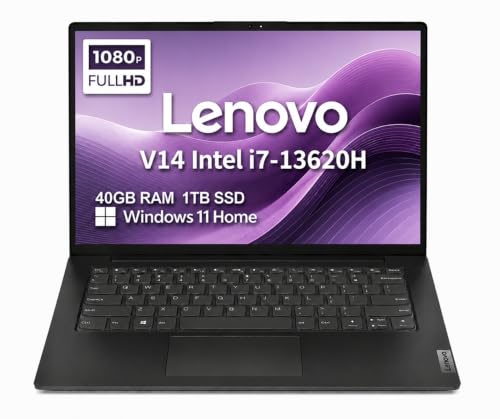
- 40GB RAM for heavy multitasking
- 1TB SSD for fast storage and boot times
- Lightweight 3.15 lb business-focused design
Best For: Students and developers who want portable, high-memory productivity
Budget Business Value Pick

- Ryzen 5 7430U for efficient everyday productivity
- 15.6-inch FHD IPS display with 300 nits brightness
- 8GB RAM and 512GB SSD keep the price-focused setup lean
Best For: Budget-conscious users who need a dependable everyday programming laptop
Big-Screen Multitasker
HP 17.3" FHD Copilot AI Laptop PC

- Ryzen 7 7730U and 32GB RAM handle heavy multitasking
- 17.3-inch FHD screen offers lots of workspace
- 1TB SSD helps with fast booting and project storage
Best For: Developers who want a large display and strong multitasking performance
Flexible 2-in-1 Choice
Lenovo IdeaPad 16" Touch Business Laptop

- Ryzen 7 8845HS delivers strong 8-core, 16-thread performance
- 16-inch 1920 x 1200 touch display adds useful vertical space
- 16GB DDR5 RAM and 1TB SSD support smooth development work
Best For: Programmers and students who want a versatile 2-in-1 with a roomy display
Business Workhorse – HP 255 G10 Ryzen 7 32GB 1TB
If you’re comparing laptops for programming and want a roomy, reliable Windows machine, the HP 255 G10 is built around practical specs that help with everyday development work. Its Ryzen 7 7730U, 32GB of RAM, and 1TB SSD give it plenty of headroom for code editors, browsers, tools, and local files.
Best For: Developers who want a straightforward business laptop with strong multitasking capacity and lots of storage.
Pros:
- 8-core, 16-thread Ryzen 7 7730U is well suited to coding and multitasking.
- 32GB RAM helps keep IDEs, tabs, and other apps responsive.
- 1TB PCIe SSD offers fast boot and generous space for projects.
- Windows 11 Pro adds enterprise-style productivity and remote desktop features.
Cons:
- 15.6-inch display is only 250 nits and 45% NTSC, so it is not especially bright or color-rich.
- Integrated graphics are fine for development, but not for heavy graphics work.
Overall, this is a sensible pick for programmers who value capacity, stability, and business-oriented features over premium screen quality. It covers the core workflow well without adding unnecessary complexity.
Ultra-Portable AI Pick – HP OmniBook 5 16 Snapdragon X
For shoppers browsing laptops for programming who care as much about mobility as screen quality, the HP OmniBook 5 brings a 16-inch OLED panel, long battery life, and a Snapdragon X chip. It is aimed at on-the-go productivity, so it makes sense if your coding work lives in editors, browsers, notes, and cloud tools more than heavy local workloads.
Best For: Programmers and students who want a light, long-lasting machine with a sharp display and modern AI features.
Pros:
- OLED 2K display at 1920 x 1200 offers crisp visuals and rich color.
- Up to 34 hours and 45 minutes of battery life is excellent for travel or campus use.
- 16GB LPDDR5x RAM and a 512GB PCIe Gen4 SSD provide solid everyday responsiveness.
- Wi-Fi 6E, Bluetooth 5.3, and dual USB-C ports support modern connectivity.
Cons:
- Snapdragon X is described as essential-performance focused, so it is not the most powerful option here.
- Windows on Arm can be a consideration for some programming tools and workflows.
This is the most mobility-focused option in the group, with a display and battery profile that suit long days away from the desk. It is a smart fit if portability matters more than maximum raw horsepower.
Budget Creator Option – NIMO 15.6 Ryzen 5 6600H
If you need laptops for programming without jumping straight to a premium price tier, the NIMO 15.6 AI Creator Laptop offers a practical mix of performance and upgrade room. The Ryzen 5 6600H, 16GB DDR5 memory, and 512GB SSD give it enough speed for coding, remote work, and everyday multitasking.
Best For: Students, remote workers, and entry-level developers who want a balanced, upgradeable laptop.
Pros:
- Ryzen 5 6600H provides 6 cores and 12 threads for sustained daily workloads.
- 16GB DDR5 RAM and a 512GB PCIe SSD handle multitasking well.
- Dual SO-DIMM slots and M.2 2280 storage support future upgrades.
- Backlit keyboard and fingerprint login add convenience for everyday use.
Cons:
- Integrated Radeon 660M graphics are geared toward light graphics work, not demanding GPU tasks.
- The notes emphasize value and flexibility more than premium build materials or a standout display.
This model stands out as a sensible middle-ground choice for coding, classes, and general productivity. It is especially appealing if you want a machine that can grow with your workload over time.
Developer ThinkPad – Lenovo ThinkPad E16 Ryzen 7
Among laptops for programming, the Lenovo ThinkPad E16 is the most clearly developer-oriented pick in this set. Its Ryzen 7 7735HS, 16GB of DDR5 RAM, 512GB PCIe 4.0 SSD, and 16:10 display are aimed at people who spend long hours in code editors, terminals, and virtualized or multitasking workflows.
Best For: Developers and power users who want a durable business laptop with a productivity-first screen and strong connectivity.
Pros:
- Ryzen 7 7735HS offers 8 cores and 16 threads for demanding workloads.
- 16-inch WUXGA 16:10 display provides more vertical workspace for code and documents.
- Windows 11 Pro, fingerprint reader, TPM 2.0, and privacy shutter add business-grade security.
- Wi-Fi 6E, HDMI 2.1, USB-C ports, and Ethernet make it flexible for docks and external displays.
Cons:
- 16GB RAM is solid, but some heavy development setups may want more headroom.
- 45% NTSC color coverage and 300 nits brightness are practical, not premium.
This is the strongest all-around programming laptop in the group if you want a classic ThinkPad-style work machine. It balances performance, security, and workspace efficiency in a way that suits serious daily development.
Business Mobility Pick – Lenovo V14 14" FHD i7
For laptops for programming, this Lenovo V14 is a practical choice if you want strong multitasking in a compact, travel-friendly build. The Intel Core i7-13620H, 40GB of RAM, and 1TB SSD give you plenty of headroom for coding, browser tabs, documentation, and everyday development work.
Best For: Students, remote workers, and developers who need a lightweight Windows laptop with lots of memory and fast storage.
Pros:
- Intel Core i7-13620H with 10 cores for responsive performance
- 40GB RAM helps with multitasking across tools and browser tabs
- 1TB PCIe NVMe SSD supports fast boot and load times
- 14-inch FHD anti-glare display and 3.15 lb design improve portability
Cons:
- Intel UHD integrated graphics only
- 45% NTSC panel is modest for color-critical work
- Best suited to productivity rather than heavy GPU workloads
This is a solid everyday programming laptop if portability and memory capacity matter more than graphics power. It focuses on reliable business-style productivity, and the extra RAM makes it especially comfortable for coding setups that keep a lot open at once.
Office-Ready Productivity Pick – Dell Inspiron 15.6" i7
If you’re comparing laptops for programming and want an office-friendly machine with plenty of workspace, this Dell Inspiron is a strong fit. Its Intel Core i7-1255U, 32GB of RAM, and 1TB SSD should handle coding, light content work, and multiple apps without feeling cramped.
Best For: Programmers, students, and office users who want a larger display, lots of memory, and Windows 11 Pro.
Pros:
- 32GB RAM supports smooth multitasking across programs and tabs
- 15.6-inch FHD IPS display with 120Hz refresh rate
- Windows 11 Pro and Microsoft Office lifetime license add work-ready value
- Numeric keypad is helpful for data entry and spreadsheets
Cons:
- Weighs 4.6 pounds, so it is less portable than smaller laptops
- Intel Iris Xe graphics are integrated, not built for demanding GPU tasks
- Wi-Fi 5 is older than the Wi-Fi 6 found on some rivals
Overall, this Inspiron leans into comfort and office productivity rather than premium portability. The combination of ample RAM, a fast SSD, and a roomy 15.6-inch screen makes it easy to recommend for day-to-day coding and study work.
Budget Business Value Pick – Lenovo V15 Gen 4 Ryzen 5
Among laptops for programming, this Lenovo V15 Gen 4 is the value pick for buyers who want dependable everyday performance without overspending. The AMD Ryzen 5 7430U and 512GB SSD are aimed at steady productivity, while the 15.6-inch FHD IPS panel gives you a useful amount of screen space for code and documents.
Best For: Budget-minded students and home-office users who need a reliable everyday programming laptop.
Pros:
- Ryzen 5 7430U is tuned for quiet, efficient productivity
- 15.6-inch FHD IPS display with 300 nits brightness
- Military-grade toughness and webcam privacy shutter add durability and privacy
- USB-C, USB-A, HDMI, audio jack, and ethernet cover basic connectivity
Cons:
- 8GB RAM is the lowest memory configuration in this group
- 512GB SSD offers less storage than the larger-capacity alternatives here
- Integrated Radeon graphics are fine for basics, not heavy graphics work
This Lenovo makes sense if you want a straightforward programming laptop for coursework, web-based tools, and general office tasks. It is the most budget-conscious option here, but the 8GB RAM means more demanding development workflows may feel tighter than on the higher-memory models.
Portable Business Pick – ASUS Vivobook 14" FHD Business & Student Laptop
If you want a practical laptop for programming that balances portability with everyday speed, this ASUS Vivobook is a solid fit. The Intel Core 5 120U, 12GB of RAM, and 1TB SSD should handle coding, browsers, docs, and light multitasking smoothly, while the 14-inch FHD anti-glare display keeps the footprint easy to carry.
Best For: Students, business users, and programmers who want a compact Windows laptop with plenty of storage.
Pros:
- Intel Core 5 120U with 10 cores for responsive everyday coding and multitasking
- 1TB SSD provides generous room for projects, tools, and files
- 14-inch FHD anti-glare IPS display is practical for long work sessions
- Windows 11 Pro, Wi-Fi 6, and a camera privacy shutter add useful work features
Cons:
- 12GB RAM is good for general development, but heavier workloads may benefit from more memory
- 14-inch screen is portable, but not as spacious for side-by-side windows as larger laptops
This is a sensible everyday machine if you value mobility and storage over raw workstation power. For many programming tasks, especially coursework, web development, and general productivity, it offers a balanced feature set.
Big-Screen Multitasker – HP 17.3" FHD Copilot AI Laptop PC
For programmers who like a larger workspace, this HP 17.3-inch laptop gives you plenty of room for code, terminals, and reference tabs. The Ryzen 7 7730U, 32GB of RAM, and 1TB SSD make it a strong pick for laptops for programming when multitasking and fast launch times matter more than compact size.
Best For: Developers, students, and power users who want a large screen and strong multitasking headroom.
Pros:
- AMD Ryzen 7 7730U offers 8 cores and up to 4.5 GHz boost for demanding workloads
- 32GB RAM is well suited to heavier multitasking and multiple development tools
- 17.3-inch FHD display gives extra space for split windows and long coding sessions
- 1TB SSD supports fast booting and plenty of storage for projects
Cons:
- Large 17.3-inch design is less portable than smaller laptops
- Integrated graphics are fine for general work, but not aimed at graphics-heavy development
This HP stands out if your priority is screen real estate and memory capacity. It is especially appealing for coding setups where you keep multiple apps open at once and want a more desktop-like experience.
Flexible 2-in-1 Choice – Lenovo IdeaPad 16" Touch Business Laptop
If you want a laptops for programming option that also works well for note-taking and reviewing documents, this Lenovo IdeaPad 2-in-1 is worth a look. Its Ryzen 7 8845HS, 16GB DDR5 RAM, and 1TB SSD give it the speed and storage needed for coding tasks, while the 16-inch 1920 x 1200 touch display adds extra vertical room for reading and editing.
Best For: Programmers, students, and office users who want a versatile 2-in-1 with a sharper, taller display.
Pros:
- Ryzen 7 8845HS brings 8 cores, 16 threads, and up to 5.1GHz boost for strong performance
- 16-inch 1920 x 1200 touch display provides more vertical space for documents and code
- 16GB DDR5 RAM and 1TB SSD support responsive multitasking and storage
- Fingerprint reader, backlit keyboard, numeric keypad, and camera privacy shutter add convenience
Cons:
- 16GB RAM is capable, but it is capped at 16GB based on the supplied specs
- 2-in-1 features are useful, but they may be more than some programmers need
This Lenovo is a well-rounded choice if you value flexibility along with solid performance. The taller display and modern port selection make it especially practical for day-to-day development and office work.
How We Picked the Best Laptops for Programming
We prioritized CPU performance, memory capacity, fast SSD storage, display quality, and build factors that matter for long coding sessions. For Laptops for Programming, smooth multitasking is often more important than peak benchmark scores, so we favored systems with at least 16GB of RAM and modern processors where possible.
Quick Comparison
ThinkPad- and business-class models are the safest choice for keyboard comfort and durability. Larger 16-inch and 17-inch laptops improve split-screen productivity, while 14-inch models are better if you move between classes, offices, or coworking spaces. If you run heavier workloads such as virtualization, Android Studio, or data tools, prioritize the highest RAM and fastest CPU in your budget.
Key Buying Factors for Laptops for Programming
Processor and Multitasking
Modern H-series and recent Ryzen 7 or Core i7-class chips are ideal for compile-heavy work, local development stacks, and heavier browser use. Lower-power chips can still be fine for web development, scripting, and coursework, but they are less futureproof.
Memory and Storage
16GB RAM is the practical baseline for most developers. If you use Docker, virtual machines, or large projects, 32GB or more is a smart upgrade. A 512GB SSD is workable, but 1TB gives you more room for SDKs, repositories, and assets without constant cleanup.
Display and Portability
A 1080p or better display is the minimum for coding comfort. Larger 16-inch screens help with side-by-side windows, while lighter 14-inch systems are easier to carry. If you spend many hours in front of the screen, a sharper panel can make text easier to read.
Ports, Keyboard, and Battery
Look for enough USB-A, USB-C, HDMI, and charging flexibility for your setup. A good keyboard and trackpad matter more than many buyers expect, especially for long typing sessions. Battery life is helpful for students and remote workers, but it should not come at the expense of performance.
Who Should Buy Which Laptops for Programming?
Choose a business laptop if you want dependable build quality and a strong keyboard for daily development. Pick a larger 16-inch model if you value workspace and split-screen efficiency. Go with the highest-RAM option if you run multiple services, virtual machines, or AI-assisted tools. If portability is your top concern, a 14-inch laptop is usually the easiest to live with.
In short, the best Laptops for Programming balance speed, memory, and comfort. Match the machine to your workload now, then leave enough headroom for the projects you will take on next.