Compact laptops are the easiest way to stay productive on the move, whether you need a simple school machine, a travel-friendly work device, or a lightweight 2-in-1 for everyday tasks.
In this roundup, we focus on practical picks that emphasize portability, usable performance, and smart value across Windows and ChromeOS options.
Best 10 Compact Laptops Picks for 2026
Ultra-Portable 2-in-1 Mini Laptop
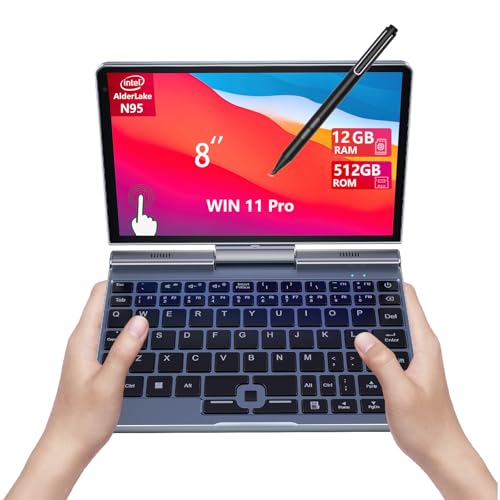
- 8-inch 2-in-1 touchscreen with stylus support
- 12GB RAM and 512GB SSD for everyday multitasking
- Wi-Fi 6, Bluetooth 5.2, and HDMI in a 0.78 kg body
Best For: Students and travelers who want a tiny Windows laptop with pen support
Budget ChromeOS Compact
Dell Chromebook 11 3100 Renewed

- 11.6-inch ChromeOS laptop for basic everyday use
- 4GB RAM, 16GB flash storage, and Bluetooth connectivity
- Up to 14-hour battery life for long sessions
Best For: Students and casual users who mainly browse, stream, and work in the cloud
High-Storage Mini 2-in-1

- 8-inch 2-in-1 touchscreen with stylus support
- 1TB NVMe SSD plus 12GB LPDDR5 RAM
- Wi-Fi 6, Bluetooth 5.2, and HDMI in an ultra-portable body
Best For: Travelers and students who want a tiny Windows laptop with extra storage
Rugged Classroom Chromebook

- Ruggedized 11.6-inch Chromebook with spill resistance
- 4GB RAM, 64GB eMMC storage, and ChromeOS
- Wi-Fi 6E, Bluetooth 5.3, and USB-C/USB-A ports
Best For: Students who need a durable Chromebook for classroom and shared use
Ultra-Portable 2-in-1 Pick
8-inch Mini Touchscreen Laptop

- 8-inch 2-in-1 with touch and stylus support
- 12GB LPDDR5 RAM and 1TB SSD
- Wi-Fi 6, HDMI, USB-C, USB 3.0
Best For: Travel, note-taking, and light multitasking
Budget School Chromebook

- 14-inch thin, lightweight Chrome OS laptop
- Up to 14 hours of battery life
- 4GB RAM and 64GB eMMC storage
Best For: Schoolwork, browsing, and streaming
Renewed Convertible Value
Dell Latitude 3190 11.6-inch 2-in-1

- 11.6-inch touchscreen convertible design
- Windows 11 Pro with 128GB SSD
- HDMI plus two USB 3.1 Gen 1 ports
Best For: Students needing a small Windows convertible
Ultra-Portable Productivity Pick
KOOFORWAY 10.1" 2-in-1 i3 Mini Laptop
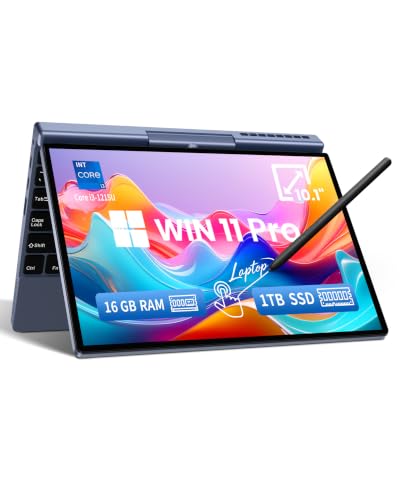
- 12th Gen Intel Core i3-1215U for everyday multitasking
- 10.1-inch Full HD IPS touchscreen with stylus support
- 1.1kg metal chassis with Wi-Fi 6 and USB-C PD charging
Best For: Portable Windows productivity, school notes, and travel
Budget Convertible Reuse Pick
HP ProBook x360 11 G5 EE Renewed

- 11.6-inch 2-in-1 touchscreen with 360-degree hinge
- Intel Pentium Silver N5030, 8GB RAM, 256GB SSD
- Windows 11 Pro in a professionally renewed device
Best For: Light business work and basic everyday computing
Student Chromebook Value Pick
Lenovo IdeaPad Flex 3i Chromebook 12.2"
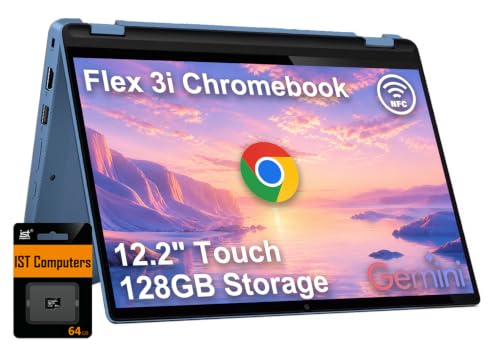
- 12.2-inch WUXGA IPS touchscreen with low blue light
- Intel N100, 4GB LPDDR5 RAM, and Chrome OS simplicity
- Up to 12 hours of battery life with Wi-Fi 6 and Bluetooth 5.3
Best For: Schoolwork, streaming, and lightweight cloud-based use
Ultra-Portable 2-in-1 Mini Laptop – KOOFORWAY 8" N95 Touchscreen
If you want one of the most compact laptops for travel or light productivity, this KOOFORWAY 8-inch 2-in-1 keeps the focus on portability without giving up core features. The Intel N95, 12GB RAM, and 512GB SSD combination should handle everyday multitasking smoothly, while the touchscreen and stylus support make it more flexible than a basic mini notebook.
Best For: Students, travelers, and mobile users who want an ultra-small Windows 11 Pro laptop with touch and pen support.
Pros:
- 8-inch 1280×800 touchscreen with 10-point touch and 1024-level stylus support
- Intel N95, 12GB LPDDR5 RAM, and 512GB NVMe SSD for responsive everyday use
- Wi-Fi 6 and Bluetooth 5.2 for modern wireless connectivity
- Very portable at 0.78 kg with HDMI output for external displays
Cons:
- 5-hour battery life is modest for long unplugged sessions
- 8-inch display is compact, so it may feel cramped for extended typing or editing
This is a strong pick if your priority is a truly small Windows machine that still offers touch, stylus input, and decent storage. It looks best suited to light work, study, and on-the-go use rather than all-day desktop replacement duties.
Budget ChromeOS Compact – Dell Chromebook 11 3100 Renewed
For shoppers comparing compact laptops on a budget, this renewed Dell Chromebook 11 3100 keeps things simple with ChromeOS and an 11.6-inch display. It is built around light everyday tasks, with 4GB RAM, 16GB flash storage, and a design that favors basic web use over demanding apps.
Best For: Students or casual users who need an affordable Chromebook for browsing, schoolwork, and cloud-based tasks.
Pros:
- 11.6-inch form factor makes it easy to carry and store
- ChromeOS is straightforward for web-based productivity and Google apps
- 14-hour battery life is appealing for long school or work days
- Includes Bluetooth and multiple USB ports for peripherals and accessories
Cons:
- 16GB flash storage is very limited for local files and apps
- 4GB RAM and Celeron N4020 class hardware are best for light use only
- 1366 x 768 display resolution is basic by modern standards
This Chromebook makes sense when you want a compact laptop for simple tasks and value battery life over performance. The renewed status and modest specs keep expectations realistic, but it can still be a practical everyday web machine.
High-Storage Mini 2-in-1 – KOOFORWAY 8" N95 1TB Model
If you want compact laptops with a little more room for files, this KOOFORWAY 8-inch model stands out by pairing the same portable 2-in-1 design with 1TB of NVMe storage. It keeps the 12GB LPDDR5 RAM, Intel N95 processor, touchscreen, and stylus support, so it is aimed at users who want mobility plus extra storage headroom.
Best For: Travelers, students, and mobile professionals who need a tiny Windows laptop with more built-in storage.
Pros:
- 1TB NVMe SSD gives you far more local storage than many mini laptops
- 8-inch 1280×800 touchscreen supports pen input and 10-point touch
- Intel N95 with 12GB LPDDR5 RAM supports smooth multitasking for everyday work
- Wi-Fi 6, Bluetooth 5.2, and HDMI add useful modern connectivity
Cons:
- 5-hour battery life is not especially long for a travel-focused device
- Very small screen may be limiting for extended productivity sessions
Compared with other mini notebooks, this version’s biggest advantage is the larger 1TB SSD. That makes it a more comfortable fit for people who need a compact Windows machine but do not want to manage storage as aggressively.
Rugged Classroom Chromebook – ASUS Chromebook CR11
Among compact laptops, this ASUS Chromebook CR11 is built less for power and more for durability and low-maintenance use. Its 11.6-inch ChromeOS design, ruggedized body, spill-resistant keyboard, and antimicrobial guard make it a practical choice for classrooms or shared environments.
Best For: Students, especially in classroom settings, who need a durable Chromebook with simple everyday functionality.
Pros:
- Ruggedized body with rubber edges for military-grade durability
- Spill-resistant keyboard and antimicrobial guard for shared or student use
- Wi-Fi 6E, Bluetooth 5.3, and multiple USB-C/USB-A ports
- HD noise-reduction webcam with privacy shield for video calls
Cons:
- 4GB RAM and 64GB eMMC storage are modest for heavier workloads
- 1366 x 768 display is standard, not high-resolution
- ChromeOS is best suited to web apps and Google services
This is a smart fit when durability matters more than raw performance. For students who mainly use web tools, classroom apps, and video meetings, the CR11 offers a solid mix of protection, connectivity, and compact size.
Ultra-Portable 2-in-1 Pick – 8-inch Mini Touchscreen Laptop
If you want compact laptops that feel built for constant movement, this 8-inch 2-in-1 keeps the focus on portability without dropping core everyday features. It pairs a touch display, stylus support, Wi-Fi 6, and a full-metal body with an Intel N95 setup that’s aimed at light multitasking, note-taking, and travel-friendly work.
Best For: Travelers, students, and mobile users who want a tiny Windows-style machine for notes, browsing, and casual productivity.
Pros:
- 8-inch touchscreen with 180° rotation for laptop-or-tablet use
- 12GB LPDDR5 RAM and 1TB SSD provide generous storage and smooth everyday multitasking
- Includes a rechargeable stylus for handwriting and touch input
- Wi-Fi 6, Bluetooth 5.2, USB-C, HDMI, and USB 3.0 add useful connectivity
Cons:
- 4–5 hour battery life is modest compared with larger ultraportables
- 8-inch, 1280 x 800 screen is very small for extended work sessions
- Best suited to light productivity rather than demanding workloads
This is a niche pick, but it stands out if your priority is maximum portability in a truly compact form factor. The specs are strong for the size, especially the storage and memory, but the tiny display means it works best when convenience matters more than screen space.
Budget School Chromebook – HP Chromebook 14
Among compact laptops, this HP Chromebook 14 is a practical pick for anyone who wants a simple, lightweight machine for everyday online tasks. Its 14-inch anti-glare display, Chrome OS, and long battery life make it a straightforward option for school, home use, and browsing on the go.
Best For: Students and casual users who want an affordable, easy-to-carry Chromebook for web work, streaming, and Google apps.
Pros:
- Thin, lightweight design with a 14-inch micro-edge anti-glare display
- Up to 14 hours of battery life with HP Fast Charge support
- Chrome OS offers a secure, always-up-to-date experience with access to Google Play apps
- Intel Celeron N4120, 4GB RAM, and 64GB eMMC are enough for basic everyday use
Cons:
- HD 1366 x 768 screen is basic for a 14-inch panel
- 4GB RAM and 64GB storage limit heavier multitasking and local file space
- Chrome OS is best for web-centric workflows, not full desktop software needs
This Chromebook makes sense if your needs are simple and you value battery life and portability over raw power. It’s a dependable everyday computer for browsing, assignments, and streaming, but it’s not the right fit for users who need more storage or a performance boost.
Renewed Convertible Value – Dell Latitude 3190 11.6-inch 2-in-1
If you’re comparing compact laptops for student use, this renewed Dell Latitude 3190 focuses on practicality rather than flash. The 11.6-inch touchscreen, Windows 11 Pro, and 2-in-1 convertible design make it a flexible little machine for basic assignments, note-taking, and everyday school tasks.
Best For: Students who want a small Windows 11 Pro convertible for classes, typing, and touch-based use.
Pros:
- 11.6-inch touchscreen with convertible 2-in-1 design
- Windows 11 Pro adds a more traditional desktop workflow
- 128GB SSD is faster and roomier than basic eMMC storage
- Includes HDMI and two USB 3.1 Gen 1 ports for peripherals and displays
Cons:
- 4GB RAM is modest for multitasking
- 1366 x 768 resolution is limited for a Windows laptop
- Renewed unit with a 90-day warranty may not suit buyers seeking a brand-new device
This Latitude is best viewed as a functional school-ready compact machine rather than a performance laptop. It offers the basics you want in a small convertible, but its older hardware means it’s most appealing when value and portability matter more than speed.
Ultra-Portable Productivity Pick – KOOFORWAY 10.1" 2-in-1 i3 Mini Laptop
If you want compact laptops that still feel capable for everyday work, this KOOFORWAY mini laptop is built around portability and practical performance. The 12th Gen Intel Core i3-1215U, Full HD touchscreen, and metal chassis make it a strong fit for school, office tasks, note-taking, and travel.
Best For: Students, remote workers, and travelers who want a small Windows 11 Pro 2-in-1 for productivity and note-taking.
Pros:
- 12th Gen Intel Core i3-1215U with support for up to 32GB DDR4 memory for everyday multitasking
- 10.1-inch 1920 × 1200 IPS touchscreen with 10-point multi-touch and optional MPP stylus support
- Lightweight 1.1kg full-metal design with Windows Hello Face Unlock
- Wi-Fi 6, Bluetooth 5.2, and dual full-function USB-C ports with PD fast charging
Cons:
- Smaller 10.1-inch display may feel tight for long work sessions
- Integrated graphics are best for general computing, not demanding creative workloads
- Mini-laptop form factor may be less comfortable for users who prefer a full-size keyboard
This is a well-rounded compact Windows option if your priority is carrying less without giving up core productivity features. The touchscreen, fast wireless, and upgrade-friendly design make it a flexible pick for life on the move.
Budget Convertible Reuse Pick – HP ProBook x360 11 G5 EE Renewed
Among compact laptops, this renewed HP ProBook x360 11 G5 EE stands out for buyers who want a small 2-in-1 without paying for a new machine. Its 11.6-inch touchscreen, 360-degree hinge, and Windows 11 Pro setup make it a straightforward pick for basic business and everyday use.
Best For: Buyers who want a renewed small touchscreen laptop for light business tasks and simple everyday computing.
Pros:
- 360-degree convertible design works in laptop or tablet mode
- Intel Pentium Silver N5030 is built for everyday computing tasks and multitasking
- 8GB RAM and 256GB SSD provide a responsive basic setup
- Windows 11 Pro adds professional-focused features
Cons:
- 1366 x 768 resolution is lower than full HD
- Older 2018 model may feel dated next to newer compact laptops
- Renewed condition means buyer expectations should be based on inspected used hardware
This HP makes sense if you mainly want a small, flexible Windows device for simple work rather than premium specs. The tradeoff is clear: you get a practical convertible form factor and SSD responsiveness, but not a modern high-resolution panel.
Student Chromebook Value Pick – Lenovo IdeaPad Flex 3i Chromebook 12.2"
If you are comparing compact laptops for school or everyday browsing, this Lenovo IdeaPad Flex 3i Chromebook offers a simple, lightweight setup. The 12.2-inch WUXGA touchscreen, Intel N100 processor, and Chrome OS focus on straightforward use, long battery life, and easy portability.
Best For: Students and casual users who want a lightweight Chromebook for classes, streaming, and web-based work.
Pros:
- 12.2-inch 1920 x 1200 IPS touchscreen with 300 nits brightness and low blue light certification
- Intel N100 processor with 4GB LPDDR5 RAM for homework and everyday tasks
- Up to 12 hours of battery life and a thin, lightweight convertible design
- Wi-Fi 6, Bluetooth 5.3, USB-C, USB-A, HDMI, and microSD support for flexible connectivity
Cons:
- 4GB RAM is modest for heavy multitasking
- Chrome OS is best for cloud-based workflows rather than full desktop software
- Storage is split across eMMC and SD expansion rather than a larger built-in SSD
For a small school-friendly laptop, this Chromebook covers the basics well and keeps setup simple. It is especially appealing if you value easy portability, solid battery life, and a touchscreen in a budget-friendly convertible.
How We Picked the Best Compact Laptops
We focused on machines that are genuinely easy to carry, with smaller screen sizes, slim builds, and enough battery life or efficiency for all-day use. We also weighed real-world performance for browsing, documents, streaming, video calls, and light multitasking rather than chasing specs that do not translate well in a portable form factor.
Quick Comparison: What Compact Laptops Are Best for
Some Compact Laptops are better for basic web use and cloud apps, while others offer more flexible 2-in-1 designs, extra storage, or stronger processors for heavier everyday workloads. ChromeOS models tend to be simplest and most efficient, while Windows models usually offer broader software compatibility.
Key Buying Factors for Compact Laptops
Screen Size and Portability
If you plan to travel often, an 11- to 12-inch model is usually easier to pack and hold. A 14-inch compact laptop can still be portable, but it offers a bit more room for typing and split-screen work.
Performance and Memory
For basic productivity, entry-level processors can be enough, but 8GB of RAM or more makes a big difference if you keep many tabs open. Higher-capacity SSD storage is also helpful for faster boot times and more room for files and apps.
Operating System
Choose ChromeOS if you want simplicity, fast startup, and low-maintenance use. Choose Windows if you need desktop software, broader accessory support, or more flexibility for work and study.
Convertible Vs. Standard Clamshell
2-in-1 Compact Laptops are ideal if you want tablet-style use, touchscreen navigation, or presentation-friendly flexibility. Traditional designs can be a better fit if typing comfort is your top priority.
Who Should Buy Which Compact Laptops?
Students and casual users often do best with a lightweight Chromebook or a basic 2-in-1 for note-taking and browsing. Travelers and remote workers may prefer a compact Windows laptop with more storage and memory. If you want the most versatile option, look for one of the stronger Compact Laptops with a touchscreen, SSD storage, and at least 8GB of RAM.