If you game for long sessions, a comfortable board can make a bigger difference than flashy lighting alone. A good gaming keyboard with wrist rest support helps reduce fatigue while keeping controls quick and responsive.
Below, we’ve focused on comfort, build quality, features, and overall value so you can choose the right fit without sorting through gimmicks.
Best 10 Gaming Keyboard with Wrist Rest Picks for 2026
Quiet Spill-Resistant Pick
SteelSeries Apex 3 RGB Gaming Keyboard

- Premium magnetic wrist rest
- Whisper quiet switches
- IP32 water resistant
Best For: Quiet, comfortable gaming with spill protection
Mechanical Palmrest Choice
Corsair K70 CORE RGB with Palmrest
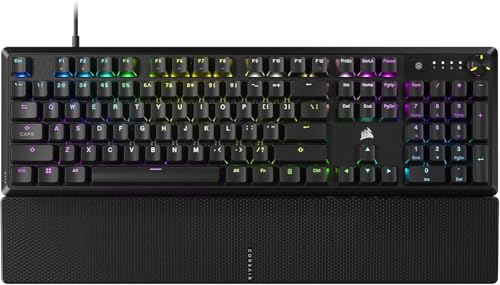
- Pre-lubed linear switches
- Magnetic detachable soft-touch palm rest
- Aluminum top plate and sound dampening
Best For: Smooth mechanical gaming with a removable palm rest
Wireless Comfort Combo
SABLUTE Backlit Keyboard and Mouse Set

- Keyboard wrist rest and foldable stand
- 7-color backlighting with RGB mouse
- Rechargeable wireless combo with phone holder
Best For: Comfort-first wireless use with a bundled mouse
Budget Gamer Favorite
Logitech G213 Prodigy Gaming Keyboard

- Integrated palm rest
- LIGHTSYNC RGB with 5 zones
- Spill-resistant wired design
Best For: Affordable gaming with built-in wrist support
Compact Wireless Pick
ASUS ROG Strix Scope II 96 Wireless Gaming Keyboard

- 96% layout keeps the num pad in a smaller footprint.
- Tri-mode connectivity supports Bluetooth, 2.4GHz, and USB.
- Detachable wrist rest and tilt positions improve comfort.
Best For: Players who want a compact wireless keyboard with a wrist rest and full-size practicality.
Macro Control Pick
Redragon K550 RGB Mechanical Gaming Keyboard

- 12 onboard macro keys are programmable right on the board.
- Built-in USB pass-through adds convenient device access.
- Includes a wrist rest and aluminum top plate.
Best For: Gamers who want macro keys, a sturdy wired build, and an included wrist rest.
Low-Profile Comfort Pick
Razer Ornata V3 Gaming Keyboard

- Low-profile keys help support a natural hand position.
- Magnetic soft-touch wrist rest snaps on securely.
- Backlit media keys make controls easy to access.
Best For: Users who prioritize wrist support, low-profile typing, and simple media controls.
Value 3-in-1 Combo
Full-Size Gaming Keyboard with Wrist Rest

- 104-key full-size layout with 26-key anti-ghosting
- Soft leather memory-foam wrist rest included
- RGB keyboard and mouse with wired USB connection
Best For: Gamers who want an affordable all-in-one keyboard, mouse, and wrist-rest bundle
Macro-Ready Pick
RGB Gaming Keyboard with Detachable Wrist Support
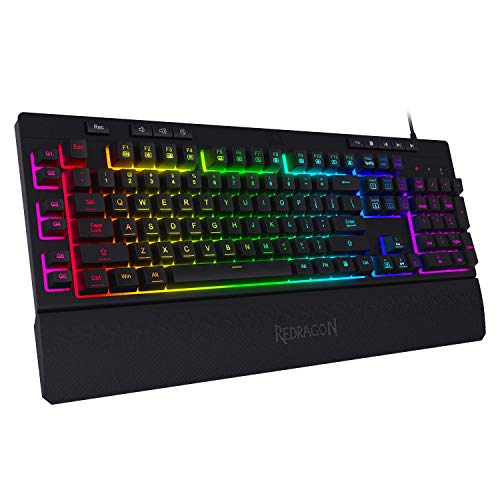
- Six onboard macro keys with no software required
- Detachable magnetic wrist rest for added comfort
- 13 RGB lighting modes with adjustable brightness
Best For: Players who want easy macros, media controls, and removable wrist support
Comfort-Focused TKL
Mecha-Membrane Keyboard with Wrist Rest

- Low-profile keys for a more natural hand position
- Magnetic soft-touch wrist rest snaps on securely
- 8-zone RGB lighting with backlit media keys
Best For: Players who want a compact, comfortable keyboard with a premium wrist-rest setup
Quiet Spill-Resistant Pick – SteelSeries Apex 3 RGB Gaming Keyboard
If you want a gaming keyboard with wrist rest that leans practical, the SteelSeries Apex 3 is built around comfort, quiet use, and everyday durability. Its premium magnetic wrist rest supports long sessions, while the IP32 rating adds some protection against accidental spills.
Best For: Players who want a quiet, comfortable wired keyboard with spill resistance and full palm support.
Pros:
- Premium magnetic wrist rest for full palm support and comfort
- Whisper quiet switches for nearly silent typing and gaming
- IP32 water resistance helps guard against accidental liquid damage
- 10-zone RGB lighting plus dedicated multimedia controls
Cons:
- Wired-only setup
- Not a mechanical switch model in the traditional sense
- RGB is zone-based rather than per-key lighting
Overall, this is a solid pick if comfort and low noise matter as much as gaming features. The combination of wrist support, liquid resistance, and simple media controls makes it easy to live with day to day.
Mechanical Palmrest Choice – Corsair K70 CORE RGB with Palmrest
The Corsair K70 CORE is a gaming keyboard with wrist rest for users who want a more premium mechanical feel and a sturdy build. It pairs pre-lubed linear switches with sound dampening, plus a magnetic soft-touch palm rest for comfort during longer sessions.
Best For: Gamers who want a smooth mechanical keyboard with a detachable palm rest and media controls.
Pros:
- Pre-lubed linear switches for smooth, responsive keystrokes
- Magnetic detachable soft-touch palm rest
- Two layers of sound dampening for quieter operation
- Aluminum top plate adds stability and durability
Cons:
- Wired USB-A connection only
- Bulkier than a minimalist keyboard design
- Best suited to Windows systems listed in the specs
This is a strong choice if you want a wrist rest included without giving up a mechanical gaming feel. The media dial and sturdy frame make it especially appealing for desktop setups.
Wireless Comfort Combo – SABLUTE Backlit Keyboard and Mouse Set
If you are shopping for a gaming keyboard with wrist rest but also want a full desk bundle, the SABLUTE KM22 Ultra+ leans more toward comfort and convenience than hardcore gaming. It combines a backlit wireless keyboard, matching mouse, and an integrated wrist rest for everyday use across multiple devices.
Best For: Users who want an ergonomic wireless keyboard-and-mouse combo with wrist support, backlighting, and a phone holder.
Pros:
- Extra-large keyboard with wrist rest and foldable stand for ergonomic support
- 7-color backlighting plus an RGB mouse
- Rechargeable design with long standby times and auto-sleep mode
- Includes a multi-function device holder for a phone or tablet
Cons:
- Membrane scissor-key design rather than a mechanical gaming keyboard
- More office-focused than performance-focused
- Single-color keyboard backlight support in the specs
For buyers who value comfort, wireless convenience, and desk organization, this combo offers a lot of utility. It is better suited to mixed work-and-play use than competitive gaming, but the wrist rest and quiet typing are real advantages.
Budget Gamer Favorite – Logitech G213 Prodigy Gaming Keyboard
The Logitech G213 Prodigy is a straightforward gaming keyboard with wrist rest support built into the design, making it a practical pick for long play sessions. It combines a full-size layout, spill-resistant construction, and dedicated media controls with Logitech’s LIGHTSYNC RGB lighting.
Best For: Gamers who want an affordable wired keyboard with an integrated palm rest and easy media control.
Pros:
- Integrated palm rest for comfort during long sessions
- 5 customizable lighting zones with LIGHTSYNC RGB
- Dedicated media controls for quick volume and playback changes
- Spill-resistant design helps with easier cleanup
Cons:
- Not a mechanical keyboard
- Wired USB connection only
- Lighting is zone-based, not per-key
This model is a dependable choice if you want comfort and gaming features without paying for a mechanical board. The palm rest, media controls, and durable build make it easy to recommend for everyday PC gaming.
Compact Wireless Pick – ASUS ROG Strix Scope II 96 Wireless Gaming Keyboard
If you want a gaming keyboard with wrist rest that still keeps nearly full-size functionality, the ASUS ROG Strix Scope II 96 Wireless is a strong all-around option. Its 96% layout preserves the num pad while staying compact, and the detachable wrist rest plus three tilt positions help it work better for long sessions at the desk.
Best For: Gamers who want a compact wireless board with full-size functionality, hot-swap switches, and a detachable wrist rest.
Pros:
- 96% layout keeps the num pad while saving desk space.
- Tri-mode connectivity supports Bluetooth, 2.4GHz wireless, and USB wired use.
- Hot-swappable, pre-lubed switches let you customize feel more easily.
- Includes a detachable wrist rest and three adjustable tilt positions for comfort.
Cons:
- More expensive and feature-heavy than a basic wired keyboard.
- Its 96% layout may take a little adjustment if you prefer standard full-size spacing.
Overall, this is the most versatile pick here if you want modern wireless convenience without giving up key count or comfort features. It fits gaming, streaming, and everyday work well, especially if you value a cleaner desk setup.
Macro Control Pick – Redragon K550 RGB Mechanical Gaming Keyboard
If you need a gaming keyboard with wrist rest and lots of onboard controls, the Redragon K550 is built for practicality. It combines a full 104-key layout with 12 programmable macro keys, a USB pass-through port, and a wrist rest for a setup that favors fast access and steady desk comfort.
Best For: Gamers and multitaskers who want dedicated macro keys, a metal top plate, and a wrist rest on a wired board.
Pros:
- 12 onboard macro keys work without additional software.
- Includes an extra USB pass-through port for peripherals and receivers.
- Aluminum top plate adds a more solid, premium-feeling build.
- Wrist rest is included for more comfortable extended use.
Cons:
- It is wired only, so it is not the cleanest choice for a cable-free setup.
- The extra macro row makes it larger than a standard full-size keyboard.
This model makes sense if you value macros and desk utility more than a minimal footprint. It offers a lot of gaming-focused convenience for the price-conscious buyer who still wants comfort features built in.
Low-Profile Comfort Pick – Razer Ornata V3 Gaming Keyboard
The Razer Ornata V3 is a good fit if you want a gaming keyboard with wrist rest that emphasizes comfort and a slimmer profile. Its low-profile keys, mecha-membrane switches, and magnetic soft-touch wrist rest are aimed at making long sessions feel less tiring while still giving you the clicky response many gamers like.
Best For: Users who want a low-profile wired gaming keyboard with a soft magnetic wrist rest and easy media controls.
Pros:
- Low-profile keys support a more natural hand position.
- Magnetic soft-touch wrist rest snaps on securely for added comfort.
- Dedicated backlit media keys make playback and volume control easy.
- UV-coated keycaps are designed for better wear resistance.
Cons:
- It is a wired USB keyboard, so it offers no wireless option.
- Mecha-membrane switches may not satisfy users who want a true mechanical feel.
For shoppers focused on comfort first, this is the most ergonomic-feeling option in the group. It balances gaming features with a wrist rest and low-key travel, which makes it appealing for long desk sessions.
Value 3-in-1 Combo – Full-Size Gaming Keyboard with Wrist Rest
If you want a gaming keyboard with wrist rest that also bundles a mouse, the RedThunder K10 is built for a full desktop setup. It uses a 104-key layout with 26-key anti-ghosting, RGB lighting, and a soft leather memory-foam wrist rest, so it fits players who want an all-in-one starter combo with basic ergonomic support.
Best For: Players who want a full-size wired gaming combo with keyboard, mouse, and wrist support in one box.
Pros:
- 104-key full-size layout with F-keys and numeric keypad
- 26-key anti-ghosting for simultaneous key presses
- Soft leather wrist rest with memory foam for added comfort
- RGB lighting on both keyboard and mouse for a gamer look
Cons:
- Keyboard is membrane-based, not a true mechanical board
- Mouse and keyboard are bundled together, which may be more than some buyers need
- Wired USB setup may not suit minimalist desks
This is a practical pick if you want broad compatibility and comfort features without piecing together separate accessories. It’s less about premium switch feel and more about delivering a usable gaming keyboard with wrist rest plus the basics needed to get playing right away.
Macro-Ready Pick – RGB Gaming Keyboard with Detachable Wrist Support
The Redragon K512 is a gaming keyboard with wrist rest aimed at players who want quick-access controls and comfort for longer sessions. It combines six onboard macro keys, 26-key anti-ghosting, and a detachable magnetic wrist rest, making it a strong fit if you like to map shortcuts directly on the board.
Best For: Gamers who want onboard macro keys and a removable wrist rest without needing software to get started.
Pros:
- Six onboard macro keys can be recorded and reassigned on the fly
- Detachable magnetic wrist rest adds comfort during long play sessions
- 26-key anti-ghosting helps prevent input conflicts
- 13 RGB lighting modes with adjustable brightness
Cons:
- Uses a membrane switch design rather than mechanical switches
- Wrist rest is detachable, so it may not appeal to users who want a fixed setup
- Best macro customization is deeper through optional software
Overall, this keyboard makes sense if your priority is convenience: the onboard macros work right away, the media wheel keeps controls handy, and the wrist support is easy to attach or remove. It’s a solid practical option for games that benefit from shortcuts more than from a premium switch feel.
Comfort-Focused TKL – Mecha-Membrane Keyboard with Wrist Rest
If you want a gaming keyboard with wrist rest that focuses on comfort and a slimmer typing angle, the Razer Ornata V3 TKL is a polished choice. Its low-profile keys, mecha-membrane switches, and magnetic soft-touch wrist rest are designed for natural hand positioning and long use with less strain.
Best For: Gamers who want a compact, low-profile keyboard with a secure magnetic wrist rest and premium finish.
Pros:
- Low-profile keys support natural hand positioning
- Magnetic soft-touch wrist rest snaps securely into place
- Mecha-membrane switches blend tactile feel with familiar key response
- 8-zone RGB lighting and backlit media keys add convenience
Cons:
- TKL layout removes the numpad, which some users may miss
- Wrist rest is built for comfort, but the board is still wired and not minimalist-free
- More premium features may put it above budget options
This model stands out if comfort, build detail, and a cleaner desk footprint matter more than having a full-size layout. The wrist rest feels like an integrated part of the experience, and the low-profile design makes it an easy daily driver for gaming and general use.
How We Picked the Best Gaming Keyboard with Wrist Rest Options
We looked for boards that balance comfort, typing feel, and gaming performance. That means a stable wrist rest or palm rest, dependable anti-ghosting, useful media and macro controls, and a layout that suits real-world use. We also considered switch type, lighting, connectivity, and whether the keyboard fits a desk setup without feeling cramped.
Quick Comparison: What Matters Most
When comparing a Gaming Keyboard with Wrist Rest support, start with the basics: wired versus wireless, mechanical versus membrane, and full-size versus compact layout. Wired models usually offer lower latency and fewer charging concerns, while wireless boards trade some convenience for cleaner cable management. Full-size boards suit users who want a numpad; smaller layouts are better for tighter spaces and mouse movement.
Key Buying Factors for a Gaming Keyboard with Wrist Rest
Wrist Rest Comfort
Look for a rest that feels supportive without being too firm or too soft. Magnetic or detachable designs can be easier to clean and adjust. The best ones align your wrists naturally with the key row and reduce strain during long play sessions.
Switch Feel and Noise
Mechanical switches are usually preferred for faster feedback and durability, but membrane and mecha-membrane options can be quieter and more affordable. If you share a room or game late at night, low-noise switches may be the better choice.
Layout and Desk Space
Full-size keyboards offer the most functionality, while TKL and 96% designs save space without sacrificing too much utility. Choose based on whether you need a numpad, extra macro keys, or more room for mouse movement.
Lighting, Controls, and Connectivity
RGB lighting is useful for visibility and style, but practical extras like media keys, macro support, and onboard controls often matter more day to day. For wireless models, check battery life and whether they support low-latency modes.
Who Should Buy Which Gaming Keyboard with Wrist Rest?
Competitive players should prioritize low-latency wired boards with responsive switches. MMO or productivity users may prefer macro keys, media controls, and a full-size layout. If comfort is your top concern, choose a Gaming Keyboard with Wrist Rest padding that feels stable and matches your typing angle. Budget shoppers can still find solid comfort-focused options, while premium buyers should look for hot-swappable switches, stronger build quality, and tri-mode connectivity.
In short, the best choice depends on how you play, how much desk space you have, and how important comfort is during long sessions.