If you want a quiet gaming keyboard that won’t distract you—or everyone around you—there are more good options than ever in 2026. From membrane boards to silent mechanical switches, the best picks now balance low noise with gaming-ready features.
Below, we focus on models that make sense for real-world use: comfortable typing, reliable input, useful extras, and value at different price points.
Best 10 Quiet Gaming Keyboard Picks for 2026
Quiet RGB Pick
SteelSeries Apex 3 Whisper Quiet Gaming Switch

- Whisper quiet gaming switches
- IP32 water resistant build
- Magnetic wrist rest included
Best For: Full-size quiet gaming with RGB and spill protection
Space-Saving Quiet Choice
96% Wired Membrane Keyboard with Volume Knob

- Quiet membrane typing
- 96% layout with numpad
- Volume knob for quick control
Best For: Compact, quiet gaming and everyday use with a numpad
Custom Quiet Wireless Pick
SOLAKAKA KI99 Pro Silent Switch

- Silent switches with gasket layers
- Bluetooth, 2.4G, and USB-C
- Hot-swappable 96% layout
Best For: Quiet mechanical typing with wireless flexibility and customization
Quiet TKL Value Pick
Corsair K55 CORE TKL Quiet Membrane

- Quiet membrane TKL layout
- 300ml spill resistance
- Dedicated media buttons
Best For: Quiet gaming with a compact tenkeyless design
Quiet Membrane Pick
yesbeaut 104-Key Silent Rainbow Keyboard
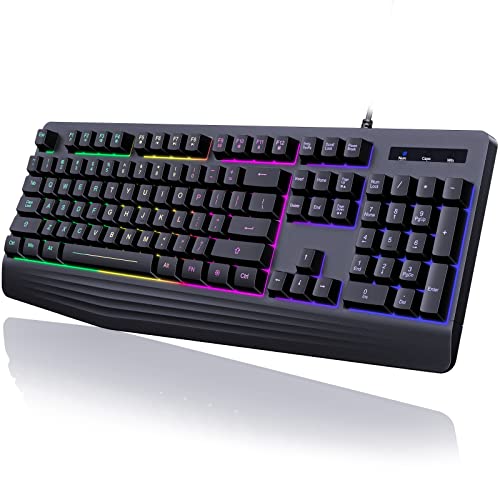
- Whisper-silent membrane keys
- Wrist rest with full-size 104-key layout
- Rainbow backlight and 19 anti-ghosting keys
Best For: Budget buyers who want a quiet full-size keyboard
Silent Mechanical Upgrade
Razer BlackWidow V4 X Yellow Switches

- Quiet yellow linear mechanical switches
- Six macro keys plus roller and media controls
- Foam and stabilizers help reduce typing noise
Best For: Gamers wanting a quieter mechanical board with extras
Spill-Ready Quiet Value
TECKNET Whisper Quiet RGB Keyboard

- Whisper-quiet membrane-style operation
- IP32 spill resistance with drainage holes
- 15-zone RGB lighting and 25 anti-ghosting keys
Best For: Value shoppers needing a quiet, durable wired keyboard
Quiet RGB Starter
HyperX Alloy Core RGB Membrane Gaming Keyboard

- Quiet membrane keys with anti-ghosting
- Spill-resistant solid frame
- Dedicated media and lighting controls
Best For: Quiet, affordable gaming with simple RGB and spill resistance
Legion Silent Compact
Lenovo Legion K310 RGB Wired Gaming Keyboard

- Quiet membrane switches with tactile feel
- 24-key rollover and programmable keys
- Water-resistant compact design
Best For: Quiet, space-saving gaming with spill protection
Quiet Control Pick
Corsair K55 CORE RGB Membrane Wired Gaming Keyboard

- Quiet responsive membrane switches
- Ten-zone RGB with media controls
- 300ml spill resistance
Best For: Quiet PC or Mac gaming with handy media keys
Quiet RGB Pick – SteelSeries Apex 3 Whisper Quiet Gaming Switch
If you want a quiet gaming keyboard that still feels built for serious play, the SteelSeries Apex 3 is an easy fit. Its whisper quiet switches are designed for low-noise use, while the 10-zone RGB lighting and dedicated media controls keep it practical for everyday gaming and work.
Best For: Players who want a full-size, quiet wired keyboard with RGB lighting, a wrist rest, and spill protection.
Pros:
- Whisper quiet gaming switches help keep typing and gaming noise low.
- IP32 water resistance adds extra protection against accidental spills.
- Premium magnetic wrist rest improves comfort during longer sessions.
- Dedicated multimedia controls make volume and settings easy to adjust.
Cons:
- Wired-only connection may not suit players wanting wireless flexibility.
- Full-size 104-key layout takes more desk space than compact boards.
Overall, the Apex 3 is a straightforward pick if quiet operation, comfort, and durability matter more than customization. It covers the essentials well and adds a few quality-of-life features that make it useful beyond gaming.
Space-Saving Quiet Choice – 96% Wired Membrane Keyboard with Volume Knob
This quiet gaming keyboard is aimed at users who want a smaller footprint without giving up a number pad. The 98-key membrane design keeps noise down, while the volume knob, rainbow backlighting, and anti-ghosting support make it easy to use for casual gaming and daily work.
Best For: Buyers who want an affordable, quiet membrane keyboard with a numpad and a compact 96% layout.
Pros:
- Quiet membrane switches are suitable for gaming, office, or casual use.
- 98-key 96% layout saves space while still including a number pad.
- Volume control knob offers quick adjustment during games or video.
- USB-C cable separation and plug-and-play setup make it simple to use.
Cons:
- Not a mechanical keyboard, so it won’t appeal to mechanical switch fans.
- Build is plastic, which may feel less premium than higher-end boards.
In practice, this model makes sense if you want a quieter, practical keyboard rather than a feature-heavy gaming board. It focuses on everyday usability, desk efficiency, and easy setup.
Custom Quiet Wireless Pick – SOLAKAKA KI99 Pro Silent Switch
If you’re shopping for a quiet gaming keyboard with more customization, the SOLAKAKA KI99 Pro stands out. It combines silent switches, a gasket structure with noise-reducing layers, and triple-mode connectivity, so you can use it wirelessly or wired while keeping typing sound low.
Best For: Users who want a quiet, customizable mechanical keyboard with wireless support and a compact 96% layout.
Pros:
- Silent switches plus a multi-layer gasket design help reduce typing noise.
- Triple-mode connectivity supports Bluetooth, 2.4G, and USB-C use.
- Hot-swappable switches make personalization easier.
- 10,000mAh battery, RGB lighting, and a control knob add convenience.
Cons:
- Customization features may be more than casual users need.
- Requires software for full programming and RGB adjustments.
This is a strong fit if you want a quieter board that still feels enthusiast-friendly. It balances silence, flexibility, and desk-friendly sizing better than many basic gaming keyboards.
Quiet TKL Value Pick – Corsair K55 CORE TKL Quiet Membrane
The Corsair K55 CORE TKL is a practical quiet gaming keyboard for players who want a smaller layout and familiar membrane feel. Its quiet keys, 8-zone RGB lighting, and dedicated media controls make it a solid everyday option for gaming setups that need a little more desk room.
Best For: Gamers who want a quiet tenkeyless membrane keyboard with media controls and spill resistance.
Pros:
- Quiet membrane keys keep noise down during play and typing.
- Tenkeyless design creates more room for mouse movement.
- 300ml spill resistance adds everyday durability.
- Dedicated media buttons and 1,000Hz polling improve convenience and responsiveness.
Cons:
- No numpad, which may be a downside for productivity-heavy users.
- Membrane switch design won’t satisfy users looking for mechanical feel.
For gamers who value quiet operation and a compact footprint, the K55 CORE TKL is easy to recommend. It keeps the feature set focused on comfort, speed, and practical protection rather than flashy extras.
Quiet Membrane Pick – yesbeaut 104-Key Silent Rainbow Keyboard
If you want a quiet gaming keyboard that keeps the price-friendly membrane feel while still adding gaming basics, this yesbeaut model is an easy fit. It focuses on low-noise typing, a full-size 104-key layout, and simple rainbow backlighting for dark-room use without adding complex customization.
Best For: Players and office users who want a whisper-silent full-size keyboard with wrist support and basic RGB-style lighting.
Pros:
- Membrane keys are designed for quiet, click-free typing.
- Integrated wrist rest and stepped keycaps add comfort for long sessions.
- 19 anti-ghosting keys help with faster game input.
- Includes 12 multimedia keys plus splash-resistant construction.
Cons:
- Backlighting is rainbow only, with no solid-color or custom lighting.
- Multimedia keys are not available on Mac.
As an affordable quiet gaming keyboard, this one leans more practical than flashy. It covers the basics well for everyday gaming, typing, and shared spaces, but buyers wanting advanced lighting controls should look higher up the stack.
Silent Mechanical Upgrade – Razer BlackWidow V4 X Yellow Switches
The Razer BlackWidow V4 X is a strong choice if you want a quiet gaming keyboard with a more premium mechanical feel. Its yellow linear switches are built for fast actuation and reduced noise, while the foam layer and lubricated stabilizers are aimed at making the board sound cleaner and more controlled.
Best For: Gamers who want a quieter mechanical keyboard with macro controls and per-key RGB lighting.
Pros:
- Yellow linear switches are quiet and require light 45g actuation.
- Six dedicated macro keys add extra control for games and shortcuts.
- Per-key Chroma RGB offers extensive lighting customization.
- Sound dampening foam and lubricated stabilizers improve acoustics.
Cons:
- It is a wired board with no water resistance rating.
- Mechanical gaming design will still feel more tactile than a membrane keyboard.
This is the pick for buyers who want silence without giving up mechanical performance. It is especially appealing if you value macro keys, media controls, and a polished typing sound over a basic no-frills layout.
Spill-Ready Quiet Value – TECKNET Whisper Quiet RGB Keyboard
The TECKNET wired gaming keyboard is built for shoppers who want a quiet gaming keyboard with extra durability and simple everyday features. It combines whisper-quiet switches, a metal panel, and IP32 spill resistance, making it a practical option for gaming desks and workspaces alike.
Best For: Users who want a quiet, spill-resistant full-size keyboard with basic RGB lighting and a sturdy build.
Pros:
- Whisper-quiet switch design is suited to shared rooms and office use.
- IP32 spill resistance and drainage holes add everyday protection.
- 15-zone rainbow backlighting with 7 modes and 4 brightness levels.
- 25 anti-ghosting keys and 12 multimedia keys support gaming and media control.
Cons:
- Multimedia keys are not compatible with Mac.
- It uses a membrane-style keyboard design rather than mechanical switches.
This TECKNET model stands out as a value-first quiet keyboard with sensible extras instead of premium frills. If you want a durable wired board that is easy to live with and safe from minor spills, it makes a lot of sense.
Quiet RGB Starter – HyperX Alloy Core RGB Membrane Gaming Keyboard
If you want a quiet gaming keyboard that still feels built for everyday play, the HyperX Alloy Core RGB is a solid membrane option. It pairs soft, responsive keys with RGB lighting, anti-ghosting, and a spill-resistant frame, making it a practical fit for a busy desk or shared room.
Best For: Gamers who want quiet membrane keys, simple RGB effects, and basic durability without moving to mechanical switches.
Pros:
- Quiet and responsive membrane keys with anti-ghosting support
- Spill-resistant design and durable solid frame
- Dedicated media controls plus quick-access brightness, lighting, and game mode buttons
- Six preset RGB lighting effects with a signature light bar
Cons:
- Membrane switch feel will not suit players who prefer mechanical switches
- No wrist rest included in the supplied notes
The Alloy Core RGB is a straightforward pick if your priority is a quieter typing and gaming experience with easy lighting controls. It focuses on comfort, protection, and convenience rather than premium switch customization.
Legion Silent Compact – Lenovo Legion K310 RGB Wired Gaming Keyboard
The Lenovo Legion K310 is a quiet gaming keyboard aimed at players who want a compact wired board with tactile membrane switches and fast response. Its water-resistant build, 24-key rollover, and RGB lighting make it a sensible option for gaming setups where space and low noise both matter.
Best For: Players who want a quiet, compact gaming keyboard with water resistance and a full-size layout.
Pros:
- Quiet key membrane switches with tactile feel and ultra-fast reaction time
- 24-key rollover plus programmable keys for gaming flexibility
- Splash-resistant draining holes and a water-resistant exterior
- Compact design with 5-zone RGB illumination and multimedia controls
Cons:
- Wired USB-A connection only
- No mechanical switch option in the supplied specs
As a quiet gaming keyboard, the K310 leans into practicality: it is compact, protected against spills, and built for responsive input. It is especially appealing if you want a full-size layout without the louder feel of mechanical boards.
Quiet Control Pick – Corsair K55 CORE RGB Membrane Wired Gaming Keyboard
The Corsair K55 CORE RGB is built for gamers who want a quiet gaming keyboard with easy controls and broad compatibility. It uses quiet, responsive membrane switches, adds ten-zone RGB lighting, and includes dedicated media buttons plus spill resistance for everyday use.
Best For: PC and Mac users who want quiet keypresses, media controls, and customizable RGB lighting.
Pros:
- Quiet, responsive membrane switches with 12-key rollover and 1,000Hz polling
- Ten-zone RGB backlighting for customizable desktop lighting
- Four dedicated media buttons plus Win lock and brightness controls
- 300ml spill resistance for added everyday protection
Cons:
- Membrane with rubber dome switches may not appeal to mechanical-keyboard fans
- QZERTY layout listed in the supplied details, which may matter for some buyers
The K55 CORE RGB is a strong all-around pick if you value quiet operation, quick access to media controls, and a feature set that fits both gaming and general PC use. It delivers useful extras without pushing into more complex keyboard territory.
How We Picked the Best Quiet Gaming Keyboard
To narrow the field, we prioritized low-noise key action, dependable build quality, gaming-friendly responsiveness, and features that matter in daily use. We also looked at comfort touches such as wrist rests, spill resistance, media controls, and lighting that improves usability without adding clutter.
Quick Comparison
In this roundup, membrane models tend to be the quietest and most budget-friendly, while silent mechanical options offer a more premium feel with reduced noise. Tenkeyless and compact layouts save desk space, while full-size boards are better if you need a numpad for work or macros. Wireless models add flexibility, but wired boards usually deliver simpler setup and consistent latency.
Key Buying Factors for a Quiet Gaming Keyboard
Switch Type
Membrane keys are usually the quietest choice. If you prefer mechanical switches, look for linear or silent switch designs that reduce bottom-out noise and key rattle.
Layout and Size
Choose full-size if you want a number pad and dedicated controls. Go tenkeyless or compact if you want more mouse room and a cleaner desk setup.
Noise Reduction Features
Quiet keyboards often add sound-dampening materials, soft key travel, pre-lubed switches, or cushioned membrane layers. These details can make a noticeable difference during late-night gaming or shared-space use.
Durability and Comfort
Look for spill resistance, strong key legends, and a stable wrist rest if you game or type for long sessions. Adjustable lighting, media keys, and anti-ghosting are practical extras, but they should complement the keyboard rather than define it.
Who Should Buy Which Quiet Gaming Keyboard?
Buy a membrane Quiet Gaming Keyboard if your top priority is low noise, simple use, and value. Choose a silent mechanical option if you want a more tactile, premium feel without the usual clicky sound. Pick a tenkeyless model if desk space matters, or a full-size board if you need the numpad for productivity, streaming, or macro-heavy games.
If you’re shopping for a shared room, late-night setup, or office-gaming hybrid, focus on the quietest switch design you can find first, then compare comfort and layout second. That order usually leads to the best long-term choice.