A good controller charging station keeps your game room tidy, your controllers ready, and your play sessions interruption-free.
From dual docks to console stands with RGB lighting, the best options balance charging speed, compatibility, and everyday convenience.
Best 10 Controller Charging Station for Game Room Picks for 2026
Best Dual-Controller Pick
PowerA Twin Charging Station for PS5 DualSense

- Charges two DualSense controllers at once
- Officially licensed for PS5
- Works as both charger and display stand
Best For: PS5 owners who want a tidy dock for two ready-to-play DualSense controllers.
Best for RGB Storage
KDD Headset Stand with Charging Station

- 9 RGB lighting modes with memory
- USB-A and USB-C charging ports
- Holds headset plus controllers in one stand
Best For: Gamers who want a flashy desk organizer with charging and controller storage.
Best for Multi-Platform Controllers

- Supports Switch, PS5, and Xbox controllers
- Charges two controllers at once
- LED status lights and compact footprint
Best For: Gamers with multiple supported controller types who want a simple dual charging dock.
Best for Fast Dual Charging
OIVO PS5 Dual Controller Charging Dock
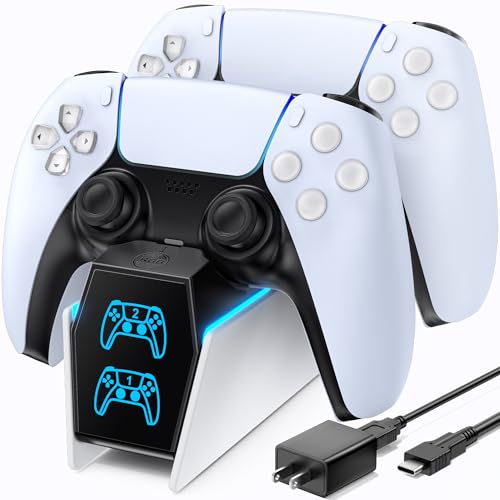
- Charges two PS5 controllers at once
- Includes AC adapter for cable-free charging
- Functions as a neat storage stand
Best For: PS5 players who want a tidy dual-controller dock with quick charging.
Best for Multi-Controller Charging
Switch Controller Charging Dock

- Charges 4 Joy-Cons plus 2 controllers
- LED lights show charging status at a glance
- USB-C power with built-in safety protection
Best For: Gamers who want a simple dock for charging multiple Nintendo and PS5 controllers in one spot.
Best RGB Pick
NEWDERY PS5 Dual Charging Stand
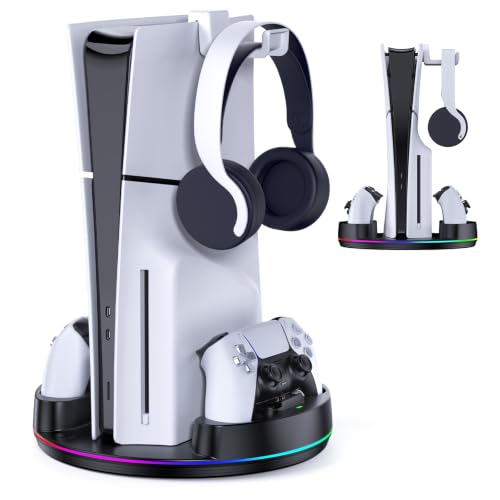
- Dual charges PS5 controllers in about 2.5 hours
- Works with PS5 Original, Slim, and Pro consoles
- Adds RGB lighting, headset storage, and anti-slip stability
Best For: PS5 owners who want charging, storage, and a more polished game room setup.
Best for RGB Game Room Style
PS 5 Dual Controller Charging Dock

- Charges two PS5 controllers in about 2 hours
- Supports DualSense and Edge controllers
- RGB lighting and touch controls add game-room style
Best For: PS5 players who want fast dual-controller charging with colorful room lighting.
Best for Fast Top-Ups
NEWDERY PS5 Controller Charger Station

- Fast 1.5-hour charging for quick turnarounds
- Drop-and-go dock with easy alignment
- LED status light shows charging progress
Best For: PS5 players who want a simple single-controller dock for quick, low-fuss charging.
Best for DualSense Edge
PS5 Dual Controller Charger Dock with LED

- Charges two PS5 controllers at once
- Includes AC adapter for faster setup
- Ambient LED lighting adds game-room style
Best For: PS5 players who want a stylish dual charging dock with LED lighting.
Best Dual-Controller Pick – PowerA Twin Charging Station for PS5 DualSense
If you want a clean, no-fuss controller charging station for game room setups, this PowerA dock is a smart fit for PS5 owners. It charges two DualSense controllers at once, doubles as a display stand, and keeps everything looking tidy beside your console or entertainment center.
Best For: PS5 players who keep two DualSense controllers ready to go and want an officially licensed charging dock that looks good on display.
Pros:
- Charges two DualSense controllers at the same time
- Officially licensed for PlayStation 5
- Simple drop-and-charge design with display-friendly styling
- Powered by an AC adapter for reliable charging
Cons:
- Only works with DualSense controllers
- Needs a nearby outlet because it uses AC power
Overall, this is a practical controller charging station for game room shelves, TV stands, and PS5 setups where convenience matters more than extra features. If you mainly want a compact dock that keeps two controllers charged and ready, this one does the job well.
Best for RGB Storage – KDD Headset Stand with Charging Station
If you want a controller charging station for game room organization and atmosphere, this KDD stand blends storage, charging, and lighting in one compact desktop setup. It keeps controllers, a headset, and small devices within reach while adding a customizable RGB look that fits a gaming desk.
Best For: Gamers who want a desk organizer with built-in charging, controller storage, and eye-catching lighting.
Pros:
- 9 lighting modes with memory function for a personalized game room look
- Built-in USB-A and USB-C ports for charging multiple accessories
- Detachable controller holder and headset hanger save desk space
- Wider base and rubber pads improve stability and help prevent scratches
Cons:
- Type-C port is not compatible with iPhone charging
- Lighting and charging features add more bulk than a simple stand
- Best suited to desktop setups rather than shelf-only storage
For buyers who want a controller charging station for game room use that also doubles as decor, this is a strong all-in-one pick. It leans more toward stylish desktop organization than pure charging speed, but the mix of storage, ports, and lighting makes it practical for everyday gaming setups.
Best for Multi-Platform Controllers – 2-Port LED Charging Dock
If you want a controller charging station for game room use that can handle multiple systems without taking up much space, this 2-port dock is a practical pick. It supports Switch Pro, Switch 2 Pro, PS5, Xbox Series X|S, and Xbox Elite Series 2 controllers, with clear LED status lights and a compact base that fits easily on a desk or TV stand.
Best For: Gamers who switch between Nintendo, PlayStation, and Xbox controllers and want a simple drop-in charging setup.
Pros:
- Charges two supported controllers at the same time.
- Includes Type-C adapters for easier drop-in charging and less wear.
- LED indicators make it easy to see charging vs. full status.
- Compact design works well for a tidy game room setup.
Cons:
- Not compatible with PowerA, Luna, or other third-party pro controllers.
- Needs a 5V/2A USB wall adapter for best performance.
- Thick protective cases may interfere with charging.
For households with mixed consoles, this controller charging station for game room use stands out for convenience rather than flashy features. It is a clean, low-fuss dock that does the basics well, as long as your controllers are on the supported list.
Best for Fast Dual Charging – OIVO PS5 Dual Controller Charging Dock
If you want a controller charging station for game room use that keeps two PS5 pads ready without extra cable clutter, this OIVO dock is a practical pick. It includes its own AC adapter, charges both controllers at once, and adds a tidy stand-style look that fits next to a console setup.
Best For: Players who want a simple, space-saving charging dock for two PS5 controllers with fast turnaround.
Pros:
- Charges two PS5 controllers at the same time, with up to about 2-hour charging.
- Includes an AC adapter, so you do not need to rely on a separate USB cable setup.
- Acts as both a charger and storage stand to reduce desk or shelf clutter.
- LED indicators make it easy to see charging status at a glance.
Cons:
- Made specifically for PS5 controllers, so it is not a universal dock.
- The built-in styling is useful, but it takes up more space than a basic cable charger.
For a controller charging station for game room setups centered on PS5, this model balances speed, convenience, and a clean display-friendly design. It is a good fit if you want a dock that doubles as storage and keeps controllers ready between sessions.
Best for Multi-Controller Charging – Switch Controller Charging Dock
If you want a practical controller charging station for game room use, this 6-in-1 dock is built for keeping multiple Nintendo Switch Joy-Cons and extra controllers ready to go. It’s a simple plug-and-play setup with LED status lights, USB-C power, and built-in protection for safer everyday charging.
Best For: Gamers who need one dock to charge several Joy-Cons plus a Pro Controller or PS5 controller without a lot of setup.
Pros:
- Charges up to 4 Joy-Cons and 2 controllers at once
- LED indicators make charging status easy to see
- USB-C power option works with a console, hub, or wall adapter
- Built-in protection chip adds safety against common power issues
Cons:
- Does not include Joy-Cons or controllers
- Mainly useful if you own multiple compatible controllers
As a controller charging station for game room setups, this dock makes the most sense for households with mixed Nintendo and PlayStation gear. It focuses on convenience and capacity rather than premium extras, which is exactly what many busy play spaces need.
Best for Fast Charging – OIVO PS4 Controller Charging Dock
If you want a controller charging station for game room use that keeps DualShock 4 pads ready without clutter, the OIVO PS4 dock is a practical pick. It focuses on fast, simple charging, clear status lights, and flexible power options from your console, PC, or a wall source.
Best For: PS4 players who want a compact dock that can quickly top off two controllers and keep a game room organized.
Pros:
- Charges two PS4 controllers in about 1.8 hours
- LED indicators make charge status easy to check at a glance
- Works with PS4, PS4 Slim, PS4 Pro, PC, or a wall power source
- Built-in protection helps guard against overcharging and overheating
Cons:
- Wall adapter is not included
- Designed specifically for PS4 DualShock 4 controllers
This is a strong choice if you want a controller charging station for game room setups that emphasizes speed and simplicity over extras. It keeps controllers powered and visible, making it easy to stay organized between play sessions.
Best RGB Pick – NEWDERY PS5 Dual Charging Stand
If you want a controller charging station for game room use that also helps organize your PS5 setup, this NEWDERY stand is a practical all-in-one option. It supports PS5 Original, Slim, and Pro consoles, includes dual controller charging, and adds RGB lighting plus a headset holder to keep the space tidy.
Best For: PS5 owners who want a single stand that charges two controllers, holds the console securely, and adds a cleaner look to a game room.
Pros:
- Charges two PS5 controllers in about 2.5 hours
- Supports PS5 Original, Slim, and Pro Disc/Digital versions
- RGB lighting and headset stand improve the setup’s look and utility
- Anti-slip mats and safety screw help keep everything stable
Cons:
- Requires a 5V/3A adapter for proper charging speed
- Designed specifically for PS5 ecosystems, so it’s not very versatile
- RGB lighting may be unnecessary for minimal setups
This is a strong pick if you want a controller charging station for game room organization as much as charging performance. It combines storage, charging, and styling in one compact stand, making it a smart fit for players who want their PS5 area to look intentional and stay clutter-free.
Best for RGB Game Room Style – PS 5 Dual Controller Charging Dock
If you want a controller charging station for game room setups that does more than just top off batteries, this PS5 dock is a strong fit. It charges two DualSense or Edge controllers at once, adds RGB lighting, and keeps your desk or console area tidier with a compact stand-style design.
Best For: PS5 players who want dual-controller charging, simple cable management, and a more colorful gaming setup.
Pros:
- Charges 2 controllers in about 2 hours with built-in protection against over-current, over-voltage, and short circuits
- Compatible with DualSense and Edge controllers for flexible everyday use
- RGB lighting with touch control and an on/off switch adds easy game-room ambiance
- Compact dock helps reduce clutter around the console
Cons:
- Designed specifically for PS5 controllers, so it won’t work as a universal charging dock
- RGB effects may be more than some buyers want in a minimalist setup
This is a practical pick if you want a controller charging station for game room use that balances speed, safety, and visual flair. It’s especially appealing for players who like their accessories to double as part of the room’s setup instead of just staying functional.
Best for Fast Top-Ups – NEWDERY PS5 Controller Charger Station
If you want a controller charging station for game room use that keeps a PS5 pad ready without extra clutter, this NEWDERY dock is a practical pick. It supports drop-and-charge convenience, fast charging, and a clean white stand design that fits neatly beside a console setup.
Best For: PS5 players who want a simple single-controller dock for quick, low-fuss charging between sessions.
Pros:
- Charges a controller in about 1.5 hours for quick turnaround
- Drop-and-go design makes docking easy and alignment-free
- LED indicator clearly shows charging and full-charge status
- Compatible with PS5 controllers and DualSense Edge
Cons:
- Charges only one controller at a time
- 5V/1A adapter is not included
- Best suited to users who prefer a dedicated stand over a multi-bay charger
For a controller charging station for game room setups where speed and simplicity matter, this dock does the essentials well. It is a good fit if you mainly want one controller always topped off and easy to grab before your next match.
Best for DualSense Edge – PS5 Dual Controller Charger Dock with LED
If you want a controller charging station for game room setups that looks good on the shelf and keeps two pads ready at once, this PS5 dock is an easy fit. It charges DualSense and DualSense Edge controllers, includes an AC adapter, and adds adjustable ambient lighting for a cleaner gaming corner.
Best For: PS5 owners who want a dual charging dock with built-in LED ambiance and quick, everyday charging.
Pros:
- Charges two DualSense or DualSense Edge controllers at the same time
- Includes AC adapter and fast 2.5-3 hour charging support
- LED light strip and touch control add a nice game-room look
- Clear charging indicators make it easy to check battery status
Cons:
- Designed specifically for PS5 controllers, so it is not broadly compatible
- Light effects may be more decorative than necessary for some setups
This is a solid controller charging station for game room spaces if you want a tidy dock with useful lighting and dependable dual-controller support. It balances function and presentation well, especially for PS5 players who keep two controllers in rotation.
How We Picked the Best Controller Charging Station for Game Room
We focused on real-world usefulness first: controller compatibility, charging speed, dock stability, and how well each station fits a shared entertainment space. A strong Controller Charging Station for Game Room setups should reduce clutter, make it obvious when devices are charging, and be easy to use between sessions.
We also looked at features that matter in busy rooms, including LED indicators, compact footprints, multi-device support, and added storage for headsets or extra controllers. Models that only sound impressive on paper but add unnecessary complexity were left out of the final list.
Quick Comparison: What Matters Most
For most buyers, the main trade-off is between simple charging docks and larger game room organizers. Basic docks are ideal if you just want fast, reliable controller charging. Larger stations with headset stands, console bases, or RGB lighting are better if you want one centerpiece to manage multiple accessories.
If you own more than one platform, compatibility becomes a top priority. Some stations are built for PlayStation controllers only, while others support Switch Pro, Xbox controllers, or mixed-device setups. Matching the dock to the controllers you actually use will matter more than extra lighting or styling.
Key Buying Factors for a Controller Charging Station for Game Room
Compatibility
Check whether the station supports DualSense, DualSense Edge, PS4, Switch Pro, Xbox controllers, or mixed charging needs. A station that fits your exact controllers is usually the safest choice.
Charging Speed and Power Source
Look for fast charging if you rotate controllers frequently. Some stations use AC adapters for more consistent power, while others rely on USB connections that may be more convenient but slower.
Layout and Footprint
In a game room, desk and shelf space can disappear quickly. Choose a compact dock if space is tight, or a larger stand only if you want it to double as storage and display.
Visual Feedback and Extras
LED charging indicators help you confirm status at a glance. RGB lighting, headset hooks, and controller holders can be useful, but they should support the setup rather than distract from it.
Who Should Buy Which Controller Charging Station for Game Room?
If you mainly use PlayStation controllers, a PS5-focused dock or stand is the most straightforward choice. If your room includes multiple consoles, a multi-platform charging station is more practical and can simplify your setup.
Gamers who want the cleanest look should prioritize a compact dock with clear charging indicators. If your game room doubles as a showcase space, a console stand with lighting and accessory storage may be the better fit. For most buyers, the best Controller Charging Station for Game Room use is the one that matches your controller ecosystem, fits your space, and keeps everything ready without extra hassle.