If you want to keep your console organized, your controllers ready, and your system running cooler, a controller charging station with cooling fan can do all three at once.
Below, we’ve rounded up 10 options for PlayStation and Xbox owners who want a cleaner setup and more convenient charging.
Best 10 Controller Charging Station with Cooling Fan Picks for 2026
Best All-in-One Dock
PS5/Slim/Pro Cooling Stand with LED Charging

- Dual controller charging with RGB status lights
- 3-level cooling fan for console airflow
- Fits PS5, Slim, and Pro configurations
Best For: PS5 owners who want one dock for cooling, charging, and display storage.
Best All-in-One PS4 Dock
KEKUCULL PS4 Charging Stand with Fans

- Charges 2 controllers simultaneously
- Dual cooling fans help manage heat
- Adds 3 USB ports in one vertical stand
Best For: PS4 and PS4 Slim users who want charging, cooling, and USB expansion in one dock.
Best for PS5 Slim/Pro Owners
PS5 Cooling & Charging Station with RGB Lights
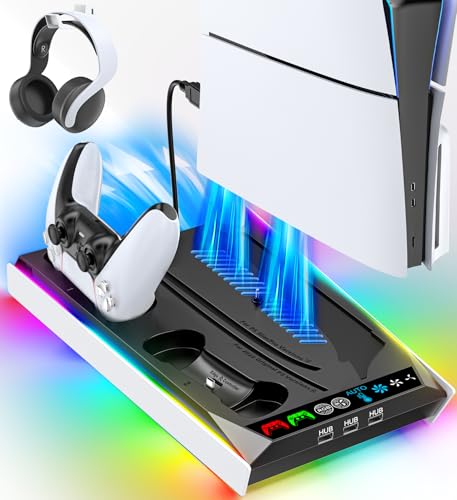
- Fits PS5, PS5 Slim, and PS5 Pro
- Charges original and Edge controllers
- Includes cooling fans, USB hubs, and RGB lighting
Best For: PS5 owners who want a single stand for charging, cooling, and extra USB ports.
Best for Cooling & Storage
CODOGOY Xbox Series X/S Charging Stand

- Dual-speed cooling fans help improve airflow
- Charges two controllers with included battery packs
- Three USB ports add extra connectivity
Best For: Xbox Series X/S owners who want a space-saving charger, fan, and USB hub in one dock.
Best for Auto-Cooling
PS5 Cooling Stand with Dual Controller Charger
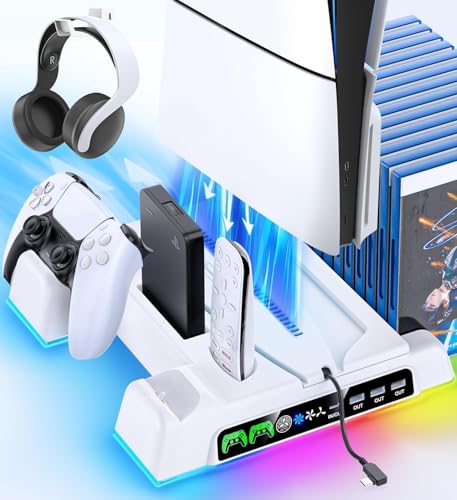
- Auto fan adjusts to console temperature
- Charges two controllers with LED status lights
- Adds storage for headset, remote, and game cards
Best For: PS5 players who want automatic cooling plus a dual controller dock in one stand.
Best for RGB Storage
MENEEA Cooling Fan Charging Station for Xbox Series X

- Charges two controllers and shows clear LED charge status
- Rear dual-fan cooling system with 3 speed settings
- RGB lights plus slots and hanger help organize accessories
Best For: Xbox Series X gamers who want charging, cooling, and storage in one RGB dock.
Best for PS4 Pro All-in-One Cooling
FASTSNAIL Vertical Stand for PS4 Pro

- Charges 2 controllers simultaneously
- Built-in cooling fans for PS4 Pro airflow
- Adds USB hub ports and LED charge indicators
Best For: PS4 Pro owners who want one dock for cooling, charging, and basic cable cleanup.
Best All-in-One PS5 Organizer
PS5 Cooling Station with Dual Controller Charger

- Charges two DualSense controllers simultaneously
- Three-speed fan helps manage console heat
- Includes disc storage, headset holder, and RGB lighting
Best For: PS5 owners who want charging, cooling, and storage in one dock.
Best Heavy-Duty Pick
MENEEA Xbox Series X Cooling Charge Stand

- Side fan improves console airflow
- Dual charger includes 2 rechargeable batteries
- Adds headset and 10-disc storage in one stand
Best For: Xbox Series X owners who want cooling, charging, and storage in one vertical dock.
Best for Cooling + Charging
PS5 Slim/Pro Cooling Station with 3 USB Hubs

- Adjustable 3-speed turbo fan for console cooling
- Charges two controllers in roughly 3 hours
- Adds 3 USB ports and accessory storage
Best For: PS5 owners who want cooling, charging, and accessory storage in one stand.
Best All-in-One Dock – PS5/Slim/Pro Cooling Stand with LED Charging
If you want a controller charging station with cooling fan that also doubles as a display stand, this PS5/Slim/Pro dock is built to do a lot in one footprint. It supports dual controller charging, includes RGB charge indicators, and adds a 3-level cooler fan to help keep your console setup organized.
Best For: PS5 owners who want a single stand for cooling, controller charging, and storage.
Pros:
- Charges two DualSense controllers at the same time with LED status indicators
- Includes a 3-speed cooling fan for added airflow around the console
- Works with PS5, PS5 Slim, and PS5 Pro setups for broader compatibility
Cons:
- More of a multi-function dock than a minimal charging stand
- PS5 Slim compatibility depends on using the correct adapter setup
- Fan and lighting features may be unnecessary if you only need basic charging
This is a strong pick if you want a controller charging station with cooling fan that combines convenience and storage in one accessory. It makes the most sense for players who prefer a tidy all-in-one dock over buying separate chargers, stands, and cooling accessories.
Best All-in-One PS4 Dock – KEKUCULL PS4 Charging Stand with Fans
If you want a controller charging station with cooling fan that also helps organize your PS4 setup, this KEKUCULL stand is built for the job. It combines dual controller charging, dual cooling fans, and extra USB ports in one vertical dock, making it a practical pick for players who keep their console running for long sessions.
Best For: PS4 and PS4 Slim owners who want one compact dock to charge controllers, improve airflow, and add USB convenience.
Pros:
- Charges two controllers at once to save time
- Dual fans help reduce heat during extended play
- Includes 3 USB ports for extra accessories
- Vertical stand design helps keep the setup tidy
Cons:
- Only compatible with PS4 and PS4 Slim
- Not a universal charging dock for other consoles
- Fan performance may be more basic than higher-end coolers
This is a solid controller charging station with cooling fan if you want a simple all-in-one accessory rather than a separate charger, hub, and cooling stand. It focuses on convenience and space-saving functionality over premium extras.
Best for PS5 Slim/Pro Owners – PS5 Cooling & Charging Station with RGB Lights
If you want a controller charging station with cooling fan support that also keeps your PS5 setup tidy, this dock packs a lot into one stand. It works with PS5, PS5 Slim, and PS5 Pro, includes charging for original and Edge controllers, and adds USB hubs plus RGB lighting for a more complete desk setup.
Best For: Players who want one all-in-one PS5 stand for cooling, controller charging, and extra USB expansion.
Pros:
- Supports PS5, PS5 Slim, and PS5 Pro with a stable, screw-secured design
- Charges original and Edge controllers with a movable charging port
- Built-in cooling fans help reduce heat during long gaming sessions
- Includes 3 USB hubs and a media remote slot for added convenience
Cons:
- More of a multi-function dock than a minimalist charging stand
- RGB lighting may be unnecessary for buyers who want a plain setup
Overall, this is a strong pick if you want a controller charging station with cooling fan features and extra utility in one accessory. It makes the most sense for gamers who need charging, airflow, and hub expansion without adding multiple separate devices.
Best for Cooling & Storage – CODOGOY Xbox Series X/S Charging Stand
If you want a controller charging station with cooling fan that also helps tidy up your setup, this CODOGOY vertical stand is a practical all-in-one option. It charges two Xbox Series X/S controllers, adds dual-speed fans for airflow, and includes extra USB ports for accessories.
Best For: Xbox Series X/S owners who want a space-saving stand that combines controller charging, console cooling, and USB expansion.
Pros:
- Dual cooling fans with two speed settings for better heat dissipation
- Charges two controllers and includes 2x 1100 mAh rechargeable battery packs
- Three USB hub ports add useful connectivity for accessories and charging
- Vertical design helps organize the console and save desk space
Cons:
- Only compatible with Xbox Series X/S, not Xbox One controllers
- Batteries are not compatible with Elite Series controllers
- Bulkier than a simple dock because it combines several functions
As a controller charging station with cooling fan, this model stands out most for buyers who want convenience in one place rather than separate accessories. The cooling, charging, and USB expansion make it especially useful for a compact Xbox setup.
Best for Auto-Cooling – PS5 Cooling Stand with Dual Controller Charger
If you want a controller charging station with cooling fan that does more than just hold your PS5, this stand is built for all-in-one convenience. It supports PS5 Disc, Digital, Slim, and Pro models, adds automatic fan control based on console temperature, and includes dual controller charging plus extra storage for accessories.
Best For: PS5 owners who want automatic cooling, dual controller charging, and a tidy vertical stand in one setup.
Pros:
- Auto-adjusting turbo fan helps manage heat without constant manual tweaking
- Charges two controllers and supports extra accessory slots for headset, remote, and storage
- Smart charging chips help protect battery life by stopping at 70%
- Compatible with PS5 Disc, Digital, Slim, and Pro versions
Cons:
- Bulkier than a simple dock or charger-only setup
- Fan speed and lighting controls may be more than some users need
- Works best for players who actually want an all-in-one console organizer
This is a strong pick if you want a controller charging station with cooling fan that also cleans up your desk and consolidates accessories. The automatic fan control and dual-charge design make it especially practical for long gaming sessions.
Best for RGB Storage – MENEEA Cooling Fan Charging Station for Xbox Series X
If you want a controller charging station with cooling fan that also helps organize a full Xbox Series X setup, this MENEEA dock is a strong all-in-one pick. It charges two controllers, adds rear cooling, and layers in RGB lighting plus storage for accessories, making it a practical fit for tidy gaming spaces.
Best For: Xbox Series X owners who want one dock to charge controllers, improve airflow, and keep accessories organized with extra lighting flair.
Pros:
- Charges two Xbox Series X controllers at once with LED status indicators
- Built-in rear cooling fans with 3 speed settings to help move hot air out
- Includes RGB lighting, headset hanger, game card slots, and expansion card storage
- Vertical stand design helps save desk space and reduce cable clutter
Cons:
- Only works with official Xbox Series X rechargeable controller batteries
- Battery packs are not included
- Cooling fan setup must be installed correctly or it will not operate
For buyers who want more than a basic dock, this controller charging station with cooling fan stands out for combining charging, airflow support, and accessory storage in one compact setup. It is especially appealing if you like a more colorful, display-ready Xbox area.
Best for PS4 Pro All-in-One Cooling – FASTSNAIL Vertical Stand for PS4 Pro
If you want a controller charging station with cooling fan that also organizes your PS4 Pro setup, this FASTSNAIL vertical stand combines charging, airflow, and extra USB convenience in one dock. It’s a practical pick for players who prefer a single accessory to handle controller power and basic console cooling without a complicated install.
Best For: PS4 Pro owners who want a vertical stand with built-in cooling fans and dual controller charging.
Pros:
- Charges two DualShock controllers at the same time
- Built-in cooling fans help keep the PS4 Pro cooler during long sessions
- Includes USB hub ports for extra accessories and devices
- LED indicators make charging status easy to check
Cons:
- Made specifically for PS4 Pro, so it won’t fit every console setup
- Cooling fans can be turned off, but the design is still fairly basic
For buyers who want a controller charging station with cooling fan plus a simple vertical dock, this model covers the core needs well. It’s especially useful if you value all-in-one convenience over premium extras.
Best All-in-One PS5 Organizer – PS5 Cooling Station with Dual Controller Charger
If you want a controller charging station with cooling fan that also cleans up your setup, this PS5 stand covers a lot of bases at once. It charges two DualSense controllers, adds adjustable cooling, and gives you storage for discs and accessories in one vertical dock.
Best For: PS5 owners who want an all-in-one stand for charging, cooling, and organizing accessories.
Pros:
- Charges two PS5 controllers at once with clear LED charge indicators
- Three fan speeds help reduce heat with relatively quiet operation
- Built-in RGB lighting and USB hubs add setup flexibility
- Holds the console, 12 game discs, and a headset to save space
Cons:
- More of a multi-function dock than a simple charger
- RGB lighting may be unnecessary if you prefer a plain look
- Designed specifically for PS5/PS5 Slim/PS5 Pro console versions
For buyers who want a controller charging station with cooling fan that doubles as an organizer, this is a practical pick. It is especially appealing if you value fewer cables, better airflow, and a tidier console area.
Best Heavy-Duty Pick – MENEEA Xbox Series X Cooling Charge Stand
If you want a controller charging station with cooling fan that also helps organize your setup, this MENEEA dock is built for Xbox Series X owners who want multiple functions in one vertical stand. It combines console cooling, dual controller charging, battery packs, headset storage, and game disc slots to keep the gaming area tidy.
Best For: Xbox Series X players who want an all-in-one stand for cooling, charging, and storage in a compact vertical layout.
Pros:
- Built-in side fan helps improve airflow around the console
- Includes two 1400mAh rechargeable batteries and dual charging docks
- Space-saving design adds headset and 10-disc storage
- LED indicators make charge status easy to check at a glance
Cons:
- Only compatible with Xbox Series X, not Xbox One
- Extended USB port is for power only, not data transfer
- Charging behavior depends on console power state and sleep mode
As a controller charging station with cooling fan, this model stands out most for users who value organization and extra storage as much as charging speed. It’s a practical pick if you want one dock to handle cooling, battery charging, and accessory storage in a single footprint.
Best for Cooling + Charging – PS5 Slim/Pro Cooling Station with 3 USB Hubs
If you want a controller charging station with cooling fan that does more than just dock controllers, this PS5 stand is built for all-in-one convenience. It combines adjustable fan cooling, dual controller charging, and extra USB ports to help keep a PS5 setup organized during long play sessions.
Best For: PS5 owners who want a single stand to cool the console, charge two controllers, and tidy up accessories.
Pros:
- Three fan speeds help move heat away from the console during extended gaming.
- Charges two PS5 controllers at once in about 3 hours.
- Includes 3 USB hubs plus storage for headset, media remote, and games.
- Compatible with PS5 Slim, Standard, and Pro disc/digital setups.
Cons:
- Not compatible with the PS5 Edge controller.
- May require removing the panel adapter for PS5 Slim disc/digital versions.
As a controller charging station with cooling fan, this model stands out for users who want practical desk organization and better thermal management in one accessory. It is especially appealing if you keep multiple PS5 add-ons nearby and prefer a dock that handles both charging and airflow.
How We Picked the Best Controller Charging Station with Cooling Fan
We focused on stations that combine controller charging with active cooling, since that’s the main value of a Controller Charging Station with Cooling Fan. Priority went to models that support current consoles, offer dual-controller charging, and include practical features such as vertical stands, LED indicators, and stable dock designs.
We also favored products that fit real-world setups: PS5 Disc and Digital/Slim systems, PS4 Pro, and Xbox Series X/S. Ease of use, footprint, and charging convenience mattered as much as raw feature count.
Quick Comparison
Some buyers will want a PS5-focused station with RGB lighting and adjustable fan speeds. Others may care more about a simple vertical dock that charges two controllers and saves space. Xbox users should verify exact console compatibility, since many cooling stands are designed for a specific platform.
In general, the best picks balance airflow, charging speed, and shelf stability without adding unnecessary bulk.
Key Buying Factors for a Controller Charging Station with Cooling Fan
Console Compatibility
Make sure the stand matches your exact console version. PS5 Disc, Digital, and Slim models are not always supported the same way, and Xbox Series X accessories are typically not interchangeable with PlayStation models.
Cooling Performance
Look for adjustable fan settings, strong intake/exhaust placement, and a design that won’t block ports or airflow. Cooling can help with heat management, but it should complement your console’s own ventilation rather than replace it.
Charging Convenience
Dual-controller docks are the most practical choice for most households. Clear LED charging indicators and secure docking points make daily use easier and reduce guesswork.
Fit, Stability, and Layout
A good station should feel stable with the console mounted on top and controllers attached below. If you have limited space, a vertical stand can be a smart choice.
Who Should Buy Which Controller Charging Station with Cooling Fan?
Choose a PS5-oriented model if you want an all-in-one stand for charging and cooling with a clean living-room footprint. Pick an Xbox Series X/S option if you want the same convenience for Microsoft hardware. PS4 Pro owners should look for older-model support specifically, since newer stations may not be backward compatible.
If you want the simplest setup, prioritize reliable dual charging and a balanced fan design. If you care about aesthetics, extras like RGB lighting and LED status displays may be worth the tradeoff. For most buyers, the best Controller Charging Station with Cooling Fan is the one that matches the console exactly, charges consistently, and keeps the setup neat.