As a gaming streamer, you know that capturing every epic moment is essential for engaging your audience. In 2026, you’ll have access to a variety of advanced cameras designed specifically for this purpose. From high-resolution options to enhanced low-light performance, these cameras offer features that can elevate your streaming experience. Curious about which models stand out and what factors you should consider before making a choice? Let’s explore the top contenders.
Razer Kiyo V2 X Streaming Webcam
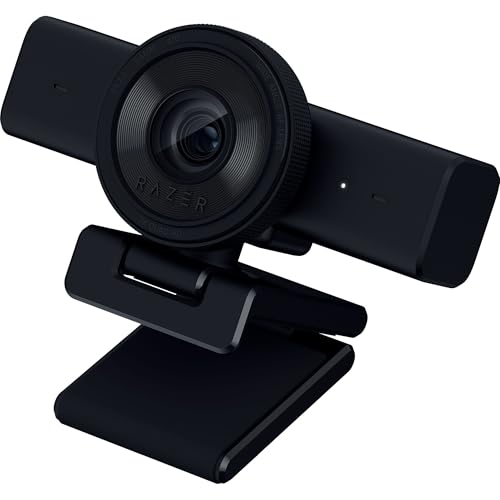
If you’re a gaming streamer looking to elevate your content, the Razer Kiyo V2 X Streaming Webcam is an excellent choice. With 1440P resolution at 60 FPS, your stream will showcase smooth, clear visuals that captivate your audience. The fast, accurate autofocus keeps everything sharp, whether you’re gaming or chatting. You’ll love the built-in microphone, delivering crystal-clear audio to enhance your streams. Its wide-angle lens offers flexibility, allowing full setup visibility or close-ups with fans. Plus, Razer Synapse software enables easy customization for color and lighting. With an integrated privacy shutter and adjustable mounting, it’s perfect for any streamer.
Best For: Streamers and content creators looking for high-quality video and audio to enhance their online presence.
Pros:
- 1440P resolution at 60 FPS provides smooth and clear visuals for engaging streams.
- Built-in microphone delivers crystal-clear audio, enhancing the overall streaming experience.
- Wide-angle lens allows flexible framing options for full setup visibility or close-up interactions.
Cons:
- Limited low-light performance may affect video quality in darker environments.
- Dependency on Razer Synapse for advanced customization could be a drawback for those preferring standalone settings.
- Integrated privacy shutter may not be as robust as external options for complete lens coverage.
Insta360 Link 2 PTZ 4K Webcam for PC/Mac

The Insta360 Link 2 PTZ 4K Webcam is a game-changer for gaming streamers seeking high-quality video quality and innovative features. With its 1/2″ sensor, you’ll capture stunning 4K visuals, even in low light. The AI tracking follows your movements, while gesture control allows remote operation and smart zooming. Specialized modes like DeskView and Whiteboard enhance your streaming experience. Enjoy professional audio with AI noise-canceling for clear communication. Plus, it’s compatible with major platforms like Zoom and Twitch. With a compact design and easy USB connectivity, this webcam is a top choice for any serious gamer.
Best For: Gamers and streamers looking for high-quality video and innovative features to enhance their streaming experience.
Pros:
- Stunning 4K visuals with HDR performance and low-light capabilities.
- AI tracking and gesture control for seamless movement and remote operation.
- Professional audio quality with AI noise-canceling algorithms for clear communication.
Cons:
- Not compatible with ARM-based Windows systems or Windows Hello Face Recognition.
- Limited to USB connectivity, which may restrict placement options.
- No support for certain video conferencing features on all platforms.
Logitech StreamCam Premium Webcam for Streaming and Content Creation

For gaming streamers seeking exceptional video quality, the Logitech StreamCam Premium Webcam stands out with its Full HD 1080p resolution at 60 fps. Its premium glass lens and smart autofocus deliver vibrant images, while auto-framing keeps you centered in every shot. With intelligent exposure, you’ll look great in various lighting conditions. The fast USB-C connection guarantees stable video, and its versatile mounting options allow for both landscape and portrait modes. Compatible with popular streaming software like OBS and Twitch, the included Logitech Capture software gives you enhanced control over settings, making it an ideal choice for content creation.
Best For: The Logitech StreamCam Premium Webcam is best for gaming streamers and content creators seeking high-quality video and versatile streaming capabilities.
Pros:
- Full HD 1080p resolution at 60 fps ensures sharp and vibrant video quality.
- Smart autofocus and intelligent exposure adapt to various lighting conditions, enhancing image clarity.
- Versatile mounting options allow for flexible use in both landscape and portrait modes.
Cons:
- Limited compatibility with older operating systems, requiring Windows 10 or later and macOS 10.14 or later.
- Weight of 10.23 oz may be slightly heavier than some other webcams, affecting portability.
- 1 Year Limited Hardware Warranty may not be sufficient for heavy users or professional streamers.
Logitech HD Pro Webcam C920
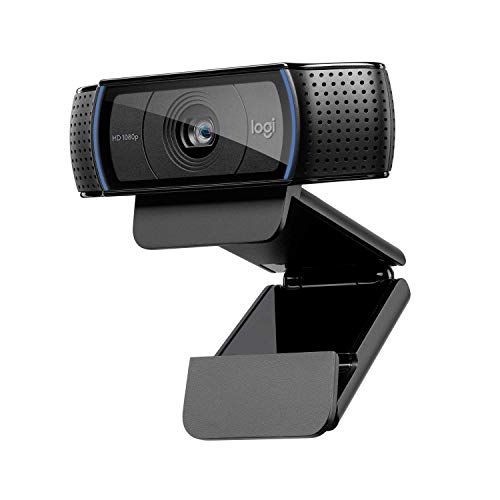
Looking to elevate your streaming game? The Logitech HD Pro Webcam C920 is a top choice for gamers like you. With Full HD 1080p resolution and 30 fps image capture, your streams will look crisp and vibrant. Its five-element glass lens guarantees precise autofocus, while dual mics with automatic noise reduction assure clear audio. Plus, the low light correction feature adapts to different lighting conditions, enhancing your visuals. Compatible with various operating systems and video calling platforms, this webcam’s H.264 encoding speeds up uploads. Weighing just 113 grams, it’s a lightweight option that doesn’t compromise on quality.
Best For: Gamers and content creators seeking high-quality streaming and video calling experiences.
Pros:
- Full HD 1080p resolution provides crisp and vibrant visuals for streaming and recordings.
- Dual mics with automatic noise reduction ensure clear audio, enhancing communication quality.
- Low light correction feature adapts to varying lighting conditions, improving video clarity in different environments.
Cons:
- No image stabilization, which may affect video quality during movement.
- Not water resistant, limiting usage in certain environments.
- Weight may be considered heavy (113 grams) for some users looking for ultra-portable options.
Acer 1080p Webcam for PC with Noise Cancellation Microphones

With its dual noise-reduction microphones, the Acer 1080p Webcam is perfect for gaming streamers who need crystal-clear audio during their broadcasts. This webcam delivers 1080p Full HD video, ensuring vibrant clarity and color. It’s easy to set up with plug-and-play functionality, and it even comes with a Type-A to Type-C adapter for universal compatibility. The automatic low-light correction enhances your image quality in dim settings, while the 360° rotation and 100° field of view keep you perfectly framed. Plus, it includes a built-in privacy cover, adding an extra layer of security when not in use.
Best For: The Acer 1080p Webcam is best for remote workers, online educators, and gaming streamers who require high-quality video and audio for their virtual interactions.
Pros:
- High-quality 1080p Full HD video with automatic low-light correction for optimal image quality.
- Dual noise-reduction microphones ensure clear audio without background distractions.
- Plug-and-play functionality with a Type-A to Type-C adapter for easy compatibility across devices.
Cons:
- Limited to a 100° field of view, which may not accommodate larger groups in a single frame.
- The built-in privacy cover may not be sufficient for users seeking more advanced security features.
- The webcam’s design may not suit all aesthetic preferences for a home office setup.
Insta360 Link 2C 4K Webcam for PC/Mac

The Insta360 Link 2C 4K Webcam stands out as an excellent choice for gaming streamers seeking superior video quality and seamless compatibility with major platforms like Twitch and Zoom. With its 4K visuals and HDR capabilities, you’ll enjoy stunning image clarity, even in low light. The AI noise-canceling mic guarantees your audio remains professional, while gesture control adds convenience. Features like Auto Framing and specialized modes enhance your streaming experience. Plus, it works effortlessly on both PC and Mac, making it a versatile addition to your setup. Don’t forget the easy-access privacy switch for added security!
Best For: Gamers and professionals who require high-quality video and audio for streaming and video calls on platforms like Twitch and Zoom.
Pros:
- Premium 4K visuals and HDR for exceptional image clarity.
- Advanced AI noise-canceling mic ensures professional audio quality.
- Versatile features like Auto Framing and specialized modes enhance the user experience.
Cons:
- Not compatible with ARM-based Windows systems or Windows Hello Face Recognition.
- Lacks image stabilization, which may affect video quality during movement.
- Compact design may not include water resistance, limiting its durability.
Elgato Facecam 4K Webcam

For gaming streamers seeking top-tier video quality, the Elgato Facecam 4K Webcam stands out with its Ultra HD 4K resolution at 60 FPS, delivering sharp detail and vibrant color that make your streams pop. Featuring a premium Sony STARVIS 2 CMOS sensor, it guarantees DSLR-like clarity. You’ll love the creative control with the Elgato Camera Hub, allowing visual customization and support for 49mm lens filters. Plus, its compact design and eco-friendly materials make it a sustainable choice. With a 2-year warranty and an average rating of 4.2 stars, this webcam is a solid investment for your streaming setup.
Best For: Gaming streamers who prioritize high-quality video and creative control in their streaming setup.
Pros:
- Ultra HD 4K resolution at 60 FPS for sharp detail and vibrant color.
- Elgato Camera Hub software allows for visual customization and supports 49mm lens filters.
- Eco-friendly materials used in construction, making it a sustainable choice.
Cons:
- Limited to USB-C connectivity, which may require adapters for some setups.
- Requires software for full functionality, which may not appeal to all users.
- Price point may be higher compared to standard webcams.
Logitech Brio 4K Webcam

Gamers looking to elevate their streaming quality will find the Logitech Brio 4K Webcam an outstanding choice. This webcam delivers stunning Ultra HD 4K resolution at 30 fps, ensuring your viewers see every detail. With features like autofocus, HDR, and RightLight 3, it adapts seamlessly to varying lighting conditions. The dual omnidirectional microphones capture clear audio while minimizing background noise. You can customize your experience using the Logi Options+ app, adjusting the field of view and focus settings. Plus, it offers security with Windows Hello support and an attachable privacy shutter, making it perfect for both streaming and privacy.
Best For: Gamers and professionals seeking high-quality video streaming and conferencing with advanced features.
Pros:
- High-resolution Ultra HD 4K video at 30 fps for exceptional clarity.
- Dual omnidirectional microphones with noise-canceling technology for clear audio capture.
- Customizable settings via the Logi Options+ app for a tailored experience.
Cons:
- May be more expensive compared to standard webcams.
- Requires a powerful computer for optimal performance at 4K resolution.
- Limited to 30 fps in 4K mode, which may not satisfy all users’ frame rate preferences.
Razer Kiyo V2 Streaming Webcam

Looking to elevate your streaming setup? The Razer Kiyo V2 Streaming Webcam is your go-to choice. It captures stunning 4K video at 30 FPS and 1080p at 60 FPS, thanks to the Sony STARVIS sensor that delivers vibrant clarity. With AI-powered auto-framing and a 93-degree ultra-wide lens, you’ll always be in focus. The integrated privacy cover and customizable settings via Razer Synapse guarantee your stream’s professionalism. Plus, it connects seamlessly with popular platforms like OBS and Discord. Don’t settle for less; make your streams shine with the Razer Kiyo V2.
Best For: Streamers and content creators looking for high-quality video capture and professional-grade features.
Pros:
- Exceptional video quality with 4K at 30 FPS and 1080p at 60 FPS.
- AI-powered auto-framing keeps you in focus while streaming.
- Easy integration with popular streaming platforms like OBS, Discord, and Zoom.
Cons:
- Higher price point compared to standard webcams.
- Limited functionality without Razer Synapse software.
- Requires USB connectivity, which may limit placement options.
Logitech MX Brio Ultra HD 4K Webcam

The Logitech MX Brio Ultra HD 4K Webcam stands out as an exceptional choice for gaming streamers who demand superior video quality. With 4K resolution at 30fps or 1080p at 60fps, your stream will look crisp and vibrant. Its AI-enhanced image quality guarantees you’re visible, even in low light. Plus, integrated noise-reducing microphones capture your voice clearly. The unique Show Mode lets you tilt the camera to share notes or sketches effortlessly. Compatible with major platforms and equipped with fine controls for customization, it’s a reliable tool for elevating your streaming experience. Enjoy the built-in privacy cover for added security too!
Best For: The Logitech MX Brio Ultra HD 4K Webcam is best for gaming streamers and content creators seeking high-quality video performance.
Pros:
- AI-enhanced image quality for excellent visibility in low light conditions.
- Integrated dual beamforming noise-reducing microphones for clear audio capture.
- Show Mode allows for easy sharing of notes and sketches during streams.
Cons:
- Higher price point compared to standard webcams.
- USB-C connectivity may require adapter for older devices.
- Limited to 30fps at 4K resolution, which may not meet all users’ needs for high frame rates.
Factors to Consider When Choosing a Camera for Gaming Streamers
When choosing a camera for your gaming streams, you’ll want to take into account several key factors. Video resolution, frame rate, and low-light performance can all impact the quality of your broadcast. Additionally, don’t overlook audio features and how easily you can mount the camera to fit your setup.
Video Resolution Options
Choosing the right video resolution for your gaming stream can greatly impact your viewers’ experience. You have several options, including 1080p (Full HD), 1440p (2K), and 4K (Ultra HD). Streaming at 1080p is a solid choice, offering smooth video at 60 frames per second, perfect for fast-paced games. If you want enhanced clarity without overloading your bandwidth, 1440p is becoming increasingly popular among streamers. For the highest detail, 4K streaming provides stunning visuals but demands powerful hardware and a fast internet connection to maintain stability. When deciding, weigh the trade-offs between resolution, frame rate, and the capabilities of your setup, ensuring you find the right balance for your streaming needs.
Frame Rate Importance
While video resolution plays a significant role in your streaming setup, frame rate is equally important for delivering a smooth and engaging experience. A higher frame rate, like 60 frames per second (fps), guarantees smoother motion and reduces motion blur—vital for fast-paced gaming. Streaming at 30 fps might work for less dynamic content, but it can create choppy visuals during intense action sequences. Many modern webcams offer 60 fps at 1080p resolution, striking a balance between quality and performance. Higher frame rates enhance viewer experience, making your streams more visually appealing and engaging. Plus, maintaining consistent frame rates is essential for synchronization with gameplay; fluctuations can lead to disjointed viewing experiences that might frustrate your audience.
Low-Light Performance
Low-light performance can make or break your streaming experience, especially if you often broadcast in dimly lit environments. To guarantee clarity and visibility, look for cameras with advanced sensors like CMOS, which provide sharper images and less noise. Cameras equipped with High Dynamic Range (HDR) capability will enhance low-light performance, delivering richer colors and better contrast. Features like automatic low-light correction are also essential, as they adjust settings in real-time to maintain image quality in challenging lighting. Additionally, consider webcams with built-in noise reduction algorithms to keep your audio clear and distractions to a minimum. Choosing the right camera can elevate your stream, making it more engaging and enjoyable for your audience.
Audio Quality Features
Great visuals can set the tone for your gaming stream, but don’t underestimate the importance of audio quality. Clear communication with your viewers and fellow players enhances engagement, making your content more enjoyable. Look for cameras with built-in microphones featuring noise-canceling technology; this helps minimize background sounds and focuses on your voice. Dual microphones can also boost sound directionality and clarity, which is essential for immersive streaming. Additionally, cameras with automatic gain control guarantee consistent volume levels during those intense gaming moments. Compatibility with external microphones can take your audio quality to the next level, enabling professional-grade sound capture. Prioritizing these audio features will elevate your streaming experience and keep your audience engaged.
Mounting Flexibility
When selecting a camera for your gaming stream, mounting flexibility plays an essential role in achieving the best angles and stability. Look for a webcam with a universal pivoting mount that lets you adjust angles easily on monitors or tripods. Options that support both landscape and portrait orientations are great if you want to switch formats depending on your content. Cameras with 360° rotation allow you to change angles effortlessly without moving the device itself. A compact design helps you mount it in tight spaces or on top of gaming monitors. Finally, verify the camera securely attaches to various surfaces, providing stability and minimizing accidental displacements during those intense gaming moments.
Software Compatibility
Choosing the right camera for your gaming stream means considering software compatibility to guarantee a smooth experience. Verify your webcam works with major platforms like OBS, Zoom, and Microsoft Teams for seamless integration. Check if it supports features like auto-framing and background removal, which can greatly enhance your streaming quality. Look for models that offer customizable settings through dedicated software, allowing you to fine-tune video and audio for peak performance. Regularly updated drivers are essential for compatibility with the latest streaming platforms and operating systems. Finally, confirm that the webcam operates smoothly on both Windows and macOS, as this will broaden your software options and streamline your streaming setup.
Field of View
The field of view (FOV) is an essential factor to take into account for gaming streamers, as it directly impacts how much of your environment gets captured on camera. A FOV of around 90 degrees strikes a great balance, allowing you to showcase both yourself and your gaming setup without overcrowding the frame. If you want to include more background or multiple participants, look for webcams with ultra-wide lenses that exceed 120 degrees. Conversely, a narrower FOV can help focus viewers’ attention on you, enhancing engagement during gameplay. Many webcams also offer adjustable FOV settings, letting you customize your framing based on the stream’s context or platform requirements. Choose wisely to amplify your streaming experience!
Privacy and Security
Privacy and security are essential considerations for gaming streamers, especially in a world where online threats are increasingly prevalent. Look for webcams with integrated privacy covers; these let you block the lens when not in use, adding a vital layer of protection against unauthorized access. Many modern models also offer customizable settings, giving you control over when your camera activates. Adjustable angles help maintain privacy during streams or calls, ensuring you capture only what you want. Additionally, choose webcams with secure connections, like USB or encrypted streaming protocols, to safeguard your data. Built-in microphones featuring noise-canceling tech can further enhance your privacy by minimizing background noise and preventing unintended audio capture.