If you’re serious about elevating your gaming streams, investing in a quality teleprompter can make a significant difference. These devices help you maintain eye contact with your audience while delivering your content smoothly. From the sleek Elgato options to versatile NEEWER models, there’s something for every streamer. You might be surprised at how much a teleprompter can enhance your broadcast quality and viewer engagement. Let’s explore the top picks that can transform your streaming setup.
Elgato Prompter Teleprompter with Built-in Screen for YouTube and More

The Elgato Prompter is an ideal choice for gaming streamers looking to enhance their on-screen presence without the hassle of extra devices. Featuring a built-in 9-inch display with 1080 pixels, you can easily read scripts or Twitch chat while maintaining eye contact with your audience. It’s compatible with DSLRs, webcams, and smartphones, making it versatile for platforms like YouTube and Zoom. The drag-and-drop interface simplifies setup, and the Camera Hub app lets you customize text appearance. Lightweight and compact, it’s perfect for professional use, ensuring you keep your streams engaging and interactive. Elevate your game with the Elgato Prompter!
Best For: Content creators and gaming streamers looking to improve engagement and maintain eye contact with their audience during broadcasts.
Pros:
- Built-in display eliminates the need for additional devices, simplifying setup.
- Versatile compatibility with DSLRs, webcams, and smartphones for various streaming platforms.
- Customizable text appearance through the Camera Hub app enhances readability during streams.
Cons:
- Limited to specific system requirements, which may restrict use for some users.
- Weight of 690 g might be considered heavy for portable setups.
- Price point may be higher compared to simpler teleprompter options on the market.
Elgato Stream Deck + Audio Mixer and Studio Controller for Content Creators

For gaming streamers looking to elevate their content creation, the Elgato Stream Deck + offers tactile control with its customizable touch strip dials and LCD keys. This versatile audio mixer and studio controller lets you manage audio, video, and lighting effortlessly. With eight customizable LCD keys and four 360° encoders, you can trigger multiple actions or switch profiles seamlessly. It supports various platforms like OBS, Twitch, and Discord, enhancing your workflow. Plus, its USB-C connectivity and integrated stand make setup a breeze. With a 4.6-star rating from users, it’s a must-have tool for any serious content creator.
Best For: The Elgato Stream Deck + is best for gaming streamers and content creators looking to enhance their audio-visual management and streamline their production workflow.
Pros:
- Fully customizable interface allows for personalized control over audio, video, and lighting.
- Supports multiple platforms, including OBS, Twitch, and Discord, improving productivity.
- Compact design with USB-C connectivity and an integrated stand for easy setup.
Cons:
- Limited to specific systems: Requires Windows 10 (64-bit) or macOS 10.13 or newer.
- May have a learning curve for beginners unfamiliar with production tools.
- Price point may be higher compared to simpler audio mixers or controllers.
Elgato Stream Deck MK.2 Studio Controller

Streamlining your streaming experience is effortless with the Elgato Stream Deck MK.2 Studio Controller, especially for gamers who crave efficiency and control. With 15 customizable LCD keys, you can trigger actions in OBS, Twitch, and more with a single touch. Instantly launch social posts, adjust audio, or activate lights—all thanks to its powerful plugins and visual feedback. Weighing only 145 g and compatible with both Mac and PC, it’s designed for seamless integration. Whether you’re editing videos or managing live streams, this controller enhances your workflow, making every broadcast smoother and more professional. Elevate your game today!
Best For: Streamers and content creators looking for efficient control over their live broadcasts and multimedia applications.
Pros:
- 15 customizable LCD keys allow for personalized control over multiple applications.
- Visual feedback provides confirmation of actions, ensuring smooth operation during streams.
- Lightweight and compact design makes it easy to integrate into any streaming setup.
Cons:
- Limited to USB connectivity, which may restrict portability options.
- Requires specific system requirements (macOS 10.15 or newer, Windows 10 64-bit) for full functionality.
- Higher restocking fees for returns in unsellable condition could deter potential buyers.
Elgato Stream Deck Mini – USB Controller for Zoom, Teams, and Productivity

Designed with versatility in mind, the Elgato Stream Deck Mini is the perfect tool for gaming streamers looking to enhance their productivity and streamline their broadcasts. With six customizable LCD keys, you can execute instant commands for software like Zoom, Teams, OBS Studio, and more. Its user-friendly software makes setup a breeze—just drag actions onto keys to personalize your experience. Weighing only 160 grams and compact at 84 x 60 x 58 mm, it fits easily into your workspace. With a stellar rating of 4.8 out of 5 stars, it’s a must-have for any serious streamer.
Best For: The Elgato Stream Deck Mini is best for gaming streamers and content creators looking to enhance their productivity and streamline their live broadcasts.
Pros:
- Customizable LCD keys allow for instant command activation tailored to individual workflows.
- Seamless integration with popular software like Zoom, Teams, and OBS Studio enhances versatility.
- Compact and lightweight design makes it easy to fit into any workspace without taking up much room.
Cons:
- Limited to six keys, which may not be enough for users needing more command options.
- Requires specific operating systems (macOS 10.15 or newer, Windows 10 64-bit) for compatibility.
- Relies on USB connection, which may restrict mobility compared to wireless options.
NEEWER 2 in 1 Teleprompter with Monitor for Camera and Mobile Phones

The NEEWER 2 in 1 Teleprompter X11 stands out as an essential tool for gaming streamers looking to enhance their on-screen presentations. With an 11-inch built-in monitor, it supports both cameras and mobile phones, making it perfect for YouTube and Twitch broadcasts. Its 9-inch HD LCD provides clear text readability up to 2.5 meters, while the double functionality allows for natural interaction during streams. Weighing just 20 ounces, it’s easy to set up with various mounting options. Plus, with a solid customer rating of 4.4 stars, you can trust its quality for your streaming needs.
Best For: The NEEWER 2 in 1 Teleprompter X11 is best for content creators, gaming streamers, and professionals looking to enhance their presentations during live broadcasts.
Pros:
- Clear visibility: The 9-inch HD LCD provides excellent text readability up to 2.5 meters.
- Versatile compatibility: Works seamlessly with both cameras and mobile devices for diverse streaming setups.
- Lightweight and portable: Weighing only 20 ounces, it is easy to transport and set up for various events.
Cons:
- Driver installation required: Initial setup may be complicated for users unfamiliar with driver installation.
- Limited payload capacity: Supports a maximum of 2 kg, which may restrict the use of heavier equipment.
- Additional accessories sold separately: Items like the microphone arm and table stand are not included, adding to the overall cost.
Logitech Mevo Start Wireless Live Streaming Camera
For gaming streamers looking to elevate their live broadcasts, the Logitech Mevo Start Wireless Live Streaming Camera stands out with its impressive 1080p HD video quality and compact design. Weighing just 8.2 ounces, it’s perfect for on-the-go streaming. You can stream via LTE or Wi-Fi to platforms like YouTube, Twitch, and Facebook simultaneously. With intelligent app control, you can easily manage multiple angles by connecting up to three cameras. The built-in microphone captures clean audio, and you can even connect external sources. Enjoy up to six hours of battery life, making it a reliable choice for extended gaming sessions.
Best For: The Logitech Mevo Start is best for gaming streamers who want a portable, high-quality camera for live broadcasts across multiple platforms.
Pros:
- Exceptional 1080p HD video quality for clear streaming.
- Lightweight and compact design makes it easy to transport.
- Supports simultaneous streaming to various platforms like YouTube, Twitch, and Facebook.
Cons:
- Fixed focus may limit creative shooting options.
- No image stabilization can lead to shaky footage.
- Battery life, while decent, may not suffice for very long streaming sessions.
Glide Gear TMP 100 Teleprompter for DSLR, Tablet, Smartphone

Looking to elevate your gaming streams? The Glide Gear TMP 100 Teleprompter is a fantastic choice for DSLR, tablet, and smartphone users. It features professional-grade 12″ beam splitter glass for crystal-clear readability and accommodates devices up to 10.5″ x 8″, including various iPads (just not the iPad Pro). Its collapsible design makes transport a breeze, and the protective hood keeps glare at bay. Quick to set up and compatible with teleprompter apps, this durable, lightweight unit offers tripod mounting options too. With a stellar 4.6-star rating, it’s a smart investment to enhance your broadcast quality.
Best For: Content creators, streamers, and presenters who use DSLR cameras, tablets, or smartphones and need a reliable teleprompter solution.
Pros:
- High-quality 12″ beam splitter glass ensures clear readability for smooth presentations.
- Lightweight and collapsible design makes it easy to transport and store.
- Compatible with various devices up to 10.5″ x 8″, including multiple iPads, enhancing versatility.
Cons:
- Does not accommodate iPad Pro, limiting options for some users.
- Requires a teleprompter app (not included) for functionality, which may add to setup time.
- Maximum weight recommendation of 6 pounds may restrict heavier camera setups.
NEEWER Basics X12B Aluminum Alloy Teleprompter for iPad and DSLR Camera

Designed specifically for content creators, the NEEWER Basics X12B Aluminum Alloy Teleprompter is an ideal choice for gaming streamers who want to enhance their on-screen presence. This lightweight yet durable teleprompter is compatible with iPads and DSLR cameras, boasting a 12-inch HD display and high-quality beam splitter glass. With its upgraded no-assembly design, you can easily transport and store it. Plus, the included remote and app control allow you to manage your script effortlessly. With a solid 4.4-star rating from users, it’s clear that this teleprompter can elevate your streaming game to new heights.
Best For: Content creators, gaming streamers, and anyone looking to enhance their on-screen presence with a professional teleprompter.
Pros:
- Lightweight and portable design allows for easy transport and storage.
- High-quality beam splitter glass ensures clear visibility of reflected text up to 10ft away.
- Remote and app control features provide convenient management of scripts and adjustments.
Cons:
- Not compatible with phone shooting; limited to iPads and DSLR cameras.
- AAA battery for the remote is not included, requiring an additional purchase.
- May require a learning curve to effectively use the app controls.
FIFINE AmpliGame Stream Controller with 15 Macro Keys
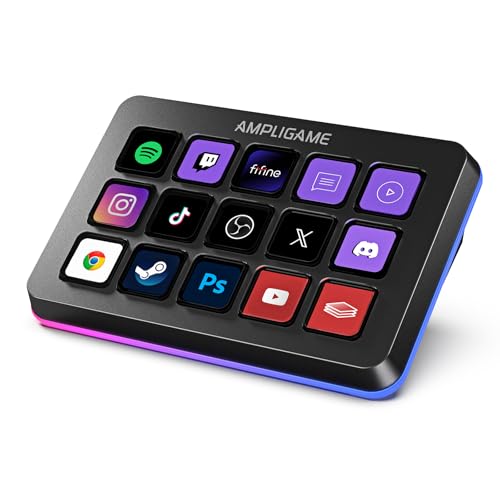
The FIFINE AmpliGame Stream Controller stands out with its 15 customizable macro keys, making it the perfect choice for gamers and streamers who crave efficiency and control. This device connects easily to both Mac and PC via USB, supporting popular software like OBS Studio and Twitch. You’ll appreciate the touchscreen’s visual feedback, allowing you to manage applications without juggling multiple windows. Plus, the RGB lighting adds flair to your setup. Its ergonomic design guarantees comfort during long sessions, while multi-tasking capabilities let you handle everything from gaming to video editing seamlessly. With a solid customer rating, it’s a worthy investment!
Best For: Gamers and streamers looking for an efficient way to control multiple applications with customizable macro keys.
Pros:
- 15 customizable macro keys allow for personalized control over various streaming applications.
- Touchscreen visual feedback simplifies managing multiple programs without cluttering your workspace.
- Customizable RGB lighting enhances the aesthetic appeal of your gaming setup.
Cons:
- Limited to USB connectivity, which may restrict portability for some users.
- May require a learning curve for optimal setup and use of macro functions.
- Some users may find the price point higher compared to basic controllers.
Desview T5 Teleprompter for Smartphone and Tablet

For gaming streamers seeking a seamless way to engage with their audience while maintaining eye contact, the Desview T5 Teleprompter is an excellent choice. This versatile teleprompter accommodates smartphones and tablets up to 11 inches and even DSLR cameras. Its professional app allows you to edit scripts, adjust font settings, and control playback wirelessly with a Bluetooth remote. The high-grade glass guarantees clear visibility, while the adjustable design enhances shooting angles. With a solid build and 1-year warranty, you can confidently elevate your broadcast quality and keep your viewers engaged without losing focus.
Best For: Gaming streamers looking to maintain eye contact with their audience while delivering engaging content.
Pros:
- Professional app for easy script editing and playback control.
- High-grade glass for clear script visibility without affecting video quality.
- Adjustable design for flexible shooting angles and easy device installation.
Cons:
- Limited to devices up to 11 inches, which may not accommodate larger tablets.
- Requires Bluetooth connectivity for full functionality, which may be a hassle for some users.
- May not be suitable for outdoor use due to potential glare from sunlight.
Factors to Consider When Choosing a Teleprompter for Gaming Streamers
When choosing a teleprompter for gaming streaming, you need to contemplate several key factors. Screen size, compatibility with your devices, and ease of setup all play essential roles in your decision. Plus, features like text visibility and customization options can greatly enhance your streaming experience.
Screen Size Considerations
Choosing the right screen size for your teleprompter can make a world of difference in your streaming experience. A larger screen—at least 11 inches—enhances readability from a distance, allowing you to follow scripts or chat without losing focus on your gameplay. Aim for a resolution of 1080 pixels or higher to guarantee clear text display, which helps reduce eye strain during those long sessions. It’s also vital to find a teleprompter that fits comfortably within your gaming setup, providing unobstructed views of your monitor and camera. Finally, look for adjustable brightness and anti-glare features, as these will improve visibility in different lighting conditions, keeping your broadcast looking professional and polished.
Compatibility With Devices
Finding the right teleprompter that works seamlessly with your gaming setup is essential for a smooth streaming experience. Make sure it supports various devices like DSLRs, webcams, and smartphones to fit your specific needs. Compatibility with both Windows and macOS is vital, as software requirements can differ. Look for USB connectivity options that allow easy integration with your existing equipment. It’s also important that the teleprompter accommodates your camera’s lens size and focal length, which affects text visibility. Additionally, consider teleprompters with adjustable mounting options for flexible positioning, ensuring they work with your tripods or stands. By keeping these factors in mind, you’ll enhance your streaming capabilities considerably.
Portability and Setup
Portability and ease of setup are essential for gaming streamers who want to focus on their content rather than technical challenges. A lightweight teleprompter weighing around 1.5 pounds or less makes transport and setup a breeze during your gaming sessions. Look for a compact design that fits easily into your storage, allowing you to set up quickly in different locations. Adjustable mounting options and quick-release plates help you install and adjust your teleprompter swiftly, ensuring minimal disruption during live streams. Opt for a user-friendly setup process with compatibility for common devices and minimal assembly. Teleprompters with plug-and-play functionality and integrated displays eliminate the need for extra devices, streamlining your overall setup and letting you concentrate on delivering great content.
Text Visibility Features
Once you’ve set up your teleprompter, text visibility becomes a top priority for gaming streamers. Look for models with high-resolution displays—at least 1080 pixels—to guarantee clear text during your sessions. A beam splitter with good light transmission (around 75% or higher) is essential for maintaining legibility without compromising camera quality. Adjustable text size and color options let you customize visibility based on your preferences and ambient lighting. Make certain the teleprompter has a readable distance of at least 2.5 meters to fit various setups comfortably. Finally, choose a teleprompter that’s compatible with multiple devices like DSLRs, smartphones, and tablets, guaranteeing consistent text visibility across all your streaming platforms.
Customization Options Available
When choosing a teleprompter for your gaming streams, customization options can greatly enhance your experience. Look for models that let you adjust text size, color, and background to improve readability. Some teleprompters even feature a drag-and-drop interface, making it easy to integrate scripts directly onto the display.
You’ll also want to evaluate teleprompters that allow multi-action commands. These can streamline your workflow by triggering several functions at once during live broadcasts. Compatibility with popular streaming software is a bonus, enabling you to tailor your setup further. Finally, remote controls can add an extra layer of convenience, letting you manage script playback without disrupting your stream. Choose wisely to elevate your gaming broadcasts!