If you’re looking to enhance your flight simulation experience in 2026, choosing the right switch panel can make all the difference. With various models available, each offering unique features and functionalities, it’s essential to know what suits your needs best. From customizable controls to ergonomic designs, these panels cater to both casual users and hardcore enthusiasts. Let’s explore which options stand out and what factors you should consider before making your choice.
SYDYSOSO Cockpit Simulator 737X MCP Flight Control Panel
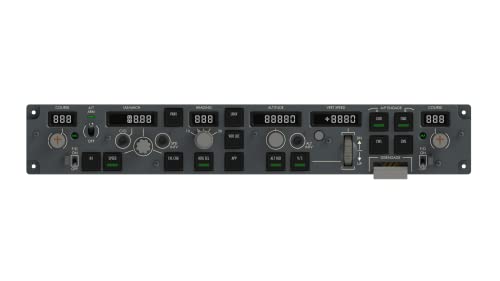
The SYDYSOSO Cockpit Simulator 737X MCP Flight Control Panel is the perfect choice for serious flight simulation enthusiasts who crave realism in their cockpit experience. This full-scale replica of the Boeing 737’s Mode Control Panel offers plug-and-play functionality, connecting easily to your PC via USB. With 14 custom switches, 5 adjusting knobs, and a tactile bank rotary, you’ll feel like you’re in a real aircraft. The digital display shows speed in a font consistent with actual planes. Compatible with multiple flight simulators, this panel enhances your flight experience, making every session more immersive and enjoyable. Trust us, you won’t be disappointed!
Best For: Serious flight simulation enthusiasts seeking an authentic Boeing 737 cockpit experience.
Pros:
- Realistic full-scale replica with high-quality construction and precise controls.
- Plug-and-play functionality makes it easy to set up and use with multiple flight simulators.
- Excellent user feedback on the feel of rotary switches and button responsiveness.
Cons:
- Manual reversion is required after auto throttle disengagement, which may be inconvenient for some users.
- Limited to PC compatibility, excluding other gaming platforms.
- Slightly heavy at 1.5 kilograms, which may not be ideal for portable setups.
Logitech G USB G Pro Flight Multi Panel

For avid flight simulation enthusiasts seeking an immersive experience, the Logitech G USB G Pro Flight Multi Panel stands out with its full autopilot LED display. This sleek, black panel connects via USB and is compatible with popular software like Microsoft Flight Simulator and X-Plane. You’ll appreciate the integrated dial for quick altitude adjustments and fingertip control over throttle, flaps, and elevator trim, allowing for seamless operation without cluttering your screen. Weighing just 14.78 ounces, it easily mounts onto the Pro Flight Yoke System or fits into your home cockpit setup, enhancing your flight experience.
Best For: Enthusiastic flight simulation gamers looking for enhanced control and realistic autopilot functionality.
Pros:
- Easy Integration: Compatible with major flight simulation software including Microsoft Flight Simulator and X-Plane.
- User-Friendly Controls: Features integrated dials for quick adjustments to altitude, throttle, flaps, and elevator trim.
- Compact Design: Lightweight and designed for easy mounting on the Pro Flight Yoke System or in home cockpits.
Cons:
- Limited Warranty: Only a 90-day warranty period may be insufficient for long-term use.
- Mounting Requirements: Requires additional equipment like the Pro Flight Yoke System for optimal use.
- Potential Learning Curve: May take time for new users to familiarize themselves with all features and controls.
Logitech G PRO Flight Yoke System for PC

Experience immersive flying like never before with the Logitech G PRO Flight Yoke System, perfect for both novice and seasoned pilots seeking to enhance their simulation skills. With a robust steel shaft and 75 programmable controls, you’ll enjoy realistic handling of your virtual aircraft. The system features a versatile throttle quadrant and a 3-position mode switch, allowing you to customize your experience effortlessly. Its 2-position desk clamp guarantees secure attachment to various surfaces. Compatible with Windows 11 through 7, this yoke system elevates your flight simulation to new heights. Plus, it comes with a 2-year warranty for peace of mind.
Best For: The Logitech G PRO Flight Yoke System is best for both new and experienced pilots looking to improve their flight simulation skills.
Pros:
- High-quality stainless steel yoke shaft offers smooth and precise control.
- Extensive programmability with 75 controls allows for a highly customizable experience.
- Compatible with multiple flight simulation software, enhancing versatility in use.
Cons:
- Requires optional software download for full compatibility with certain flight simulators.
- The weight of the system may make it less portable for some users.
- Limited to corded electric power, restricting placement options.
Logitech G X56 H.O.T.A.S Flight Simulator Game Controller
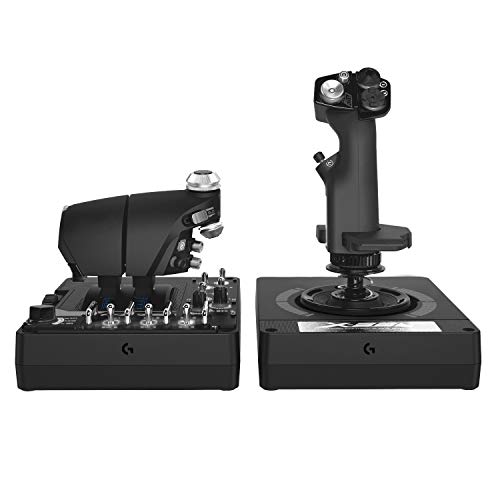
Designed with military-grade precision, the Logitech G X56 H.O.T.A.S Flight Simulator Game Controller is ideal for serious flight simulation enthusiasts who crave accuracy and control. Weighing 6.92 pounds, its compact design features customizable RGB backlighting and over 189 programmable controls for a tailored experience. The dual throttles come with friction adjusters, while the new mini analog stick allows for precise pitch, roll, and yaw control. With 16-bit non-contact sensors, your movements translate seamlessly, especially in virtual reality. Compatible with PCs running Windows, it’s a top choice for immersive gameplay. Experience the thrill like never before!
Best For: Serious flight simulation enthusiasts seeking military-grade precision and customizable control options.
Pros:
- Over 189 customizable controls allow for a tailored gaming experience.
- Dual throttles with friction adjusters provide enhanced control and realism during flight simulation.
- 16-bit non-contact sensors ensure high accuracy and seamless movement translation, especially beneficial for virtual reality gaming.
Cons:
- Weight of 6.92 pounds may be cumbersome for some users during extended gameplay.
- Limited compatibility mainly with PC and specific VR systems, potentially excluding console gamers.
- Learning curve associated with programming and mastering the extensive controls may deter casual gamers.
Turtle Beach VelocityOne Flight Universal Control System for Xbox and Windows PCs

The Turtle Beach VelocityOne Flight Universal Control System stands out as the ideal choice for gamers seeking an immersive flight simulation experience on Xbox and Windows PCs. Its all-in-one design features a true-to-life 180° yoke handle, throttle quadrant, and trim wheel, ensuring realistic control. You’ll appreciate the modular throttle quadrant with customizable lever handles and integrated rudder and brake controls for seamless operation. Plus, the full-color flight management display makes system learning easy. Compatible with popular titles like Microsoft Flight Simulator 2020 and 2024, this system elevates your flight experiences, making every takeoff and landing feel authentic.
Best For: Gamers looking for an immersive and realistic flight simulation experience on Xbox and Windows PCs.
Pros:
- All-in-one design with yoke, throttle quadrant, and trim wheel for realistic control.
- Modular throttle quadrant allows for customizable lever handles and buttons.
- Full-color flight management display simplifies system learning and configuration.
Cons:
- May require a dedicated space due to its size and clamping system.
- Higher price point compared to basic flight controllers.
- Compatibility may be limited to specific flight simulation titles for optimal performance.
Thrustmaster TFRP Flight Rudder Pedals for Flight Simulator

For serious flight simulation enthusiasts who crave precision and control, the Thrustmaster TFRP Flight Rudder Pedals stand out with their advanced S.M.A.R.T. Rail System. Weighing just under 5 pounds, these pedals feature an ergonomic design with removable heel rests, ensuring comfort during long sessions. Their large base provides stability, while the self-centering rudder axis and differential brake pedals enhance your handling. The long travel range allows for accurate turns, and connectivity options make setup a breeze. With a 4.4-star rating from nearly 3,000 users, you’ll find these pedals a top choice for elevating your flight experience.
Best For: Serious flight simulation enthusiasts seeking precision, control, and comfort during extended sessions.
Pros:
- Ergonomic design with removable heel rests for customizable comfort.
- S.M.A.R.T. Rail System for friction-free motion and enhanced stability.
- High customer satisfaction with a 4.4-star rating from nearly 3,000 reviews.
Cons:
- May be considered expensive compared to basic rudder pedals.
- Limited to compatibility with specific flight simulation games.
- External testing certification not applicable, which might concern some users.
Meza-Ignition Panel for Flight Simulator MSFS2020 & X-Plane
If you’re looking to elevate your flight simulation experience, the Meza-Ignition Panel stands out with its realistic 5-position magneto switch, mimicking those found in Cessna aircraft. Compatible with MSFS2020 and X-Plane, it’s perfect for your home cockpit or standalone setup. You’ll enjoy two rocker switches for battery and alternator controls, plus seven toggle switches for essential functions like landing lights and fuel pumps. With 14 buttons in total, the panel connects effortlessly via USB. Its compact size (14 x 4.5 x 4.5 inches) makes it easy to integrate into any workspace, enhancing your flight experience greatly.
Best For: Flight simulation enthusiasts looking to enhance their cockpit experience with realistic controls inspired by Cessna aircraft.
Pros:
- Realistic Design: Mimics actual Cessna aircraft controls, adding authenticity to your flight simulation.
- Easy Setup: USB plug-and-play connectivity makes it compatible with both Windows and Mac OS without hassle.
- Versatile Functionality: Includes multiple switches and buttons for essential aircraft functions, providing a comprehensive control experience.
Cons:
- Average Customer Rating: Rated 3.2 out of 5 stars, indicating mixed feedback from users.
- Limited Compatibility: Specifically designed for MSFS2020 and X-Plane, which may not suit users of other flight simulation software.
- Size Constraints: While compact, its dimensions may not fit all cockpit setups seamlessly.
Logitech G Pro Flight Rudder Pedals

Experience unparalleled realism in flight simulation with the Logitech G Pro Flight Rudder Pedals. These self-centering pedals let you control rudder and toe brakes just like a real pilot. With an adjustable tension dial, you can customize the response for both light aircraft and heavy jets, ensuring an immersive experience every time you fly. The ergonomic design and adjustable footrests accommodate various foot sizes, while the non-slip materials keep you stable during intense sessions. Weighing 2.3 kg and easily connecting via USB, these pedals are compatible with Windows 7 through 10. Elevate your flight simulation today!
Best For: Flight simulation enthusiasts seeking a realistic experience with precise control.
Pros:
- Enhanced Realism: Self-centering pedals and differential toe brakes mimic actual pilot operations.
- Customizable Tension: Adjustable tension dial allows users to tailor the response to their aircraft type.
- Ergonomic Design: Comfortable for extended use with adjustable footrests and non-slip materials for stability.
Cons:
- Limited Compatibility: Only compatible with Windows operating systems (7, 8, 8.1, 10).
- Weight: At 2.3 kg, they may be less portable for users who travel frequently.
- Return Policy Restrictions: Limited return window of 30 days, which may be a drawback for some customers.
Thrustmaster T-Flight Hotas X Flight Throttle and Joystick

The Thrustmaster T-Flight Hotas X Flight Throttle and Joystick stands out as an excellent choice for both novice and seasoned flight simulator enthusiasts. Weighing in at 2.2 kg, its ergonomic design guarantees comfort during long sessions. The detachable throttle lets you customize your setup, while 12 programmable buttons and 5 axes offer extensive control. You’ll appreciate the precision joystick with adjustable resistance for fine-tuning. Plus, the weighted base enhances stability, assuring smooth maneuvers. With plug-and-play functionality, you can jump right into your flight experience. Rated 4.4 out of 5 stars, it’s a reliable option for immersive simulation.
Best For: Flight simulation enthusiasts looking for a comfortable and customizable joystick and throttle setup.
Pros:
- Ergonomic design reduces fatigue during long gaming sessions.
- Extensive programmability with 12 action buttons and 5 axes for personalized control.
- Plug-and-play functionality enables quick setup and immediate use.
Cons:
- Limited compatibility as it is only designed for PC.
- Some users may find the weight challenging for portable use.
- The detachable throttle may take time to get used to for those familiar with integrated designs.
Honeycomb Alpha Flight Controls Yoke & Switch Panel for Flight Simulation

For avid flight simulation enthusiasts seeking an authentic cockpit experience, the Honeycomb Alpha Flight Controls Yoke & Switch Panel stands out with its impressive 180° rotation and smooth control, thanks to its solid steel shaft and dual ball bearings. You’ll appreciate the integrated switch panel featuring essential controls like ignition switches and backlit options for night use. The dampened, self-centering mechanism guarantees precise maneuvers with minimal deadzone. Plus, with versatile mounting solutions and compatibility with top flight sim software, this yoke promises durability and reliability. Join the ranks of satisfied users who’ve rated it 4.7 out of 5 stars for a reason!
Best For: Avid flight simulation enthusiasts looking for an authentic and immersive cockpit experience.
Pros:
- Integrated switch panel with essential controls, including backlit ignition switches for night use.
- Smooth control with a dampened, self-centering mechanism and minimal deadzone for accurate maneuvers.
- Versatile mounting options with heavy-duty clamps and a strong micro-suction pad for various tabletop thicknesses.
Cons:
- May require additional desk space due to its size and mounting setup.
- Some users might find the price point higher compared to basic flight control setups.
- Limited compatibility with certain flight simulation software may affect user experience.
Factors to Consider When Choosing a Flight Simulator Switch Panel
When choosing a flight simulator switch panel, you’ll want to contemplate several key factors. Think about how well it integrates with your simulation software, its build quality, and the precision of its controls. Also, pay attention to the ease of setup and any customization options that might enhance your flying experience.
Compatibility With Simulation Software
Choosing a flight simulator switch panel that aligns with your simulation software is crucial for maximizing your flying experience. First, verify it’s compatible with popular platforms like Microsoft Flight Simulator, X-Plane, and Prepar3D. Some panels are designed for specific aircraft models, so confirm this based on your preferred simulations.
Next, check for USB connectivity options for easy plug-and-play setup with your PC, supporting operating systems from Windows 7 onward. Look for customizable controls that can be mapped to different functions in your software, enhancing realism. Finally, consider user reviews for insights into any compatibility issues, helping you assess the panel’s reliability and effectiveness in real-world applications. This way, you’ll enjoy a seamless flying experience.
Build Quality and Durability
Build quality and durability are essential factors that can greatly impact your flight simulation experience. When choosing a switch panel, look for high-quality materials like engineering plastics or metals, as these guarantee longevity and resilience during frequent use. Pay attention to the precision of the components; panels crafted with multiple molds and detailed engineering often provide a more realistic feel. Tactile feedback in switches and knobs can enhance your experience, making it feel closer to real aircraft controls. Additionally, check for features like ambient light sensors, which improve usability in different lighting conditions. Finally, don’t forget to review customer feedback and ratings to gather insights on the durability and build quality based on real-world experiences.
Control Precision and Responsiveness
Control precision and responsiveness play an essential role in enhancing your flight simulation experience, as they directly influence how accurately you can execute commands during maneuvers. Look for switch panels with minimal deadzone and responsive feedback, as these traits guarantee accurate input during critical flight situations. High-quality panels often feature tactile controls, giving you a realistic feel that enables precise adjustments without diverting your gaze. The buttons and switches should strike a balance between firm engagement and easy activation, facilitating quick operations. Advanced models offer customizable resistance on knobs and switches, allowing you to tailor responsiveness to your preferences. Review ratings often highlight user satisfaction, so prioritize products known for excellent tactile feedback and swift response times for an immersive experience.
Connectivity and Setup Ease
When it comes to enhancing your flight simulation setup, connectivity and ease of installation are crucial factors to take into account. Look for switch panels that offer plug-and-play functionality, so you won’t have to deal with complicated configurations. Verify the panel connects via USB, a standard compatible with various operating systems, including Windows 7, 8, 10, and newer. Consider the length of the provided USB cable; longer cables offer more flexibility in your cockpit setup. Additionally, check if the panel supports multiple flight simulation software for broader compatibility. Finally, opt for products that come with clear instructions or extra accessories, like adhesive strips or mounting hardware, to simplify your installation process.
Customization Options Available
While selecting a flight simulator switch panel, you’ll want to contemplate the customization options available to enhance your experience. Many panels come with programmable controls, letting you tailor functions to fit your unique preferences. Look for models with various switch types, like toggle, rocker, and rotary switches, which provide flexibility for different flight operations. Some panels even allow you to adjust button legends, so you can label switches according to your specific configurations. Compatibility with various flight simulation software is key too, as it enables you to map controls seamlessly. Finally, consider integrated lighting options, such as RGB backlighting, to personalize the aesthetic of your cockpit setup, adding to the immersive experience you seek.
Ergonomics and Comfort Design
Ergonomics play an essential role in the design of flight simulator switch panels, ensuring you remain comfortable during long sessions. Look for adjustable footrests and customizable tension controls to tailor your setup. A self-centering mechanism with minimal deadzone enhances accuracy and reduces fatigue, letting you execute precise maneuvers effortlessly. User-friendly controls, like multi-function switches and easily accessible buttons, improve usability and lessen strain on your hands. High-quality materials, such as steel shafts and robust bases, provide stability, vital for extended use without discomfort. Additionally, features like dampened control mechanisms and wide hand rests minimize fatigue, making your flight experience more enjoyable. Prioritizing these ergonomic aspects will greatly enhance your overall simulation experience.
Price and Value Comparison
Comfort and usability are just part of what you should consider when selecting a flight simulator switch panel; price and value are equally important. Prices for switch panels can range from around $50 for basic models to over $300 for advanced options. Assess the value by looking at features like the number of programmable buttons, build quality, and compatibility with your flight simulation software. Higher-priced panels often offer more realistic controls and additional functionalities, enhancing your experience. Warranty periods can also influence value, with longer warranties reflecting manufacturer confidence. Finally, check customer reviews and ratings to gauge performance and satisfaction, ensuring you make a worthwhile investment that fits your budget and needs.
Additional Functional Features
When choosing a flight simulator switch panel, it’s crucial to take into account additional functional features that can greatly enhance your experience. Look for panels with customizable switches and buttons, allowing you to control various flight functions more intuitively. Integrated displays or indicators can provide real-time feedback on flight parameters, improving your situational awareness. Programmable controls are also important, as they let you tailor the panel to your preferences and streamline your workflow. Verify compatibility with major flight simulation software to maximize functionality. Finally, consider ergonomic design features, like tactile feedback on switches and knobs, which reduce fatigue during extended sessions and enhance control precision. These features can make a significant difference in your simulation experience.