If you want to enhance your PC build’s performance and aesthetics, choosing the right case is essential. Vertical GPU mounts can elevate your setup, showcasing your graphics card while ensuring ideal airflow. With various options available, from sleek designs to robust features, you’ll find something that fits your style. Let’s explore the top contenders that can transform your build into a stunning centerpiece.
Lian Li ATX PC Case Vertical GPU Kit (VG4v4)
If you’re looking to showcase your high-performance GPU while guaranteeing ideal airflow, the Lian Li ATX PC Case Vertical GPU Kit (VG4v4) is an ideal choice. This premium riser cable supports PCI-E 5.0, offering data transfer rates up to 32 Gbps. With three height settings and a dual-angle tilt function, you can optimize both clearance and aesthetics. The anti-sag support arm stabilizes your GPU, while thinner rubber pads guarantee a secure fit. Compatible with most ATX cases, the VG4v4 accommodates thick GPUs up to four slots, making installation a breeze. Elevate your build with this stellar kit.
Best For: Enthusiasts looking to showcase high-performance GPUs with optimal airflow and stability in their PC builds.
Pros:
- High-Speed Performance: Supports PCI-E 5.0 with data transfer rates up to 32 Gbps, ensuring future-proofing for high-end GPUs.
- Customizable Setup: Features three height settings and a dual-angle tilt function for optimal GPU clearance and aesthetics.
- Enhanced Stability: Includes an anti-sag support arm and redesigned rubber pads for secure GPU fitting and reduced sagging.
Cons:
- Limited Compatibility: Requires ATX cases with at least six PCIe slots, which may not fit all setups.
- Weight Consideration: At 2.35 pounds, the added weight may be a concern for some lighter case builds.
- Installation Complexity: May require additional tools or adjustments for optimal installation with third-party GPU brackets.
Hyte Y70 Modern Aesthetic Mid-Tower Gaming Case
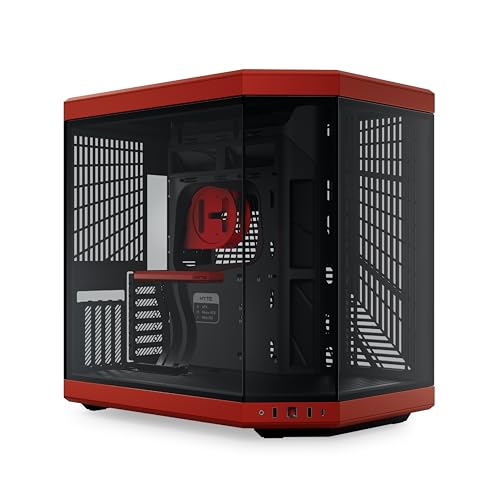
The Hyte Y70 Modern Aesthetic Mid-Tower Gaming Case is perfect for gamers who want to showcase their high-end graphics cards with style. With its stunning 3-piece panoramic tempered glass design, this case enhances your setup while allowing impressive airflow. You’ll appreciate the dual chamber layout for efficient cable management and the luxury PCIe 4.0 riser for easy GPU installation. Supporting massive 4-slot graphics cards and offering ample cooling options, including space for ten fans, the Y70 guarantees peak performance. Available in four colorways, it’s an eye-catching addition to any gaming rig. You won’t regret choosing this case for your build!
Best For: Gamers looking for a stylish mid-tower case that showcases high-end components while providing excellent cooling and cable management options.
Pros:
- Stunning 3-piece panoramic tempered glass design enhances visual appeal.
- Supports massive 4-slot graphics cards and up to 10 fans for optimal cooling.
- Dual chamber layout improves cable management and airflow efficiency.
Cons:
- Weighs 24.3 pounds, which may be heavier than some competitors.
- Limited to specific cooling configurations, which might not suit all setups.
- Higher price point may deter budget-conscious buyers.
Lian Li ATX PC Case Vertical GPU Kit (VG4v4)

For gamers and PC builders seeking a sleek and efficient way to showcase their graphics cards, the Lian Li ATX PC Case Vertical GPU Kit (VG4v4) stands out with its premium Gen 5 riser cable that supports PCI-E 5.0. This kit features three adjustable heights for ideal GPU clearance and a dual-angle tilt function, enhancing airflow and aesthetics. With an anti-sag support arm and improved thermal management, your GPU remains stable and cool. Integrated RGB lighting adds flair, while the refined frame design guarantees easy installation. Enjoy a stunning build with this top-rated vertical GPU kit, favored by users for its performance and reliability.
Best For: Gamers and PC builders looking to enhance their system’s aesthetics and thermal performance with a reliable vertical GPU mounting solution.
Pros:
- Adjustable Heights: Three height options for optimal GPU clearance, accommodating various setups.
- Improved Airflow: Dual-angle tilt function enhances airflow for better thermal management.
- Stability Features: Anti-sag support arm ensures GPU stability, preventing sagging over time.
Cons:
- Slot Requirements: Requires a minimum of 6 PCIe slots for installation, which may limit compatibility with some cases.
- Weight Consideration: Weighing 2.39 pounds, it may add extra weight to the overall build.
- Potential Fit Issues: While refined, some users may still experience fit issues with third-party GPU brackets.
HAVN HS 420 VGPU Dual-Chamber Mid Tower ATX PC Case

Designed specifically for gamers and PC builders who prioritize aesthetics and cooling performance, the HAVN HS 420 VGPU Dual-Chamber Mid Tower ATX PC Case stands out with its innovative dual-chamber design. It optimizes GPU cooling through balanced airflow, featuring an angled bottom fan bracket and a glass airflow guide. You can support up to eleven 140mm fans and even install 420mm radiators. With a PCIe 5.0 X16 riser cable and VGPU Mount Kit, your GPU gets the spotlight without performance loss. Plus, the SimpliCable routing system guarantees your build looks clean and organized, enhancing your gaming setup’s appeal.
Best For: Gamers and PC builders who value aesthetics and optimal cooling performance in their setups.
Pros:
- Innovative dual-chamber design enhances GPU cooling and airflow efficiency.
- Supports extensive cooling options with compatibility for up to eleven 140mm fans and 420mm radiators.
- Organized cable management system provides a clean and tidy appearance for your build.
Cons:
- Limited to mid-tower size, which may restrict space for larger components.
- Glass panel may require regular cleaning to maintain clarity and visual appeal.
- Vertical GPU mounting may limit space for additional components due to height constraints.
HAVN HS 420 VGPU Dual-Chamber Mid Tower ATX PC Case

With its innovative dual-chamber design, the HAVN HS 420 VGPU Mid Tower ATX PC Case stands out as the perfect choice for gamers and PC builders seeking exceptional GPU cooling. This case directs cool air from the bottom intake straight to your GPU, ensuring peak performance. You can support up to 11 x 140mm fans and install two 420mm radiators for impressive airflow. The SimpliCable System simplifies cable management, keeping your build neat. Plus, the heat-formed glass panel offers a distortion-free view of your components. With a customer rating of 4.7 stars, it’s a reliable and stylish option for your setup.
Best For: Gamers and PC builders looking for superior GPU cooling and streamlined cable management in their setups.
Pros:
- Exceptional Cooling: Dual-chamber design directs cool air to the GPU, supporting up to 11 fans and two large radiators for optimal airflow.
- User-Friendly Cable Management: The SimpliCable System provides easy routing and organization of cables, ensuring a clean build.
- High-Quality Design: The heat-formed glass panel minimizes distortion, giving a clear view of components while enhancing the overall aesthetic.
Cons:
- Weight: At 41.8 pounds, the case may be heavier compared to other options on the market, making it less portable.
- Space Requirements: Its dimensions may require a larger desk or dedicated space for optimal placement in your setup.
- Limited Color Options: Only available in black, which may not appeal to users looking for a wider variety of colors.
Hyte Y60 Modern Aesthetic Dual Chamber Gaming Case

The Hyte Y60 Modern Aesthetic Dual Chamber Gaming Case stands out for gamers who want to showcase their graphics card in style. With its stunning panoramic tempered glass design, you’ll enjoy exceptional views of your components. The vertical GPU mounting allows your graphics card to shine, while the protective riser cable canopy keeps everything neat. Its antechamber construction improves cable management and aesthetics, and cold floor cooling enhances airflow to prevent hot spots. Plus, with 6 USB 3.0 ports and a solid 4.8-star rating, this case combines functionality with flair, making it a top choice for your gaming setup.
Best For: Gamers looking for a stylish and functional case to showcase their high-performance graphics cards.
Pros:
- Panoramic tempered glass design provides exceptional visibility of components.
- Vertical GPU mounting enhances the aesthetic appeal of your gaming setup.
- Improved cable management with antechamber construction keeps the interior neat and organized.
Cons:
- Limited color options available, as it currently only comes in Snow White.
- Weight may be a concern for some users, as it weighs 22 pounds.
- Potentially higher price point compared to standard cases on the market.
Thermaltake Tower 600 Snow Mid-Tower ATX Case (CA-1Z1-00M6WN-00)

If you’re a PC enthusiast seeking a striking build that’ll showcase your graphics card, search no further than the Thermaltake Tower 600 Snow Mid-Tower ATX Case. Its unique octagonal design, with three removable tempered glass panels, offers easy access and stunning visibility. You’ll appreciate the tool-free access and hidden connector support for a clean look. With flexible GPU installation options, this case accommodates various setups. Cooling is a breeze, supporting up to nine fans and large radiators. Plus, with solid customer ratings, you can trust this case to elevate your build without compromising performance.
Best For: PC enthusiasts looking for a visually striking case that offers excellent cooling capabilities and flexibility in GPU installation.
Pros:
- Unique octagonal design with three removable tempered glass panels for enhanced visibility and access.
- Tool-free access to panels allows for easy assembly and maintenance.
- Extensive cooling support for up to nine fans and large radiators, ensuring optimal performance.
Cons:
- Larger footprint may not fit in smaller spaces or setups.
- Weight of 9.70 kg could make it less portable for users who move their systems frequently.
- Limited drive bays may not accommodate extensive storage needs for some users.
LIAN LI O11D MINI V2 Flow Compact ATX Mid-Tower Computer Case
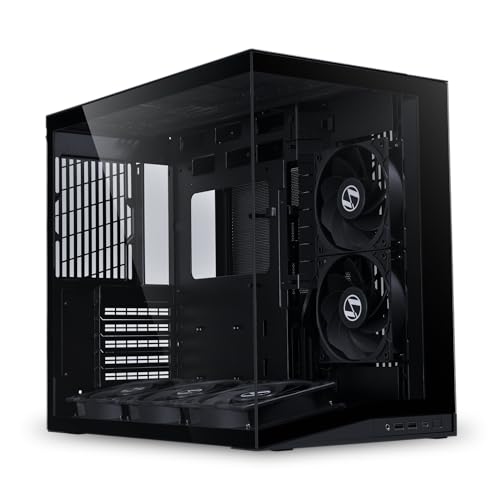
For gamers and PC enthusiasts seeking a sleek, efficient build, the LIAN LI O11D MINI V2 Flow Compact ATX Mid-Tower Computer Case stands out with its exceptional cooling capabilities. With five pre-installed 120mm reverse blade fans and a 10° slanted bottom design, your GPU stays cool and performs effectively. The stunning pillar-less tempered glass panels let you showcase your components beautifully. Plus, it supports standard ATX, M-ATX, and Mini-ITX motherboards, ensuring versatile compatibility. The anti-sag brackets provide robust GPU support, while clever cable management features keep your build organized and tidy. It’s a perfect blend of form and function.
Best For: Gamers and PC enthusiasts looking for a stylish and efficient computer case with excellent cooling capabilities.
Pros:
- Exceptional Cooling: Five pre-installed 120mm fans and a slanted design enhance GPU cooling performance.
- Aesthetic Appeal: Pillar-less tempered glass panels provide an unobstructed view of internal components.
- Versatile Compatibility: Supports standard ATX, M-ATX, and Mini-ITX motherboards for flexible build options.
Cons:
- Limited Space: Compact design may restrict additional components or upgrades.
- Price Point: Higher cost compared to other mid-tower cases on the market.
- Assembly Complexity: May require more effort for cable management due to its compact layout.
Cooler Master Vertical GPU Card Holder Kit V3

Looking to showcase your high-end GPU? The Cooler Master Vertical GPU Card Holder Kit V3 is your perfect solution. It supports PCIe 4.0 and 5.0 motherboards, fitting modern GPUs like the RTX 5090 and RX 9070 XT. Designed for standard ATX cases, it accommodates 3-slot GPUs and even allows for 4-slot Micro-ATX cases with a removable bracket. Enjoy tool-less adjustments up to 65mm horizontally and 30mm side-to-side, giving you flexibility in setup. The PCIe 4.0 riser cable guarantees reliable performance, making it an excellent choice for gamers and creators looking to enhance their build’s aesthetics and efficiency.
Best For: Gamers and content creators looking to showcase their high-end GPUs while ensuring optimal performance and flexibility in their PC builds.
Pros:
- Supports modern PCIe 4.0 and 5.0 GPUs including the latest RTX 5090 and RX 9070 XT.
- Tool-less adjustability allows for easy customization of positioning without the need for additional tools.
- Flexible installation options enable GPU setup after securing the holder, accommodating various case configurations.
Cons:
- May block rear fans in some setups when using the removable M-ATX bracket for Micro-ATX cases.
- Limited to standard ATX and Micro-ATX cases, which may not suit all build preferences.
- Length of 165mm might not accommodate larger or specialized GPU sizes in certain builds.
Cooler Master Vertical GPU Card Holder Kit V3

The Cooler Master Vertical GPU Card Holder Kit V3 stands out with its premium PCI-E 4.0 riser cable, ensuring compatibility with both PCIe 4.0 and 5.0 motherboards and GPUs. It fits standard ATX cases and supports modern 3-slot GPUs, along with traditional 7-slot ATX cases. The removable M-ATX bracket allows you to install it in most 4-slot Micro-ATX cases. With a toolless, adjustable design, you can easily make horizontal adjustments up to 65mm and side panel adjustments up to 30mm. Just keep in mind that it might block the rear fan in certain cases.
Best For: Gamers and creators seeking a reliable and adjustable vertical GPU mount for enhanced aesthetics and performance.
Pros:
- Premium PCI-E 4.0 riser cable ensures high-speed data transfer and compatibility with modern motherboards and GPUs.
- Toolless, adjustable design allows for easy installation and customization of GPU positioning.
- Compatible with various case sizes, including standard ATX and Micro-ATX cases, enhancing versatility.
Cons:
- May block rear fan in certain cases, potentially affecting cooling performance.
- Installation may require additional considerations for certain case layouts.
- Limited to specific GPU slot sizes, which may not accommodate all configurations.
Factors to Consider When Choosing a PC Case with Vertical GPU Mount
When choosing a PC case with a vertical GPU mount, you need to take into account several key factors. Think about GPU size compatibility, available cooling solutions, and cable management features that suit your setup. Also, pay attention to build quality and design, as well as how easy it is to install everything.
GPU Size Compatibility
Choosing the right PC case for vertical GPU mounting hinges on understanding GPU size compatibility. First, verify the case supports GPUs up to 4 slots wide, as thicker GPUs can weigh considerably. Check the number of PCIe slots available; vertical mounting typically requires at least 6 slots, or 7 for tilted setups. The length of the GPU is essential too, as some cases have restrictions on maximum GPU length in vertical positions. Adjustable height settings in the GPU mount can also help minimize interference with HDMI and DisplayPort cables. Finally, confirm the case includes a high-speed riser cable that supports the necessary PCIe version for peak performance, especially with modern GPUs.
Cooling Solutions Availability
After ensuring your GPU fits well in a vertical mount, the next important factor is cooling solutions. Effective cooling is essential for maintaining ideal GPU performance, especially since airflow can be restricted in vertical mounts. Look for cases that support multiple fan configurations—some can fit up to eleven 140mm fans to boost airflow. Radiator support is also significant; top and side placements can accommodate larger systems, including up to 420mm radiators. Features like angled fan brackets and airflow guidance systems can enhance cooling efficiency by directing cool air toward the GPU. Additionally, integrated cooling solutions, such as pre-installed fans and optimized airflow designs, play a critical role in preventing overheating during high-performance tasks.
Cable Management Features
Good cable management can make or break your build, especially in cases with vertical GPU mounts. Look for effective systems featuring top-to-bottom grooved guides that help keep cables organized and looking clean. Tool-less panel designs offer easy access for quick adjustments, eliminating the need for tools when rearranging your cables. Some cases even provide unique routing systems, like dedicated pathways or integrated Velcro straps, which minimize visual clutter. Additionally, special brackets for essential cables, such as the 24-pin motherboard cable, can help keep them tidy and clear of airflow paths. Consider dual-chamber designs too; they separate cables from thermal components, enhancing both aesthetics and airflow efficiency in your PC case.
Build Quality and Design
When selecting a PC case with vertical GPU mounts, build quality and design play essential roles in ensuring a stable and visually appealing setup. A robust frame design is important to support heavy graphics cards, preventing sagging. Opt for cases made from high-quality materials like tempered glass and durable steel; they not only enhance aesthetics but also provide clear visibility of your components. Effective cable management is necessary for a clean build, so look for integrated channels and tie-down points to improve airflow. Additionally, consider cooling features that support multiple fans and radiators, ensuring ideal thermal performance. Finally, a user-friendly tool-less design can greatly enhance your building experience, making installation and maintenance easier.
Installation Ease
While selecting a PC case with vertical GPU mounts, you should prioritize installation ease to simplify the building process. Look for cases featuring tool-less panel designs, as these allow for quick access without needing extra tools. Adjustable GPU mounts can also make your life easier, accommodating various GPU sizes and configurations. Clear labeling and organized internal layouts help streamline cable management, enhancing your overall installation experience. Opt for cases that include pre-installed riser cables tailored for vertical GPU mounting, ensuring compatibility with modern GPUs. Additionally, evaluate cases with ample space and dedicated mounting slots for GPUs to facilitate straightforward installation and avoid interference with other components. Simplifying these aspects will lead to a smoother build process.
Aesthetic Appeal
Aesthetic appeal plays an essential role in selecting a PC case with vertical GPU mounts. With these mounts, you can showcase your graphics card prominently, creating a visually striking display. Cases featuring tempered glass panels offer unobstructed views, allowing you to highlight your GPU’s design and RGB lighting effects. Opting for a dual-chamber case not only enhances aesthetics but also improves cable management and airflow, keeping your build looking clean. Adjustable height settings let you customize your GPU’s position, aligning it perfectly with your design vision. A well-designed vertical GPU mount integrates seamlessly with the overall case aesthetics, contributing to a modern and polished look while still maintaining essential functionality. Choose wisely to elevate your PC’s visual impact!
Price Considerations
Choosing a PC case with vertical GPU mounts requires careful consideration of your budget, as prices can vary considerably based on features and materials. You’ll find options starting around $80, while premium cases can exceed $300. Mid-range cases priced between $100 and $150 often provide a solid balance of aesthetics and functionality, along with decent cooling options. If you opt for a premium model, expect advanced cooling solutions and superior build quality, but also be prepared for a higher price tag. Don’t forget to account for additional costs like riser cables, which can add $20 to $50. Finally, consider the warranty and customer support, as these factors can add long-term value to your investment.