The best video transmitters make it easier to monitor cameras, send a feed to a remote display, or build a cleaner live-production setup without running long cables. The right system depends on your resolution, range, latency, connection type, and receiver capacity.
This roundup compares 10 wireless video transmission systems, from compact camera transmitters to long-range HDMI kits with loop-out, UVC, multi-receiver, and professional SDI support.
Best 10 Video Transmitters Picks for 2026
Professional 4K Connectivity

- 4K30 HDMI video transmission
- HDMI and SDI input/output
- Up to four app monitoring devices
Best For: Production teams needing flexible 4K HDMI/SDI monitoring
Simple Dual-Band Home Streaming

- 4K decode with 1080p60 output
- 2.4GHz and 5.8GHz dual-band operation
- Plug-and-play mirror or extend modes
Best For: Home, office, classroom, and event display connections
Long-Range Production Monitoring

- 4K30 dual-band HDMI transmission
- Up to 1,300-foot advertised LOS range
- Supports four receivers and UVC streaming
Best For: Film crews, live broadcasters, and multi-viewer monitoring
Budget Long-Range HDMI Extension
Vrriis WL081 Wireless HDMI Kit

- 1080p60 wireless HDMI extension
- Transmitter loopout for local monitoring
- IR remote control support
Best For: 1080p TVs, projectors, offices, and home entertainment
Professional-Range Pick

- 3 km transmission with 1080p/60fps video
- Automatic frequency hopping across multiple bands
- SDI, HDMI, USB-C, and multi-receiver monitoring
Best For: Professional shoots and long-range on-set monitoring
Mobile Monitoring Pick
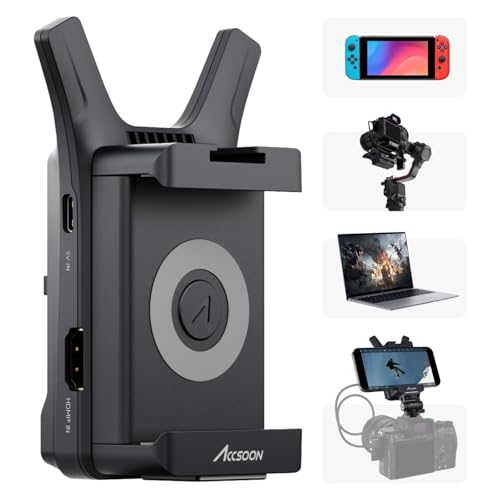
- 1080p/60fps transmission up to 150 meters
- Shares one camera feed with four mobile devices
- Lightweight design with Accsoon SEE app support
Best For: Portable camera, gimbal, and smartphone monitoring
Flexible HDMI Value
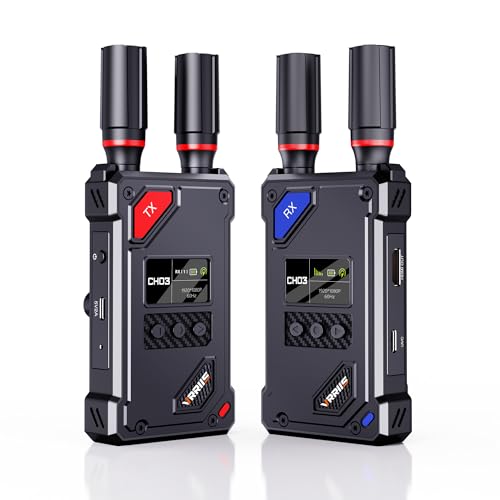
- 1080p/60Hz transmission with 0.05-second latency
- 20-channel manual selection with LCD status display
- UVC streaming and HDMI loop-out included
Best For: HDMI monitoring, OBS streaming, and flexible multi-device setups
Best All-in-One Pick
Wireless HDMI Video Hub with 7-Inch Monitor
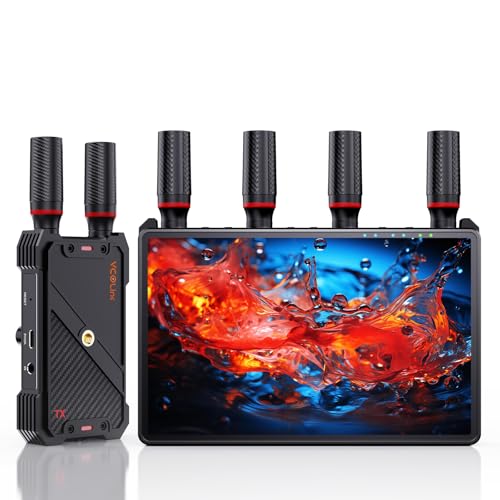
- Built-in 7-inch receiver monitor
- 1080p/60Hz transmission up to 1,312 feet line of sight
- Supports up to five receivers with HDMI loop-out
Best For: Film crews and live productions needing built-in monitoring
Best Plug-and-Play Value
1080p Wireless HDMI Extender with Loop-Out

- 1080p/60Hz video with about 0.05-second latency
- Up to 1,300 feet in open line-of-sight conditions
- Loop-out and dual HDMI receiver outputs
Best For: Home theater, camera monitoring, and simple multi-screen setups
Best 4K Streaming Pick
20-Channel Wireless HDMI System with UVC Output

- 4K30Hz transmission with about 0.1-second latency
- USB-C UVC output for OBS and computer streaming
- 20 adjustable 5GHz channels and support for up to five receivers
Best For: Live streaming and 4K outdoor video production
Professional 4K Connectivity – Hollyland Mars 4K
For creators who need flexible video transmitters with both HDMI and SDI support, the Hollyland Mars 4K combines 4K30 transmission, professional frame-rate compatibility, and app monitoring. Its advertised 450-foot line-of-sight range and 66ms latency suit many on-set monitoring workflows, though real-world performance depends on interference and surroundings.
Best For: Filmmakers and production teams needing HDMI/SDI connectivity, 4K support, and multi-device monitoring.
Pros:
- Supports up to 4K30 video through HDMI.
- Includes HDMI and SDI input/output options, including select fractional SDI frame rates.
- Supports up to four app monitoring devices in transmitter-only use.
- Offers multiple power options and a color LCD with joystick controls.
Cons:
- The 450-foot range and 66ms latency are laboratory line-of-sight specifications.
- Does not support QC/PD charging protocols.
- Its professional feature set may be more than basic home users need.
The Mars 4K is a versatile choice among video transmitters when SDI compatibility and production-focused monitoring matter. Choose it over simpler HDMI kits when your setup includes professional cameras, switchers, or multiple viewers.
Simple Dual-Band Home Streaming – Wireless HDMI Extender
This wireless HDMI kit is designed for straightforward cable-free connections between HDMI sources and displays. It decodes 4K input while outputting 1080p at 60Hz, uses 2.4GHz and 5.8GHz bands, and connects automatically without software or Wi-Fi setup.
Best For: Home theaters, offices, classrooms, events, and users who want plug-and-play video transmitters with mirror and extend modes.
Pros:
- Supports 4K decoding with 1080p60 output.
- Offers advertised range up to 360 feet in open spaces, with a shorter indoor estimate.
- Supports duplicate and extended display modes.
- Can connect one receiver to up to eight transmitters, with up to three sets operating together.
Cons:
- It does not output 4K; maximum listed output is 1080p60.
- Walls and obstacles can reduce transmission distance and speed.
- Near-zero latency is an advertised performance claim rather than a stated measured specification.
For everyday presentations, entertainment, and display extension, this kit emphasizes convenience over professional production features. Its LED status display, automatic pairing, and broad HDMI compatibility make it a practical option for uncomplicated installations.
Long-Range Production Monitoring – Hollyland Pyro H
The Hollyland Pyro H is one of the more capable video transmitters for crews that need long-range wireless monitoring. It supports 4K30 input/output, dual-band operation, smart channel scanning, HDMI loopout, app monitoring, and UVC live streaming for computer-based broadcasts.
Best For: Film production, live streaming, ENG/EFP work, and multi-person monitoring setups.
Pros:
- Supports up to 4K30 transmission over HDMI.
- Advertises up to 1,300 feet of line-of-sight range with 60ms latency.
- Can transmit to up to four receivers for shared monitoring.
- Includes HDMI loopout and UVC support for plug-and-play computer streaming.
Cons:
- The stated range is a line-of-sight specification and may vary in real shooting environments.
- It is HDMI-focused and does not list SDI connectivity.
- The professional feature set may be unnecessary for basic living-room use.
Pyro H stands out when range, team monitoring, and streaming flexibility are priorities. Smart channel scanning and dual-band support add useful tools for crowded or changing production locations.
Budget Long-Range HDMI Extension – Vrriis WL081 Wireless HDMI Kit
The Vrriis WL081 is a straightforward option for extending 1080p HDMI signals without running a long cable. These video transmitters support 1080p60, include transmitter-side loopout, and add IR remote control support for source devices located away from the display.
Best For: Offices, conference rooms, churches, home entertainment, and 1080p projector or TV setups.
Pros:
- Supports 1080p at 60Hz with claimed 0.05-second latency.
- Includes transmitter loopout for a local monitor.
- Supports IR remote control from the receiver location.
- Advertises up to 1,300 feet in an open, interference-free field.
Cons:
- It is limited to Full HD rather than 4K.
- Walls, metal, brick, and glass can significantly reduce coverage.
- The listed configuration supports up to one transmitter and five receivers, but added receivers can reduce transmission distance.
WL081 is a sensible choice when dependable 1080p extension and remote source control matter more than 4K quality or advanced production features. Its loopout is especially useful when the source must remain visible locally.
Professional-Range Pick – DJI SDR Transmission Combo
For demanding video transmitters setups, the DJI SDR Transmission Combo emphasizes range, interference resistance, and flexible monitoring. It supports 1080p at 60fps with up to 20 Mbps bitrate, 35 ms minimum latency, and transmission distances up to 3 km in suitable conditions.
Best For: On-set crews needing long-range wireless monitoring, multiple receivers, and compatibility with DJI Ronin equipment.
Pros:
- Supports 1080p/60fps transmission with up to 20 Mbps bitrate.
- Automatically hops across 2.4 GHz, 5.8 GHz, and DFS bands to help avoid interference.
- Offers SDI, HDMI, USB-C, and direct Wi-Fi monitoring options.
- Broadcast mode supports an unlimited number of receivers.
Cons:
- Its professional feature set may be more than casual users need.
- The listed 3 km range depends on the environment and operating conditions.
- The kit requires a 12V battery.
This is the most capable option here for production environments where range, signal management, and flexible monitoring matter. Ronin control and camera-monitoring features add value for DJI-based workflows.
Mobile Monitoring Pick – Accsoon CineView Nano
The Accsoon CineView Nano is a compact choice among video transmitters for camera operators who want to monitor footage on mobile devices. It sends 1080p/60fps video up to 150 meters with latency under 60 ms and can share the feed with up to four iOS or Android devices through the Accsoon SEE app.
Best For: Photographers and small crews who want lightweight phone or tablet monitoring and app-based live-streaming tools.
Pros:
- Very compact 72.3-gram design with an aluminum housing.
- Supports up to four mobile monitoring devices from one transmitter.
- Accsoon SEE adds monitoring, recording, LUT, overlay, and RTMP streaming features.
- Can use NP-F batteries or 5V USB power.
Cons:
- HDMI cables, batteries, and charging cables are sold separately.
- Mobile video uses the phone’s Wi-Fi connection, so live streaming requires a separate 5G network.
- Its stated range is shorter than the DJI system’s range.
The Nano prioritizes portability and mobile workflows over extensive hardware outputs. It is a practical fit for camera and gimbal users who prefer app-based monitoring and need a transmitter that adds minimal weight.
Flexible HDMI Value – Vrriis Wireless Video System
The Vrriis Wireless Video System is a practical option among video transmitters for HDMI sources, local monitoring, and computer-based streaming. It delivers up to 1080p/60Hz, offers a stated 1,500-foot line-of-sight range, and includes UVC output for streaming through platforms such as OBS without a separate capture device.
Best For: Users who need a plug-and-play HDMI link with manual channel selection, loop-out monitoring, and direct USB-C streaming.
Pros:
- Supports Full HD 1080p at 60Hz with stated latency of 0.05 seconds.
- Offers 20 manually adjustable channels with signal and interference information on the LCD.
- UVC output supports computer streaming, while HDMI loop-out enables local monitoring.
- Includes HDMI, Mini HDMI, and Micro HDMI cables plus multiple power options.
Cons:
- The 1,500-foot range is specified for open, unobstructed line-of-sight conditions.
- Walls, metal, brick, and glass can reduce coverage or cause signal loss.
- Batteries are not included, and range decreases as additional receivers are added.
With manual channel control and useful streaming connections, this system suits mixed home, event, and production setups. Its included cables and flexible power choices make setup easier, provided the signal path remains relatively clear.
Best All-in-One Pick – Wireless HDMI Video Hub with 7-Inch Monitor
Among video transmitters, this wireless HDMI system stands out for its built-in 7-inch receiver monitor, long-range 1080p transmission, and support for up to five receivers. It is designed for crews that want private monitoring, external HDMI display output, and flexible power options without adding another monitor to the kit.
Best For: Film crews, live productions, studios, and on-set monitoring where a built-in screen and multi-viewer support are useful.
Pros:
- Built-in 7-inch HD monitor with brightness, volume, headphone, and sleep controls.
- Transmits 1080p at 60Hz up to 1,312 feet in line-of-sight conditions with under 0.05-second latency.
- Supports one transmitter to as many as five receivers, plus HDMI loop-out and IR remote control.
- Can use NP-F batteries, a power bank, or USB-C power and includes a 1/4-inch mounting thread.
Cons:
- The stated range depends on clear line-of-sight conditions.
- An HDMI cable is not included for the receiver’s external HDMI output.
- Smartphone and tablet use requires a Type-C-to-HDMI cable.
This is the most complete option for mobile production setups because the receiver doubles as a monitor. Its combination of low latency, multi-receiver expansion, and flexible mounting makes it particularly practical for coordinated video work.
Best Plug-and-Play Value – 1080p Wireless HDMI Extender with Loop-Out
This wireless HDMI video transmitter and receiver offers a straightforward way to send 1080p video from a camera, laptop, set-top box, or other HDMI source to a distant display. Its loop-out, dual receiver outputs, IR support, and multiple power options make it a versatile choice for home theater and basic production monitoring.
Best For: Users who want simple 1080p wireless HDMI distribution for TVs, projectors, cameras, or streaming setups.
Pros:
- Plug-and-play setup with support for 1080p at 60Hz and approximately 0.05-second latency.
- Advertised transmission distance reaches up to 1,300 feet in open, interference-free conditions.
- Transmitter loop-out and receiver dual HDMI outputs support local and multiple-screen monitoring.
- Supports up to five receivers and can use NP-F batteries, USB-C power, adapters, or portable power banks.
Cons:
- Walls, metal, brick, and glass can significantly reduce signal coverage.
- Transmission distance may decrease as additional receivers are added.
- Batteries are not included.
For buyers prioritizing easy setup and broad device compatibility over advanced production features, this is a balanced wireless HDMI option. The loop-out and dual HDMI output are especially helpful when one source needs to feed both a local and a remote display.
Best 4K Streaming Pick – 20-Channel Wireless HDMI System with UVC Output
For video transmitters aimed at live streaming and higher-resolution production, this 4K wireless HDMI system adds adjustable 5GHz channels, UVC output, and status LCDs on both units. It supports 4K at 30Hz and can send video to up to five receivers while also providing transmitter loop-out for local monitoring.
Best For: Live streamers, outdoor filmmakers, and production teams that need 4K transmission, channel selection, and computer-based UVC monitoring.
Pros:
- Supports 4K at 30Hz using H.265 encoding with a stated latency of about 0.1 seconds.
- UVC output connects to a computer over USB-C 3.0 for OBS and other streaming platforms without a capture card.
- Offers 20 manually adjustable 5GHz channels to help manage interference.
- Supports one transmitter with up to five receivers and includes transmitter loop-out.
Cons:
- The approximately 0.1-second latency is not intended for highly responsive gaming.
- UVC output is limited to up to 1080p at 60Hz.
- Batteries are not included.
This model is the strongest fit for creators who want wireless 4K video plus a direct computer workflow for streaming and monitoring. Its channel controls and LCD status displays also provide more operational visibility than simpler plug-and-play systems.
How We Picked the Best Video Transmitters
We focused on the specifications that have the greatest effect on real-world use: supported resolution and frame rate, transmission distance, latency, HDMI or SDI compatibility, receiver options, loop-out functionality, wireless-band design, and setup convenience. We also considered whether each system is better suited to filmmaking, streaming, presentations, monitoring, or multi-display installations.
Advertised range is measured in ideal, unobstructed conditions, so walls, people, nearby Wi-Fi networks, and other radio interference can reduce performance. Treat range figures as a comparison point rather than a guaranteed indoor distance.
Quick Comparison
- Best for professional camera workflows: Choose a system with SDI support, dependable signal handling, and flexible frame-rate compatibility.
- Best for 4K monitoring: Look for 4K input and output support, while checking whether 4K is limited to 24 or 30 frames per second.
- Best for streaming: UVC output can let a computer recognize the receiver as a video source without an additional capture device.
- Best for several displays: Multi-receiver support or a kit with multiple receivers is more practical than splitting the signal manually.
- Best for simple home or office use: Plug-and-play HDMI kits with automatic pairing and clear status displays usually require the least configuration.
Key Buying Factors for Video Transmitters
Resolution, Frame Rate, and Connectors
Confirm that the transmitter accepts your camera, laptop, or media source. HDMI is common for consumer cameras and computers, while SDI is preferred in many professional production environments. Also check the complete signal path: a system may accept 4K but deliver only 1080p wirelessly, or support 4K only at 30 fps.
Latency and Reliability
Low latency matters for camera operators, live performances, gaming, and interactive presentations. A quoted delay of 50–100 milliseconds may be acceptable for monitoring, but it can feel noticeable when precise real-time response is required. Dual-band operation, manual channel selection, and interference protection can improve reliability in crowded locations.
Range, Power, and Installation
Long-range claims are most useful outdoors with a clear line of sight. For indoor use, prioritize stable performance through your expected obstacles. Check how each unit is powered, whether batteries or USB power are required, and whether mounting hardware is included. Loop-out is especially useful when you need both a local monitor and a wireless feed.
Receiver Capacity and Extra Outputs
If several people need to monitor the same source, choose a system that supports multiple receivers. UVC output is valuable for computer-based streaming, while IR pass-through, LED status displays, and manual channel controls can make an installation easier to operate.
Who Should Buy Which Video Transmitters?
Filmmakers and camera crews should prioritize low latency, dependable range, camera-friendly power options, and compatibility with their camera’s HDMI or SDI output. Live streamers should look for UVC output or a receiver that integrates easily with a capture workflow. Event and presentation users will benefit from plug-and-play pairing, strong obstacle handling, and loop-out. Multi-display installations should focus on receiver count, channel management, and consistent 1080p performance rather than paying extra for unused 4K capability.
Before buying, match the transmitter and receiver to every device in your setup, verify the required frame rate, and allow for less range than the headline specification in busy indoor environments.