Switching a keyboard, mouse, headset, webcam, or other gaming peripherals between computers should not require unplugging cables every time. The best USB switch boxes for gaming setups make multi-PC desks faster, cleaner, and easier to manage.
This roundup covers compact USB selectors, high-speed USB 3.x models, multi-port hubs, and HDMI KVM switches for gamers who need to share peripherals—or control two systems from one monitor and input set.
Best 10 USB Switch Boxes for Gaming Setups Picks for 2026
High-Resolution KVM Pick

- Shares one monitor and USB devices between two PCs
- Supports up to 4K@240Hz and 8K@30Hz
- Switches by button or wired remote, not hotkey
Best For: Two-computer gaming setups that need shared display control
Compact USB Switch Pick
Aluminum Bi-Directional USB 3.0 Switch

- Supports 2-in-1-out and 1-in-2-out operation
- Provides up to 5Gbps USB 3.0 transfer speeds
- Physical switching only; no HDMI video output
Best For: Simple peripheral sharing between PCs
Flexible KM Switch Pick
USB 3.0 Switch with A and C Ports
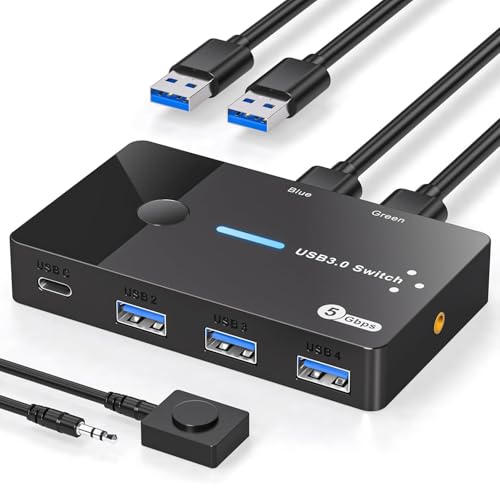
- Shares four USB ports between two computers
- Includes three USB-A and one USB-C port
- Uses a button or extended controller, but does not switch video
Best For: Peripheral-heavy two-computer setups with mixed USB connections
High-Speed Expansion Pick
UGREEN 10Gbps Seven-Port USB Switch

- Shares up to seven USB devices between two computers
- Offers four USB-A and three USB-C outputs
- Includes power adapter and supports up to 10Gbps
Best For: Large two-computer setups with many mixed USB peripherals
Best All-Around USB Switch
BENFEI 2-Computer 4-Port USB 3.0 Switch

- Shares four USB devices between two computers
- Up to 5Gbps USB 3.0 data transfer
- Supports Windows, macOS, Linux, and Chrome OS
Best For: Two-computer gaming and work setups with several shared peripherals
Best Budget Manual Switch
OLLGEN 4-Port USB 2.0 Sharing Switch

- Lets four computers share one USB device
- Individual push buttons for each computer
- Compact USB 1.1 and USB 2.0 design
Best For: Simple multi-computer sharing of one keyboard, printer, or scanner
Best High-Capacity USB Switch
UGREEN 2-Computer 7-Port USB 3.0 Switch

- Shares up to seven USB-A and USB-C devices
- Up to 5Gbps USB 3.0 transfer speeds
- Includes adapter, power adapter, and controller
Best For: Modern dual-computer setups with many mixed USB peripherals
4K Dual-Computer KVM

- Shares one monitor, keyboard, and mouse between two computers
- Supports 4K at 60Hz and includes HDMI and USB cables
- Driver-free operation with button-based switching
Best For: Two-computer gaming and work desks using HDMI
Remote USB Peripheral Hub

- Shares three USB 3.0 and one USB-C peripheral port
- Switches by button or remote control
- Supports up to 5Gbps and optional USB-C power
Best For: Two-computer desks sharing USB peripherals without video switching
Four-Computer USB 3.2 Selector

- Shares four USB peripherals across four computers
- Provides 10Gbps USB 3.2 transfer speeds
- Includes button and remote switching plus an adapter
Best For: Four-computer setups sharing fast USB accessories without monitor support
High-Resolution KVM Pick – 8K HDMI KVM for Two Computers
For gaming setups that need to share one monitor and USB peripherals between two computers, this HDMI KVM is a more complete option than a basic USB switch. It supports high-refresh gaming resolutions and offers button or wired-remote switching, though it does not support hotkey switching.
Best For: Gamers switching between two computers while sharing one monitor, keyboard, mouse, and other USB devices.
Pros:
- Supports up to 8K@30Hz and 4K@240Hz with suitable HDMI 2.1 cables.
- Shares three USB 3.0 ports among two computers.
- Includes push-button and wired-remote switching.
- Plug-and-play design requires no drivers or external power.
Cons:
- Does not support hotkey switching.
- Three HDMI cables are required but not included.
- 8K@60Hz performance depends on high-quality HDMI 2.1 cables.
This is the strongest fit here if video switching matters as much as USB control. It is especially appealing for high-refresh gaming displays, provided you are comfortable managing the required HDMI cabling.
Compact USB Switch Pick – Aluminum Bi-Directional USB 3.0 Switch
This compact USB switch is a straightforward choice for gaming setups where you only need to move USB peripherals between computers or select between two devices on one computer. Its bi-directional design keeps switching simple, but it does not handle HDMI video.
Best For: Gamers sharing a keyboard, mouse, printer, storage device, or other USB peripheral without switching monitor inputs.
Pros:
- Supports two computers sharing one USB device or one computer using two USB devices.
- Offers USB 3.0 speeds up to 5Gbps and backward compatibility.
- Includes two USB-A-to-A cables.
- Aluminum housing is compact and designed for heat dissipation.
Cons:
- Does not support HDMI or video output.
- Only one channel can be active at a time; it does not provide simultaneous A+B output.
- Switching is by physical button rather than remote control.
Choose this model when your gaming desk already has separate monitor arrangements or you manually change display inputs. It is an affordable, tidy solution for basic USB sharing rather than a full KVM workflow.
Flexible KM Switch Pick – USB 3.0 Switch with A and C Ports
For gaming setups with several USB accessories, this KM switch lets two computers share three USB-A ports and one USB-C port. It is useful for keyboard-and-mouse control and other peripherals, but it does not switch video, so each computer needs its own monitor or manual monitor-input changes.
Best For: Two-PC gaming or workstations with mixed USB-A and USB-C peripherals and a need for convenient desktop switching.
Pros:
- Allows two computers to share four USB ports.
- Includes three USB-A ports and one USB-C port.
- Supports USB 3.0 transfer speeds up to 5Gbps.
- Offers body-button or extended-controller switching with status LEDs.
Cons:
- Does not support monitors or video output.
- Requires a power source; the power adapter is not included.
- The USB-C port is for data and slow charging, not display output.
The extra ports and remote-style controller make this more convenient than a basic two-port selector. It is a good match for peripheral-heavy desks, as long as video switching is not part of your requirements.
High-Speed Expansion Pick – UGREEN 10Gbps Seven-Port USB Switch
The UGREEN switch is built for gaming setups that need to share a large number of peripherals between two computers. With seven USB outputs, 10Gbps-capable ports, mixed USB-A and USB-C connectivity, and an included power adapter, it targets demanding desks rather than simple keyboard-and-mouse switching.
Best For: Two-computer gaming and productivity setups with many USB-A and USB-C devices, including storage and printers.
Pros:
- Lets two computers share up to seven USB devices.
- Combines four USB-A and three USB-C outputs.
- Supports transfer speeds up to 10Gbps on USB 3.2 Gen 2 ports.
- Includes a power adapter for more stable use with high-power devices.
Cons:
- Does not support video output and is not a KVM switch.
- Audio device connections are not recommended.
- Requires Windows 10 or macOS 10.15 Catalina or later according to the listed requirements.
This is the most capable choice for a crowded, mixed-port desk. Its large port count and included power supply reduce hub clutter, while the lack of video switching means it works best alongside separate monitor controls.
Best All-Around USB Switch – BENFEI 2-Computer 4-Port USB 3.0 Switch
For gaming setups that share a keyboard, mouse, headset, storage drive, or other peripherals between two computers, the BENFEI is a versatile choice among USB switch boxes for gaming setups. Its four USB 3.0 ports support up to 5Gbps transfers, while a front button and LED indicator make switching straightforward.
Best For: Gamers and multitaskers switching four USB peripherals between a gaming PC and a second computer.
Pros:
- Shares four USB devices between two computers.
- USB 3.0 supports data speeds up to 5Gbps and is backward compatible with USB 2.0.
- Works with Windows, macOS, Linux, and Chrome OS without drivers.
- Includes an extra USB-C power input for higher-power devices.
Cons:
- Requires BENFEI USB-A-to-USB-A cables for connection.
- Power adapter is not included for the auxiliary power input.
This is a strong middle-ground option when you need more than basic peripheral sharing but do not need video switching. Add external power when using demanding devices such as hard drives, cameras, or headphones.
Best Budget Manual Switch – OLLGEN 4-Port USB 2.0 Sharing Switch
The OLLGEN offers a simple, low-cost approach to USB switching for gaming setups. It lets up to four computers share one USB device, with a dedicated push button for each computer and compatibility with USB 1.1 and USB 2.0.
Best For: Basic setups that need to share one keyboard, printer, scanner, camera, or similar USB device among multiple computers.
Pros:
- Allows four computers to share one USB device.
- Dedicated front-panel buttons simplify manual switching.
- Compact and portable design.
- Supports USB 1.1 and USB 2.0 devices.
Cons:
- USB 2.0 limits transfer speeds to 480Mbps.
- Shares one USB device rather than multiple peripherals.
- Listed operating-system support is focused on older Windows versions and Mac OS.
This model is best for straightforward peripheral sharing rather than a modern high-speed gaming desk. It can fit a simple keyboard or accessory workflow, but users with multiple USB 3.0 devices may want a faster switch.
Best High-Capacity USB Switch – UGREEN 2-Computer 7-Port USB 3.0 Switch
The UGREEN is designed for crowded gaming setups with many USB accessories. Two computers can share up to seven devices across four USB-A and three USB-C ports, with 5Gbps USB 3.0 performance, an onboard button, an external controller, and LED status indication.
Best For: Modern gaming and workstations that use a mix of USB-A and USB-C keyboards, mice, storage, printers, and other data peripherals.
Pros:
- Supports up to seven shared USB devices between two computers.
- Combines four USB-A and three USB-C device ports.
- USB 3.0 ports support up to 5Gbps and work with USB 2.0.
- Includes a USB-C-to-USB-A adapter, power adapter, and external controller.
Cons:
- Does not transmit video and is not a KVM switch.
- USB ports are primarily for data and are not recommended for charging.
Choose this switch when port capacity and mixed connector support matter most. It is especially convenient for dual-computer desks, though anyone seeking monitor switching will need a separate video-capable KVM.
4K Dual-Computer KVM – 4K HDMI USB KVM Switch
For gaming setups that also serve as workstations, this 4K KVM switch lets you share one HDMI monitor, keyboard, and mouse between two computers. It supports 4K at 60Hz, includes two HDMI and two USB cables, and switches with a physical button.
Best For: Gamers and multitaskers switching between two HDMI-equipped computers or consoles while keeping one control setup.
Pros:
- Supports UHD 4K at 60Hz, plus 4K at 30Hz, 3D, and 1080p.
- Shares a monitor, keyboard, and mouse between two computers.
- Includes two HDMI cables and two USB cables.
- Works without drivers on Windows, macOS, Linux, and Chrome OS.
Cons:
- It supports only two connected computers.
- It is designed around HDMI video and does not provide USB-C connectivity.
- Switching is through the unit’s push button rather than a remote control.
This is a practical choice among USB switch boxes for gaming setups when video switching matters as much as peripheral sharing. Its included cables and 4K60 support simplify a two-computer desk, though users with USB-C peripherals or more than two systems will need another option.
Remote USB Peripheral Hub – BENFEI 2-Computer USB Switch
The BENFEI USB switch is a focused option for gaming setups that need to share peripherals rather than a display. It connects two computers to three USB 3.0 ports and one USB-C port, with button or remote switching and data speeds up to 5Gbps.
Best For: Users sharing keyboards, mice, storage, printers, cameras, or headphones between two computers without switching a monitor.
Pros:
- Provides three USB 3.0 ports and one USB-C port for shared peripherals.
- Supports data transfer speeds up to 5Gbps and is backward compatible with USB 2.0.
- Offers both unit-button and remote-control switching.
- Works with Windows, macOS, Chrome OS, and Linux without drivers.
Cons:
- It is a USB peripheral switch, not a video or monitor KVM.
- The included connection requirement specifies USB-A-to-USB-A cables.
- High-power devices may require an additional USB-C power connection.
Among USB switch boxes for gaming setups, this model makes sense when the main goal is moving peripherals between a gaming PC and another computer. Its USB-C device port and remote are convenient, but monitor switching must be handled separately.
Four-Computer USB 3.2 Selector – 10Gbps USB-A and USB-C Switch
This four-computer USB 3.2 switch is built for gaming setups with several systems and shared accessories. It provides three USB-A 3.2 ports and one USB-C 3.2 port, supports up to 10Gbps transfer speeds, and includes button and remote-control switching.
Best For: Multi-system gaming or creator desks that share keyboards, mice, gamepads, storage, webcams, and other USB devices across four computers.
Pros:
- Connects four computers to three USB-A and one USB-C shared-device ports.
- Offers up to 10Gbps data transfer, twice the stated 5Gbps USB 3.0 rate.
- Includes a USB-C-to-USB-A adapter for broader connection flexibility.
- Supports physical-button and remote-control switching.
Cons:
- It is not a KVM switch and does not support a monitor.
- The remote does not include batteries.
- High-power devices may require separate 5V power.
This is one of the more capable USB switch boxes for gaming setups when four computers need access to the same accessories and fast file transfers matter. It is not suitable as a one-box display solution, so plan on separate monitor switching.
How We Picked the Best USB Switch Boxes for Gaming Setups
We focused on the features that matter at a gaming desk: switching reliability, USB data speed, port selection, device compatibility, build quality, and ease of use. The list includes simple two-computer USB switches, larger hubs for several peripherals, and HDMI KVM models that combine USB switching with monitor control.
We also considered whether a product supports USB-A, USB-C, remote or wired controls, high-refresh video, and peripherals that may be sensitive to interruptions. Specifications can vary by configuration, so verify the included cables, power requirements, and video limits before ordering.
Quick Comparison
| Type | Best For | What to Check |
|---|---|---|
| Basic USB switch | Sharing a keyboard, mouse, or printer | Port count, USB version, switching method |
| Multi-port USB 3.x switch | Gaming desks with several peripherals | Bandwidth, USB-A/C mix, external power |
| HDMI KVM switch | Sharing USB devices and one monitor | Resolution, refresh rate, HDMI support |
| USB 2.0 switch | Simple keyboards, mice, printers, and scanners | Lower speed and possible compatibility limits |
Key Buying Factors for USB Switch Boxes for Gaming Setups
USB Speed and Bandwidth
USB 3.0 and USB 3.2 models are better choices for external drives, webcams, capture devices, and other bandwidth-heavy accessories. USB 2.0 is usually sufficient for a keyboard, mouse, printer, or scanner, but it is not ideal for fast storage or high-data peripherals.
Port Layout and Connector Type
Count the devices you want to share before choosing a switch. Models with three or four USB-A ports suit traditional gaming accessories, while USB-C ports are useful for newer laptops, docks, and compact peripherals. Confirm whether the listed ports are host ports, device ports, or both.
Video Support and Refresh Rate
Choose an HDMI KVM only if you want to share a monitor as well as USB devices. Check the maximum resolution and refresh rate together; a switch advertised for 4K may not support the gaming refresh rate you use. HDMI cables and computer graphics outputs can also affect results.
Power and Switching Controls
Bus-powered switches are convenient for light accessories, but multiple devices may require external power for stable operation. A physical button, wired controller, or remote control can make switching easier when the box is placed behind a monitor or under a desk.
Who Should Buy Which USB Switch Boxes for Gaming Setups?
Choose a basic USB switch if you mainly need to move a keyboard and mouse between two PCs. It is the simplest, most affordable option for a work-and-gaming setup.
Choose a multi-port USB 3.x model if both computers share several accessories, external storage, a webcam, or other faster devices. Prioritize adequate bandwidth and enough ports for future additions.
Choose an HDMI KVM switch if one monitor is shared between systems and you want a single button to change the display and USB peripherals together. Confirm that its resolution and refresh-rate support match your monitor.
Choose a USB-C-equipped switch if one or both computers use modern USB-C connections. Check whether USB-C carries data only or also supports charging and video; most USB switches do not replace a full-featured docking station.