Portable optical disc drives remain useful for installing legacy software, playing movie collections, burning music, and accessing files stored on CDs and DVDs. The right model depends on your computer’s ports, the disc formats you use, and whether you need Blu-ray support.
We compare 10 compact USB drives, from basic DVD writers to Blu-ray burners, so you can choose a dependable option for travel, backups, media playback, or occasional disc work.
Best 10 Portable Optical Disc Drives Picks for 2026
Best Overall
Amicool USB 3.0/USB-C DVD Drive

- USB 3.0 and USB-C connectivity
- Reads and burns CDs and DVDs
- Slim, plug-and-play design
Best For: Everyday computer-based CD/DVD use
Best Simple Option
Dell Slim DW316 External DVD Burner

- Lightweight 200-gram enclosure
- Supports DVD±RW, DVD±R DL, and DVD-RAM
- Plug-and-play USB 2.0 connection
Best For: Basic notebook DVD/CD tasks
Best for Blu-ray Archiving
LG WP50NB40 Portable Blu-ray Burner

- Reads and burns Blu-ray, DVD, and CD media
- Includes 50GB Verbatim M-DISC BD-R DL
- Portable drive with CyberLink software
Best For: Blu-ray backups and archival storage
Best Multifunction Hub
ORIGBELIE External CD/DVD Drive

- CD/DVD burner with USB 3.0 support
- Adds USB-A, USB-C, SD, and TF ports
- Includes built-in cables and carrying case
Best For: Travelers needing disc and card connectivity
Best Blu-ray Pick
ASUS SBW-06D5H-U Blu-ray Burner

- External Blu-ray and M-DISC burner
- USB-A and USB-C connectivity
- Slim 240-gram design
Best For: Blu-ray backup and M-DISC storage
Best Plug-and-Play Value
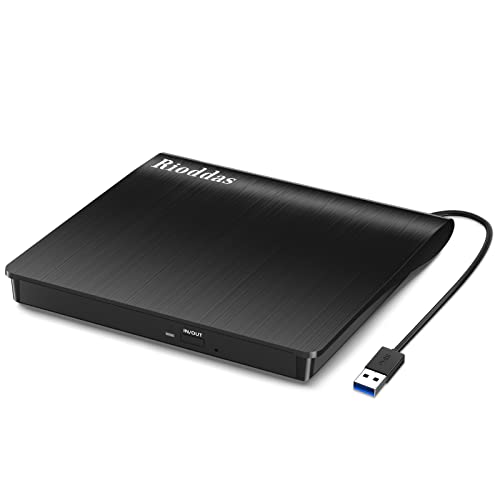
- Powered directly through USB
- Reads and burns CDs and DVDs
- Built-in cable storage
Best For: Everyday CD/DVD use across Windows, macOS, and Linux
Best USB-C DVD Pick
ASUS ZenDrive V1M USB-C DVD Writer

- USB-C interface for newer laptops
- Built-in 24cm cable storage
- Supports M-DISC and Windows/macOS
Best For: USB-C laptops needing portable CD/DVD writing
Best All-in-One Hub

- Reads and burns CD/DVD media
- Adds USB, USB-C, and card-reader ports
- Supports Windows, Mac, and Linux
Best For: Users seeking an optical drive with built-in connectivity
Best Premium Slim Pick

- Slim 13mm portable design
- Includes USB 2.0 and Type-C cables
- Adds M-Disc and disc-encryption support
Best For: Mac and Windows users wanting a compact branded burner
Best Simple USB 3.0 Value

- USB 3.0 plug-and-play connection
- Slim design with hidden data cable
- Reads and burns common CD/DVD formats
Best For: Everyday laptop and desktop disc access
Best Overall – Amicool USB 3.0/USB-C DVD Drive
For a straightforward option among portable optical disc drives, the Amicool external DVD drive combines USB 3.0 and USB-C connectivity with CD/DVD reading, writing, and burning. It is designed for direct connection to Windows, macOS, and Linux computers, although it does not support Blu-ray, ChromeOS, tablets, TVs, or game consoles.
Best For: Laptop and desktop users who want a slim, dual-connector CD/DVD burner for everyday data, media, and backup tasks.
Pros:
- USB 3.0 and USB-C interfaces support up to 5Gbps transfer rates.
- Reads, writes, and burns common CD and DVD formats, with up to 8x DVD and 24x CD speeds.
- Plug-and-play design includes a built-in cable and supports Windows, macOS, and Linux.
- Slim, lightweight body includes error correction and anti-shock technology.
Cons:
- Requires a direct computer connection for reliable power; hubs and extension cables are discouraged.
- Does not support Blu-ray, DVD-RAM, ChromeOS, or mobile and entertainment devices.
- Mac users may need VLC Player, and Apple DVD Player is not supported.
The Amicool is a practical all-around DVD solution, especially for newer laptops with USB-C ports. Its direct-connection power requirements and format limitations are worth checking before purchase.
Best Simple Option – Dell Slim DW316 External DVD Burner
The Dell Slim DW316 is a compact USB 2.0 DVD±RW drive aimed at notebook users who need a basic optical drive without extra features. Its tray-loading design supports DVD and CD reading and writing, with plug-and-play operation on Windows systems.
Best For: Notebook owners seeking a simple, lightweight external DVD burner for business and routine disc tasks.
Pros:
- Compact 200-gram design is easy to carry with a laptop.
- Supports DVD±RW, DVD±R DL, and DVD-RAM media.
- Offers up to 24x CD read, write, and rewrite speeds.
- Plug-and-play USB 2.0 connection keeps setup simple.
Cons:
- USB 2.0 is slower than USB 3.0-equipped alternatives.
- The supplied compatibility details focus on Windows notebooks and listed Dell models.
- It is a DVD/CD drive rather than a Blu-ray solution.
The Dell is best when reliability and simplicity matter more than modern connectivity or maximum transfer speed. Verify your notebook and operating-system compatibility, particularly if you use a newer non-Dell computer.
Best for Blu-ray Archiving – LG WP50NB40 Portable Blu-ray Burner
The LG WP50NB40 stands apart from typical portable optical disc drives by supporting Blu-ray burning and reading in addition to DVD and CD media. This bundle includes a 50GB Verbatim M-DISC BD-R DL and CyberLink burning software, making it suited to users focused on higher-capacity or long-term disc storage.
Best For: Users who need portable Blu-ray capability and want to create durable M-DISC backups.
Pros:
- Supports Blu-ray, DVD, and CD media in a portable USB drive.
- Burns BD-R at up to 6x, DVD±R at up to 8x, and CD-R at up to 24x.
- Includes a 50GB Verbatim M-DISC BD-R DL and CyberLink burning software.
- Buffer-under-run prevention and a 4MB buffer support reliable burning.
Cons:
- Listed operating-system support is centered on older Windows versions and Mac OS X 10.7.5 or later.
- USB connectivity is less modern than USB 3.0 or USB-C alternatives.
- The bundle includes one M-DISC BD-R DL, so additional media may be needed for larger projects.
The LG is the strongest choice here for Blu-ray users and archival projects. Its included M-DISC and software add value, but buyers with newer computers should confirm operating-system and port requirements.
Best Multifunction Hub – ORIGBELIE External CD/DVD Drive
The ORIGBELIE combines a portable CD/DVD reader and burner with a built-in USB hub and SD/TF card reader. For shoppers comparing portable optical disc drives, it offers broader connectivity than a conventional drive, plus USB-A and USB-C cables, a carrying case, and support for common Windows, Mac, and Linux computers.
Best For: Travelers and laptop users who need disc burning plus extra USB and memory-card connectivity in one compact accessory.
Pros:
- Supports CD/DVD reading, writing, rewriting, and burning at up to 8x DVD and 24x CD speeds.
- Includes USB-A, USB-C, SD, and TF connectivity for peripherals and memory cards.
- Built-in dual-connector cable and included carrying case improve portability.
- Plug-and-play operation works with listed Windows, Mac OS, and Linux systems.
Cons:
- SD and TF card slots cannot be used simultaneously.
- Does not support Blu-ray, cars, TVs, tablets, phones, or projectors.
- Some computers may require the included power cable because of insufficient USB power.
The ORIGBELIE is a versatile travel accessory rather than just a disc drive. Its extra ports are useful for laptop expansion, but buyers who only need CD/DVD burning may prefer a simpler, less feature-heavy model.
Best Blu-ray Pick – ASUS SBW-06D5H-U Blu-ray Burner
ASUS SBW-06D5H-U BDXL External Ultra Slim Blu-ray and MDisc Burner USB 3.1 USB-C 2 Cables Black
Check Price On AmazonFor shoppers comparing portable optical disc drives, the ASUS SBW-06D5H-U stands out when Blu-ray writing and M-DISC support matter. Its slim enclosure includes both USB-A and USB-C connectivity, making it practical for laptops and desktops with different ports.
Best For: Users who need an external Blu-ray and M-DISC burner with flexible USB connectivity.
Pros:
- Supports Blu-ray and M-DISC burning.
- Includes USB 3.1 Type-A and Type-C interfaces.
- Ultra-slim 240-gram design is convenient for portable use.
- Offers write speeds up to 10x, depending on the media.
Cons:
- Its listed read speed is up to 8x, so it is not the fastest optical drive for every task.
- The notes list macOS compatibility but do not provide detailed Windows support information.
This is the most capable option of the three for Blu-ray users. Choose it if broader disc support outweighs the simpler, lower-cost design of a CD/DVD-only drive.
Best Plug-and-Play Value – Rioddas USB 3.0 CD/DVD Drive
The Rioddas is a straightforward choice among portable optical disc drives for reading and burning CDs and DVDs. It draws power from USB, supports USB 3.0 transfer speeds, and stores its cable in the drive for easier transport.
Best For: Windows, macOS, or Linux users who want an affordable portable CD/DVD reader and burner.
Pros:
- Plug-and-play operation requires no external power adapter or driver.
- Supports USB 3.0 with backward compatibility to USB 2.0.
- Reads and writes common CD and DVD formats at up to 24x CD and 8x DVD.
- Built-in cable storage and a physical eject button improve portability and convenience.
Cons:
- Does not support Blu-ray or 4K discs.
- Not compatible with ChromeOS, smartphones, tablets, TVs, projectors, or vehicles.
- Desktop users may need to connect it directly to a high-power rear USB port.
For everyday disc playback, burning, and file access, the Rioddas offers broad computer compatibility and useful travel-friendly design details. It is a poor fit only if Blu-ray support or non-computer device compatibility is required.
Best USB-C DVD Pick – ASUS ZenDrive V1M USB-C DVD Writer
The ASUS ZenDrive V1M is one of the more convenient portable optical disc drives for newer laptops, thanks to its USB-C interface and built-in 24cm cable. It reads and writes CDs and DVDs, supports M-DISC, and works with Windows and macOS systems.
Best For: USB-C laptop owners who want a compact DVD writer with M-DISC support and integrated cable storage.
Pros:
- USB-C connection suits current ultraslim laptops.
- Built-in cable storage helps prevent cable loss.
- Supports M-DISC for long-term photo, video, and data storage.
- Compatible with Windows and macOS, with a listed one-year warranty.
Cons:
- Supports DVD and CD media but not Blu-ray.
- Write speed is listed at up to 6x, slower than some CD/DVD drives.
- The drag-and-burn feature is specified for Windows only.
This drive is a sensible match for modern notebooks that lack built-in optical hardware. Its integrated cable and M-DISC support add convenience, while users needing Blu-ray should choose the ASUS SBW-06D5H-U instead.
Best All-in-One Hub – 8-in-1 USB 3.0 Optical Drive
For shoppers comparing portable optical disc drives, this model stands out by combining CD/DVD reading and burning with extra connectivity. Its USB 3.0 hub, three USB 2.0 ports, SD/TF card reader, and USB-C port make it useful for laptops with limited ports.
Best For: Users who want an optical drive plus card-reading and USB expansion in one portable unit.
Pros:
- Reads and burns a broad range of CD and DVD formats.
- Includes USB-A, USB-C, USB hub, and SD/TF card connectivity.
- Supports Windows, Mac, and Linux systems, with USB 3.0 transfer speeds.
- Offers error correction, slip resistance, and a one-year warranty.
Cons:
- Some Windows laptops may need the extra power cable if USB power is insufficient.
- SD and TF cards cannot be used simultaneously.
- Not compatible with TVs, tablets, smartphones, projectors, cars, or Blu-ray discs.
This is the most versatile choice in the group if you need more than disc access. The built-in ports add practical value, but the larger feature set also means checking your device compatibility and available USB power first.
Best Premium Slim Pick – ASUS ZenDrive 8X DVD Burner
The ASUS ZenDrive is a straightforward option among portable optical disc drives, with a slim 13mm design and support for both Mac and Windows computers. It includes USB 2.0 and Type-C cables, while M-Disc support and disc-encryption features add useful backup and privacy options.
Best For: Mac and Windows users who prioritize a slim branded drive with M-Disc and encryption support.
Pros:
- Ultra-slim 13mm form factor for portable use.
- Includes both USB 2.0 and USB Type-C cables.
- Supports DVD/CD reading and writing, including dual-layer DVD formats.
- Offers M-Disc support and DISC Encryption II for password control and hidden files.
Cons:
- Uses USB 2.0 rather than USB 3.0.
- Its listed operating-system support is centered on Windows and Mac rather than Linux.
- Maximum DVD write speed is 8x.
The ZenDrive is a good fit when portability, familiar brand support, and extra disc-security features matter more than the fastest interface. It is less compelling for buyers specifically seeking USB 3.0 transfer performance.
Best Simple USB 3.0 Value – Antika Slim CD/DVD Burner
For a basic, travel-friendly addition to a newer or older computer, the Antika is one of the simpler portable optical disc drives to consider. It uses USB 3.0, supports CD/DVD reading and writing, and stores its data cable in the drive for easier carrying.
Best For: Laptop and desktop owners who want a slim plug-and-play drive for media playback, software installation, and disc backups.
Pros:
- USB 3.0 supports transfer speeds up to 5Gbps and remains backward compatible.
- Works with Windows versions from 2000 through Windows 11 and Mac OS systems.
- Slim, lightweight, shock-resistant design includes a hidden data cable.
- Supports CD/DVD playback, burning, and common recordable media formats.
Cons:
- A low-power USB port may require an external power source.
- Not compatible with TVs, tablets, or car audio players.
- The listed warranty includes a 30-day refund/replacement policy, while the details also mention a one-year warranty.
The Antika keeps the focus on essential disc functions and portability. It is a sensible choice for routine use, provided your computer supplies enough USB power and you do not need the extra ports offered by the first model.
How We Picked the Best Portable Optical Disc Drives
We focused on practical differences that matter in everyday use: supported disc formats, connection type, portability, operating-system compatibility, burning capabilities, included accessories, and overall versatility. The selection includes straightforward CD/DVD readers and writers as well as higher-end Blu-ray and M-Disc burners.
Because external optical drives vary widely, we also considered whether a model is suitable for newer laptops with USB-C ports, older computers with USB-A connections, and users who need more than simple disc playback. Product claims such as speed, software inclusion, and bundled media should be checked against the latest manufacturer specifications before purchase.
Quick Comparison
| Best For | Drive Type | Connection Considerations |
|---|---|---|
| Basic disc reading and burning | External CD/DVD drive | Usually USB-A; adapters may be needed for USB-C-only laptops |
| Modern laptops | USB-C DVD drive | Direct USB-C connection is convenient and reduces adapter clutter |
| Large-capacity optical backups | External Blu-ray burner | Typically requires compatible software and adequate USB power |
| Travel and mobile use | Slim portable drive | Look for a compact body, short cable storage, or a carrying case |
Key Buying Factors for Portable Optical Disc Drives
Disc Format Support
Confirm whether you need CD, DVD, Blu-ray, dual-layer, or M-Disc support. Most DVD drives cannot read or write Blu-ray discs, while Blu-ray models generally handle CDs and DVDs as well.
Ports and Power
USB 3.0 can offer faster data transfer than USB 2.0, although the optical mechanism itself may remain the limiting factor. Check whether the drive has USB-A, USB-C, or both, and verify that your laptop can supply enough power through one connection.
Reading Versus Burning
A drive marketed as a reader may not support writing. If you plan to create music discs, archive files, or duplicate DVDs, choose a model explicitly described as a burner or writer and confirm the included burning software.
Software and Operating-System Compatibility
Windows and macOS support can differ, particularly for Blu-ray playback and commercial movie discs. Burning may work without bundled software, but playback and authoring often require compatible applications or licenses.
Who Should Buy Which Portable Optical Disc Drives?
Choose a basic external CD/DVD writer if you mainly need software installation, music playback, photo backups, or occasional DVD burning. A USB-C model is the simplest choice for a newer laptop without USB-A ports, while a dual-connector drive offers broader compatibility across multiple computers.
Choose an external Blu-ray burner if you archive large files, work with Blu-ray media, or want M-Disc support for long-term storage. Travelers should prioritize a slim design, protected cable storage, or an included case. If you only need to read discs occasionally, avoid paying extra for Blu-ray features you will not use and select a compact DVD drive instead.