The best universal remote controls for seniors make everyday TV use less frustrating with clear labels, large buttons, and fewer unnecessary controls. The right model can simplify volume, channel changes, input selection, and access to favorite channels.
Our 2026 roundup compares 10 large-button remotes for different setups, including basic televisions, smart TVs, cable boxes, and multi-device entertainment systems. Use the guide below to identify the features that matter most before choosing.
Best 10 Universal Remote Controls for Seniors Picks for 2026
Most Versatile Jumbo Option
QFX REM-115 8-in-1 Jumbo Remote

- Supports up to eight devices
- Glow-in-the-dark jumbo buttons
- Latest model adds five streaming shortcuts
Best For: Multi-device entertainment setups needing a large remote
Best for TV-and-Cable Simplicity

- Large color-coded tactile buttons
- Controls TV plus cable or satellite box
- 40-foot infrared range and two-year warranty
Best For: Seniors and caregivers simplifying traditional TV setups
Best for Guided Setup
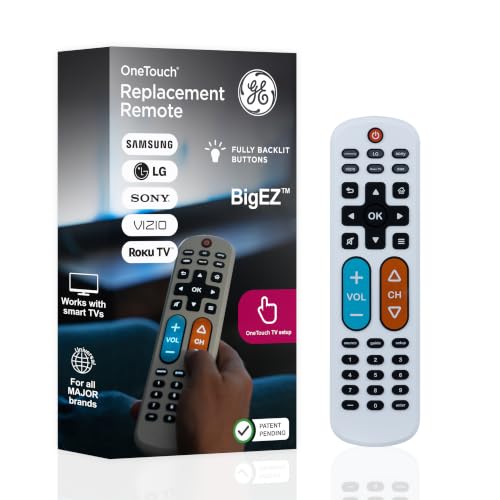
- Extra-large, fully backlit buttons
- Controls a TV plus one other device
- U.S.-based support and limited lifetime warranty
Best For: Seniors wanting visible controls and assisted setup
Best Overall
GE Big Button 2-Device Universal Remote

- Large, simplified buttons
- Controls two compatible devices
- U.S.-based setup support
Best For: Basic home, nursing home, hotel, or assisted-living entertainment setups
Best 3-Device Option
RCA Big Button 3-Device Universal Remote

- Controls up to three devices
- Includes streaming controls
- Several programming methods
Best For: Managing a TV plus cable, satellite, DVD, or streaming equipment
Top Senior-Friendly Pick – Flipper Big Button Universal TV Remote
For shoppers comparing universal remote controls for seniors, the Flipper stands out for its deliberately simple layout. Large, color-coded controls handle everyday power, volume, channel, and mute functions, while hidden buttons allow caregivers to program up to 25 favorite channels.
Best For: Seniors or people with dementia, low vision, or dexterity challenges who use traditional TV, cable, or satellite service.
Pros:
- Large tactile buttons use clear labels and color coding.
- Can control a TV and cable or satellite box in one remote.
- Supports up to 25 programmed favorite channels.
- Works with compatible soundbars and other IR devices.
Cons:
- Does not navigate Netflix, YouTube, Roku, Fire TV, or other streaming apps.
- Requires two AA batteries, which are not included.
The Flipper is a strong choice when simplicity and caregiver-friendly customization matter more than smart-TV navigation. Confirm that the household primarily watches through broadcast, cable, or satellite before buying.
Most Versatile Jumbo Option – QFX REM-115 8-in-1 Jumbo Remote
The QFX REM-115 is a practical option among universal remote controls for seniors who want one large remote for several entertainment devices. It supports up to eight devices and adds glow-in-the-dark buttons plus shortcut keys for popular streaming services on the latest model.
Best For: Households managing multiple compatible devices that want a large, illuminated remote with streaming shortcuts.
Pros:
- Controls up to eight devices, including TVs, Blu-ray players, and cable equipment.
- Jumbo design is easy to spot and handle.
- Glow-in-the-dark buttons help with operation in dim rooms.
- Latest edition includes Netflix, Prime Video, YouTube, Hulu, and Disney+ shortcuts.
Cons:
- Compatibility and shortcut availability depend on the model edition and device setup.
- Its many-device layout may be less simple than a remote designed only for basic TV functions.
- Requires two AA batteries, which are not included.
Choose the REM-115 when broad device control is more important than an ultra-minimal interface. Verify the current edition and your equipment compatibility, especially if streaming access is a priority.
Simplest TV-Only Choice – EZClicker Big Button Senior Remote
This EZClicker model keeps the experience focused on basic television control. Its large buttons, tactile feedback, and simple programming process make it a straightforward candidate for shoppers seeking universal remote controls for seniors without cable-box or streaming-device functions.
Best For: Seniors who need a lightweight, TV-only remote for a compatible major-brand television.
Pros:
- Large buttons and tactile feedback support easier handling.
- Programming uses a simple Mute and Volume+ button sequence.
- Lightweight 6-by-2-inch design is easy to store and hold.
- Offers a stated maximum range of 45 feet.
Cons:
- Controls one television only.
- Not compatible with cable boxes, Firestick, Roku Stick, or streaming apps.
- Requires two AAA batteries, which are not included.
Its narrow focus can be an advantage for someone overwhelmed by extra controls, but check the supplied compatibility list before ordering. It is best suited to basic TV viewing rather than a mixed streaming setup.
Best No-Setup Alternative – Gvirtue Big Button TV Remote
The Gvirtue remote offers a familiar, full-size button layout with an extra-large Enter key and tactile feedback. For buyers considering universal remote controls for seniors, its main convenience is that it is designed to work with the listed TV brands without programming or pairing.
Best For: Seniors who want a basic replacement remote for a compatible Samsung, LG, VIZIO, Sony, Hisense, Philips, Panasonic, Sharp, or similar TV.
Pros:
- Extra-large buttons and Enter key can be easier to see and press.
- No programming or pairing is required according to the supplied notes.
- Supports many major TV brands.
- Lightweight ergonomic design is intended for easier handling.
Cons:
- Controls one television only.
- Not compatible with streaming devices, cable boxes, or unrelated platforms.
- Requires two AAA batteries.
This is a convenient pick when the remote is intended strictly for a compatible TV and immediate use matters. Confirm the exact television brand and model expectations, since it does not replace a cable-box or streaming remote.
Best for TV-and-Cable Simplicity – Flipper Big Button Remote
If you are comparing universal remote controls for seniors, this Flipper-style big-button model focuses on reducing clutter and simplifying traditional TV viewing. Its large, color-coded tactile buttons can control both a television and a cable or satellite box, with infrared operation reaching up to 40 feet.
Best For: Seniors, caregivers, and users with low or impaired vision who want one simple remote for a TV and cable or satellite box.
Pros:
- Large, color-coded buttons designed for easier identification.
- Controls up to two devices, including TVs and cable or satellite boxes.
- Compatible with major TV brands and providers, including Samsung, LG, Sony, Xfinity, Spectrum, DirecTV, and Dish.
- Includes a stated two-year warranty and 90-day free replacement service.
Cons:
- Requires direct line of sight to an Xfinity box; an IR extender may be needed if the box is hidden.
- Requires two AAA batteries.
This is a practical choice when the main goal is fewer remotes and larger controls. Its two-device limit and infrared requirements make it less suitable for complex entertainment systems.
Best for Illuminated Controls – Gvirtue Big Button TV Remote
For shoppers seeking universal remote controls for seniors that are easier to see in dim rooms, this Gvirtue replacement remote combines large buttons with illuminated, glow-in-the-dark visibility. It is designed for one television and offers infrared control up to 40 feet, with setup instructions included if direct use is not successful.
Best For: Users who want a straightforward replacement TV remote with visible buttons and quick-access channel shortcuts.
Pros:
- Large, illuminated keys help reduce guesswork in low light.
- Compatible with Samsung, Vizio, LG, Sony, Philips, and additional TV models.
- Includes four shortcuts to popular channels or apps.
- Retains its memory when batteries are changed and is tested for responsive infrared operation.
Cons:
- Supports one device rather than a TV-and-cable-box combination.
- Requires initial setup if the remote does not work immediately after inserting batteries.
- Illumination requires exposure to indoor light for charging.
This remote makes a strong case for bedrooms or viewing areas where lighting varies. Buyers should confirm TV compatibility and expect to use the included setup process when automatic operation is not available.
Best for Guided Setup – GE BigEZ OneTouch Remote
This GE BigEZ model is among the more approachable universal remote controls for seniors, pairing extra-large backlit buttons with preset controls for five TV brands. It can also operate one additional device, such as a cable box, streaming player, soundbar, or Blu-ray player.
Best For: Seniors and visually impaired users who want a prominent remote with simple brand-based setup and support resources.
Pros:
- Extra-large white body and fully backlit buttons are easier to see and locate.
- Color-coded blue volume and orange channel buttons support easier identification.
- Controls Samsung, LG, Vizio, Sony, and Roku TVs plus one additional device.
- Offers U.S.-based technical support, online programming videos, and a limited lifetime warranty.
Cons:
- Two AA batteries are required and are not included.
- Maximum range is listed at 30 feet.
- Preset TV support is centered on five brands, so other setups may require additional programming.
The GE BigEZ is a well-rounded option for households that want clear controls without giving up basic multi-device functionality. Its guided setup and support resources are especially useful for buyers who prefer assistance during programming.
Best Overall – GE Big Button 2-Device Universal Remote
For shoppers comparing universal remote controls for seniors, the GE Big Button Universal Remote stands out for its large, simplified keyboard and straightforward two-device operation. It is preprogrammed for Samsung TVs and supports automatic code search, direct code entry, and master volume control.
Best For: Seniors who want an easy-to-read remote for a basic TV and soundbar, cable box, or other compatible device setup.
Pros:
- Large, easy-to-read buttons and an ergonomic design
- Controls up to two compatible devices
- Supports automatic code search and direct code entry
- Includes U.S.-based technical support and online programming videos
Cons:
- Two AA batteries are required but not included
- Limited to two devices
- 90-day limited warranty
This GE model is a practical choice when visibility and simplicity matter more than advanced features. Its two-device limit keeps the layout manageable for users who prefer fewer controls.
Best 3-Device Option – RCA Big Button 3-Device Universal Remote
The RCA RCR313BE is a useful pick among universal remote controls for seniors when one remote needs to handle more than a television. Its big-button design supports up to three devices, including a TV, DVD or VCR player, and cable, satellite, or digital TV equipment.
Best For: Users who need simple control of up to three home-entertainment devices, including compatible streaming boxes.
Pros:
- Controls up to three devices
- Big buttons simplify everyday operation
- Supports Roku, Apple TV, and other streaming boxes
- Offers automatic, brand, manual, and direct code search methods
Cons:
- Two AA batteries are required but not included
- Listed maximum range is 10 feet
- 30-day warranty
Choose this RCA remote if three-device coverage is more important than the GE model’s longer listed range or U.S.-based support. Multiple setup methods can also help when automatic programming does not work immediately.
Best Simple TV Remote – LuckyStar Big Button TV Remote
The LuckyStar A-TV2 keeps things especially simple for shoppers seeking universal remote controls for seniors. It is designed for one television, offers three compatibility modes, and is intended to work with many supported brands without programming beyond inserting the batteries.
Best For: Seniors who want a dedicated, uncomplicated remote for a compatible television rather than a multi-device controller.
Pros:
- No programming is needed for the supported initial settings
- Automatic search works with more than 1,000 U.S. TV brands, according to the supplied details
- Comfortable, natural-fit design that is easy to clean and stand
- Includes a one-year manufacturer warranty
Cons:
- Controls only one device
- Two AAA batteries are required but not included
- May not control the newest models for some brands
This is the most focused option of the three: a simple TV remote with broad stated brand coverage. Confirm compatibility if the television is a newer model, especially outside the listed LG, Vizio, Sharp, Zenith, Panasonic, Philips, and RCA settings.
How We Picked These Universal Remote Controls for Seniors
We focused on remotes designed to reduce confusion and improve usability for older adults, including large buttons, high-contrast labels, straightforward layouts, and simplified setup. We also considered whether each remote supports one television or multiple devices, such as a cable box, satellite receiver, DVD player, or streaming device.
Compatibility was another priority. The selections cover common brands such as Samsung, LG, Sony, Vizio, Philips, Panasonic, RCA, Sharp, and Toshiba, although exact support can vary by model. Features such as favorite-channel buttons, color-coded controls, memory retention, and separate device modes were also weighed when relevant.
Quick Comparison
| Best For | Look For |
|---|---|
| Basic TV control | Simple layout, large labels, and dedicated power, volume, and channel buttons |
| TV plus cable box | Two-device support or clearly separated device controls |
| Multiple components | Three-device or eight-device programming |
| Memory or cognitive accessibility | Few buttons, favorite shortcuts, and minimal setup complexity |
| Smart TV households | Verified compatibility with the specific TV brand and required functions |
Key Buying Factors for Universal Remote Controls for Seniors
Button Size and Labeling
Large, well-spaced buttons are easier to see and press accurately. High-contrast lettering and color coding can help users distinguish power, volume, channel, and navigation controls. Avoid layouts that crowd too many small buttons together.
Ease of Setup
Some remotes use automatic code search, while others require a brand code or manual programming. If a caregiver will not always be available, choose a model with simple instructions and a setup method suited to the user’s comfort level.
Device Compatibility
Check the product’s supported brands and device count before buying. A remote may control a television reliably but offer limited control over a particular cable box, Roku device, or smart-TV menu. Confirm the functions that matter most, not just basic power and volume.
Control Layout
A remote with fewer controls is often easier for seniors to use. Dedicated favorite buttons can be especially helpful, while unused modes and advanced functions may add confusion. Consider whether the user needs input, guide, menu, or streaming controls.
Power and Durability
Most models use standard batteries, so check whether battery access is easy and whether settings remain saved after replacement. A sturdy casing and tactile buttons are useful for frequent daily use.
Who Should Buy Which Universal Remote Controls for Seniors?
Choose a basic big-button remote for a user who mainly needs power, volume, channel, and input controls. A favorite-channel model is a strong choice when quick access to familiar stations matters more than advanced features.
For a television-and-cable setup, select a remote that explicitly supports both devices and keeps their controls understandable. Households with several components should consider a multi-device model, but only if the user can comfortably manage its additional modes.
Finally, verify the exact TV or receiver brand before ordering. The best Universal Remote Controls for Seniors are not necessarily the ones with the most functions; they are the ones the intended user can identify, program, and operate confidently every day.