USB-C KVM over IP switches make it possible to control computers remotely while sharing displays, keyboards, mice, storage, and other peripherals. They are useful for home labs, server rooms, hybrid offices, conference rooms, and technical support.
Our roundup covers compact remote KVMs, PoE models, multi-port systems, USB-C dock-style switches, and IP extenders. The right choice depends on video requirements, network design, power delivery, security, and how many computers you need to manage.
Best 10 USB C Kvm Over Ip Switches Picks for 2026
Best Wireless 4K Remote KVM
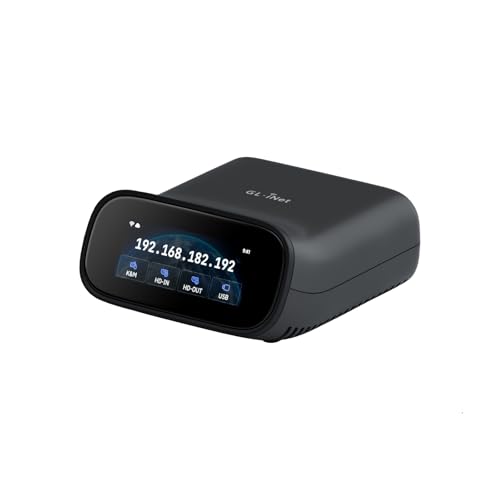
- 4K@30FPS passthrough and two-way audio
- Dual-band Wi-Fi 6 plus wired connectivity
- Tailscale and self-hosted cloud support
Best For: Wireless home labs, IT support, and remote recovery
Best Open-Source USB-C IP KVM

- 1080p@60FPS streaming with 30–60ms latency
- Browser, cloud, and Wake on LAN access
- Open-source Linux platform with expansion support
Best For: Developers and administrators needing customizable remote control
Best PoE 4K Remote KVM

- PoE and USB-C dual power options
- 4K@30Hz streaming with low latency
- 32GB eMMC for stored system images
Best For: PoE-equipped server rooms, offices, and home labs
Best Long-Range HDMI KVM Extender

- 4K HDMI, audio, and USB over long Cat cable runs
- Works over an existing IP network
- Supports up to 16 paired extender sets
Best For: Server rooms, control centers, and distributed workstations
Best Rack-Ready Pick
GL.iNet Comet X Quad-Port Remote KVM

- Four-host HDMI and USB-C remote KVM control
- PoE with 5V Type-C backup power
- Touchscreen, HTTPS access, and rack brackets
Best For: Home labs and rack-mounted IT environments
Best for Conference Rooms
AV Access 4K USB-C KVM Extender

- Two-host switching with dual 4K 60Hz displays
- 100m extension over one Cat6A/7 cable
- USB 3.2, Ethernet, RS232, GPIO, and PoH+
Best For: BYOM rooms and structured AV installations
Best for Remote Power Control
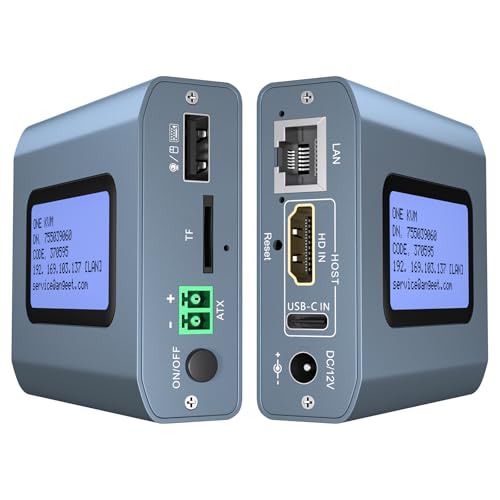
- 4K 60Hz remote KVM with low stated latency
- Remote desktop power on/off via ATX connection
- ZeroTier, web access, and app control
Best For: Off-site PC and server troubleshooting
Best USB-C Dock Sharing

- Shares one USB-C or Thunderbolt 4 display or dock among three computers
- Up to 20Gbps data, 8K30 video, and 140W PD
- Includes RF remote, but requires the supplied USB4 cables
Best For: Windows users with a compatible USB-C monitor or detachable-cable dock
Best Pocket Remote KVM

- Hardware-level remote control through a single USB-C connection
- Browser and app access with Wi-Fi 6 networking
- Supports remote wake-up, 2K60 streaming, and secure access options
Best For: Portable remote support for compatible DP Alt Mode computers
Best Two-PC IP KVM

- Remotely accesses and switches between two computers
- Supports 4K60 video, synchronized audio, and H.264 encoding
- Adds ZeroTier, LCD IP display, and desktop remote power control
Best For: Two-PC remote administration over LAN, WAN, or supported app access
Best Wireless 4K Remote KVM – GL-RM10 Comet Pro
The GL.iNet GL-RM10 Comet Pro is a flexible choice for USB C KVM over IP setups when wireless access, 4K passthrough, and remote recovery matter. It supports dual-band Wi-Fi 6, Ethernet connectivity, browser-based access, and app control across major desktop and mobile platforms.
Best For: Home labs, IT support, and remote BIOS or system recovery where wireless connectivity and two-way audio are useful.
Pros:
- 4K@30FPS passthrough with H.264 encoding and two-way audio
- Supports 2.4GHz and 5GHz Wi-Fi plus wired connectivity
- Built-in Tailscale and optional self-hosted cloud deployment
- Touchscreen interface and optional ATX Board or Fingerbot support
Cons:
- ATX Board and Fingerbot accessories are sold separately
- Wireless performance depends on the local network environment
The Comet Pro stands out for combining wireless flexibility with hardware-level remote access, including BIOS and operating-system recovery. Its touchscreen and broad client support also make it approachable for mixed-device environments.
Best Open-Source USB-C IP KVM – JetKVM IP KVM
JetKVM is a compact USB C KVM over IP option for controlling a computer through a browser over Ethernet. It combines USB-C and HDMI connections with local browser access, optional cloud access, Wake on LAN, and an open-source Linux-based platform.
Best For: Developers, homelab users, and administrators who want low-latency remote control with flexible power and expansion options.
Pros:
- 1080p@60FPS streaming with stated 30–60ms latency
- Local browser, cloud dashboard, and Wake on LAN access options
- Open-source Linux foundation with SSH customization
- Expansion support for ATX, DC power, serial console, and other accessories
Cons:
- Video output is listed as USB-C with DisplayPort Alternate Mode and may require an adapter
- Cloud access is optional and requires using the JetKVM cloud service
JetKVM is particularly appealing if software openness and hardware expandability are priorities. Its 1080p output is less focused on 4K than some alternatives, but the low-latency controls and recovery features suit hands-on remote administration.
Best PoE 4K Remote KVM – GL-RM1PE Comet PoE
The GL.iNet Comet PoE is a practical USB C KVM over IP device for installations that can use Power over Ethernet. It provides 4K streaming, Ethernet connectivity, Tailscale support, and dual PoE or USB-C power options while keeping remote system recovery in reach.
Best For: Server rooms, offices, and home labs with PoE networking and a need for centralized remote management.
Pros:
- PoE reduces the need for a separate power adapter
- Supports 4K@30Hz video with H.264 hardware encoding
- Built-in Tailscale for encrypted direct connections
- 32GB eMMC can store multiple system images
Cons:
- PoE requires a compatible PoE switch or network setup
- ATX Board and Fingerbot extensions are sold separately
Choose the Comet PoE when simplified power distribution and 4K remote access are more important than a wireless-first design. Its onboard storage also adds practical value for reinstalling systems remotely.
Best Long-Range HDMI KVM Extender – AV Access 4K IP KVM
The AV Access 4K HDMI USB KVM Extender is suited to USB C KVM over IP buying decisions where long-distance wired transmission is the priority. It sends HDMI, audio, and USB signals over Cat5e or better cabling, and can use an existing IP network for distributed control.
Best For: Server rooms, control centers, classrooms, and workstations separated by long cable runs.
Pros:
- Extends 4K@30Hz up to 390 feet over Cat5e and farther over Cat6/6A/7
- USB 2.0 receiver provides three peripheral ports
- Supports up to 16 extender sets through DIP-switch pairing
- Plug-and-play operation for Windows, macOS, and Linux
Cons:
- This is a transmitter-and-receiver extender rather than a compact single-device remote KVM
- Requires HDMI, USB, and network cabling between the equipment and receiver
- 4K operation is limited to 30Hz
This model is strongest for fixed installations that need dependable, high-bandwidth extension over structured cabling. Its multi-set addressing and extra USB ports make it more suitable for professional or distributed environments than casual remote access.
Best Rack-Ready Pick – GL.iNet Comet X Quad-Port Remote KVM
The GL.iNet Comet X is a practical choice for shoppers comparing usb c kvm over ip switches for a home lab or server room. It controls up to four HDMI-connected hosts remotely through a browser, while PoE, local controls, and rack-mount hardware simplify installation.
Best For: Home labs, IT professionals, and compact rack installations requiring four-host remote access.
Pros:
- Supports four hosts with four HDMI inputs and dedicated USB Type-C device ports.
- PoE power and 5V Type-C backup provide flexible installation options.
- Includes browser-based HTTPS access, a touchscreen, 4K 30Hz HDMI loop-out, and rack brackets.
Cons:
- HDMI loop-out is limited to 4K at 30Hz.
- The 25–40°C rated temperature range may limit harsher environments.
Its combination of local switching, remote browser control, storage, and rack accessories makes the Comet X especially well suited to managed equipment spaces rather than casual desktop use.
Best for Conference Rooms – AV Access 4K USB-C KVM Extender
The AV Access 4K USB-C KVM Extender suits buyers seeking usb c kvm over ip switches for BYOM meeting rooms and long-distance installations. It switches between a USB-C host and a USB-B host, extending video, USB, Ethernet, audio, control signals, and power over one Cat6A/7 cable.
Best For: Conference rooms, hybrid meetings, and professional AV installations up to 100m.
Pros:
- Switches between two hosts and supports two 4K 60Hz displays.
- Extends signals up to 100m/330ft over a single Cat6A/7 cable.
- Provides USB 3.2 Gen 1, 1G Ethernet, RS232, GPIO, and PoH+ power delivery.
Cons:
- Its transmitter-and-receiver design is more installation-oriented than a simple desktop switch.
- DisplayLink support may require attention to compatibility and setup.
This is the strongest fit when cable distance, dual-display output, and conference-device connectivity matter more than a compact plug-and-play desktop footprint.
Best for Remote Power Control – 4K Internet Remote KVM
This internet-enabled remote KVM is a compelling option for usb c kvm over ip switches when remote BIOS access and power management are priorities. Connect a computer through HDMI and USB-C, then use its web interface or app to control compatible PCs, servers, cameras, and streaming devices.
Best For: Remote IT administration, unattended desktop PCs, and cross-network access using ZeroTier.
Pros:
- Supports 4K at 60Hz with stated latency below 60 milliseconds.
- Enables remote power on/off for desktop computers through the motherboard F_PANEL connection.
- Includes ZeroTier for peer-to-peer access without port forwarding or VPN configuration.
Cons:
- Remote power control is not supported for laptops.
- App access requires web-browser login and downloading the ONE KVM app.
- ZeroTier requires an online upgrade according to the supplied notes.
With web and app access, BIOS-level installation support, and remote power control, this model is geared toward off-site troubleshooting rather than local multi-host switching.
Best USB-C Dock Sharing – 3-Computer 20Gbps KVM
If you need usb c kvm over ip switches for a multi-computer desk, the Cable Matters switch shares one USB-C or Thunderbolt 4 monitor or dock among three computers. It supports up to 20Gbps data transfer, high-resolution video, and charging for the selected computer, but cable and dock compatibility require careful attention.
Best For: Windows users sharing a USB-C monitor or compatible dock between three computers.
Pros:
- Connects three computers to one USB-C or Thunderbolt 4 display or dock.
- Supports up to 20Gbps data, 8K at 30Hz, and up to 140W Power Delivery.
- RF remote control enables convenient computer switching without software.
Cons:
- Requires the included USB4 20Gbps cables; Thunderbolt 3/4/5 cables are not recommended.
- Its 20Gbps bandwidth may reduce display stability or resolution compared with a direct connection.
- macOS supports only one external display, and only the active computer receives charging.
This is a strong choice for a high-performance desk built around one USB-C display or detachable-cable dock. Confirm your dock, monitor, cables, and operating system before buying, especially if you need maximum refresh rates or multi-monitor support.
Best Pocket Remote KVM – Comet Q Portable IP Control
The GL.iNet Comet Q takes a different approach to usb c kvm over ip switches: it provides hardware-level remote access to a compatible computer through one USB-C connection. Its Wi-Fi 6 networking, browser and app control, and compact design suit troubleshooting and family or office support away from the target device.
Best For: Remote support and diagnostics for compatible USB-C DP Alt Mode computers and mobile devices.
Pros:
- One foldable USB-C cable carries video, audio, keyboard, and mouse data.
- Supports browser or GLKVM app access without installing software on the target device.
- Offers remote wake-up, Tailscale and ZeroTier support, two-factor authentication, and a 1.8-inch status touchscreen.
Cons:
- Requires a compatible DP Alt Mode device and network connection.
- Remote image quality and responsiveness vary with available bandwidth.
- It is designed for remote control of a target device, not for switching several local computers through one monitor.
Choose the Comet Q when portability and remote assistance matter more than traditional desk-based KVM switching. Its 2K QHD at 60 FPS capability and security features are useful for support sessions, while device compatibility should be verified before purchase.
Best Two-PC IP KVM – 4K Remote Network Switch
For users comparing usb c kvm over ip switches with more conventional HDMI-based network KVM hardware, this two-port model provides remote access to two computers through a web interface or app. It adds local switching, 4K video, remote power control for desktop PCs, and ZeroTier connectivity for cross-network access.
Best For: Remote IT administration, work-from-home access, and managing two desktop computers over a network.
Pros:
- Switches between two computers locally or remotely through its web interface and app.
- Supports 3840×2160 at 60Hz, synchronized audio, and hardware H.264 encoding.
- Includes an LCD for IP information, ZeroTier support, and remote power control for compatible desktop PCs.
Cons:
- Uses HDMI, USB, Dupont, Ethernet, and a required 12V power adapter rather than a single USB-C connection.
- Web access is available on LAN only; WAN access requires the app.
- Remote power control requires connecting to a desktop motherboard’s F_PANEL header.
This is the most suitable option here for a two-computer remote-management setup rather than a USB-C display-sharing desk. Its local controls, 4K support, and network features are practical for IT use, but installation involves more cabling than a USB-C KVM.
How We Picked the Best USB C Kvm Over Ip Switches
We compared the selected models by looking at remote-access capabilities, supported resolutions, connection types, port counts, network compatibility, USB performance, and installation flexibility. We also considered practical features such as power delivery, PoE, remote power control, browser access, Tailscale or ZeroTier support, webcam compatibility, and operating-system installation features.
Because these products serve different roles, we did not treat a compact single-computer remote KVM the same as a dual-monitor conference-room extender. Instead, we matched each design to its most useful application and prioritized clear specifications over headline features.
Quick Comparison
| Best For | Look For | Recommended Type |
|---|---|---|
| Home labs and servers | Remote BIOS access, virtual media, secure networking | Dedicated IP KVM |
| Travel or occasional support | Compact size, plug-and-play setup, USB-C connectivity | Pocket remote KVM |
| Multiple systems | Several KVM channels and centralized management | Multi-port or quad-port KVM |
| Conference rooms | Dual-monitor support, USB 3, and 100W charging | USB-C KVM extender |
| Long cable runs | Cat5e or better cabling and TCP/IP transmission | HDMI or USB KVM extender |
Key Buying Factors for USB-C KVM Over IP Switches
Video Resolution and Latency
Check whether the unit supports 4K at your required refresh rate and whether it provides passthrough or compressed remote streaming. Local switching may feel nearly instantaneous, while internet-based control can vary with bandwidth and latency.
USB-C, USB, and Display Connections
Confirm the exact host and display ports before buying. USB-C may support video, data, charging, or only some of these functions. If you need a webcam, storage device, or USB 3 transfer speeds, verify the available USB standard and bandwidth.
Network and Remote-Access Security
Consider wired Ethernet, Wi-Fi, PoE, VPN support, browser access, and overlays such as Tailscale or ZeroTier. Avoid exposing an IP KVM directly to the public internet unless it has strong authentication, current firmware, and a properly configured secure gateway.
Power and Computer Control
Some models can provide USB-C power delivery, wake a computer, control remote power, or access BIOS and operating-system installers. These capabilities are especially valuable for unattended servers and troubleshooting.
Who Should Buy Which USB C Kvm Over Ip Switches?
Choose a compact pocket model for travel, laptop support, or occasional remote control. A PoE model suits installations where a single Ethernet cable simplifies power and networking. Home-lab users and IT professionals should favor multi-port or dedicated IP KVMs with remote boot and virtual-media features.
For meeting rooms and desks, a USB-C KVM extender with dual-monitor support and power delivery is usually more convenient than a server-focused IP KVM. If your priority is local switching rather than internet access, a high-bandwidth USB-C KVM may offer lower latency and simpler operation. Before ordering, verify host compatibility, monitor resolution, cable length, network speed, and the security controls required for your environment.