Powered KVM over IP switches give you remote access to computers and servers while preserving keyboard, video, and mouse control. The right model can simplify server-room administration, home-lab maintenance, and unattended troubleshooting without requiring a trip to the rack.
This roundup compares ten options ranging from compact single-system remote KVMs to high-density rackmount switches. We focus on video support, port capacity, remote-access features, security, installation requirements, and the type of buyer each device best serves.
Best 10 Powered Kvm Over Ip Switches Picks for 2026
Best Flexible Wireless Option
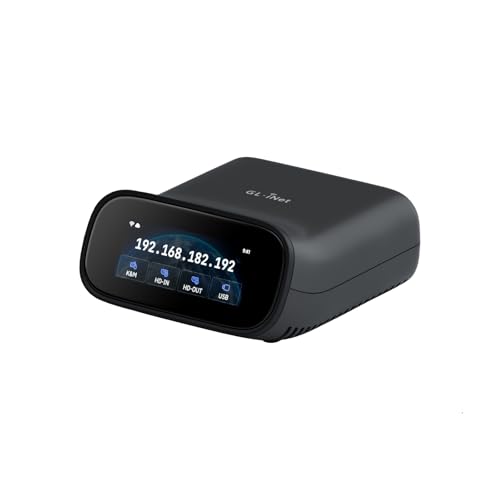
- Dual-band Wi-Fi 6 plus wired connectivity
- 4K passthrough and two-way audio
- Tailscale and multi-platform remote access
Best For: Home labs and small offices needing flexible single-device recovery access
Best Rack-Mount Multi-Port Choice

- Eight-port remote KVM switching
- Rack-mount design for server rooms
- Supports USB, PS/2, Sun, and RS-232 systems
Best For: Mixed-generation rack environments requiring centralized remote control
Best PoE-Powered Recovery Device

- PoE and Type-C dual power options
- 32GB eMMC for stored system images
- 4K streaming with Tailscale and two-way audio
Best For: Single-server remote recovery through PoE-equipped networks
Best Enterprise Rack Capacity
Raritan Dominion KX III 16-Port

- 16-port KVM-over-IP capacity
- Two simultaneous remote users
- DVI local port, virtual media, and dual power
Best For: Larger IT environments needing scalable rack-based remote access
Best PoE Quad-Port Pick

- PoE with 5V Type-C backup power
- Four-host HDMI and USB switching
- HTTPS access, touchscreen, and rack brackets
Best For: Home labs and small server rooms managing four systems
Best Rackmount Enterprise-Style Option
Tripp Lite NetCommander 8-Port KVM

- Eight ports with expansion to 128 servers
- One local and one remote user simultaneously
- IPv4/IPv6, RADIUS, LDAP/S, and 1U rackmount design
Best For: Business server rooms and centralized rack management
Best Single-Host Remote Access Pick
GL.iNet Comet GL-RM1 Remote KVM

- BIOS-level remote control without host software
- 4K 30Hz video with H.264 encoding
- Remote audio, file transfer, and reboot support
Best For: Remote support and maintenance of one PC or server
Best 4K DisplayPort Choice
ATEN CN9950 KVM Over IP Switch

- 4K DCI DisplayPort video at local and remote consoles
- FPGA processing for crisp video response
- Dual LAN and power for backup operation
Best For: Single-server 4K remote management
Best High-Density Rack Option
Eaton 32-Port KVM Over IP Switch

- BIOS-level access for up to 32 servers
- HDMI/VGA video up to 1920 x 1200
- Secure IPv4/IPv6 remote management
Best For: Enterprise server rooms and TAA procurement
Best 16-Port Legacy-Friendly Pick
Tripp Lite NetCommander IP KVM

- Controls 16 computers locally or remotely
- Supports USB and PS/2 server interfaces
- Dual Ethernet ports support remote availability
Best For: Mixed USB/PS/2 server environments
Best Flexible Wireless Option – Comet Pro Remote KVM
The GL.iNet Comet Pro is a compact choice for powered KVM over IP setups that need both wired and wireless flexibility. Dual-band Wi-Fi 6, 4K passthrough, two-way audio, and browser-based access make it useful for remote troubleshooting without interrupting the local display.
Best For: Home labs, small offices, and remote disaster recovery where wireless access, BIOS control, and flexible client support matter.
Pros:
- Supports 2.4 GHz and 5 GHz Wi-Fi 6 alongside wired connectivity.
- Provides 4K at 30 FPS passthrough with H.264 encoding and two-way audio.
- Includes Tailscale, self-hosted cloud support, and access from Windows, macOS, Linux, iOS, and Android.
- Built-in touchscreen simplifies network and cloud-service management.
Cons:
- ATX Board and Fingerbot power-control accessories are sold separately.
- Its compact desktop design is aimed at single-device management rather than multi-port rack deployments.
Choose the Comet Pro when ease of deployment and broad remote-access compatibility are more important than managing several systems from one rack switch. Its recovery-focused features also extend beyond ordinary software remote control.
Best Rack-Mount Multi-Port Choice – ATEN KN1108VA KVM Over IP
The ATEN KN1108VA is a rack-mount powered KVM over IP switch built for centralized remote access to up to eight connected systems. Its compatibility with USB, PS/2, Sun Legacy, and serial RS-232 connections makes it a practical option for mixed-generation server environments.
Best For: Rack-based IT environments that need remote-only control of several Windows, Mac, Sun, or Linux devices.
Pros:
- Provides eight switch positions for multi-system management.
- Rack-mount form factor suits centralized server installations.
- Supports systems using USB, PS/2, Sun Legacy, and serial RS-232 connectors.
- Remote control is available across Windows, Mac, Sun, and Linux devices.
Cons:
- The supplied details do not list video resolution or audio capabilities.
- Its 17.3-inch-wide rack chassis is less suitable for compact desktop use.
- The listed connectivity protocol is Wi-Fi, so confirm network requirements before purchase.
The KN1108VA stands out when port count and legacy-device compatibility take priority. Buyers focused on modern 4K streaming or audio should verify those specifications separately, as they are not provided here.
Best PoE-Powered Recovery Device – Comet PoE Remote KVM
The GL.iNet Comet PoE is a single-device powered KVM over IP solution designed to simplify deployment with Power over Ethernet. It combines 4K streaming, Tailscale security, dual power input, and onboard storage for remote troubleshooting and system reinstallation.
Best For: Home labs, offices, and server setups with a PoE switch that need dependable remote BIOS access and recovery features.
Pros:
- PoE power reduces the need for a separate power adapter and extra cabling.
- Supports both PoE and Type-C power for added power flexibility.
- Built-in 32GB eMMC storage can hold multiple system images.
- Offers 4K at 30 Hz, low-latency H.264 streaming, two-way audio, and Tailscale.
Cons:
- Supports a maximum of one connected computer or server.
- PoE functionality requires a compatible PoE switch or infrastructure.
- ATX Board and Fingerbot accessories are sold separately.
The Comet PoE is a strong fit when clean installation and recovery capability matter more than multi-port switching. Its eMMC storage is especially useful for keeping system images ready for remote reinstalls.
Best Enterprise Rack Capacity – Raritan Dominion KX III 16-Port
The Raritan Dominion KX III is a 16-port powered KVM over IP switch for larger desktop or server deployments. It supports two remote users, includes a DVI local port and virtual media, and adds dual power for an enterprise-oriented installation.
Best For: IT teams managing up to 16 connected desktop systems while allowing two remote users to work through one rack-based KVM platform.
Pros:
- Provides 16 ports for centralized device management.
- Supports two remote users.
- Includes a DVI local port and virtual media functionality.
- Dual power supports a more resilient rack installation.
Cons:
- The 13.9-pound chassis is substantially larger than compact single-device KVM units.
- The supplied details identify DVI but do not specify 4K resolution or audio support.
- Its 16-port capacity may be unnecessary for a small home or office setup.
For organizations that need more ports and concurrent remote access, the Dominion KX III offers a more scalable approach than desktop KVM devices. Its virtual-media and dual-power features further suit structured IT environments.
Best PoE Quad-Port Pick – GL.iNet Comet X Remote KVM
For buyers comparing powered kvm over ip switches, the GL.iNet Comet X stands out as a compact four-port option with PoE networking and 5V Type-C backup power. It supports remote browser access, local control, and 4K 30Hz HDMI loop-out in a rack-ready chassis.
Best For: Home labs, small server rooms, and IT users managing up to four systems.
Pros:
- PoE power reduces rack cabling, with 5V Type-C backup available.
- Four HDMI inputs and four USB Type-C device ports support multi-system switching.
- Browser-based HTTPS access, a touchscreen, and included 10-inch and 19-inch rack brackets provide flexible control and installation.
Cons:
- HDMI loop-out is limited to 4K at 30Hz.
- The operating temperature range listed in the specifications is 25°C to 40°C.
The Comet X is a feature-rich choice when PoE power, local access, and four-host management matter more than a larger enterprise port count. Its 64 GB eMMC also provides onboard space for images, backups, and deployment files.
Best Rackmount Enterprise-Style Option – Tripp Lite NetCommander 8-Port KVM
The Tripp Lite NetCommander is a practical powered kvm over ip switch for rack-based server management. Its eight-port Cat5 design supports one local and one remote user simultaneously, with IPv4 and IPv6 connectivity and a 1U rackmount form factor.
Best For: Businesses and server rooms that need centralized control of multiple rack-mounted PCs or servers.
Pros:
- Eight ports can be cascaded with a second level to control up to 128 servers.
- Supports simultaneous local and remote users.
- Offers browser-based remote access, RADIUS and LDAP/S authentication, and IPv4/IPv6 support.
- 1U rackmount construction and Cat5 cabling help reduce rack clutter.
Cons:
- The remote browser application is Java-based.
- It is designed for rack and PC management rather than a compact home-lab setup.
- The supplied warranty description specifies two years, despite the title referencing three years.
Choose the NetCommander when port capacity, cascading, dual-user operation, and organizational security features are priorities. Its rack-oriented design makes it better suited to established server environments than portable installations.
Best Single-Host Remote Access Pick – GL.iNet Comet GL-RM1 Remote KVM
For powered kvm over ip switch shoppers who only need to manage one computer, the GL.iNet Comet GL-RM1 is a compact hardware-based remote KVM. It provides BIOS-level access, 4K 30Hz video, remote audio, file transfer, and control without installing software on the host computer.
Best For: Remote IT support, BIOS maintenance, home servers, and single-PC access from outside the local site.
Pros:
- Enables remote rebooting, operating-system installation through BIOS, and power-on control.
- Supports 3840×2160 video at 30Hz with H.264 hardware encoding.
- Compact 85 g design connects through Ethernet, HDMI, USB 2.0, and USB Type-C.
- Includes remote audio and file transfer capabilities.
Cons:
- It has one KVM port, so it does not switch between multiple hosts by itself.
- PD adapters cannot be used.
- The listed minimum operating-system requirement is Windows 10.
The GL-RM1 is not a multi-host rack switch, but it is a strong fit for direct remote management of one PC or server. Its BIOS access and no-host-software design are especially useful for troubleshooting and deployments.
Best 4K DisplayPort Choice – ATEN CN9950 KVM Over IP Switch
ATEN 1-Local/Remote Share Access Single Port 4K DisplayPort KVM Over IP Switch
Check Price On AmazonFor buyers seeking powered kvm over ip switches for a single computer or server, the ATEN CN9950 combines remote access with sharp DisplayPort video. It supports up to 4K DCI at 30Hz at both local and remote consoles, while redundant power and networking add resilience.
Best For: Single-server remote management where 4K DisplayPort video, environmental controls, and backup connectivity matter.
Pros:
- Supports 4096 x 2160 at 30Hz locally and remotely.
- FPGA graphics processing helps deliver crisp video and improved frame throughput.
- Dual power supply and dual LAN support backup operation.
- Relay/DI terminal supports environment monitoring and reboot control.
Cons:
- Single-port design is not intended for managing many servers.
- DisplayPort connectivity may require adapters for other video interfaces.
The CN9950 is a specialized choice rather than a high-density rack switch. Its combination of 4K DisplayPort support and redundant infrastructure makes it particularly suitable for a critical single-system installation.
Best High-Density Rack Option – Eaton 32-Port KVM Over IP Switch
For data centers managing a large server fleet, this Eaton unit is one of the more capable powered kvm over ip switches in the group. It provides BIOS-level access to up to 32 computers or servers, with one local and one remote user able to connect simultaneously.
Best For: Rack-based server rooms, federal procurement environments, and administrators who need secure remote access across many systems.
Pros:
- Controls up to 32 computers or servers through one 1U rackmount unit.
- Supports VGA or HDMI video up to 1920 x 1200.
- Virtual Media and USB ports support remote peripheral access.
- Includes IPv4/IPv6 support, encryption, and RADIUS, LDAP/S, or Active Directory authentication.
Cons:
- Video resolution is lower than the 4K-capable ATEN model.
- The 16.82-pound chassis is comparatively heavy for installation.
- Only one local and one remote user are specified for simultaneous access.
With 32 ports, TAA compliance, free management software, and a three-year warranty, the Eaton is built for organized enterprise deployment. Its security and capacity are stronger priorities than ultra-high-resolution video.
Best 16-Port Legacy-Friendly Pick – Tripp Lite NetCommander IP KVM
The Tripp Lite NetCommander is a practical mid-capacity option among powered kvm over ip switches, offering local, network, and Internet control for up to 16 computers or servers. Its Cat5 architecture supports USB or PS/2 server interfaces, making it useful for mixed or older installations.
Best For: Small and midsize server rooms that need 16-port access, browser-based remote management, and compatibility with USB and PS/2 systems.
Pros:
- Provides local and remote control for up to 16 computers or servers.
- Supports both USB and PS/2 server interfaces through separate interface units.
- Dual Ethernet ports help maintain remote access availability.
- Supports browser access on Windows and Linux systems.
Cons:
- Virtual Media requires the separately specified B078-101-USB2 interface unit.
- Remote access details specify particular browser and operating-system combinations.
- Its 12 Mbps Virtual Media rate is modest by current standards.
This Tripp Lite model stands out for broad interface compatibility and redundant Ethernet in a 16-port format. Confirm the required server interface units before buying, especially if Virtual Media is part of the plan.
How We Picked These Powered Kvm Over Ip Switches
We selected products across the main KVM-over-IP use cases: remote access for one computer, small office and home-lab control, and centralized management of larger server racks. Our comparison considers port count, supported video standards and resolutions, remote and local-user access, BIOS-level control, virtual media, network compatibility, and rack-mount practicality.
We also considered setup and ownership factors. Features such as PoE, Tailscale support, IPv4/IPv6 compatibility, Cat5/Cat5e extension, and free management software can significantly affect installation cost and day-to-day convenience. Enterprise products may offer stronger fleet-management capabilities, while compact units are often easier to deploy for a single workstation or lab.
Quick Comparison
| Best For | Look For | Typical Choice |
|---|---|---|
| One remote computer | Single-port design, 4K video, BIOS control | Compact GL.iNet or ATEN models |
| Home labs and small offices | Multiple ports, simple remote networking, PoE | GL.iNet Comet X or PoE models |
| Small server racks | 8–16 ports, rack mounting, local and remote users | Tripp Lite, ATEN, or Raritan units |
| Large infrastructure | High port density, virtual media, enterprise administration | 32-port Eaton or comparable enterprise KVM |
Key Buying Factors for Powered Kvm Over Ip Switches
Port Count and Expansion
Choose a single-port remote KVM when you need dependable access to one workstation, firewall, NAS, or test machine. For multiple systems, leave room for growth rather than buying only for today’s device count. Rackmount models with 8, 16, or 32 ports are better suited to centralized administration.
Video Quality and Connection Type
Check whether the switch supports VGA, DisplayPort, HDMI, or a specific maximum resolution and refresh rate. “4K” support can vary by refresh rate and operating mode, so verify the exact requirement for your monitor, server console, or remote session. Cat5/Cat5e-based systems may require compatible dongles or adapters at each connected computer.
Remote Control and Security
Look for true pre-boot and BIOS access if you must recover systems that are offline or cannot load an operating system. Secure authentication, encrypted sessions, current firmware, and network segmentation matter for any device exposed beyond a trusted LAN. Tailscale or similar overlay networking can simplify private remote access, but it does not replace strong account security.
Power, Media, and User Access
PoE can reduce cabling in suitable installations, while virtual media lets you mount ISO files or remote drives for operating-system repair. Confirm whether the product supports simultaneous local and remote users, how many remote sessions are allowed, and whether USB peripherals are available during remote control.
Who Should Buy Which Powered Kvm Over Ip Switches?
Choose a compact GL.iNet Comet model for a home lab, single server, desktop, or small-business device where low cost and straightforward remote access matter most. Select a PoE version when running a separate power cable is inconvenient, or choose a multi-port Comet X when several systems need centralized control.
ATEN and Tripp Lite models are practical choices for small offices and modest server rooms that need established rackmount designs, local-console access, and multiple connected computers. Raritan and Eaton options make more sense for larger infrastructure, higher port counts, virtual media, and more formal server-management requirements.
Before buying, confirm connector compatibility, required resolution, rack depth, network policy, and the included cables or dongles. Those details usually determine whether installation is immediate or requires additional adapters and accessories.