The best smart display for video calls makes it easier to connect with family, friends, and colleagues without holding a phone or sitting at a desk. Screen size, camera features, audio quality, privacy controls, and portability all affect which model fits your space.
We’ve gathered 10 standout options, from compact Alexa displays and family-focused video-call devices to large monitors and TV accessories. Use the guide below to narrow the list by room, calling style, and budget.
Best 10 Smart Display for Video Calls Picks for 2026
Best Natural-Feeling Calls

- Automatic camera framing keeps you in view
- Messenger and WhatsApp support
- Physical camera cover and device controls
Best For: Hands-free family video calls at home
Best All-Around Smart Display
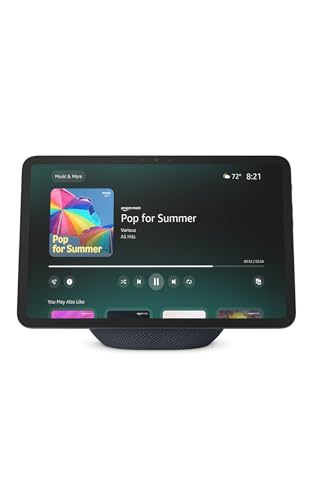
- 11-inch Full-HD touchscreen
- Auto-framing camera with 3.3x zoom
- Smart-home hub and spatial audio
Best For: Video calls plus everyday home assistance
Best for TV-Sized Group Calls
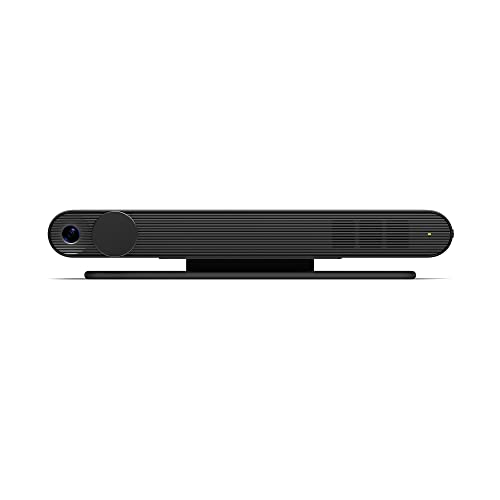
- Brings calls to your television
- 120-degree room view for groups
- Smart Camera and privacy cover
Best For: Large-screen family and group calls
Best Compact Option
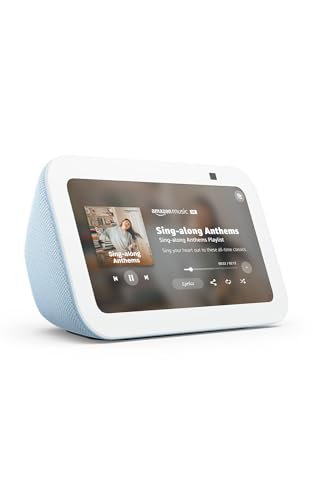
- Space-saving 5.5-inch display
- Alexa app and Echo video calling
- Camera shutter and privacy controls
Best For: Small rooms and personal video calls
Best Business Monitor
Dell P2424HEB Video Conferencing Monitor

- 24-inch Full HD IPS display
- Integrated 4MP RGB and IR camera
- AI auto framing and extensive ports
Best For: Office users seeking a dedicated video-call monitor
Best Portable Option
Meta Portal Go Portable Video Calling Display

- 10-inch touchscreen with rechargeable battery
- Handle makes room-to-room carrying easy
- Automatic framing and sound adjustment
Best For: Flexible video calls around the home
Best Large Smart Display
LG Smart Monitor Swing 32-Inch 4K

- 32-inch 4K touchscreen with webOS
- Rolling, fully adjustable stand
- USB-C, HDMI, and Remote PC support
Best For: Multipurpose home offices needing a movable large screen
Compact Family Connector
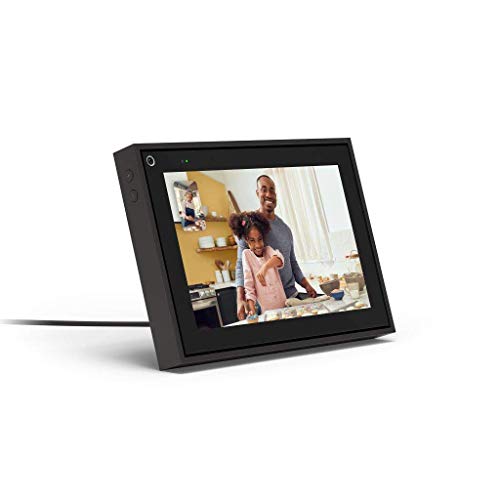
- 8-inch display with automatic camera framing
- Messenger and WhatsApp video calling
- Alexa, privacy controls, and smart-home features
Best For: Small spaces and family video calls
Senior-Friendly Family Frame

- 15.6-inch 1080p display for calls and photos
- Auto-answer and remote family management
- Private encrypted calls with one-month membership included
Best For: Simple senior communication and family sharing
Home Video-Calling Hub
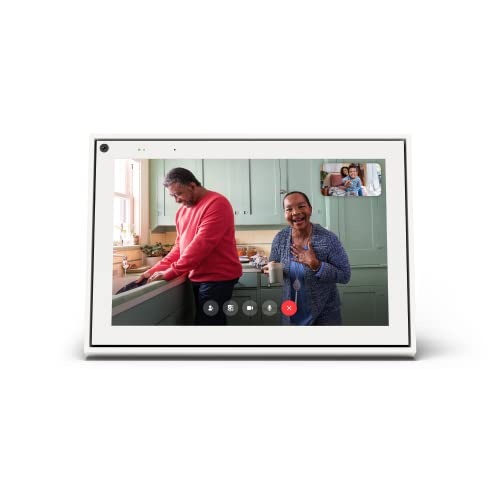
- 10-inch touchscreen with 1080p video capture
- Automatic framing and voice-enhancing Smart Sound
- Privacy cover plus Messenger and WhatsApp support
Best For: Dedicated home video calls on a larger screen
Best Natural-Feeling Calls – Meta Portal 10
Meta Portal - Smart Video Calling for the Home with 10” Touch Screen Display - Black
Check Price On AmazonFor shoppers seeking a smart display for video calls, the Meta Portal 10 combines a 10-inch touchscreen with a camera that automatically adjusts to keep you in frame. Its support for Messenger and WhatsApp makes it practical for staying in touch with friends and family, including people who do not own a Portal.
Best For: Households that prioritize natural, hands-free video calls and straightforward privacy controls.
Pros:
- Smart Camera adjusts automatically as you move.
- Smart Sound helps you stay clearly heard.
- Supports Messenger and WhatsApp calls.
- Camera and microphone can be disabled, with a physical camera cover.
Cons:
- Its 10-inch, 1280 x 800 display is smaller and lower-resolution than a Full-HD screen.
- Designed primarily for corded home use.
The Meta Portal 10 is a focused choice for family video calling, especially when automatic framing and flexible privacy controls matter more than broad entertainment features.
Best All-Around Smart Display – Echo Show 11
The Echo Show 11 is a versatile smart display for video calls, with an 11-inch Full-HD screen, centered auto-framing camera, 3.3x zoom, and noise reduction. It also adds spatial audio, Alexa+ features, entertainment streaming, and built-in smart-home control.
Best For: Users who want video calling alongside entertainment, recipes, calendars, and smart-home management.
Pros:
- Vibrant 11-inch Full-HD display provides more viewing area.
- Centered camera includes auto-framing, 3.3x zoom, and noise reduction.
- Built-in smart-home hub controls compatible devices without a separate hub.
- Camera and microphone controls support privacy management.
Cons:
- Its broad feature set may be more than needed for shoppers focused only on calls.
- Some personalized assistant features depend on Alexa+.
Choose the Echo Show 11 if your smart display needs to serve as a household hub as well as a video-calling screen. Its larger Full-HD panel and enhanced camera make it the most feature-rich option here.
Best for TV-Sized Group Calls – Meta Portal TV
The Meta Portal TV turns a compatible television into a smart display for video calls, putting conversations on the big screen. Its wide 120-degree viewing angle and room-capturing Smart Camera are designed to keep groups visible without making everyone crowd together.
Best For: Families and groups who want to make Messenger or WhatsApp calls from the living room TV.
Pros:
- Uses the TV for larger-than-life video conversations.
- 120-degree viewing angle helps capture the whole room.
- Smart Camera adjusts as people move.
- Includes a camera cover plus camera and microphone disable controls.
Cons:
- Requires a separate TV rather than having its own display.
- Video capture is listed at 720p.
- Its living-room form factor is less suitable for personal desk calls.
Portal TV is a specialized option for shared calls. It makes the most sense when group visibility and a large television screen are more important than compact, standalone operation.
Best Compact Option – Echo Show 5
The Echo Show 5 is a compact smart display for video calls, with a 5.5-inch screen and 2 MP camera. It supports calls with people using the Alexa app or a screen-equipped Echo, while also handling music, shows, compatible cameras, photos, and smart-home controls.
Best For: Bedrooms, desks, kitchens, and other spaces where a small Alexa display is more practical than a larger model.
Pros:
- Compact 5.5-inch design fits small spaces.
- Supports video calls through the Alexa app or compatible Echo devices.
- Improved speaker delivers deeper bass and clearer vocals.
- Includes a camera shutter and mic/camera off button.
Cons:
- The small screen is less suitable for group calls or shared viewing.
- Its 2 MP camera is more modest than the camera system in the Echo Show 11.
- Calling is centered on Alexa-compatible contacts and devices.
The Echo Show 5 is a sensible space-saving pick for one-on-one calls and everyday assistant tasks. Consider a larger display if several people need to see the screen at once.
Best Business Monitor – Dell P2424HEB Video Conferencing Monitor
The Dell P2424HEB is a practical smart display for video calls when you want a dedicated desk monitor with an integrated camera. Its 24-inch Full HD IPS panel, AI auto framing, and broad connectivity make it well suited to office meetings and everyday computer work.
Best For: Business users who want a traditional monitor with built-in video-conferencing hardware.
Pros:
- Integrated 4MP RGB and IR camera supports up to 2K at 30 fps or Full HD at 60 fps.
- AI auto framing helps keep users in view during calls.
- IPS display offers 178-degree viewing angles, with HDMI, DisplayPort, and multiple USB ports.
- Includes anti-glare treatment, tilt adjustment, and a three-year manufacturer warranty.
Cons:
- Full HD resolution is less detailed than a 4K display.
- The 24-inch screen is comparatively compact for shared viewing.
- Its 18.1-pound weight makes it less portable.
The P2424HEB is a focused office choice rather than a room-to-room smart device. Choose it if integrated camera features and desk connectivity matter more than portability or ultra-high resolution.
Best Portable Option – Meta Portal Go Portable Video Calling Display
The Meta Portal Go is a smart display for video calls designed to move around the home. Its 10-inch touchscreen, integrated handle, rechargeable battery, and automatic camera and sound adjustments make it convenient for flexible, informal calling.
Best For: Families and home users who want to carry a video-calling device from room to room.
Pros:
- Battery-powered design and built-in handle support room-to-room portability.
- Smart Camera automatically adjusts to help keep you in frame.
- Smart Sound is designed to help you remain audible as you move.
- Camera and microphone can be disabled, with a physical camera cover for added privacy.
Cons:
- The 10-inch screen is smaller than a desktop monitor.
- Conference calling is listed as basic.
- Its app-based calling experience may be less suitable for formal business setups.
Portal Go prioritizes convenience and mobility over workspace connectivity. It is a strong fit for casual household calls, music playback, and users who do not want to stay at a desk.
Best Large Smart Display – LG Smart Monitor Swing 32-Inch 4K
The LG Smart Monitor Swing is a versatile smart display for video calls, remote work, and entertainment. Its 32-inch 4K IPS touchscreen, webOS platform, rolling base, and support for remote PC and cloud services give it flexibility beyond a standard fixed monitor.
Best For: Home offices that need a large, movable screen for work, streaming, and video-conferencing workflows.
Pros:
- 32-inch 4K UHD IPS touchscreen provides a spacious, detailed workspace.
- Rolling stand supports tilt, swivel, height, and portrait-mode adjustments.
- webOS enables standalone smart features, while Remote PC supports home-office services including video conferencing.
- Three USB-C ports can deliver up to 65W, alongside two HDMI ports.
Cons:
- The large wheeled design is less compact than a conventional monitor.
- The supplied notes do not specify an integrated camera, so video calls may require separate hardware.
- Its feature-rich design may be more than users need for basic calling.
The Smart Monitor Swing is best viewed as a flexible workstation and entertainment hub rather than a dedicated all-in-one conferencing screen. Its adjustable mobility and standalone webOS features are especially useful in multipurpose spaces.
Compact Family Connector – Portal Mini
Facebook Portal Mini - Smart Video Calling 8” Touch Screen Display with Alexa - Black
Check Price On AmazonThe Facebook Portal Mini is a compact smart display for video calls, combining an 8-inch touchscreen with automatic camera framing and Alexa features. It supports Messenger and WhatsApp calls, including calls with people who do not own a Portal device.
Best For: Families who want a small video-calling display with smart-home and entertainment features.
Pros:
- Smart Camera pans and zooms to help keep people in frame as they move.
- Smart Sound enhances voices while reducing unwanted background noise.
- Camera and microphone controls include a physical lens cover option.
- Works with Alexa, music apps, photo displays, Zoom, and Workplace from Facebook.
Cons:
- The 8-inch screen is smaller than the displays on the other products here.
- Its calling features center on Messenger and WhatsApp.
Portal Mini is a practical choice when space is limited but you still want hands-free framing and broad Alexa functionality. Its compact size also makes it suitable for bedrooms, offices, or smaller living areas.
Senior-Friendly Family Frame – ViewClix Smart Frame
The ViewClix Smart Frame is a 15.6-inch smart display for video calls designed around simple communication with seniors. Its auto-answer option, remote management, and private family sharing make it especially focused on low-effort connection.
Best For: Families supporting seniors who need simple video calls and remotely managed photo sharing.
Pros:
- Auto-answer can provide a hands-free video-calling experience.
- Family members can remotely manage photos, videos, settings, playlists, and invitations.
- Supports private family sharing, encrypted calls, and calls that are never recorded.
- Large 15.6-inch 1080p display includes reminders and scheduled weather updates.
Cons:
- Premier membership is required after the included one-month trial and costs $9.95 per month.
- The frame uses buttons rather than a touchscreen.
- It requires AC power.
ViewClix stands out for families who want to handle setup and content remotely. The subscription adds ongoing cost, but it also includes the stated Premier warranty and family-wide membership coverage.
Home Video-Calling Hub – Meta Portal 10
Meta Portal - Smart Video Calling for the Home with 10” Touch Screen Display - White
Check Price On AmazonThe Meta Portal 10 is a home-focused smart display for video calls with a 10-inch touchscreen, 1080p video capture, and automatic camera adjustment. It supports Messenger and WhatsApp, so callers can connect even when they do not have a Portal device.
Best For: Households wanting a larger, dedicated video-calling display with simple voice and touchscreen controls.
Pros:
- Smart Camera helps keep you in frame while you move.
- Smart Sound is designed to make voices easier to hear.
- Supports Messenger and WhatsApp calls with non-Portal users.
- Camera cover and separate camera and microphone controls support privacy.
Cons:
- It is designed for indoor, corded use rather than portable calling.
- The calling platform options listed are Messenger and WhatsApp.
With its 10-inch screen and picture-frame-style design, Meta Portal 10 is well suited to a living room, study, or other permanent home location. Choose it over the Mini when a larger display is more useful than a compact footprint.
How We Picked the Best Smart Display for Video Calls
We compared these models by looking at the features that matter most during real conversations: display size and clarity, camera usability, microphone and speaker performance, calling-platform compatibility, setup requirements, privacy controls, and placement flexibility. We also considered whether each product is best suited to a desk, kitchen counter, living room, bedroom, or shared family space.
The selection includes dedicated video-calling devices, smart displays with voice assistants, portable options, video-conferencing monitors, and products designed to help older relatives stay connected. Because no single model is ideal for every household, the right choice depends on how and where you plan to make calls.
Quick Comparison
| Best For | Look For | Standout Type |
|---|---|---|
| Everyday home calls | Simple controls and a clear 10-inch screen | Dedicated smart display |
| Small rooms | Compact footprint and voice control | Small smart display |
| Group calls | Wide framing and large-screen viewing | TV-based device |
| Remote work | Webcam, monitor connectivity, and productivity features | Video-conferencing monitor |
| Flexible placement | Battery power or a movable stand | Portable or wheeled display |
| Older family members | Large images, uncomplicated calling, and remote sharing | Family-focused frame |
Key Buying Factors for a Smart Display for Video Calls
Screen Size and Placement
A larger screen makes it easier to see multiple people and read facial expressions, while a compact display works better on a nightstand or crowded counter. Check viewing distance, available surface area, and whether the screen can be tilted or repositioned.
Camera and Framing
Look for a camera that keeps faces visible when you move naturally. Wide-angle framing is useful for group calls, while automatic subject tracking can help when you walk around. A physical camera shutter or electronic privacy control is valuable for everyday peace of mind.
Audio Quality and Connectivity
Clear microphones and speakers matter as much as screen resolution. Consider models with noise reduction, stronger bass, spatial audio, or multiple microphones if calls take place in a busy room. Confirm Wi-Fi requirements and compatibility with the calling services you use.
Power and Smart Features
Most home displays remain plugged in, but a battery-powered model is more convenient if you want to move between rooms. Voice assistants, photo sharing, captions, and smart-home controls can add value, provided the interface remains easy to use.
Who Should Buy Which Smart Display for Video Calls?
Choose a dedicated 10-inch smart display for straightforward household calling and a compact model for bedrooms, desks, or kitchens. A TV-connected option makes sense for family group calls when everyone wants to sit together. Remote workers should prioritize a conferencing monitor with the ports, webcam, and screen size needed for daily productivity.
If you need calls in different rooms, consider a portable display or a monitor on a mobile stand. For grandparents or less technical users, a family-oriented smart frame may be the better choice because photo sharing and calling can be designed around simplicity. Before buying, verify platform support, account requirements, camera privacy features, and whether the device will receive the updates and services you depend on.