The best memory cards for Windows make it easier to expand storage, move files, and capture photos or video without compatibility headaches. This roundup includes microSD and SD cards, plus versatile USB readers for computers with different ports.
We selected options across capacities, speed classes, device types, and budgets so you can match your purchase to a Windows laptop, desktop, camera, security system, Fire device, or general media workflow.
Best 10 Memory Cards for Windows Picks for 2026
Best Rugged Pick
Amazon Basics 128GB microSDXC Card

- 128GB capacity with full-size adapter
- Up to 100MB/s read speed; U3, V30, A2
- Shock-resistant and IPX6 water-resistant
Best For: Durable, versatile storage for Windows-compatible devices
Best Card Reader

- Four slots for microSD, SD, MS, and CF
- USB 3.0 transfer support up to 5Gbps
- Plug-and-play support for Windows and other systems
Best For: Transferring files from multiple card formats
Best High-Capacity Option
SanDisk 256GB Ultra microSD Card

- 256GB storage for files and media
- Up to 150MB/s read speed
- Includes adapter and 10-year limited warranty
Best For: Expanding storage on compatible Windows laptops and Chromebooks
Best Compact Camera Card

- 32GB capacity for cameras and security devices
- Full HD support with up to 90MB/s read speed
- Waterproof, shockproof, and temperature-proof
Best For: Full HD cameras, dash cams, and security cameras
Fire Storage Pick
SanDisk 128GB microSD for Fire Tablets and Fire TV

- Made for Amazon and tested for Fire devices
- 128GB for media, apps, and games
- Class 10 Full HD video support
Best For: Fire Tablet and Fire TV owners needing extra storage
Windows Transfer Hub
UGREEN USB 3.0 Four-Slot Card Reader
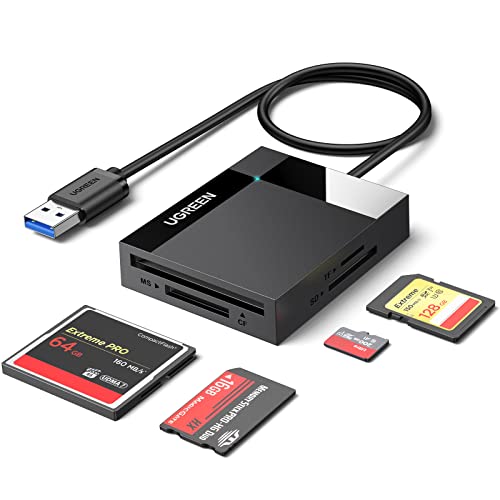
- Works with Windows and several other operating systems
- Reads and writes four cards simultaneously
- Supports SD, microSD, CF, MS, and related formats
Best For: Users transferring files from multiple card types
Everyday SD Value
SanDisk 32GB Ultra SDHC Memory Card

- 32GB capacity for everyday storage
- Up to 100MB/s read speed
- Water-resistant and impact-resistant design
Best For: Routine storage on compatible full-size SD devices
Best Universal Reader

- Reads SD, microSD, Memory Stick, and CompactFlash cards
- USB-A and USB-C connectivity for Windows devices
- Supports simultaneous reading and writing of four cards
Best For: Windows users managing multiple card formats
Best High-Capacity microSD

- 128GB capacity for photos, video, and files
- Up to 195MB/s read speed with compatible hardware
- Water-, temperature-, wearout-, and X-ray-proof features
Best For: Compatible Windows laptops and portable storage needs
Best Simple Pick
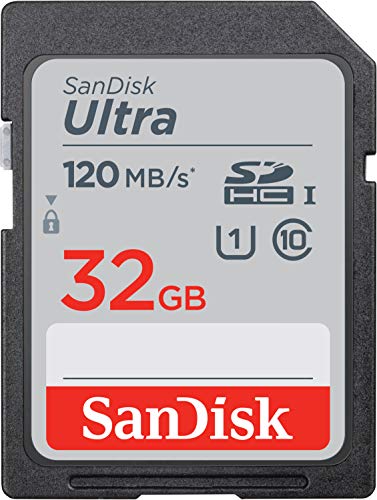
- 32GB SDHC capacity for photos and Full HD video
- Up to 120MB/s advertised read speed
- Class 10 and U1 performance rating
Best For: Compact and mid-range point-and-shoot cameras
Best Rugged Pick – Amazon Basics 128GB microSDXC Card
For shoppers comparing memory cards for windows, this Amazon Basics microSDXC card offers 128GB of storage, a full-size adapter, and up to 100MB/s read speeds. Its U3, V30, and A2 ratings make it suited to demanding everyday storage, video, and app-use scenarios.
Best For: Windows laptops and other compatible devices that need versatile, durable microSD storage.
Pros:
- Includes a full-size adapter for broader device compatibility.
- UHS-I U3, V30, and A2 ratings support fast transfers, video, and app loading.
- Shock-resistant, IPX6 water-resistant, and rated for extreme temperatures.
Cons:
- Actual usable capacity is listed as at least 116GB rather than the full labeled 128GB.
- Maximum supported capacity should be confirmed for the intended device.
- Not compatible with Nintendo Switch 2.
This is a well-rounded choice when durability and performance matter more than choosing the lowest-cost card. The included adapter also makes it practical for systems with a standard SD slot.
Best Card Reader – SmartQ C368 USB 3.0 Reader
The SmartQ C368 is an accessory rather than a memory card, but it is useful when moving files to or from memory cards for windows. Its four slots support microSD, SD, Memory Stick, and CompactFlash formats, while plug-and-play compatibility covers Windows, macOS, and Linux.
Best For: Windows users who need one reader for multiple card formats and straightforward file transfers.
Pros:
- Four-in-one design supports Micro SD, SD, MS, and CF cards.
- USB 3.0 connectivity supports data transfer rates up to 5Gbps.
- Works with Windows, Mac OS, and Linux without additional drivers.
- Blue LED indicates when the reader is powered.
Cons:
- Memory card is not included.
- Requires a USB Type-A connection.
- Performance depends on the card and host device used.
If you already own several card types, the C368 can simplify transfers to a Windows laptop or desktop. It is especially convenient for travel because one compact reader handles multiple formats.
Best High-Capacity Option – SanDisk 256GB Ultra microSD Card
For memory cards for windows that prioritize capacity, this 256GB SanDisk Ultra card provides substantial space for files, Full HD video, and media collections. It includes an adapter and offers read speeds up to 150MB/s, making it a strong fit for compatible Windows laptops and Chromebooks.
Best For: Expanding storage on Windows laptops, Chromebooks, Android devices, and tablets.
Pros:
- 256GB capacity provides ample room for media and files.
- Up to 150MB/s read speeds support faster file access and transfers.
- Includes an adapter for devices with a standard SD slot.
- Backed by a 10-year limited manufacturer warranty.
Cons:
- Its V10/U1 rating is aimed at Full HD rather than higher-performance video workloads.
- Device compatibility and maximum supported capacity should be checked first.
- Not compatible with Nintendo Switch 2.
This card is a sensible capacity-focused upgrade for compatible Windows systems. Its combination of 256GB storage, adapter flexibility, and high listed read speed makes it useful for everyday media and file storage.
Best Compact Camera Card – Gigastone 32GB Camera Plus
This 32GB Gigastone microSDHC card is a practical, smaller-capacity option for memory cards for windows and compatible cameras, dash cams, and security devices. It supports Full HD recording and includes an adapter for use in standard SD slots.
Best For: Full HD security cameras, dash cams, cameras, and everyday storage where 32GB is sufficient.
Pros:
- Designed for Full HD video recording and playback.
- Includes an adapter for standard SD-card compatibility.
- Waterproof, shockproof, temperature-proof, and X-ray-proof construction.
- Covered by a five-year limited Gigastone warranty.
Cons:
- 32GB offers less storage than the other cards in this roundup.
- Listed write speed is up to 20MB/s, so it is not the fastest option for transfers.
- Storage capacity may be limiting for lengthy or high-volume recordings.
Choose this card when compatibility with a camera or security device and dependable Full HD recording are the priorities. Its modest capacity can be an advantage for devices that work best with smaller cards.
Fire Storage Pick – SanDisk 128GB microSD for Fire Tablets and Fire TV
Made for Amazon SanDisk 128GB microSD Memory Card for Fire Tablets and Fire -TV
Check Price On AmazonIf you need memory cards for windows but primarily use Amazon Fire devices, this 128GB microSD card is designed specifically for Fire Tablets and Fire TV. It adds room for photos, music, movies, apps, and games while supporting Class 10 Full HD video recording and playback.
Best For: Fire Tablet and Fire TV owners who want dedicated storage for media, apps, and games.
Pros:
- Made for Amazon and tested for compatibility with Fire Tablet and Fire TV.
- Provides 128GB of additional storage for photos, music, movies, apps, and games.
- Class 10 performance supports Full HD video recording and playback.
- Designed for multiple simultaneous activities without lag or delay.
Cons:
- Its primary compatibility focus is Amazon Fire devices rather than general Windows storage use.
- It is a microSD card, so a compatible slot or adapter may be needed for some computers.
This is the most specialized option in the lineup. Choose it when Fire-device certification and generous capacity matter more than broad computer-focused compatibility.
Windows Transfer Hub – UGREEN USB 3.0 Four-Slot Card Reader
For memory cards for windows, the UGREEN USB 3.0 reader is a flexible way to connect different card formats to a laptop or desktop. It supports SD, microSD, CompactFlash, Memory Stick, and related formats, with simultaneous reading and writing for up to four cards.
Best For: Windows users, photographers, and mobile workers who handle multiple memory-card formats.
Pros:
- Compatible with Windows, MacOS, Linux, and ChromeOS.
- Supports SD, microSD, CompactFlash, Memory Stick, and multiple related formats.
- USB 3.0 transmission reaches up to 5Gbps.
- Can read and write four different memory cards simultaneously.
Cons:
- It is a card reader, not a memory card, so storage must be purchased separately.
- Its four-slot design is less compact than a single-format reader.
- It uses a USB connection and includes a 1.7-foot cable.
This is the strongest choice when your Windows workflow involves transferring files from several card types. Its broad format support and simultaneous operation reduce the need to swap readers or repeatedly reconnect cards.
Everyday SD Value – SanDisk 32GB Ultra SDHC Memory Card
This SanDisk Ultra SDHC card is a straightforward option for memory cards for windows when your computer or device uses a full-size SD slot. Its 32GB capacity, Class 10 rating, and up-to-100MB/s read speed suit everyday storage and file transfers across compatible cameras, computers, smartphones, and tablets.
Best For: Everyday photos, files, and general storage on compatible SDHC devices.
Pros:
- Offers 32GB of storage for everyday use.
- Up to 100MB/s read speed supports quicker file access and transfers.
- Class 10 rating is suitable for common camera and video-storage tasks.
- Water-resistant and impact-resistant design adds practical durability.
Cons:
- 32GB is less capacity than the 128GB microSD option.
- It is an SDHC card, so device compatibility should be checked before purchase.
- Performance specifications emphasize read speed; the supplied notes do not state a write speed.
Choose this card for a simple, broadly compatible SDHC solution rather than maximum capacity. It is a sensible fit for routine storage in devices that accept full-size SD media.
Best Universal Reader – BENFEI 4-in-1 USB Card Reader
If you use several card formats with a Windows laptop, the BENFEI 4-in-1 is a practical choice for memory cards for windows setups. Its USB-A and USB-C connections support SD, microSD, Memory Stick, and CompactFlash cards, while four cards can be read and written simultaneously.
Best For: Windows users who need one compact reader for multiple card types and USB connection standards.
Pros:
- Supports SD, microSD, Memory Stick, and CompactFlash media.
- Works through USB 3.0 or USB-C and is compatible with Windows.
- Can read and write four cards at the same time.
- Includes an 18-month warranty.
Cons:
- It is a card reader, not a memory card, so cards must be purchased separately.
- Not compatible with standard Memory Stick, Memory Stick Micro, or CF Type I cards.
- Actual transfer speed depends on the card and USB port.
The BENFEI stands out when flexibility matters more than having a single dedicated slot. Its dual connector design and broad format support make it a useful Windows accessory for transferring photos, videos, and other files.
Best High-Capacity microSD – SanDisk Ultra 128GB microSD
The SanDisk Ultra 128GB microSD is a compact storage upgrade for compatible Windows laptops, cameras, and other devices. It offers 128GB of capacity, Full HD video support, and advertised read speeds of up to 195MB/s when used with a compatible reader.
Best For: Windows users who need portable microSD storage for photos, Full HD video, files, or device expansion.
Pros:
- Provides 128GB of storage for files, photos, and Full HD video.
- Advertised read speeds reach up to 195MB/s with compatible hardware.
- A1 rating is designed to support faster app launches and performance.
- Includes temperature-, water-, wearout-, magnetic-, and X-ray-proof features.
Cons:
- It is a microSD card, so a compatible slot or adapter may be required for some Windows computers.
- The maximum advertised speed requires compatible hardware, including a suitable reader.
- Its U1/V10 rating is aimed at Full HD rather than higher-demand video formats.
For memory cards for windows devices that accept microSDXC media, this SanDisk model balances useful capacity with fast advertised read performance. Check your computer’s slot and reader compatibility before buying.
Best Simple Pick – SanDisk Ultra 32GB SD Card
The SanDisk Ultra 32GB SDHC card is a straightforward option for compatible Windows workflows and compact cameras. Its Class 10 and U1 rating is designed for Full HD video, while read speeds are advertised up to 120MB/s with compatible devices.
Best For: Compact to mid-range point-and-shoot cameras and users who need a modest-capacity SD card for transfers to Windows PCs.
Pros:
- 32GB capacity holds photos and Full HD video.
- Advertised read speeds reach up to 120MB/s with compatible hardware.
- Class 10 and U1 ratings support Full HD video recording.
- Designed with temperature-, water-, and X-ray-proof features.
Cons:
- The manufacturer has discontinued this version.
- Its 32GB capacity is smaller than many newer card options.
- Actual performance varies by host device and other conditions.
This SanDisk card remains a sensible basic choice when 32GB is enough and your device uses standard SDHC media. Because the version is discontinued, confirm availability and device compatibility before purchasing.
How We Picked the Best Memory Cards for Windows
We focused on practical compatibility rather than capacity alone. The selection includes microSD cards with full-size adapters, standard SD cards, and USB card readers that support Windows computers. We also considered advertised read speeds, UHS and application-performance ratings, storage capacity, supported formats, and the types of devices each option is designed to serve.
Because a memory card’s real-world performance depends on the host device, file size, port, and reader, advertised maximum speeds should be treated as best-case figures. A suitable card and a capable USB 3.0 reader can still make routine transfers noticeably easier.
Quick Comparison
| Best For | Recommended Type | Typical Capacity | What to Look For |
|---|---|---|---|
| Windows laptop expansion | microSD with adapter | 128GB–256GB | UHS-I, A1 or A2, reputable brand |
| Cameras and camcorders | Full-size SD card | 32GB–128GB | Correct speed class and sustained recording support |
| Security cameras | High-endurance-compatible microSD | 32GB–128GB | Device-approved capacity and recording rating |
| Multiple card formats | USB 3.0 card reader | Not applicable | SD, microSD, CF, MS, and USB-C support as needed |
Key Buying Factors for Memory Cards for Windows
Card Format and Adapter Fit
Check whether your computer or device accepts SD, microSD, or another format. A microSD card with a full-size adapter works in many SD slots, but an adapter does not change the card’s speed or capacity. If your Windows computer has no built-in slot, choose a USB reader.
Capacity and File System
Choose capacity based on file sizes and how often you can offload data. A 32GB card suits basic documents or light recording, while 128GB or 256GB provides more room for photos, games, and video. Confirm that the target device supports the card’s capacity and file system before buying.
Speed Ratings and Real-World Performance
UHS-I, U1, U3, V10, A1, and A2 describe different aspects of performance. U3 or V-rated cards are generally more appropriate for higher-bitrate video, while A1 or A2 ratings target app-related workloads. Your reader and computer port must also support the advertised transfer rate.
Reader Connectivity
USB 3.0 readers are preferable for faster file transfers than USB 2.0 models. If your Windows laptop uses USB-C, select a reader with native USB-C or a suitable adapter. Multi-slot readers are useful when you regularly work with several card formats.
Who Should Buy Which Memory Cards for Windows?
Choose a microSD card with an adapter for flexible use across Windows computers, tablets, action cameras, and other compact devices. A standard SD card is the simpler choice for cameras and laptops with full-size SD slots. For dashcams or security cameras, prioritize the manufacturer’s approved capacity and endurance requirements over maximum advertised read speed.
If your computer lacks a card slot, buy a USB 3.0 reader rather than relying on an adapter alone. Pick a multi-format reader if you use SD, microSD, CompactFlash, or Memory Stick cards; otherwise, a compact single-purpose reader may be easier to carry. Finally, back up important files elsewhere, safely eject the card from Windows, and format it in the destination device when its manufacturer recommends doing so.