Busy households need more than a shared calendar app. The best smart displays for families make schedules, chores, meals, and reminders visible to everyone in one convenient place.
We selected 10 family planners in popular sizes, from compact 10.1-inch screens to large 27-inch wall displays. Use the guide below to compare key features and choose the best fit for your home.
Best 10 Smart Displays for Families Picks for 2026
Best Wall-Mounted Planner
15.6-Inch Smart Family Calendar

- 15.6-inch Full HD touchscreen
- Calendar sync, chores, and meal planning
- Wall mount with adaptive smart sensors
Best For: Families wanting a visible wall-mounted household planner
Best Large-Screen Command Center

- Large 21.5-inch HD touchscreen
- No subscription fee for calendar syncing
- Desk or wall mounting with 2-year warranty
Best For: Busy or multigenerational households needing maximum readability
Best Compact Value

- Compact 10.1-inch Wi-Fi touchscreen
- No subscription for core planning features
- Chores, meals, lists, and photo sharing
Best For: Families needing broad organization features in a smaller display
Best Premium Ecosystem

- 15.4-inch HD touchscreen
- Syncs five popular calendar services
- Optional Plus plan adds photos and rewards
Best For: Families wanting broad syncing and a polished planning ecosystem
Best Large-Screen Pick

- 27-inch anti-glare HD touchscreen with wall or desk placement
- Syncs Google, Apple, Outlook, and Cozi calendars
- Includes chores, meal planning, reminders, and subscription-free photo display
Best For: Large households needing a highly visible family command center
Best Balanced Family Hub
Dragon Touch 15.6-Inch Calendar

- 15.6-inch Full HD touchscreen for schedules and family planning
- Real-time Google, Outlook, and iCloud sync with no monthly fee
- Adds chore tracking, dinner planning, grocery lists, and phone control
Best For: Families of two to 10 wanting a versatile mid-size organizer
Best Compact Budget-Friendly Organizer

- Compact 10.1-inch 1080p touchscreen for desks or wall mounting
- Syncs Apple and Google Calendars with color-coded schedules
- Includes chore rewards, meal planning, reminders, weather, and photo display
Best For: Smaller spaces needing a compact all-in-one family organizer
Best Large-Screen Family Hub
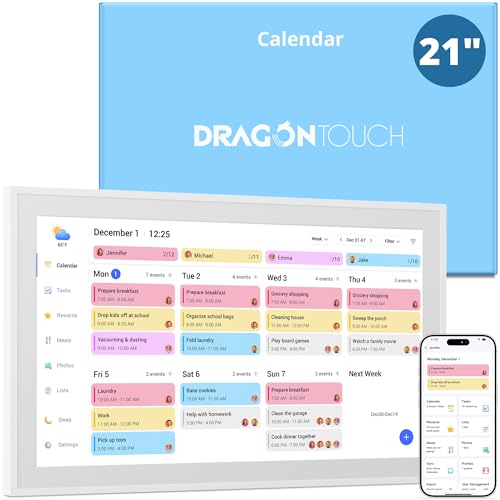
- Large 21.5-inch 1080p touchscreen
- Syncs iOS, Google, Outlook, and iCloud calendars
- Includes chores, dinner planning, and photo mode
Best For: Families wanting a prominent shared planning display
Best Compact Family Planner
Portable 10.1-Inch Smart Display

- Compact countertop-friendly design
- Two-way multi-account synchronization
- Adds chore rewards and AI meal planning
Best For: Families needing flexible planning in a small space
Best No-Subscription Organizer

- 15.6-inch HD touchscreen with no monthly subscription
- Syncs five major calendar services
- Adds chores, meals, weather, and custom lists
Best For: Families wanting a versatile mid-size home organizer
Best Wall-Mounted Planner – 15.6-Inch Smart Family Calendar
For families seeking smart displays for families, this 15.6-inch touchscreen combines shared scheduling with practical household tools. It syncs Google, iCloud, and Outlook calendars, while its wall-mountable design keeps plans visible in a central location.
Best For: Families that want a wall-mounted command center with chores, meal planning, calendar syncing, and a photo-frame mode.
Pros:
- Full HD touchscreen with a generous 15.6-inch display.
- Syncs supported Google, iCloud, Outlook, and other calendars through the eCalendar app.
- Includes chore tracking with customizable rewards and an integrated meal planner.
- Offers weather, auto-brightness, auto-rotation, sleep mode, and over-the-air updates.
Cons:
- The supplied notes do not specify whether desk placement is supported.
- Calendar and photo-sharing features depend on Wi-Fi and the companion app.
This is a practical choice when visibility matters most. Its bright display and family-focused planning tools make it especially suitable for a kitchen, hallway, or other shared space.
Best Large-Screen Command Center – 21.5-Inch Family Calendar
This 21.5-inch model stands out among smart displays for families because its large screen makes schedules, lists, chores, and meal plans easier to view together. It supports desk or wall mounting and syncs compatible Google, Outlook, and iCloud calendars without a monthly subscription fee.
Best For: Larger households, multigenerational families, or anyone who prioritizes maximum readability and shared organization.
Pros:
- Spacious 21.5-inch HD touchscreen is designed for easy viewing across generations.
- Combines calendars, to-do lists, groceries, chores, rewards, and meal planning.
- Supports desk or wall mounting for flexible placement.
- Includes 32GB of expandable storage, Wi-Fi photo and video sharing, 24/7 support, and a 2-year warranty.
Cons:
- Its larger footprint may require more wall or desk space than smaller options.
- The supplied notes do not list the specific supported calendar-sync limitations.
The roomy display is the main reason to choose this model. It is well suited to busy homes where several people need to read and update family information at once.
Best Compact Value – FORC 10.1-Inch Family Planner
Families looking for smart displays for families in a more compact format may prefer the FORC 10.1-inch planner. It provides calendar syncing, chores, rewards, meal planning, lists, weather, and photo sharing, with core features available without recurring subscription fees.
Best For: Families that want an approachable, space-conscious organizer with broad planning features and no subscription requirement.
Pros:
- Compact 10.1-inch Wi-Fi touchscreen fits smaller shared spaces.
- Syncs supported Google Calendar, iCloud, and Outlook accounts in daily, weekly, or monthly views.
- Includes chore assignments, star-based rewards, meal planning, recipes, grocery lists, and family to-dos.
- Supports remote photo sharing, local weather, sleep scheduling, and auto-wake features.
Cons:
- The smaller screen may show less information at once than larger family calendars.
- The supplied notes do not specify mounting options.
This model offers a strong mix of household tools in a smaller package. Choose it when you want a family command center without dedicating substantial wall or counter space.
Best Premium Ecosystem – Skylight 15-Inch Calendar
The Skylight Calendar is a polished option among smart displays for families, pairing a 15.4-inch HD touchscreen with shared schedules, chores, meal planning, tasks, and lists. It syncs with Google, iCloud, Outlook, Cozi, and Yahoo, and can sit on a surface or mount on a wall.
Best For: Families that want a refined shared calendar with broad service compatibility and optional premium personalization.
Pros:
- 15.4-inch HD touchscreen provides a readable central family display.
- Supports Google, iCloud, Outlook, Cozi, and Yahoo calendar syncing.
- Includes interactive chores, meal planning, shared tasks, lists, and app access.
- Offers wall or countertop placement plus an optional Disney mode with themed characters.
Cons:
- Some features, including photo screensavers, stars and rewards, Magic Import, and Disney mode, require the optional Calendar Plus plan.
- The supplied notes do not indicate that all features are included without a subscription.
Skylight is compelling for households that value a polished interface and wide calendar compatibility. Factor the optional Plus plan into the cost if you want its enhanced photo, rewards, or Disney features.
Best Large-Screen Pick – 27-Inch Digital Calendar Max
For families comparing smart displays for families, this 27-inch Digital Calendar Max is a strong choice when visibility and household planning matter most. Its anti-glare HD touchscreen supports wall or desk placement, portrait or landscape orientation, and syncs with Google, Apple, Outlook, and Cozi calendars.
Best For: Large households that want a highly visible central calendar with chores, meal planning, reminders, and shared lists.
Pros:
- Large 27-inch touchscreen with flexible wall or desktop placement.
- Syncs with Google, Apple, Outlook, and Cozi calendars, with remote editing through the companion app.
- Combines color-coded chores, rewards, meal planning, grocery lists, reminders, and a doodle whiteboard.
- Works as a subscription-free photo frame with automatic sleep and wake modes.
Cons:
- The large footprint may be excessive for smaller kitchens or limited wall space.
- The notes do not specify the companion app’s supported mobile platforms or update policy.
Choose this model if your priority is at-a-glance visibility across a busy household. It offers the broadest display area in this group while retaining family-focused tools and no monthly subscription.
Best Balanced Family Hub – Dragon Touch 15.6-Inch Calendar
The Dragon Touch 15.6-inch calendar is a practical middle-ground option among smart displays for families. Its Full HD touchscreen brings schedules, chores, dinner planning, and grocery lists together, while real-time Google, Outlook, and iCloud syncing keeps updates visible without a monthly fee.
Best For: Families of two to 10 members seeking a balanced-size organizer with remote phone control and a two-year warranty.
Pros:
- 15.6-inch 1080p touchscreen provides a useful balance of screen size and space.
- Syncs in real time with Google Calendar, Outlook, and iCloud at no subscription cost.
- Supports color-coded schedules, interactive chore tracking, dinner planning, and grocery lists.
- Includes a companion app, wall or desk mounting, and a two-year warranty.
Cons:
- The supplied notes do not mention Apple Calendar syncing by name, only iCloud.
- It is smaller than the 27-inch option for viewing from across a large room.
This is a well-rounded pick for households wanting core planning tools without committing to a very large display. The warranty and phone-based management add practical convenience for busy families.
Best Compact Budget-Friendly Organizer – 10.1-Inch Smart Display
For smaller spaces, this 10.1-inch Full HD smart display keeps the essentials of smart displays for families in a compact format. It syncs with Apple and Google Calendars, offers chore rewards and meal planning, and doubles as a photo frame and weather display with no monthly subscription.
Best For: Smaller kitchens, desks, or home offices where a compact family organizer with basic planning features is preferable.
Pros:
- Compact 10.1-inch 1080p touchscreen fits desks, kitchens, and wall-mounted setups.
- Syncs with Apple and Google Calendars using color-coded family schedules.
- Includes chore rewards, meal planning, grocery lists, to-do lists, and event reminders.
- Adds a photo slideshow, temperature, and daily forecast without a monthly fee.
Cons:
- The smaller screen may be less readable from a distance than the larger models.
- The supplied details do not identify supported mobile platforms or provide a warranty length.
- Calendar syncing is listed for Apple and Google, with fewer integrations specified than some alternatives.
This model makes sense when footprint and simplicity are more important than maximum viewing area or broad calendar compatibility. It still covers the main family-planning tasks and adds useful photo and weather functions.
Best Large-Screen Family Hub – 21.5-Inch Smart Calendar
For families comparing smart displays for families, the Dragon Touch 21.5-inch planner stands out as a large, easy-to-see scheduling hub. It combines shared calendars, chores, dinner planning, grocery lists, and photo display in one wall- or desk-mountable touchscreen without a monthly fee.
Best For: Large households that want a highly visible central family calendar with chore and meal-planning tools.
Pros:
- Large 21.5-inch 1080p touchscreen is easy to view across a room.
- Syncs multiple iOS, Google, Outlook, and iCloud calendars.
- Includes interactive chores, dinner planning, grocery lists, and photo-frame features.
- Supports wall or desk placement and includes a two-year manufacturer warranty.
Cons:
- The larger footprint may require more wall or counter space.
- Advanced Magic Import functions are paid features.
This is a strong choice when visibility and broad household organization matter most. Its large screen makes shared planning practical, while the photo-frame mode helps it blend into the home when schedules are not on display.
Best Compact Family Planner – Portable 10.1-Inch Smart Display
Among smart displays for families, this 10.1-inch planner is designed for flexible, room-to-room use. Its two-way account synchronization keeps family members’ schedules aligned, while chore rewards, cloud photos, and AI-generated meal plans add everyday household support.
Best For: Families that need a compact countertop planner with shared schedules, chore motivation, and meal-planning assistance.
Pros:
- Compact size fits kitchens, coffee tables, and other small spaces.
- Supports multiple accounts with two-way real-time synchronization.
- Uses star-based rewards to encourage children to complete chores.
- Can generate meal plans based on stated health goals and transform into a cloud photo frame.
Cons:
- The 10.1-inch screen provides less viewing area than larger family planners.
- The supplied notes do not specify supported calendar services or warranty coverage.
This model is a practical fit when portability matters more than maximum screen size. Its combination of shared updates, child-friendly rewards, and meal planning gives it a particularly broad role in smaller homes or busy kitchens.
Best No-Subscription Organizer – 15.6-Inch Family Planner
This 15.6-inch model is a versatile option for shoppers comparing smart displays for families. It combines a touchscreen calendar, chore chart, meal planner, weather display, custom lists, and photo frame, with synchronization for Google, iCloud, Outlook, Cozi, and Yahoo calendars and no monthly subscription.
Best For: Families seeking a mid-size organizer with broad calendar compatibility, flexible placement, and no recurring subscription.
Pros:
- 15.6-inch HD touchscreen balances visibility with a more manageable footprint.
- Syncs Google, iCloud, Outlook, Cozi, and Yahoo calendars.
- Includes chores with star tracking, meal planning, weather, and custom checklists.
- Works on a desk or wall and includes scheduled sleep/wake mode.
Cons:
- The supplied notes do not specify the exact included accessories beyond a standard US-style plug.
- Its feature-rich interface may be more than needed for households wanting only a basic calendar.
With its broad service compatibility and balanced 15.6-inch size, this planner is a well-rounded household command center. It is especially appealing for families that want shared organization without adding a monthly service cost.
How We Picked the Best Smart Displays for Families
We focused on digital family planners that make household information easy to see, update, and share. The selected models were evaluated by screen size, touchscreen usability, calendar synchronization, chore-management tools, meal-planning features, mounting flexibility, and subscription requirements.
Because family needs vary, the list includes compact displays for kitchens and entryways, larger wall-mounted organizers for shared spaces, and models with features such as rewards, photo-frame modes, and real-time Google or Outlook syncing. A good family display should reduce planning friction rather than create another complicated system to maintain.
Quick Comparison
| Best For | Look For |
|---|---|
| Small spaces | 10.1-inch display, compact footprint, simple controls |
| Most households | 15.6-inch screen, touchscreen calendar, chore and meal tools |
| Large families | 21.5-inch or larger display with clear multi-person views |
| Wall organization | Wall-mountable design, bright display, easy viewing distance |
| Connected schedules | Wi-Fi and synchronization with Google or Outlook calendars |
Key Buying Factors for Smart Displays for Families
Screen Size and Placement
Choose the screen based on where it will live and how many people need to read it at once. A 10.1-inch model works well on a counter or desk, while 15.6-inch displays offer a useful balance of visibility and space. Larger 21.5-inch and 27-inch screens are better for shared kitchens, mudrooms, or busy household command centers.
Calendar Sync and Connectivity
Wi-Fi connectivity is essential for keeping plans current. Check which services are supported before buying, especially if your household uses Google Calendar, Outlook, or multiple accounts. Real-time syncing is particularly useful when parents update appointments away from home.
Chores, Meals, and Family Participation
A basic calendar may be enough for appointment tracking, but chore charts, achievement rewards, and meal-planning tools can make a display more useful for the whole family. Look for clear profiles or task assignments if several people will use it.
Mounting, Interface, and Ongoing Costs
Confirm whether the unit can be wall-mounted or used with a stand. The touchscreen should be responsive and readable from normal viewing distance. Also check whether core features require a recurring subscription; a no-subscription model may offer better long-term value for straightforward scheduling.
Who Should Buy Which Smart Displays for Families?
Choose a compact 10.1-inch display if space is limited or you mainly need a shared calendar and reminders. A 15.6-inch model is the strongest all-around choice for most families because it provides room for schedules, chores, and meal planning without dominating the wall.
Move up to a 21.5-inch or 27-inch display if several family members need to read the planner at the same time or you want a prominent household command center. Prioritize advanced chore, reward, and meal features if children will actively use the display, while calendar syncing and a clean interface matter most for households focused on appointments and daily logistics.