Smart displays can make apartment living more organized without taking up much counter or wall space. The right model can combine calendars, reminders, video calls, recipes, entertainment, digital photos, and smart-home controls in one accessible screen.
Our selection includes compact voice-assistant displays, large family planning screens, wall-mountable calendars, and dedicated control panels, so you can match the display to your layout, routine, and connected devices.
Best 10 Smart Displays for Apartments Picks for 2026
Best Compact Smart Display

- Compact 5.5-inch screen for limited counter space
- Streams content and controls compatible smart-home devices
- Camera shutter and mic/camera controls support privacy
Best For: Small apartments, bedrooms, desks, and compact kitchens
Best Wall-Mounted Family Planner

- Syncs Google, Outlook, and iCloud calendars in real time
- Combines chores, meal planning, and family scheduling
- Mounts on a wall or sits on a desk with no essential subscription fee
Best For: Families and roommates coordinating schedules in shared spaces
Best Large-Screen Entertainment Display
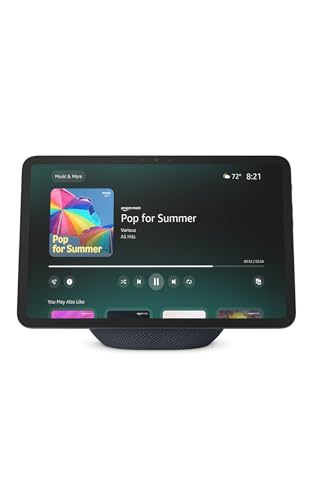
- 11-inch Full-HD touchscreen with more viewing area
- Spatial audio and streaming support suit entertainment
- Built-in smart-home hub controls compatible devices
Best For: Apartment living rooms and kitchens needing entertainment and smart-home control
Best Subscription-Free Family Command Center

- Real-time Google, Outlook, and iCloud syncing
- Includes chores, dinner planning, groceries, and shared schedules
- Phone updates, wall or desk mounting, and no monthly fee
Best For: Families needing a shared apartment planner with remote access
Best Security Hub
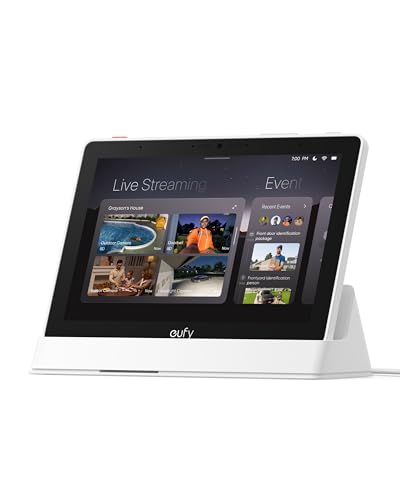
- 8-inch touchscreen security hub
- Shows four live camera feeds
- Local event playback and alerts
Best For: Apartment security monitoring with compatible eufy devices
Best Family Organizer

- Syncs Google, iCloud, and Outlook
- Tracks chores and household tasks
- Wall-mountable with photo mode
Best For: Shared apartment schedules, chores, meals, and lists
Best Compact Alexa Display
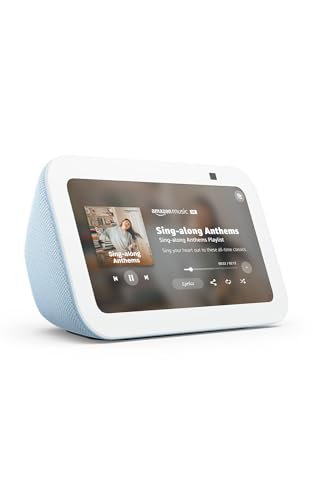
- Compact 5.5-inch smart screen
- Alexa control for compatible devices
- Calls, streaming, and camera viewing
Best For: Small-apartment entertainment and Alexa control
Best Large-Screen Family Hub
Mazera 21.5-Inch Smart Calendar

- Large Full HD touchscreen for shared planning
- Google Play supports multiple calendar and productivity apps
- Wall-mount or countertop setup with photo-frame mode
Best For: Families or roommates needing a highly visible, customizable planning hub
Best Heavy-Duty Pick
- Small 5.5-inch display fits apartment-sized surfaces
- Supports Alexa, entertainment, calls, and compatible cameras
- Includes camera shutter and microphone/camera-off controls
Best For: Small-space Alexa users who want communication and smart home features
Best Dedicated Calendar Frame

- FHD IPS touchscreen with four calendar views
- Syncs with Google, iCloud, and Outlook
- Doubles as a photo frame with desktop stand
Best For: Households wanting a focused, space-efficient shared calendar
Best Compact Smart Display – Echo Show 5
For apartments where counter space is limited, the Echo Show 5 is a practical choice among smart displays for apartments. Its 5.5-inch screen handles quick updates, video calls, compatible camera views, streaming, and smart-home controls without taking up much room.
Best For: Small kitchens, bedrooms, desks, and apartment residents who want Alexa features in a compact format.
Pros:
- Compact 5.5-inch display fits smaller spaces.
- Supports music, shows, podcasts, video calls, and compatible camera viewing.
- Includes microphone and camera controls plus a built-in camera shutter.
- Can display photos and control compatible lights and thermostats.
Cons:
- The smaller screen provides less viewing area than larger models.
- The 2 MP camera and compact speaker are more limited than those on larger smart displays.
The Echo Show 5 is the easiest fit when apartment space matters most. Choose it for everyday Alexa assistance and basic entertainment rather than a large-screen command center.
Best Wall-Mounted Family Planner – 15.6-inch Digital Calendar
This 15.6-inch touchscreen is a family-focused option among smart displays for apartments, combining shared calendars, meal planning, chores, and photo display in one screen. It can be wall mounted or used on a desk, helping organize a busy household without recurring subscription fees for essential calendar features.
Best For: Families and roommates who need shared scheduling, chore tracking, and a visible household command center.
Pros:
- Real-time syncing with Google, Outlook, iCloud, and other platforms.
- Combines calendars, meal planning, chore charts, and reward points.
- Works as either a wall-mounted or desk-mounted display.
- Offers 32GB of storage, expandable capacity, and photo-frame functionality.
Cons:
- Batteries are not included.
- The 15.6-inch format requires more wall or desk space than compact displays.
- Its focus is household organization rather than voice-controlled entertainment.
This model makes the most sense when visibility and coordination are priorities. Its large screen and flexible mounting are useful in an apartment entryway, kitchen, or shared workspace.
Best Large-Screen Entertainment Display – Echo Show 11
The Echo Show 11 brings a larger viewing area to smart displays for apartments, with an 11-inch Full-HD touchscreen, spatial audio, and a built-in smart-home hub. It is suited to apartments where one device needs to handle entertainment, recipes, calendars, calls, and connected-device control.
Best For: Apartment living rooms and kitchens where a larger screen, stronger audio, and broad Alexa functionality are useful.
Pros:
- 11-inch Full-HD display provides more viewing area for shows, recipes, and calendars.
- Spatial audio, crisp vocals, and a wide soundstage support entertainment use.
- Controls compatible smart-home devices without a separate hub.
- Centered auto-framing camera supports video calls and live camera views.
Cons:
- Its larger footprint may be less suitable for small counters or cramped rooms.
- The feature-rich design may be more than needed for simple reminders or basic smart-home control.
Choose the Echo Show 11 when screen size and sound matter as much as apartment automation. It is a stronger all-around entertainment and home-control hub than a compact display.
Best Subscription-Free Family Command Center – Dragon Touch 15.6
The Dragon Touch 15.6 is a family-oriented choice among smart displays for apartments, combining a Full-HD touchscreen with shared calendars, chores, dinner planning, grocery lists, and photo display. Real-time syncing and phone access make it useful for households that want coordination without monthly fees.
Best For: Families of two to ten members who want a shared planner with remote updates and flexible placement.
Pros:
- Syncs Google Calendar, Outlook, and iCloud in real time with no subscription fees.
- Supports color-coded schedules, chore tracking, dinner planning, and grocery lists.
- Companion app allows updates from a phone while away from home.
- Can be wall mounted or placed on a desk and doubles as a photo frame.
Cons:
- The 15.6-inch screen needs substantial wall or desk space.
- Its family-planning focus may be less useful for shoppers seeking entertainment or voice-assistant features.
This is a practical pick for apartment households that want a visible, shared organizer rather than a general-purpose media display. The app access is especially helpful for making updates away from home.
Best Security Hub – eufy Smart Display E10
For shoppers comparing smart displays for apartments, the eufy Smart Display E10 is primarily a security-focused home hub. Its 8-inch touchscreen brings compatible camera feeds, alerts, recordings, and security-event summaries into one easy-to-use location.
Best For: Apartment residents who want a dedicated display for monitoring compatible eufy security devices and reviewing activity.
Pros:
- Automatically shows a live feed and voice alert when supported security events occur.
- Displays up to four simultaneous live camera feeds.
- Supports local playback of historical events and daily security summaries.
- Includes a wall mount, charging station, and 64GB configuration.
Cons:
- Its features are centered on the eufy security ecosystem rather than general entertainment.
- At 2.44 pounds, it may be less convenient to move between rooms than smaller displays.
The E10 makes the most sense when security monitoring is the priority. Apartment dwellers already using compatible eufy cameras, doorbells, or HomeBase 3 can get a more immediate overview of activity without relying only on a phone.
Best Family Organizer – 10.1-Inch Digital Calendar
Among smart displays for apartments, this 10.1-inch digital calendar is designed to organize household routines rather than stream entertainment. It combines shared calendars, chores, meal planning, lists, reminders, weather, and photo slideshows in a wall-mountable format.
Best For: Busy households that need a highly visible shared planning screen for schedules, chores, meals, and shopping lists.
Pros:
- Syncs schedules with Google, iCloud, and Outlook in real time.
- Includes chore tracking with task assignment, progress monitoring, and points.
- Combines meal planning, grocery lists, reminders, weather, and photo display.
- Wall-mountable design suits high-traffic areas.
Cons:
- It is a planning-focused display, not a general-purpose smart speaker or video hub.
- The supplied notes do not specify support for video calling or media streaming.
This display is a practical choice for apartments where shared routines are the main challenge. Mount it in a visible spot to give everyone access to the same schedule and household to-do list, while the photo mode adds a more personal touch.
Best Compact Alexa Display – Amazon Echo Show 5
For compact smart displays for apartments, the Amazon Echo Show 5 pairs a 5.5-inch screen with Alexa voice control and a speaker designed for stronger bass and clearer vocals. It can show weather and news, stream supported content, control compatible smart-home devices, and support calls.
Best For: Apartment residents who want a small, versatile Alexa display for entertainment, smart-home control, calls, and camera viewing.
Pros:
- Compact 5.5-inch display fits smaller counters and shelves.
- Streams music, shows, podcasts, and other supported content.
- Controls compatible lights and thermostats through Alexa.
- Includes a 2MP camera, camera shutter, and microphone/camera off button.
Cons:
- The screen is smaller than the 8-inch and 10.1-inch options in this roundup.
- Camera viewing and smart-home control depend on compatible devices and services.
The Echo Show 5 is the most flexible small-space pick here. It suits apartment residents who want one compact device for Alexa commands, audio, basic visual information, video calling, supported streaming, and compatible camera access.
Best Large-Screen Family Hub – Mazera 21.5-Inch Smart Calendar
For apartments that need a shared planning station, the Mazera is one of the most flexible smart displays for apartments. Its large touchscreen supports Google Play apps, multiple calendar services, household planning tools, photo apps, and compatible smart home controls without requiring a subscription-based calendar system.
Best For: Families or roommates who want a large, customizable command center for a kitchen, office, or shared living space.
Pros:
- 21.5-inch Full HD anti-glare touchscreen is easy to view across a room.
- Supports Google Calendar, Apple Calendar, Outlook, Cozi, and other apps through Google Play.
- Works as a calendar, task dashboard, photo frame, and compatible smart home control screen.
- Can be wall-mounted or used on a countertop with the included metal stand.
Cons:
- The larger footprint may require more wall or counter space than compact displays.
- Its broad app flexibility may take more setup than a dedicated calendar device.
The Mazera stands out when visibility and customization matter most. It is a strong apartment-friendly option if you have room for a substantial display and want to choose your own calendar and productivity apps.
Best Heavy-Duty Pick – Like-New Echo Show 5
The Like-New Echo Show 5 is a compact choice among smart displays for apartments, combining Alexa controls, a 5.5-inch screen, video calling, entertainment, and smart home features. Its small footprint suits nightstands, kitchen counters, desks, and other spaces where a larger display would be intrusive.
Best For: Apartment residents who want a space-saving Alexa display for music, calls, compatible cameras, and everyday smart home control.
Pros:
- Compact 5.5-inch design fits easily on small counters and tables.
- Supports music, shows, news, weather, video calls, and compatible camera viewing.
- Built-in camera shutter and microphone/camera-off button provide added privacy controls.
- Like-New units are refurbished, tested, certified to look and work like new, and include the same limited warranty as a new device.
Cons:
- The 5.5-inch screen is less suitable for viewing shared calendars from across a room.
- It is a refurbished Like-New product and may arrive in generic Amazon-branded packaging.
Choose this Echo Show when a compact assistant matters more than a dedicated household calendar. It offers a broad mix of entertainment, communication, privacy, and smart home functions in an apartment-friendly size.
Best Dedicated Calendar Frame – OFFNOVA 10.1-Inch Planner
The OFFNOVA 10.1-inch model is a focused option for smart displays for apartments, pairing a dedicated digital calendar with task management and photo slideshows. Its 1920×1200 IPS touchscreen and multiple calendar views make it useful for organizing household schedules without taking up the space of a full-size wall display.
Best For: Families or shared households that want a straightforward desktop calendar with color-coded schedules and photo-frame functionality.
Pros:
- 10.1-inch 1920×1200 FHD IPS touchscreen provides clear interactive calendar views.
- Syncs with Google, iCloud, and Outlook calendars over dual-band Wi-Fi.
- Offers schedule, day, week, and month views with member color coding.
- Also works as a photo frame and includes a dedicated desktop stand.
Cons:
- It is designed as a desktop calendar rather than a wall-mounted display.
- Its feature set is more calendar-focused than the app-flexibility of a general Android smart hub.
The OFFNOVA is a practical middle ground for apartment desks, entryway tables, or kitchen counters. It keeps the focus on shared schedules and reminders while adding a useful photo-slideshow mode when the calendar is idle.
How We Picked the Best Smart Displays for Apartments
We focused on the features that matter most in smaller homes: screen size, placement flexibility, ease of setup, calendar support, voice control, sound quality, smart-home compatibility, and everyday usefulness. The list includes both general-purpose displays and dedicated digital planners, since apartment residents may prioritize different tasks.
We also considered whether a display works well on a nightstand, kitchen counter, desk, shelf, or wall; whether it requires a subscription; and how easily households can share schedules, reminders, photos, and chores.
Quick Comparison
| Best For | Recommended Type | Why It Stands Out |
|---|---|---|
| Small spaces | Compact smart display | Uses little counter or shelf space |
| Family scheduling | 10- to 15.6-inch planner | Shows calendars, chores, and reminders at a glance |
| Wall organization | Wall-mountable touchscreen | Keeps shared information visible without using furniture |
| Smart-home control | Dedicated hub or assistant display | Provides a central interface for compatible devices |
| Entertainment and video calls | Larger smart display | Offers more comfortable viewing and stronger audio potential |
Key Buying Factors for Smart Displays for Apartments
Size and Placement
Measure the intended location before buying. A compact five-inch model suits a bedside table, small kitchen, or desk, while a 10- to 21.5-inch screen is easier to read from across a room but needs more wall or counter space.
Calendar and Household Features
If the display is primarily for organization, check support for Google, Outlook, iCloud, or other calendars. Look for shared schedules, chore lists, reminders, photo rotation, and real-time syncing. A no-subscription option may be important if you want predictable long-term costs.
Smart-Home Ecosystem
Choose a model that works with the devices you already own. Alexa-focused displays are convenient for compatible voice commands, while dedicated hubs may be better for viewing cameras, lighting, locks, and other connected equipment from one screen.
Audio, Camera, and Privacy
Consider speaker performance if the display will play music or podcasts. For video calls, check camera capabilities and physical privacy controls. Place any camera-equipped screen where it provides useful coverage without pointing into private areas.
Who Should Buy Which Smart Displays for Apartments?
Choose a compact assistant display if you want timers, music, weather, recipes, reminders, and basic smart-home control in a limited footprint. Choose a larger digital planner if several people need to see schedules, chores, appointments, or photos throughout the day.
Choose a wall-oriented calendar when counter space is scarce and shared visibility matters. Choose a smart-home hub if controlling cameras and connected devices is your main goal. For mixed use, a larger assistant display offers a better balance of organization, entertainment, voice control, and communication.