The best compact smart displays save space while putting useful controls, calendars, entertainment, and information within easy reach. This roundup compares ten options ranging from voice-enabled home hubs to portable monitors and specialized screens.
Because these products serve very different purposes, the right choice depends on your preferred ecosystem, screen size, connectivity, sound quality, and installation needs.
Best 10 Compact Smart Displays Picks for 2026
Best Compact Alexa Display
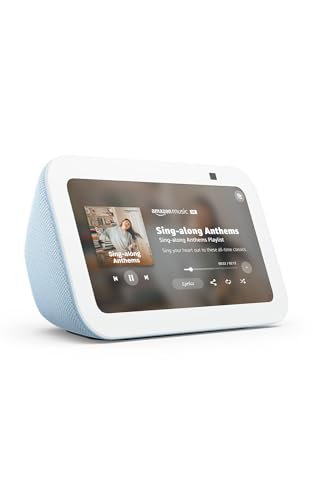
- 5.5-inch display for small spaces
- Smart-home control and video calls
- Camera shutter and privacy controls
Best For: Bedrooms, kitchens, desks, and other compact spaces
Best Family Planning Display

- Syncs Google, iCloud, and Outlook calendars
- Tracks chores, meals, and grocery lists
- Wall-mountable with photo slideshow mode
Best For: Families managing shared schedules and household tasks
Best Large Compact Smart Display

- 8.7-inch HD touchscreen with spatial audio
- Built-in smart-home hub
- Auto-framing camera with 3.3x zoom
Best For: Entertainment, video calls, and broader smart-home control
Best Security Monitoring Display
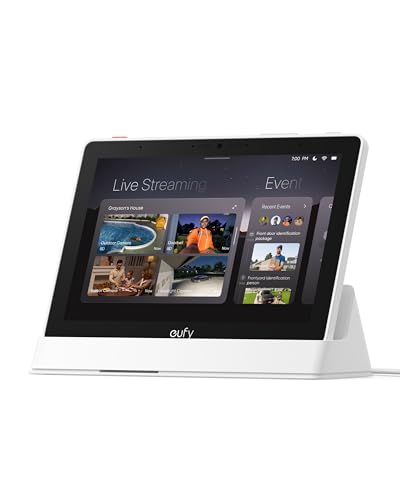
- Shows up to four live camera feeds
- Instant alerts for doorbell and camera events
- Local event playback and security summaries
Best For: eufy-equipped homes focused on camera monitoring
Best Portable Work Display

- USB-C plug-and-play design for compatible devices
- 1080p IPS panel with matte finish and HDR
- Slim, lightweight build with USB-C and mini HDMI
Best For: Remote workers, travelers, and portable dual-screen setups
Best Compact Smart Home Hub

- Voice and touchscreen control through Google Assistant
- Manages compatible smart-home devices
- Displays photos, recipes, weather, and entertainment
Best For: Google Assistant users and small-room smart-home control
Best Retro Desktop Display

- Retro television design for desks and shelves
- Android 11 with Play Store access
- Supports photos, games, HDMI, Wi-Fi, and Bluetooth
Best For: Collectors, retro décor fans, and compact desktop entertainment
Battery Panel Pick

- Real-time battery readings and alarms
- Panel switch for compatible JK BMS units
- Small housing for RV and portable power projects
Best For: Compatible JK Smart BMS monitoring
Smart Home Pick

- 7-inch touchscreen with Google Assistant
- Controls compatible smart-home devices
- Streams YouTube, Spotify, and more
Best For: Google Assistant-powered home control and media
PC Build Pick

- Customizable themes and backgrounds
- Rotates for horizontal or vertical use
- USB-C plug-and-play connection
Best For: ITX chassis and compact desktop projects
Best Compact Alexa Display – Echo Show 5
The Echo Show 5 is a practical choice among compact smart displays when you want Alexa features in a small footprint. Its 5.5-inch screen supports glanceable information, video calls, compatible camera viewing, entertainment, smart-home controls, and photo slideshows.
Best For: Bedrooms, kitchens, desks, and small spaces that need a versatile Alexa display.
Pros:
- Compact 5.5-inch screen fits easily in smaller spaces.
- Supports music, shows, podcasts, weather, news, and video calls.
- Built-in camera includes a physical shutter and microphone/camera controls.
- Can control compatible smart-home devices and display personal photos.
Cons:
- The smaller screen is less suitable for detailed viewing than larger models.
- The 2 MP camera is more basic than the Echo Show 8’s camera system.
The Echo Show 5 balances everyday Alexa functions with a space-saving design. Choose it when compact size matters more than a larger display or room-filling audio.
Best Family Planning Display – 10.1-Inch Digital Calendar
This wall-mountable digital calendar is a specialized option among compact smart displays, combining shared scheduling with household planning tools. It syncs with Google, iCloud, and Outlook while also handling chores, meal planning, grocery lists, reminders, photos, and local weather.
Best For: Families that want a visible command center for schedules, chores, meals, and shared lists.
Pros:
- Syncs schedules from Google, iCloud, and Outlook in real time.
- Includes chore tracking with points and reward support.
- Combines meal planning, grocery lists, reminders, weather, and photo slideshows.
- Can be wall-mounted in a high-traffic area.
Cons:
- Its calendar-focused design is less entertainment-oriented than an Alexa display.
- The supplied notes do not identify support for video calling or smart-home device control.
For households focused on organization rather than media playback, this display offers a useful shared planning hub. Its wall-mountable format helps keep family information visible and centralized.
Best Large Compact Smart Display – Echo Show 8
The Echo Show 8 is a strong all-around pick among compact smart displays for shoppers who want more screen and sound without moving to a full-size hub. Its 8.7-inch HD touchscreen, spatial audio, smart-home hub, camera features, and Alexa+ support cover entertainment, organization, calls, and home control.
Best For: Kitchens, living areas, and home offices where a larger screen and stronger multimedia experience are useful.
Pros:
- Vibrant 8.7-inch HD display provides more viewing area than smaller models.
- Spatial audio, crisp vocals, and a wide sound stage support music and video.
- Built-in smart-home hub controls compatible devices without a separate hub.
- Centered auto-framing camera offers 3.3x zoom and noise reduction for calls.
Cons:
- Its larger footprint may be less convenient for tight bedside or desk spaces.
- The supplied features are centered on Alexa-compatible services and devices.
The Echo Show 8 is the more capable entertainment and household-assistant option in this group. It is worth choosing over a smaller display when screen visibility, audio, and video calling take priority.
Best Security Monitoring Display – eufy Smart Display E10
The eufy Smart Display E10 takes a security-first approach to compact smart displays. Its 8-inch touchscreen works as a home hub for live camera feeds, doorbell and detection alerts, local event playback, and daily security summaries through compatible eufy equipment.
Best For: Homes using eufy cameras, doorbells, and HomeBase 3 for centralized monitoring.
Pros:
- Can show four simultaneous live camera feeds.
- Automatically displays live video and voice alerts for doorbell or camera events.
- Downloads historical events to local storage for quicker playback.
- Offers facial and package recognition features powered by HomeBase 3.
Cons:
- Its most distinctive features depend on compatible eufy security products and HomeBase 3.
- It is less suited to general entertainment or calendar use than Alexa-oriented displays.
- The supplied dimensions and weight suggest it may be less portable than smaller smart displays.
The E10 is best viewed as a dedicated security control panel rather than a general-purpose media screen. It makes the most sense for eufy households that want quick, centralized access to cameras and recorded events.
Best Portable Work Display – Yodoit 15.6-inch FHD Monitor
The Yodoit 15.6-inch monitor is a practical choice among compact smart displays for remote workers who need a second screen without carrying a full-size monitor. Its 1080p IPS panel, slim design, USB-C connectivity, and included smart cover make it suited to travel, shared workspaces, and temporary desks.
Best For: Remote work, travel, presentations, study, and portable dual-screen setups.
Pros:
- USB-C plug-and-play connection can work without a separate power adapter on compatible devices.
- Full HD IPS display offers a 178-degree viewing angle, matte finish, and HDR support.
- Supports USB-C and mini HDMI connections, with built-in speakers for basic audio.
- Lightweight, slim construction fits easily into a laptop bag.
Cons:
- USB-C single-cable operation depends on the connected device supporting video output and power requirements.
- The 300-nit display and 60Hz refresh rate are practical for work but not designed as a high-end gaming monitor.
- Some devices require the mini HDMI and USB-A power combination rather than one cable.
Choose this model when portability and extra workspace matter more than a built-in smart operating system. It is a compact secondary screen rather than a standalone streaming display, but its broad device compatibility makes it flexible for work and entertainment.
Best Compact Smart Home Hub – Google Nest Hub 7-inch
Google Nest Hub 7” Smart Display with Google Assistant (1st Gen) - Chalk (Bulk Packaging)
Check Price On AmazonThe first-generation Google Nest Hub is a straightforward option among compact smart displays for kitchens, bedrooms, desks, and nightstands. Its 7-inch touchscreen combines Google Assistant voice control with smart-home management, entertainment, reminders, recipes, and visual information.
Best For: Smart-home control, hands-free assistance, music, recipes, reminders, and bedside or countertop use.
Pros:
- Google Assistant provides hands-free answers, timers, reminders, and daily organization.
- Controls compatible lights, cameras, thermostats, plugs, speakers, and other devices.
- 7-inch display supports Google Photos, music, videos, weather, and recipes.
- Compact footprint works well on counters, desks, nightstands, and office surfaces.
Cons:
- This is the first-generation model, so it may lack features found on newer Nest Hub versions.
- The supplied product is a Korean/international version and may require changing the language to English during setup.
- Bulk packaging may provide a less retail-oriented unboxing experience.
The Nest Hub is the strongest fit here if you want a dedicated Google Assistant control point rather than a portable monitor. Confirm language settings and compatibility with your existing smart-home devices before buying.
Best Retro Desktop Display – FILONA 4-inch Android Mini TV
The FILONA 4-inch mini TV stands out among compact smart displays with its vintage television styling and Android 11 system. It can serve as a decorative desktop gadget, digital photo frame, mini entertainment screen, secondary display, or retro game device for buyers who value character as much as function.
Best For: Retro décor, collectors, casual Android entertainment, photo display, and compact gaming.
Pros:
- Distinctive 1980s–1990s-inspired design adds visual appeal to desks, shelves, and bedside tables.
- Android 11 supports downloadable apps through the Play Store.
- Can function as a mini TV, photo frame, calendar, secondary monitor, and retro gaming device.
- Includes Wi-Fi, Bluetooth, HDMI, USB ports, and 16GB of storage.
Cons:
- The 4-inch 480p screen is very small and suited more to casual viewing than detailed work.
- The 4:3 aspect ratio can make 16:9 videos or HDMI content appear stretched or distorted.
- Game support and downloaded content may require setup and external storage.
This model is best treated as a charming multifunction desktop gadget rather than a conventional smart TV. Its compact retro design is the main attraction, while the Android platform adds flexibility for light entertainment and personalization.
Battery Panel Pick – Compact JK BMS LCD Display
This compact smart display is designed for compatible JK Smart BMS setups, giving you a quick view of battery performance without opening the enclosure. Its small panel-mount housing suits RVs, marine systems, golf carts, scooters, and portable power projects.
Best For: Monitoring and controlling compatible JK Smart BMS installations.
Pros:
- Shows pack voltage, charge/discharge current, state of charge, and active alarms in real time.
- Built-in active switch can turn the compatible BMS and display on or off from the panel.
- Scrolling fault codes help identify voltage, current, temperature, communication, and balance-wire issues.
- Compact 2-inch design measures 2.39 x 1.42 x 0.42 inches.
Cons:
- Display only; the BMS is not included.
- Requires a compatible JK Smart BMS RS485 display port.
- Not intended for PB Series V19 systems.
This is a focused battery-monitoring panel rather than a general-purpose smart display. Confirm your BMS model and port compatibility before ordering.
Smart Home Pick – Google Nest Hub 1st Gen
The Google Nest Hub is a practical choice among compact smart displays for everyday home control and media. Its 7-inch touchscreen pairs with Google Assistant for hands-free answers, reminders, smart-home commands, videos, music, and personalized routines.
Best For: Kitchen counters, bedside tables, and homes using Google Assistant-compatible devices.
Pros:
- 7-inch, 1024×600 touchscreen displays weather, calendars, photos, and videos.
- Voice control supports reminders, questions, and compatible smart-home devices.
- Works with more than 200 devices from over 50 brands, including lights, cameras, and thermostats.
- Supports YouTube, Spotify, Pandora, Google Photos, Wi-Fi, and Bluetooth.
Cons:
- This is the first-generation model.
- Its listed video output resolution is 1024×600, rather than a higher-resolution format.
- Smart-home functions depend on compatible devices and Wi-Fi connectivity.
With its 7-inch screen and broad Google Assistant integration, the Nest Hub balances information, entertainment, and smart-home control in a relatively small footprint measuring 7 x 2.65 x 4.65 inches.
PC Build Pick – 5-Inch ITX Smart Display
This 5-inch smart display is aimed at ITX chassis and desktop projects where a small configurable screen is useful. It connects through USB-C, supports horizontal or vertical orientation, and lets you customize backgrounds and themes through a visual editor.
Best For: ITX PC builds and compact desktop setups needing a configurable auxiliary screen.
Pros:
- Visual theme editor lets you change background images and switch themes.
- Supports horizontal and vertical display modes with 360-degree rotation.
- Stepless brightness adjustment is designed for more comfortable extended viewing.
- USB-C plug-and-play connection requires no separate power supply or HDMI cable.
Cons:
- The 5-inch screen is primarily suited to compact projects rather than large-format viewing.
- Its software and theme features require connection to the intended computer setup.
- Product dimensions are 7.87 x 5.12 x 2.36 inches, so verify available mounting space.
For builders who want a customizable auxiliary screen without adding a separate power connection, this ITX-focused display offers useful rotation, brightness, and theme controls in a compact format.
How We Picked These Compact Smart Displays
We selected products that represent the main ways shoppers use Compact Smart Displays: controlling smart-home devices, viewing calendars and media, monitoring security systems, extending a laptop screen, and displaying information in specialized hardware projects. We considered display size and resolution, voice-assistant support, connectivity, portability, audio capability, installation format, and ease of use.
The selection includes mainstream options from Amazon and Google, dedicated smart-home panels, portable screens, and niche displays. That variety matters because a small smart display for a kitchen counter has very different requirements from a travel monitor or an embedded control screen.
Quick Comparison
| Best For | Recommended Type | What to Prioritize |
|---|---|---|
| Alexa households | Echo Show 5 or Echo Show 8 | Assistant features, audio, and screen size |
| Google households | Google Nest Hub | Google Assistant and smart-home compatibility |
| Security control | eufy Smart Display E10 | Camera integration and centralized controls |
| Family scheduling | 10.1-inch wall calendar display | Visibility, mounting, and calendar software |
| Travel and work | 15.6-inch portable monitor | USB-C compatibility, brightness, and portability |
| DIY or embedded projects | Specialized small LCD displays | Dimensions, voltage, connectors, and software support |
Key Buying Factors for Compact Smart Displays
Choose the Right Ecosystem
Amazon Echo models are the natural fit for Alexa users, while Google Nest Hub models work best with Google services and compatible smart-home devices. Check compatibility before buying, particularly if your lights, cameras, thermostats, or routines already depend on one platform.
Match Screen Size to the Viewing Distance
A 4- or 5-inch screen suits close-up controls and small spaces, but a 7- to 10-inch display is easier to read from across a kitchen or bedroom. Larger portable monitors are better for documents and multitasking than for voice-assistant features.
Check Connectivity and Power
Most countertop smart displays require continuous power and Wi-Fi. Portable monitors may use USB-C for video and power, though compatibility varies by device. Specialized LCD panels can require particular connectors, voltages, controllers, or installation hardware.
Consider Audio, Privacy, and Placement
Speakers matter for music, calls, alarms, and voice responses. Also review microphone controls, camera features, privacy switches, and whether the display is designed for a desk, wall, vehicle, or embedded enclosure.
Who Should Buy Which Compact Smart Displays?
Choose an Echo Show 5 when counter space and Alexa access matter most; select the Echo Show 8 if you want a more readable screen and fuller sound. Google users should consider a Nest Hub, while eufy households may prefer a dedicated security control panel. A wall-mounted calendar is best for shared schedules. Travelers and laptop users should choose the portable monitor, while DIY builders should focus on the small LCD and ITX-compatible options rather than conventional voice-assistant displays.