The best wireless smart displays do more than show information: they can organize family schedules, control compatible devices, stream content, display photos, or deliver signage without relying on a permanent wired setup.
Our 2026 roundup covers compact home hubs, touchscreen calendars, portable monitors, e-paper boards, and battery-powered commercial displays. Use the guide below to match screen type, connectivity, battery life, and software support to your needs.
Best 10 Wireless Smart Displays Picks for 2026
Security Hub Pick
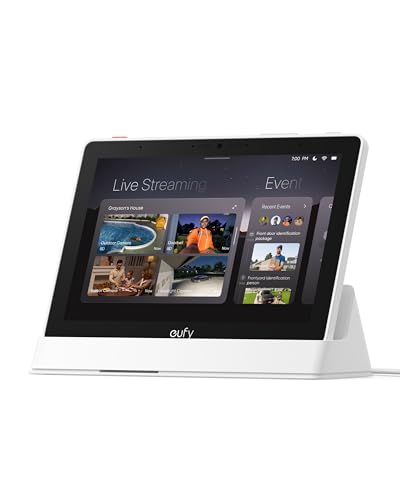
- 8-inch touchscreen security hub
- Four simultaneous live camera feeds
- Local event playback and daily reports
Best For: eufy security users who want a dedicated monitoring panel
Portable Productivity Pick

- AirPlay and Miracast support
- 8000mAh battery for 4–5 hours
- Full HD anti-glare IPS display
Best For: travelers and remote workers needing a portable second screen
Family Planning Pick
Changing F16S Digital Calendar
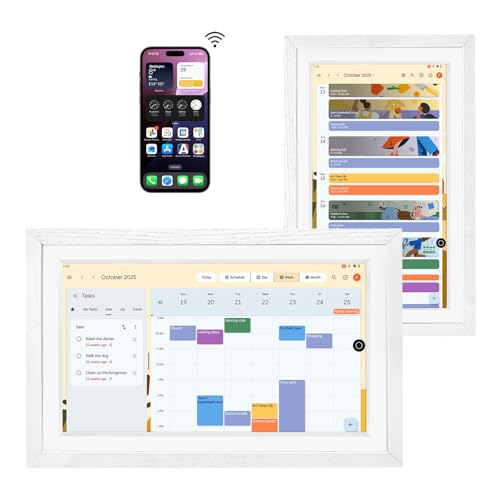
- 15.6-inch anti-glare FHD touchscreen
- Syncs Google and Apple calendar data
- Chore chart, photos, apps, and voice control
Best For: families managing shared schedules and household tasks
Paper-Like Display Pick

- Glare-free E-Ink screen
- NFC setup with 2.4GHz Wi-Fi
- Shows photos, weather, clocks, and custom text
Best For: small, low-glare displays for desks, bedrooms, and refrigerators
Family Organization Pick

- Syncs Google, iCloud, and Outlook schedules
- Tracks chores, meals, lists, and reminders
- Adds photo slideshows and wall mounting
Best For: Busy families managing shared routines
Everyday Assistant Pick

- Built-in Google Assistant for hands-free help
- Controls compatible smart-home devices
- Streams media and manages daily tasks
Best For: Compact Google Assistant setups
Large Interactive Display Pick
15.6-Inch Android Signage Screen
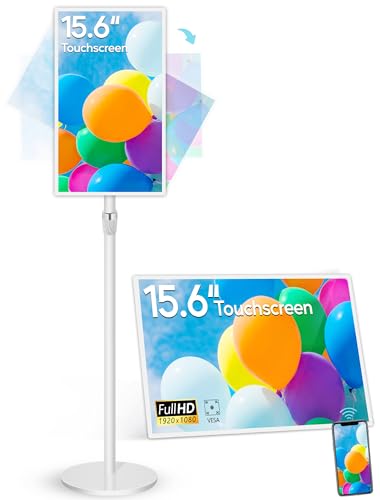
- 15.6-inch touchscreen with 1080p resolution
- Mirrors iOS, Android, Windows, and macOS devices
- Runs Android apps with battery and mounting options
Best For: Interactive signage and presentations
Family Command Center

- Combines scheduling, casting, and video calls
- 1280x800 touchscreen with Bluetooth 5.0
- Wall mount and desktop stand included
Best For: Families managing shared schedules and communication
Portable Business Signage

- Android 11 with 4GB RAM and 32GB storage
- 23,200mAh removable battery
- USB, cloud, CMS, and custom app support
Best For: Portable signage in restaurants, bars, and retail
Long-Life Epaper Signage
7.5-Inch Three-Color Epaper Display

- Three-color reflective e-paper screen
- Bluetooth updates with customizable templates
- Battery rated for up to one year
Best For: Reusable office, conference, school, and retail signs
Security Hub Pick – eufy Smart Display E10
The eufy Smart Display E10 is one of the more security-focused wireless smart displays, combining an 8-inch touchscreen with hands-free alerts and multi-camera monitoring. It is designed for quick access to live and recorded footage throughout the home.
Best For: Households using compatible eufy security cameras, doorbells, and HomeBase 3.
Pros:
- Automatically shows live video and provides voice alerts for doorbell rings, door unlocks, and camera detections.
- Supports four simultaneous live feeds for at-a-glance property monitoring.
- Local storage, daily reports, and facial and package recognition support quick review of events.
Cons:
- Its strongest features are centered on the eufy security ecosystem.
- The display is more focused on monitoring than general entertainment or productivity.
Choose the E10 if security visibility is your priority. Its accessible touchscreen and automatic alerts make it practical for families, seniors, and anyone who wants a dedicated monitoring panel.
Portable Productivity Pick – 15.6-inch Wireless Monitor
This battery-powered 15.6-inch monitor is a practical choice among wireless smart displays for extending or mirroring a compatible phone, tablet, laptop, or PC. AirPlay and Miracast provide cable-free casting, while USB-C and Mini HDMI offer wired backup options.
Best For: Remote work, travel, presentations, and portable dual-screen setups.
Pros:
- Supports AirPlay and Miracast for wireless screen mirroring with compatible devices.
- Built-in 8000mAh battery provides a stated 4 to 5 hours of cord-free use.
- Full HD IPS panel offers 60Hz refresh, 400-nit brightness, 125% sRGB coverage, and a 180-degree kickstand.
Cons:
- Netflix, Hulu, Prime Video, and other streaming apps do not support wireless mirroring because of HDCP restrictions.
- It has no Bluetooth or touchscreen, and some devices require a wired connection.
- Wireless laptop extend mode and automatic rotation have device-specific setup limitations.
This monitor stands out for flexible travel use rather than smart-home control. Check your device’s wireless and USB-C display compatibility before buying, especially if you need laptop extension or protected streaming support.
Family Planning Pick – Changing F16S Digital Calendar
The Changing F16S is a family-oriented wireless smart display that combines a 15.6-inch touchscreen calendar with chore planning, photo display, Android apps, and voice control. It can sync Google Calendar and Apple calendar data through the described app setup without a calendar subscription.
Best For: Families wanting a shared kitchen, living-room, or office scheduling display.
Pros:
- Supports shared calendar planning and compatibility with apps such as Outlook, Cozi, Canvas, and ParentSquare.
- 15.6-inch anti-glare FHD touchscreen doubles as a photo frame and family information hub.
- Google Assistant, built-in speakers, Bluetooth, and a built-in battery add everyday flexibility.
Cons:
- Apple calendar syncing requires installing Google Calendar and using the same account.
- Software update support is listed as unknown.
- The supplied notes do not specify battery capacity or runtime.
The F16S is a versatile household organizer rather than a simple calendar. Its large screen, Android app support, and voice assistant make it useful when several family members need schedules and tasks visible in one place.
Paper-Like Display Pick – Paper Portrait E-Ink Frame
The Paper Portrait is a compact wireless smart display built around a glare-free E-Ink screen. Instead of acting like a conventional tablet, it presents photos, artwork, weather, clocks, quotes, stock prices, custom text, QR codes, or Bible verses with a paper-like appearance.
Best For: Bedrooms, offices, refrigerators, and small wall displays where low-glare, glanceable information matters.
Pros:
- Paper-like E-Ink screen remains visible when asleep and avoids harsh backlighting.
- NFC setup simplifies connecting to a 2.4GHz Wi-Fi network.
- App and web controls support remote image uploads and scheduled display changes.
Cons:
- It supports 2.4GHz Wi-Fi only; 5GHz-only networks require router changes.
- The compact 4.2-inch display is less suitable for large photos or room-wide viewing.
- The supplied warranty is only one month.
Pick the Paper Portrait when a quiet, low-power information display is more important than video, touch interaction, or a large screen. Its rechargeable, cord-free design and magnetic mounting make it especially convenient for small spaces.
Family Organization Pick – Digital Calendar Wall Display
For households comparing wireless smart displays, this 10.1-inch wall-mounted digital calendar focuses on shared scheduling and family organization. It syncs with Google, iCloud, and Outlook, while also adding photo slideshows, chores, meal planning, grocery lists, weather, and reminders.
Best For: Busy families that want a shared command center for schedules, tasks, meals, and memories.
Pros:
- Synchronizes schedules across Google, iCloud, and Outlook.
- Includes chore tracking with points for completed tasks.
- Combines meal planning, grocery lists, reminders, weather, and photo display.
- Supports wall mounting for placement in high-traffic areas.
Cons:
- Its primary focus is family planning rather than general voice-assistant features.
- The 10.1-inch screen may offer less viewing space than larger display options.
This is a practical choice when shared organization matters more than entertainment. The chore rewards and synchronized lists are especially useful for coordinating daily routines, while the slideshow mode gives the display a more personal role in the home.
Everyday Assistant Pick – Google Nest Hub 7
Google Nest Hub 7” Smart Display with Google Assistant (1st Gen) - Chalk (Bulk Packaging)
Check Price On AmazonAmong wireless smart displays, the Google Nest Hub offers a compact way to access Google Assistant, control compatible smart-home devices, and handle everyday tasks. Its 7-inch touchscreen fits naturally on kitchen counters, desks, nightstands, and office surfaces.
Best For: Users who want a compact Google Assistant display for smart-home control, media, and daily reminders.
Pros:
- Supports hands-free help through Google Assistant.
- Controls compatible lights, cameras, thermostats, plugs, and speakers.
- Handles music, videos, Google Photos, weather, timers, recipes, and reminders.
- Compact design works well in kitchens, bedrooms, offices, and on nightstands.
Cons:
- This is a first-generation model with a relatively small 7-inch display.
- The listing identifies it as an international/Korean version, so setup may require changing the language to English.
- Bulk packaging includes the cable but may provide a less retail-oriented presentation.
The Nest Hub is a straightforward pick for shoppers already invested in Google Assistant-compatible devices. It is better suited to voice control, quick information, and light entertainment than to large-format viewing or advanced productivity work.
Large Interactive Display Pick – 15.6-Inch Android Signage Screen
For shoppers seeking wireless smart displays with more screen space and interactive capability, this 15.6-inch Android 13 display combines digital signage, touchscreen control, and wireless screen mirroring. It can run apps, autoplay content, operate on battery for 4–6 hours, and mount or stand in a range of indoor settings.
Best For: Businesses, educators, and households needing a larger interactive display for signage, presentations, or Android apps.
Pros:
- 15.6-inch 10-point capacitive touchscreen with 1920×1080 resolution.
- Supports wireless screen sharing from iOS, Android, Windows, and macOS through the EShare app.
- Android 13, 4GB RAM, and 64GB storage support an open app ecosystem.
- Offers a 10,000mAh battery, adjustable stand, VESA mounting, and multiple ports.
Cons:
- Its listed 4–6-hour battery runtime is limited for all-day untethered use.
- At 13 pounds, it is substantially less portable than compact smart displays.
- The product is designed primarily for indoor commercial and interactive use.
This display makes the most sense when size, touch interaction, and connectivity are priorities. Its signage features and mounting flexibility suit commercial environments, while wireless mirroring and Android apps broaden its usefulness for presentations, learning, and home projects.
Family Command Center – 8-Inch Smart Calendar Display
This 8-inch wireless smart display combines family scheduling, media casting, and video calling in one touchscreen hub. Its 1280×800 display, Bluetooth 5.0, camera, speakers, and multiple ports make it a practical choice for connected home organization.
Best For: Families that want a shared digital calendar with video-calling and smart-home connectivity features.
Pros:
- Integrates scheduling, media casting, and video calls.
- 8-inch 1280×800 touchscreen supports calendar synchronization and apps.
- Includes a 5MP camera, dual speakers, Bluetooth 5.0, and multiple ports.
- Can be wall-mounted or placed on a desktop.
Cons:
- Software update support is listed as unknown.
- The supplied information does not specify compatibility with particular calendar platforms.
Choose this model if you want a versatile family display rather than a calendar-only device. The included mounting options and communication hardware add flexibility, though platform compatibility should be confirmed before purchase.
Portable Business Signage – WeADS Android Display Board
This wireless smart display is designed for portable business signage, with Android 11, Wi-Fi, touchscreen control, and a high-capacity removable battery. USB uploads, cloud or CMS management, and custom app support give businesses several ways to manage content.
Best For: Restaurants, bars, retailers, and other businesses needing flexible tabletop signage that can operate away from a constant power connection.
Pros:
- Android 11 system with 4GB RAM and 32GB storage.
- 23,200mAh battery supports extended use without constant power.
- Removable battery and portable design support different placements.
- Supports custom apps, USB content uploads, and cloud/CMS management.
Cons:
- At 3.6 pounds, it may be less convenient to move than a lightweight sign.
- The supplied details do not state a specific runtime per charge.
This is a stronger fit for commercial messaging than home scheduling. Its storage, app flexibility, and removable battery are useful for changing displays, but buyers should verify the preferred CMS and expected battery runtime.
Long-Life Epaper Signage – 7.5-Inch Three-Color Epaper Display
This compact wireless smart display uses a reflective three-color e-paper screen for signs, name cards, prices, agendas, and QR codes. Bluetooth updates through a dedicated app and a claimed year-long battery life make it suited to information that changes occasionally rather than constantly.
Best For: Offices, schools, conferences, and retailers that need reusable signs with low-maintenance wireless updates.
Pros:
- Supports text, images, QR codes, and barcodes with customizable templates.
- Reflective display is readable from any 180-degree viewing angle.
- Built-in 4000mAh battery is rated for up to one year per charge.
- Bluetooth setup enables wireless updates through the dedicated app.
Cons:
- Three-color e-paper is less versatile than a full-color display.
- Bluetooth updates require the dedicated app.
- The supplied information does not specify the app’s platform compatibility.
Consider this display when readability, reusability, and long battery life matter more than animation or rich color. Its paper-like reflective screen should work well in bright settings, while the three-color format limits visual variety.
How We Picked These Wireless Smart Displays
We selected displays across the main use cases shoppers are likely to consider: smart-home control, family planning, photo and art presentation, portable viewing, and commercial signage. We compared screen size, touch capability, wireless connectivity, operating system, power options, camera and speaker features, app compatibility, and installation flexibility.
Because these products serve different audiences, there is no single specification that makes one model best for everyone. A home calendar should be easy to update and readable from across a room, while a portable monitor needs dependable casting and practical battery performance. Commercial displays also require sturdier stands, longer runtime, and easier content management.
Quick Comparison
- Best for smart-home control: A dedicated hub-style display such as the eufy Security E10.
- Best for family organization: A touchscreen digital calendar with Google and iCloud synchronization.
- Best for portable viewing: A 15.6-inch wireless monitor with AirPlay and Miracast support.
- Best for low-power information: An e-paper display with Bluetooth updates and long battery life.
- Best for signage: A larger Android display with a high-capacity battery and adjustable stand.
- Best for simple voice assistance: Google Nest Hub, provided its older hardware and platform support meet your needs.
Key Buying Factors for Wireless Smart Displays
Screen Type and Viewing Environment
LCD and touchscreen panels are best for colorful media, interactive calendars, video, and signage. E-ink or e-paper screens use less power and remain comfortable for static information, but they usually refresh more slowly and offer less visual flexibility.
Wireless Compatibility
Check whether the display supports the devices and services you already use. AirPlay is useful for Apple equipment, while Miracast broadens compatibility with many Windows and Android devices. Wi-Fi is essential for cloud calendars, streaming, and remote updates; Bluetooth is mainly useful for accessories or nearby content transfers.
Power and Placement
Battery-powered models are easier to move and can work on counters, tables, or temporary signage locations. For wall-mounted calendars and smart-home panels, confirm charging requirements, mounting hardware, and cable routing before buying. A larger battery does not automatically guarantee a specific runtime, especially with bright screens, Wi-Fi, and video playback.
Software and Updates
Review the companion app, synchronization options, subscription requirements, and operating-system support. A no-subscription calendar may cost more initially but can be less expensive over time. Older smart displays should be checked for current software support and compatibility with the services you depend on.
Who Should Buy Which Wireless Smart Displays?
Choose a smart-home hub if your priority is controlling compatible devices from one location. Families should favor a calendar display with reliable cloud synchronization, touch controls, and a readable layout. Remote workers, travelers, and presenters will get more value from a portable monitor that supports their preferred casting standard.
For restaurants, retail counters, events, and temporary promotions, prioritize Android flexibility, adjustable positioning, battery capacity, and commercial content tools. Select an e-paper board when information changes infrequently and long battery life matters more than color or animation. Finally, choose a photo-focused wireless display if rotating images, artwork, weather, or personal messages is the main goal.