If you’re serious about virtual reality gaming, you know how essential it is to keep your gear charged and ready for action. A reliable VR charging dock can make all the difference, from organizing your headset and controllers to providing fast charging options. With so many options available, finding the right one for your needs can be overwhelming. Let’s explore the top choices to help you power up your VR experience effectively.
VR Headset Charging Dock for Meta Quest 3/Quest 2

If you’ve got a Meta Quest 2 or Quest 3, the VR Headset Charging Dock is the perfect solution for you. This sleek dock supports your headset and controllers, keeping your gaming area tidy while providing a dedicated space for everything. It charges your headset in just 3-5 hours using a Type-C cable and is compatible with third-party accessories. Constructed from high-quality ABS plastic, it features non-slip pads for stability and a tilted tray to prevent wobbling. Plus, assembly’s a breeze—no tools required! With a solid 4.5-star rating, it’s a must-have for any VR enthusiast.
Best For: VR enthusiasts looking for a tidy and efficient way to charge their Meta Quest 2 or Quest 3 headset and controllers.
Pros:
- Sleek and compact design keeps gaming areas organized.
- Quick charging time of 3-5 hours with Type-C compatibility.
- Made of durable ABS plastic with non-slip pads for stability.
Cons:
- Requires a specific power adapter for optimal charging speed.
- Limited to Meta Quest 2 and Quest 3 compatibility.
- Potential wobbling if not placed on a completely flat surface.
Kinwin Magnetic Charging Dock for Meta Quest 3S/3

The Kinwin Magnetic Charging Dock for Meta Quest 3S/3 is an ideal choice for avid VR gamers who want a streamlined and efficient charging solution. You can charge your headset and two controllers simultaneously, ensuring everything’s ready for your next gaming session. With a magnetic USB-C interface, it minimizes wear and provides stable connections. Plus, the customizable RGB ambient lights keep you informed about charging status. The dock includes rechargeable batteries, lasting over 1,000 uses, which cuts down on waste. With an 18-month warranty and friendly customer support, you can enjoy peace of mind with your purchase.
Best For: Avid VR gamers looking for an efficient and organized charging solution for their Meta Quest 3S/3 headset and controllers.
Pros:
- Supports simultaneous charging for headset and two controllers, ensuring everything is ready for use.
- Features customizable RGB ambient lights to indicate charging status, adding a visual appeal.
- Includes rechargeable batteries with a long lifespan, reducing waste and the need for disposable batteries.
Cons:
- Charging time may be longer compared to some quick-charge options on the market.
- Specific compatibility limited to Meta Quest 3S/3, which may not suit users with other VR headsets.
- The aesthetic design might not appeal to all users’ preferences or gaming setups.
BOBOVR BD3 Charging Dock for B100

Designed specifically for BOBOVR B100 batteries, the BOBOVR BD3 Charging Dock stands out by charging up to three batteries simultaneously. With its fast charging capability, you’ll get your batteries from 0-80% in just one hour, thanks to the independent 30W power for each battery. The desktop design features a digital display that shows output power, the fastest charging battery, and precise battery levels. Keep in mind, it’s only compatible with B100 batteries, not the B2 Battery Pack. With an 18-month warranty and a solid 4.7-star rating, this dock is a reliable choice for any VR enthusiast.
Best For: VR enthusiasts who use BOBOVR B100 batteries and need a fast, efficient charging solution.
Pros:
- Charges up to three B100 batteries simultaneously with fast charging (0-80% in 1 hour).
- Digital display provides real-time information on output power and battery levels.
- Solid customer reviews with a 4.7-star rating and an 18-month warranty.
Cons:
- Not compatible with B2 Battery Pack or other battery packs; limited to B100 only.
- Charger not included; requires a separate 30-100W USB-C charger.
- Desktop design may not be convenient for all users or setups.
Meta Quest Compact Charging Dock for Meta Quest 3/3S
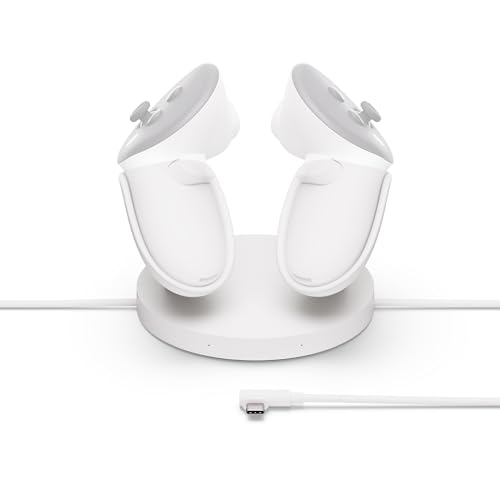
For those who own the Meta Quest 3 or 3S and want a seamless charging experience, the Meta Quest Compact Charging Dock is an ideal choice. This dock offers convenient drop-in wireless charging for your Touch Plus Controllers, ensuring they’re always ready for action. It includes an extended headset charging cable and two rechargeable lithium-ion batteries, so you won’t run out of power. Plus, you can easily check your controller battery levels right within your headset. With its sleek Moonstone White design and solid customer rating of 4.2 stars, this dock elevates your VR experience while keeping your gear charged.
Best For: Gamers who own the Meta Quest 3 or 3S and want a hassle-free, efficient charging solution for their controllers and headset.
Pros:
- Convenient drop-in wireless charging for controllers with overheating protection.
- Extended headset charging cable included for added flexibility.
- Rechargeable lithium-ion batteries for controllers ensure you never run out of power.
Cons:
- Charging dock may take up extra space on your gaming setup.
- Limited compatibility, as it only works with Meta Quest 3/3S and Touch Plus Controllers.
- Some users may prefer a docking station with more features or functionality.
Anker Charging Dock for Oculus Quest 2
If you’re looking for a hassle-free charging solution for your Oculus Quest 2, the Anker Charging Dock is the perfect choice. This Oculus certified charging station includes a headset display holder, controller mount, and two rechargeable batteries, making it easy to keep everything powered up. Simply place your headset and controllers on the dock for effortless charging, fully recharging them in just 2.5 hours. With a sleek design and an 18-month warranty, you can trust Anker’s friendly customer support if you need assistance. Weighing only 1.54 pounds, it’s a compact solution for your VR gear.
Best For: Gamers who want a convenient and efficient charging solution for their Oculus Quest 2 headset and controllers.
Pros:
- Effortless Charging: Simply place the headset and controllers on the dock for easy charging without the need for battery swaps.
- High-Speed Charging: Fully charges both the headset and controllers in just 2.5 hours, ensuring minimal downtime.
- Compact Design: Weighs only 1.54 pounds, making it a space-saving addition to your gaming setup.
Cons:
- Limited USB Ports: Only one USB Type C port may limit connectivity options for additional devices.
- Corded Electric Power Source: Requires a power outlet, which might restrict placement options in some setups.
- No Additional Features: Lacks extra functionalities beyond charging and storage, which may not appeal to users seeking multifunctional devices.
YOGES Charging Dock for Meta Quest 3S and Quest 3

The YOGES Charging Dock is the ultimate solution for Meta Quest 3 and Quest 3S users seeking a fast and organized charging experience. With a vertical design, it saves space while keeping your headset and controllers neatly in one place. You’ll love the quick charging times—your headset fully charges in about 2.5 hours, while controllers take 3-3.5 hours. The dock includes two rechargeable batteries and features LED status indicators for easy monitoring. Plus, its strong magnetic adsorption guarantees safe charging. Enjoy the cool blue lighting ambiance, and remember, customer support is available 24/7 to assist you with any issues.
Best For: Meta Quest 3 and Quest 3S users looking for an efficient and organized charging solution for their gaming accessories.
Pros:
- Fast charging times: fully charges the headset in about 2.5 hours and controllers in 3-3.5 hours.
- Space-saving vertical design keeps your gaming area tidy and organized.
- Includes two rechargeable batteries and features strong magnetic adsorption for safe charging.
Cons:
- Not compatible with Quest 2, limiting its use for those with older models.
- Requires a separate purchase of an 18W fast charging adapter for optimal charging speed.
- LED lights may not appeal to users who prefer a more minimalist aesthetic.
Tilted Nation Charging Dock – Fast Magnetic Charging with RGB Modes

Gamers seeking a sleek and efficient charging solution for their Quest 3 headset and controllers will find the Tilted Nation Charging Dock an ideal choice. This dock offers fast magnetic charging, getting your headset and controllers powered up in just three hours. With three docking stations and 12 customizable RGB lighting modes, you can create the perfect gaming ambiance. The compact design reduces clutter, while the touch sensor makes cycling through lighting options a breeze. Plus, you’ll receive rechargeable AA batteries and custom controller covers. Enjoy a stylish organization that keeps everything ready for your next gaming session!
Best For: Gamers looking for a stylish and efficient charging solution for their Quest 3 headset and controllers.
Pros:
- Fast magnetic charging for both headset and controllers in just three hours.
- Customizable RGB lighting modes enhance the gaming ambiance.
- Compact design reduces clutter and includes rechargeable batteries and custom covers.
Cons:
- Customer feedback shows a moderate rating of 3.7 out of 5 stars.
- Limited to only Quest 3 headset and controllers, not compatible with other devices.
- The touch sensor for lighting may not be intuitive for all users.
PlayStation VR2 Sense™ Controller Charging Station

For those who own a PlayStation VR2 and appreciate seamless gaming experiences, the PlayStation VR2 Sense™ Controller Charging Station is an essential accessory. This sleek, white dock charges your controllers simultaneously with a convenient click-in design, making it quick and easy to use. You won’t need to connect it to your console, freeing up valuable USB ports for other devices. Weighing just 0.76 kilograms and measuring 10 x 2.75 x 7.5 inches, it fits perfectly in any setup. With a fantastic 4.7-star rating from over 800 reviews, it’s a top choice among gamers looking to stay powered up.
Best For: Gamers who own a PlayStation VR2 and want a convenient way to charge their controllers without occupying USB ports on their console.
Pros:
- Simultaneous charging allows for quick power-ups of both controllers at once.
- Click-in design makes it easy to dock and remove controllers.
- No console connection required provides flexibility and keeps USB ports available for other devices.
Cons:
- May take up additional space in your gaming setup.
- Limited to compatibility with PlayStation VR2 and PS5 controllers.
- Does not come with a console or additional charging cables.
VR Headset Charging Dock for Meta Quest 3/Quest 2
Looking for a reliable charging solution for your Meta Quest 2 or Quest 3? This VR Headset Charging Dock is perfect for you. It supports Type-C charging for your headset and fits controllers with covers, keeping everything organized. Weighing just 0.49 kg, it’s compact and easy to store. With a charging time of 3-5 hours, you’ll be back in the game quickly. The dock’s sturdy design features non-slip pads and a tilted tray, ensuring stability and protection. Plus, assembly is a breeze—no tools needed! Enjoy peace of mind with a 30-day return guarantee from Amazon.
Best For: Gamers looking for a convenient and organized charging solution for their Meta Quest 2 or Quest 3 headsets and controllers.
Pros:
- Compact design helps keep gaming areas tidy and organized.
- Supports quick charging with a range of compatible power adapters.
- Easy assembly and disassembly without the need for tools.
Cons:
- Charging time of 3-5 hours may be longer compared to some fast-charging options.
- Limited to devices with Type-C charging ports, excluding older models.
- Weight may not be suitable for those seeking a lightweight charging solution.
Kinwin Magnetic Charging Dock for Meta Quest 3S/3

The Kinwin Magnetic Charging Dock for Meta Quest 3S/3 stands out as an essential accessory for anyone who wants to keep their VR headset and controllers organized and fully charged. You can charge your headset and two controllers simultaneously, with the headset reaching full charge in about three hours. The magnetic USB-C interface reduces wear, ensuring a stable connection. Plus, customizable RGB ambient light enhances your gaming setup while indicating charging status. With eco-friendly rechargeable batteries lasting over 1,000 uses, you’ll minimize waste. Enjoy an 18-month warranty and friendly customer support for peace of mind.
Best For: Gamers who own a Meta Quest 3S/3 or Oculus Quest 3 and want a convenient and organized charging solution for their headset and controllers.
Pros:
- Simultaneous charging for headset and two controllers, enhancing convenience.
- Eco-friendly rechargeable batteries reduce waste and save on replacements.
- Customizable RGB ambient light adds an aesthetic touch and indicates charging status.
Cons:
- Charging time may be longer compared to traditional battery solutions.
- Limited to compatibility with Meta Quest 3S/3 and Oculus Quest 3 only.
- The design may not appeal to all users’ tastes or gaming setups.
Factors to Consider When Choosing a VR Charging Dock
When choosing a VR charging dock, you need to take into account several key factors. Make certain the dock is compatible with your headset, as well as how efficiently it charges. Additionally, think about its design, stability, and battery capacity to verify it meets your gaming needs.
Compatibility With Headsets
Choosing the right VR charging dock hinges on compatibility with your specific headset model. Confirm the dock you choose is designed for your headset, whether it’s the Meta Quest 2, Quest 3, or Quest 3S. Also, check if it supports the necessary charging method, like Type-C connections, which are common in newer models. It’s crucial to find a dock that accommodates any third-party accessories you might use, guaranteeing a snug fit while charging. Additionally, confirm that the dock’s power specifications, including voltage and amperage, match your headset’s requirements for peak performance. By focusing on these factors, you’ll make certain your charging dock meets all your headset’s needs and keeps your device ready for action.
Charging Speed Efficiency
While selecting a VR charging dock, it’s essential to take into account charging speed efficiency to guarantee your headset is ready for use without unnecessary delays. Charging times can vary from 2.5 to 5 hours, so look for docks that specify ideal power ratings, like 5V-3A or 12V-3A, for the best performance. Some docks feature fast charging technology, allowing your headset to reach 80% capacity in just an hour. If you want to maximize efficiency, consider docks with simultaneous charging capabilities that can power both your headset and controllers at once. Additionally, magnetic charging interfaces can improve connection stability and minimize wear on charging ports, ensuring longer-lasting performance with every charge.
Design and Aesthetics
A well-designed VR charging dock not only serves its functional purpose but also elevates your gaming space. Look for a compact structure that keeps your area organized and reduces clutter. Aesthetic features, like customizable RGB lighting, enhance your gaming ambiance while providing visual indicators of charging status. Opt for vertical or space-saving designs that maximize room usage and allow easy access to your headsets and controllers. Consider materials that are both durable and visually appealing, as they contribute to the overall look and feel of your setup. Finally, choose a dock with dedicated spaces for both headsets and controllers to improve functionality and maintain a cohesive aesthetic in your gaming environment.
Stability and Protection
When enhancing your gaming setup, stability and protection play an essential role in ensuring your VR charging dock serves its purpose effectively. Look for a dock with an enlarged contact area and non-slip pads to prevent wobbling, keeping your headset securely in place while charging. A tilted tray design enhances balance, reducing the risk of accidental falls. Opt for high-quality materials, like ABS plastic, which contribute to the dock’s durability and stability, ensuring it withstands regular use. Additionally, a well-designed dock should have dedicated spaces for controllers, preventing them from tipping over or being knocked off easily. These stability features are vital for maintaining the longevity of both your charging dock and your devices, minimizing wear and tear from unexpected movements.
Battery Life and Capacity
Choosing the right VR charging dock means considering battery life and capacity, as these factors directly influence how long you can enjoy your gaming sessions. Rechargeable batteries for VR controllers can last over 1,000 uses, minimizing replacements and environmental waste. Look for docks that offer quick charging times; some headsets can fully charge in just 2.5 to 4 hours, letting you get back to gaming sooner. Pay attention to battery capacity, measured in milliampere-hours (mAh), since it directly affects how long you can play before needing a recharge. Additionally, some docks allow for simultaneous charging of both your headset and controllers, optimizing battery life management and ensuring all your devices are ready to use together when you need them.
Charging Method and Features
Battery life and capacity play an essential role in your gaming experience, but the charging method and features of a VR charging dock can greatly enhance your convenience and usability. Consider docks with various charging methods, like magnetic connections or drop-in designs, which simplify the process and improve durability. Look for options that allow simultaneous charging of your headset and controllers to minimize downtime between sessions. Charging times can vary; some docks fully charge in just 2.5 to 5 hours. Additional features like LED indicators or RGB ambient lighting can signal your charging status while enhancing the gaming atmosphere. If you’re eco-conscious, choose docks with rechargeable batteries to minimize waste and make your gaming setup more sustainable.
Space-Saving Organization
While it’s easy to overlook the organization of your gaming area, a well-designed VR charging dock can make a significant difference in maximizing space. Look for a compact structure that minimizes space usage, helping keep your area tidy. Charging docks with dedicated spots for headsets and controllers prevent clutter, ensuring everything’s in one place. Vertical or stacked designs work wonders in smaller spaces, allowing you to charge without sacrificing room. Many docks also include built-in cable management solutions to avoid tangles and enhance your setup’s aesthetic. A neat organization not only boosts visual appeal but also makes it easier to access your devices quickly when you’re ready to plunge into your VR experience.
Warranty and Support Options
When investing in a VR charging dock, it’s essential to contemplate the warranty and support options available. Many docks come with warranties ranging from 30 days to 18 months, giving you peace of mind about your purchase. Check the warranty details on product listings to understand the manufacturer’s commitment to quality. Customer support can vary, so look for brands that offer professional and friendly assistance for troubleshooting or inquiries. Additionally, most retailers have a 30-day return policy, ensuring you can return the dock if it doesn’t meet your needs. Remember, reliable warranty and support options can greatly enhance your overall ownership experience, making your investment more worthwhile.