A sim racing button box puts frequently used commands within reach, so you can adjust settings without hunting for keyboard keys mid-race. The right one depends less on its size than on whether its controls fit the way you drive.
These 10 listings span compact panels, higher-input options, and several versions of the PXN CB1. Use the roundup to narrow down a layout, then check the exact listing before you buy.
Best 10 Sim Racing Button Box Picks for 2026
Best for Multi-Sim Setups
PXN CB1 with RGB and Flexible Mounting

- 19 controls across nine input types
- Adjustable RGB lighting
- Clamp and 100 × 100 mm VESA options
Best For: Windows PC users switching between racing and other simulators
Best Metal-Build Option

- Carbon-fiber faceplate and metal housing
- Six press-enabled rotary encoders
- 32-key customizable profile
Best For: PC racers seeking substantial controls and frequent dial adjustments
Best for PXN Wheel Users
PXN CB1 with 30 Programmable Functions
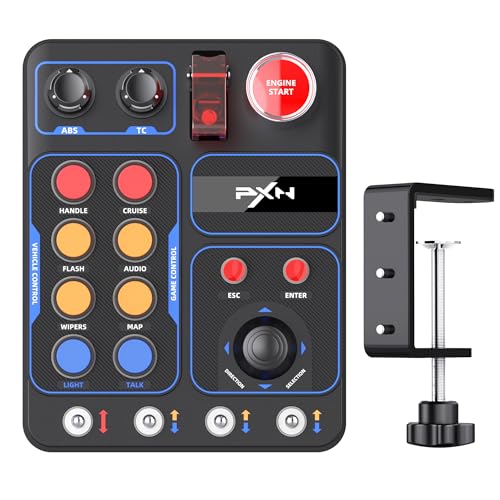
- Up to 30 programmable functions
- Lists PXN V9 Gen2 compatibility
- Desk mount fits surfaces up to 7 cm
Best For: PC racers pairing a button box with a PXN V9 Gen2
Best Horizontal Layout
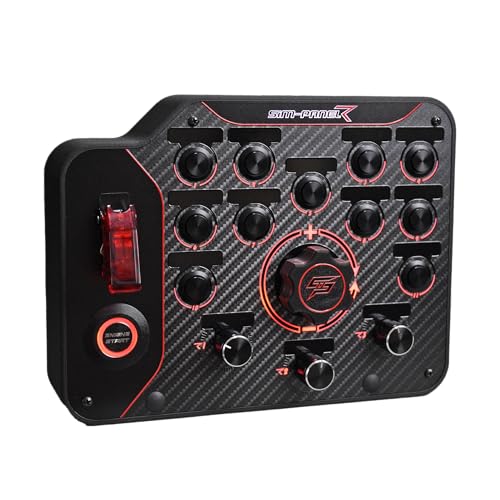
- Reachable horizontal layout
- Individually programmable button modes
- Desk clamp and 75 mm VESA mounting
Best For: PC racing rigs needing a horizontal, mountable control panel
Best for PXN Wheel Setups

- 30 programmable buttons
- Seven selectable RGB effects
- Clamp supports desks up to 70 mm
Best For: Windows racers using a PXN V9 GEN2 wheel
Most Tactile Controls

- 37 programmable control positions
- Mix of knobs, toggles and buttons
- USB mapping without a proprietary app
Best For: PC racers who want distinct controls by feel
Best for Flexible Mounting

- 30 programmable inputs
- Desk clamp and 100 x 100 mm VESA holes
- Seven RGB lighting effects
Best For: Windows sim players choosing between desk and rig mounting
Compact PC Pick

- Seven red LED metal buttons
- Four rotary encoders and a covered toggle
- Plug-and-play PC connection
Best For: PC racers seeking a compact, straightforward panel
Versatile Sim Pick

- Up to 30 programmable inputs
- RGB lighting on most buttons
- Desk clamps and VESA mounting holes
Best For: PC users switching between racing, trucking, and farming sims
Telemetry Lighting Pick

- 34 configurable inputs
- 100 RGB LEDs with supported SimHub effects
- Carbon fiber front and aluminum enclosure
Best For: Windows PC racers seeking control density and telemetry lighting
Best for Multi-Sim Setups – PXN CB1 with RGB and Flexible Mounting
The PXN CB1 sim racing button box puts frequently used commands on a dedicated panel instead of your keyboard. Its 19 physical controls span nine input types, with up to 30 programmable inputs for racing, trucking, flight, and farming sims on Windows PC.
Best For: PC sim users who want one configurable control panel for several simulation genres.
Pros:
- Mix of encoders, toggles, push buttons, a joystick, and dedicated system keys.
- Adjustable RGB color and brightness help make controls visible in low light.
- Includes a clamp for surfaces up to 70 mm thick and 100 × 100 mm VESA mounting compatibility.
- Driver-free USB connection; inputs are mapped in supported games.
Cons:
- Designed for Windows PC, not console use.
- Control assignments must be configured within your simulator.
Choose this CB1 listing if mounting flexibility and a broad mix of physical inputs matter more than having a specialized racing-only layout.
Best Metal-Build Option – MiYee Carbon Fiber Button Box
This MiYee sim racing button box emphasizes physical construction: a genuine carbon-fiber faceplate, full-metal housing, and CNC-machined, backlit buttons. It connects to a PC over USB without a driver and offers a customizable 32-key profile.
Best For: PC racers who prioritize metal controls and multiple rotary encoders.
Pros:
- Carbon-fiber faceplate and full-metal unibody housing.
- Six press-enabled programmable rotary encoders for mapped adjustments.
- Ten backlit buttons, three self-locking metal toggles, and a dedicated start control.
- Includes a secure, adjustable installation bracket.
Cons:
- PC compatibility is specified; console support is not listed.
- The notes do not specify which individual racing games are supported.
Its encoder-heavy layout makes sense if you frequently adjust mapped settings mid-session. Check that its mounting bracket suits your cockpit before choosing it over a model with stated clamp or VESA dimensions.
Best for PXN Wheel Users – PXN CB1 with 30 Programmable Functions
This PXN CB1 sim racing button box is a practical add-on for a PC setup, particularly if you use the listed PXN V9 Gen2 steering wheel. It combines 19 physical controls across nine input types with up to 30 programmable functions, plus adjustable RGB lighting.
Best For: PC racers using a PXN V9 Gen2 or playing the racing and trucking titles named in the listing.
Pros:
- Programmable controls support personalized commands.
- Listing names Assetto Corsa, iRacing, Project Cars, Euro Truck Simulator 2, and American Truck Simulator.
- Desk mounting accommodates surfaces up to 7 cm thick.
- RGB lighting offers multiple effects, with color and brightness adjustments described.
Cons:
- The compatibility description focuses on PC and the PXN V9 Gen2; verify any other intended setup.
- ABS construction may not appeal to buyers specifically seeking a metal housing.
This is the CB1 listing to examine if named game compatibility and PXN wheel pairing are your priorities. Confirm the exact mounting and lighting features you need before ordering.
Best Horizontal Layout – SIM-PANEL Gen 2 Button Box
The SIM-PANEL Gen 2 sim racing button box uses a horizontal layout intended to keep controls visible and within reach. It is a USB device designed exclusively for PC racing setups, with individually programmable button modes and customizable backlighting.
Best For: PC racers who prefer a horizontal control arrangement on a desk or racing rig.
Pros:
- Horizontal, organized layout emphasizes easy control recognition and reach.
- Individually programmable button modes allow personalized assignments.
- Integrated desk clamp and 75 mm VESA mounting compatibility.
- Customizable backlighting and a listed one-year manufacturer warranty.
Cons:
- Not compatible with consoles.
- The supplied specifications do not state a button count.
Consider this model if layout and mounting are your deciding factors. If you need a specific number of inputs or particular switch types, verify those details before purchasing.
Best for PXN Wheel Setups – PXN CB1 Racing Button Box
The PXN CB1 sim racing button box gives Windows PC players 30 programmable buttons for keeping driving commands close at hand. It also supports the PXN V9 GEN2 PC steering wheel, making it worth a look if that wheel is already part of your setup.
Best For: Windows sim racers who want a configurable control panel with PXN wheel compatibility.
Pros:
- 30 programmable buttons can be assigned to functions such as signals, wipers, cruise control and horn.
- RGB lighting offers seven effects selectable with a knob.
- USB connection and included clamp support desk mounting up to 70 mm thick.
Cons:
- Compatibility is specified for Windows PCs, not consoles.
- Expanded lighting customization requires connection to a wheel base.
Choose this model if button count and PXN integration matter more than a compact, minimal control panel. Check your desk thickness before planning a clamp-mounted setup.
Most Tactile Controls – 37-Control PC Button Box
This sim racing button box combines 37 programmable control positions with push buttons, rotary controls and several switch styles. Its horizontal layout gives Windows PC players a dedicated place to map frequently used simulator commands.
Best For: PC racers who prefer varied physical controls they can distinguish by feel.
Pros:
- 37 control positions offer room for ignition, lights, wipers, pit controls and other supported commands.
- Rotary knobs, metal toggles, covered switches and an engine-start-style button provide distinct control types.
- USB setup supports basic in-game mapping without a proprietary control app.
- Metal enclosure and carbon-fiber faceplate suit a cockpit installation.
Cons:
- Side expansion accessories are not included.
- Controls must be assigned in a supported game or simulator.
The appeal here is the range of control types, not just the input count. Consider whether its wide format fits your wheel deck, desktop or under-monitor space.
Best for Flexible Mounting – PXN CB1 RGB Button Box
This PXN CB1 sim racing button box offers 30 programmable inputs and two stated mounting approaches: desk clamp support and 100 x 100 mm VESA holes. It is a practical option for Windows players planning either a desktop position or a rig-mounted control panel.
Best For: Windows sim players who want mounting flexibility alongside programmable controls and RGB lighting.
Pros:
- 30 inputs include buttons, toggle switches, rotary dials and joystick controls.
- USB plug-and-play setup lets you assign controls in game settings without extra drivers.
- Clamp support accommodates desks up to 70 mm thick; VESA holes offer another mounting option.
- RGB lighting provides seven effects plus color and brightness options.
Cons:
- PC compatibility is specified for Windows 7/8/10/11, not consoles.
- Controls still need to be mapped in each game’s settings.
Pick this listing if your mounting plan is a deciding factor. Its stated VESA pattern makes it easier to assess fit with a compatible rig bracket before buying.
Compact PC Pick – Carbon Fiber Button Box
This sim racing button box is a compact PC-only option with a real carbon fiber front plate and aluminum alloy rear housing. Seven red LED metal buttons, one covered toggle, and four rotary encoders put common controls within reach.
Best For: PC racers who want a straightforward physical control panel without additional software.
Pros:
- Carbon fiber plate and aluminum alloy housing.
- Seven illuminated buttons, a covered toggle, and four encoders.
- Plug-and-play PC connection; USB-C cable included.
Cons:
- PC-only compatibility limits its use with other platforms.
- Fewer listed controls than the other panels in this roundup.
Choose this one if build materials and simple PC setup matter more to you than a larger control layout.
Versatile Sim Pick – PXN CB1 Programmable Panel
The PXN CB1 sim racing button box suits drivers who also spend time in truck or farming simulators. Its mix of 19 buttons and switches offers up to 30 programmable inputs, including pushable rotary encoders, toggles, and a directional joystick.
Best For: PC sim users who want varied controls and flexible desk or stand mounting.
Pros:
- Multiple switch types support up to 30 programmable inputs.
- Adjustable RGB halo lighting on most buttons.
- Includes desk clamps and 100 mm × 100 mm VESA mounting holes.
- Driver-free PC connection and direct connection options for specified PXN wheel bases.
Cons:
- Requires initial in-game button mapping.
- The joystick does not have RGB halo lighting.
The CB1 is the flexible choice if you want one panel for several types of simulation and need mounting options built into the package.
Telemetry Lighting Pick – 34-Input RGB Control Panel
This sim racing button box combines 34 configurable inputs with 100 RGB LEDs for a Windows PC cockpit. Alongside illuminated buttons, rotary controls, and toggles, it supports telemetry-driven lighting through compatible SimHub functions.
Best For: Windows PC racers who want numerous mapped controls and supported telemetry lighting.
Pros:
- 34 configurable control inputs for supported in-game commands.
- 100 RGB LEDs can display supported telemetry effects through SimHub.
- Genuine carbon fiber front panel and aluminum alloy enclosure.
Cons:
- Telemetry effects depend on compatible software and supported game data.
- Console compatibility is not specified.
This panel makes the most sense if you will use its extra inputs and are prepared to configure SimHub for the lighting effects you want.
How We Picked These Sim Racing Button Boxes
We focused on buyer-relevant differences shown in the selected listings: control count and type, layout, PC connectivity, lighting, and how readily a box might fit into a rig. A listing title is not proof of software support, build quality, or long-term reliability, so confirm those details in the current product description and buyer feedback.
Several entries are PXN CB1 listings with different titles or highlighted features. Treat them as potentially overlapping versions of the same device, not automatically as distinct models. Compare their photos, included accessories, seller details, and prices before choosing between them.
Quick Comparison: Which Layout Fits Your Rig?
Start with the commands you actually use. The PXN CB1 listings advertise 19 controls and suit shoppers looking for a defined set of physical inputs; some listings also emphasize RGB lighting or plug-and-play USB setup. The 34-input RGB panel and 37-control box advertise more inputs for drivers who want additional dedicated mappings. The SIM-PANEL Gen 2 calls out a horizontal layout, which may work well beneath a monitor or alongside a dashboard. MiYee’s listing highlights rotary encoders and momentary buttons, a combination worth considering if you frequently make incremental adjustments.
The listing labeled “Button Box-ONLY” deserves a careful look at what is included. Do not assume a mount, bracket, cable, or other accessories are in the package unless the seller specifies them.
Key Buying Factors for a Sim Racing Button Box
Controls You Can Use Without Looking
Count distinct functions, not just buttons. Rotary encoders can be useful for stepped adjustments, while toggles and push buttons serve different tasks. Check whether controls are spaced far enough apart for your hands and whether labels are clear or customizable. More inputs are only an advantage if you can remember and reach them during a race.
PC Compatibility and Mapping
These listings target PC setups, but compatibility can still vary by game and configuration. Verify the operating-system requirements, USB connection, and whether your sims recognize the device as a mappable controller. If a listing mentions programmability or plug-and-play operation, check what setup those claims require. Console compatibility should not be assumed.
Mounting, Size, and Lighting
Measure the space beside your wheel, on your cockpit frame, or under your display. Check mounting-hole details and whether hardware is supplied. RGB can improve visibility or match a rig, but it should come after control feel and placement on your priority list.
Who Should Buy Which Sim Racing Button Box?
Choose a 19-control PXN CB1 listing if its layout covers your key commands and you find a clearly specified package at a good price. Consider the 34- or 37-input options if you routinely run out of mappings. Look at the MiYee box if rotary adjustments are central to your setup, or the horizontal SIM-PANEL if placement is your main constraint. Whichever you choose, verify the exact controls and contents of the listing you are purchasing rather than relying on a similarly named entry.